DPI provides a robust set of metrics to enable application performance monitoring and user behavior analysis across your web and native applications. Use DPI metrics for a holistic view of web and mobile app health, performance, and real-user experience, unifying performance analysis with user journey optimization. Metric values appear as time series and distributions in metric widgets, and alongside dimensional values in the dimension drill-down tables.
Note: Previous ‘average’ metrics have been replaced with percentile metrics for more precise impact analysis. See Percentile Aggregation.
| Category | Metrics | ||
| Audience and Engagement |
App Active Time (Interval) (Formerly Active Time) |
||
| QoE and KPI Metrics | |||
| Frustration Signals | |||
| Web User Experience | |||
| Mobile User Experience | |||
| Service Performance |
Mins with 0 Network Response Code |
Mins with 4xx Network Response Code |
|
Metric Types
DPI supports several metric types:
-
Flow Metric: helps in the identification of crucial moments in user journeys to optimize applications and improve the user experience. For example, consider the metrics corresponding to the flow from searching for a video to successfully playing it.
-
Individual Metric: associates with initial and follow up events.DPI enables several types of individual metrics.
-
Duration Metric: Measures the time interval between two events, such as the duration between the login screen event and the login success event.
-
Conversion Metric: Measures the count or conversion rates of events from one stage to another, such as the count of sessions with successful login after opening the login screen.
-
Event Aggregation Metric: Measures the number of events, or calculates the value of event attributes, such as the average duration of network requests.
-
Ratio Metric: Displays the relationships or proportions using mapped event values and OOB/custom aggregation metric values, such as revenue per paying user.
For this metric, select the Ratio metric settings with:
-
Numerator: build from a mapped event, such as Total Revenue, calculated by total values
-
Denominator: build from the predefined metric Unique Users
For detailed analysis, applying this metric to a dimension in Trends, such as Device, shows how revenue per paying user varies across different device types.
-
-
-
Out-of-Box Metric: enables application performance monitoring and user behavior analysis across web and native applications. The OOB metrics include these categories:
-
Audience and Engagement: Insights into user activity patterns, session behaviors, and content consumption, enabling a comprehensive understanding of audience reach and engagement levels.
-
QoE and KPI Metrics: Insights into performance issues on user sessions, highlighting areas where poor experience may affect engagement, satisfaction, or retention.
-
Frustration Signals: Insights to user friction points, such as rage clicks (repeatedly clicking on an element in frustration), excessive app restarts, and clicks preceding web errors and mobile app crashes.
-
Web User Experience: Insights into how users perceive and interact with web pages, highlighting performance bottlenecks, navigation delays, and error occurrences. A Presets dashboard offers quick starting points and commonly used metrics and metadata for Web use cases.
-
Mobile User Experience: Insights into how users perceive app performance, including startup times, screen loading, and navigation speed. A Presets dashboard offers quick starting points and commonly used metrics and metadata for Mobile app use cases.
-
Service Performance: Insights into how network performance impacts user experiences, highlighting slow responses, failed requests, and error rates. A Presets dashboard offers quick starting points and commonly used metrics and metadata for service use cases.
-
DPI also provides bad pattern metrics such as ANR -> Exit and Crash -> Exit to quantify sequences of events that indicate poor user experiences, including repeated errors, failed interactions, and app restarts. Unlike isolated incident tracking, these metrics capture the compounded impact of problematic event chains, offering a more holistic and actionable view of user frustration.
A DPI session starts when any system or user-defined event is received and ends after 90 seconds of inactivity.
Metrics can span a specific interval or a complete session.
-
Session Metrics: Metrics based on data from events that occur throughout sessions that end within the selected time interval, for example App Video Bounce Rate metric from sessions that ended yesterday. If a session starts before the selected time interval but ends within it, the data for that session is still considered for the calculation of the session metrics.
-
Interval Metrics: Metrics based on data from events that occur within a specific interval during sessions, for example, Total Events, the cumulative count of mapped events occurring within a specific interval during sessions.
In addition to the metrics designed by Conviva to optimize your analysis, DPI supports a custom metric builder so you can create customized metrics based on your specific requirements. For more details, see Metric Builder.
Secondary Metric
As primary metrics, Conviva uses a proprietary combination of native and web applications events to provide a rich set of application performance and experience metrics. The Conviva DPI Sensor supports events, such as page_view and network_request.
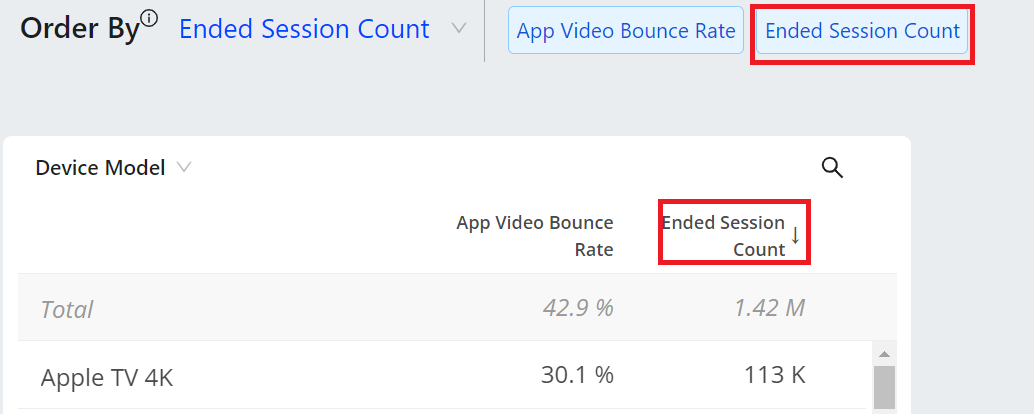
Selecting a metric widget in DPI also displays a secondary metric that provides a context or related data to help you more completely understand the primary metric. Secondary metrics enhance the interpretation and analysis of primary metrics.
Secondary metrics display in the dimension panel after clicking a metric widget in the metric panel, for example Ended Session Count displays as a secondary metric for App Video Bounce Rate.
Percentile Aggregation (Beta)
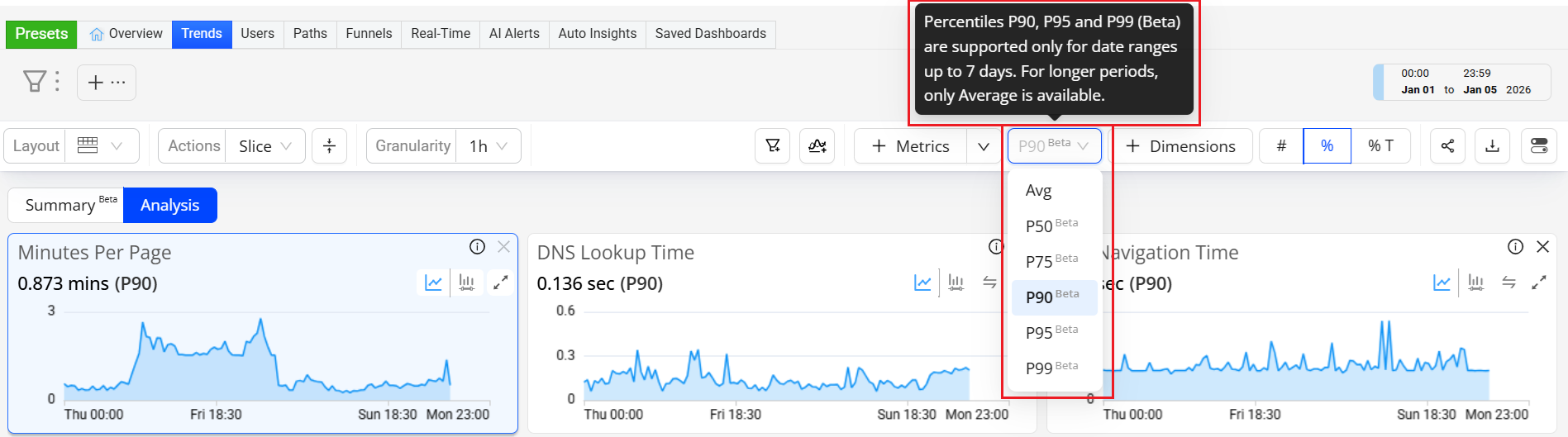
For Duration, Flow-Duration, and Custom Metrics, Conviva introduces percentile data percentile-ranked statistical aggregation for P50, P75, P90, P95, and P99 levels of Duration, Flow-Duration and Custom performances. Ranked-flow and custom performance data enable accurate measurement of performance distributions, minimizing the impact of long-tail outliers that can distort average-based metrics. Percentile aggregation provides a statistically robust representation of data and aligns Conviva analytics with industry-standard performance measurement practices.
By sorting and then ranking data, a percentile indicates the value below which a given percentage of observations fall. For example, within a ranked data set of session performance,
-
P50 (50th percentile) means 50% of the session performance is completed at or below this value.
-
P95 (95th percentile) means 95% of session performance is completed at or below this value, and only the slowest 5% take longer.
Note: Percentiles indicate the distribution of experience, not just a single average value. In some cases, a single average value might be misleading because a few extreme values can distort the result. Percentiles show what different levels of users actually experienced, more clearly indicating a small group of user experiences.
Out-of-Box Events
Check the auto-ingested events and minimum player versions for details about auto-collected event support.
 Out-of-Box Events
DPI provides a robust set of metrics to enable application performance monitoring and user behavior analysis across your web and native applications. Metric values appear as time series and distributions in metric widgets, and alongside dimensional values in the dimension drill-down tables.
| OOB Events | Android | iOS | JavaScript (WEB) |
React Native on Android and iOS |
c-SDK | Rust | Roku | Flutter on Anroid | Flutter on iOS | Flutter on WEB (JS) |
|---|---|---|---|---|---|---|---|---|---|---|
| periodic_heartbeat | Auto-collected | Auto-collected | NA | Auto-collected | Auto-collected | Auto-collected | Auto-collected | Auto-collected | Auto-collected | NA |
| page_ping | NA | NA | Auto-collected | NA | NA | NA | NA | NA | NA | Auto-collected |
| network_request | Auto-collected | Auto-collected | Auto-collected | Auto-collected | API Config | API Config | API Config | Auto-collected only for HTTP, Dio, Chopper, and Retrofit clients | Auto-collected | Auto-collected only for HTTP, Dio, Chopper, and Retrofit clients |
| screen_view | Auto-collected | Auto-collected | NA | Auto-collected | API Config | API Config | API Config | API Config | API Config | NA |
| page_view | NA | NA | API Config | NA | NA | NA | NA | NA | NA | API Config |
| application_error | Auto-collected | Auto-collected | Auto-collected | Auto-collected | API Config | API Config | API Config |
Auto-collected; only Java and Kotlin errors |
Auto-collected | Auto-collected |
| button_click | Auto-collected | Auto-collected | Auto-collected | Auto-collected | NA | API Config | API Config | API Config | API Config | API Config |
| Any clickable UI items (including button and link) | NA | Auto-collected from Conviva Sensor ver1.1.2 onwards | NA | NA | NA | NA | NA | NA | API Config | NA |
| application_background | Auto-collected | Auto-collected | Auto-collected | Auto-collected | Not Implemented | API Config | NA | Auto-collected | Auto-collected | Auto-collected |
| application_foreground | Auto-collected | Auto-collected | Auto-collected | Auto-collected | Not Implemented | API Config | NA | Auto-collected | Auto-collected | Auto-collected |
| app_install | Auto-collected | Auto-collected | NA | Auto-collected | Not Implemented | API Config | Not Implemented | Auto-collected | Auto-collected | NA |
| deep_link_received | Auto-collected | NA | NA | NA | Not Implemented | API Config | Not Implemented | Auto-collected | API Config | NA |
| anr_start | Auto-collected | NA | NA | NA | API Config | API Config | Not Implemented | Auto-collected | NA | NA |
| anr_end | Auto-collected | NA | NA | NA | Not Implemented | Not Implemented | Not Implemented | Deprecated | NA | NA |
| conviva_fragment_view | Auto-collected | NA | NA | NA | NA | NA | NA | Auto-collected | NA | NA |
| conviva_compose_view | Auto-collected | NA | NA | NA | NA | NA | NA | Auto-collected | NA | NA |
| first_app_launch | NA | NA | Auto-collected | NA | API Config | API Config | Not Implemented | NA | NA | Auto-collected |
| page_loaded | NA | NA | Auto-collected | NA | NA | NA | NA | NA | NA | Auto-collected |
| soft_navigation | NA | NA | Auto-collected | NA | NA | NA | NA | NA | NA | NA |
| conviva_revenue_event | API Config | API Config | API Config | NA | NA | NA | NA | NA | NA | NA |
| conviva_webvitals_lcp | NA | NA | Auto-collected | NA | NA | NA | NA | NA | NA | Auto-collected |
| conviva_webvitals_inp | NA | NA | Auto-collected | NA | NA | NA | NA | NA | NA | NA |
| conviva_webvitals_cls | NA | NA | Auto-collected | NA | NA | NA | NA | NA | NA | NA |
| conviva_webvitals_fcp | NA | NA | Auto-collected | NA | NA | NA | NA | NA | NA | NA |
| conviva_webvitals_ttfb | NA | NA | Auto-collected | NA | NA | NA | NA | NA | NA | NA |
| conviva_form_start | NA | NA | Auto-collected | NA | NA | NA | NA | NA | NA | NA |
| conviva_form_submit_attempt | NA | NA | Auto-collected | NA | NA | NA | NA | NA | NA | NA |
| conviva_form_validation_error | NA | NA | Auto-collected (only for Native invalid event, HTML5 constraint validation) |
NA | NA | NA | NA | NA | NA | NA |
| conviva_form_field_blur | NA | NA | Auto-collected | NA | NA | NA | NA | NA | NA | NA |
| conviva_scroll_milestone | NA | NA | Auto-collected | NA | NA | NA | NA | NA | NA | NA |
| conviva_scroll_reset | NA | NA | Auto-collected | NA | NA | NA | NA | NA | NA | NA |
Agentic Events
Conviva JavaScript (WEB) Sensor supports the collection of agentic events:
-
Server-sent events
-
WebSocket message stream
-
Event source message stream
Predefined Mapping Event
DPI offers a comprehensive set of predefined mapped events that enable you to create custom metrics and perform application performance monitoring and user behavior analysis on the Trends dashboard.
In the Scope column:
-
Trends and Activation: The events can be used on the Trends dashboard and all pages in Activation.
-
Activation: The events can be used on all pages within Activation.
-
Metric Builder: The events can be used on the Metric Builder page of Activation.
|
Predefined Mapped Event |
Raw Event Name |
Mapping Rules |
Scope |
|---|---|---|---|
| conviva_screen_view | conviva_screen_view | Mapped directly | Trends and Activation |
| conviva_page_view | conviva_page_view | Mapped directly | Trends and Activation |
| conviva_application_error | conviva_application_error | Mapped directly | Trends and Activation |
| conviva_network_request | conviva_network_request | Mapped directly | Trends and Activation |
| conviva_window_loaded | conviva_window_loaded | Mapped directly | Trends and Activation |
| conviva_app_backgrnd_before_page_view | conviva_app_backgrnd_before_page_view | Mapped directly | Trends and Activation |
| conviva_application_foreground | conviva_application_foreground | Mapped directly | Trends and Activation |
| conviva_application_background | conviva_application_background | Mapped directly | Trends and Activation |
| conviva_application_startup | conviva_screen_view | event_name = 'conviva_screen_view' and os_type in ('android') AND unstruct_event_com_snowplowanalytics_mobile_screen_view_1_0_0.previous_name = 'Unknown' OR event_name = 'conviva_screen_view' and os_type in ('ios', 'tvos') AND unstruct_event_com_snowplowanalytics_mobile_screen_view_1_0_0.previous_id is null | Activation |
| - | conviva_session_start | find event that triggerd a new session based on the session definition, and duplicate this event as the session start event | Metric Builder |
| - | conviva_session_end | find the session end time based on the session definition, and create a dummy event on this time point | Metric Builder |
| conviva_video_play | conviva_video_events | event_name = 'conviva_video_events' AND unstruct_event_com_conviva_conviva_video_events.name = c3.video.play | Activation |
| conviva_video_attempt | conviva_video_events | event_name = 'conviva_video_events' AND unstruct_event_com_conviva_conviva_video_events.name = c3.video.attempt | Activation |
| conviva_ad_break_start | conviva_video_events | event_name = 'conviva_video_events' AND unstruct_event_com_conviva_conviva_video_events.name = c3.ad.ad_break_start | Activation |
| conviva_ad_break_end | conviva_video_events | event_name = 'conviva_video_events' AND unstruct_event_com_conviva_conviva_video_events.name = c3.ad.ad_break_end | Activation |
| conviva_video_sdk_init | conviva_video_events | event_name = 'conviva_video_events' AND unstruct_event_com_conviva_conviva_video_events.name = c3.sdk.init | Activation |
| conviva_video_set_content_info | conviva_video_events | event_name = 'conviva_video_events' AND unstruct_event_com_conviva_conviva_video_events.name = c3.video.set_content_info | Activation |
| conviva_video_bitrate_switch | conviva_video_events | event_name = 'conviva_video_events' AND unstruct_event_com_conviva_conviva_video_events.name = c3.video.bitrate_switch | Activation |
| conviva_video_buffering | conviva_video_events | event_name = 'conviva_video_events' AND unstruct_event_com_conviva_conviva_video_events.name = c3.video.buffering | Activation |
| conviva_video_pause | conviva_video_events | event_name = 'conviva_video_events' AND unstruct_event_com_conviva_conviva_video_events.name = c3.video.pause | Activation |
| conviva_video_end | conviva_video_events | event_name = 'conviva_video_events' AND unstruct_event_com_conviva_conviva_video_events.name = c3.video.end | Activation |
| conviva_sdk_custom_event | conviva_video_events | event_name = 'conviva_video_events' AND unstruct_event_com_conviva_conviva_video_events.name = c3.sdk.custom_event | Activation |
| conviva_video_custom_event | conviva_video_events | event_name = 'conviva_video_events' AND unstruct_event_com_conviva_conviva_video_events.name = c3.video.custom_event | Activation |
| conviva_defined_error | conviva_application_error and conviva_network_request | event_name = 'conviva_network_request' AND responseStatusCode in range 500-510 OR event_name = 'conviva_application_error' AND platform = 'mob' | Metric Builder |
| app crash | conviva_application_error | event_name = 'conviva_application_error' AND platform = 'mob' | Trends and Activation |
| 5XX server error | conviva_network_request | event_name = 'conviva_network_request' AND responseStatusCode in range 500-510 | Trends and Activation |
| conviva_<element>_click | conviva_<element>_click |
Mapped directly. Note: <element> can be any UI element (such as button, link, radio_button, checkbox, and div). |
Trends and Activation |
Custom Events
| Event Type | Semantic Mapping | Metric Building | Metric in App |
|---|---|---|---|
|
Custom Events |
|
Use mapped events to build metrics. |
Metrics based on the mapped events appear in App pages. |
|
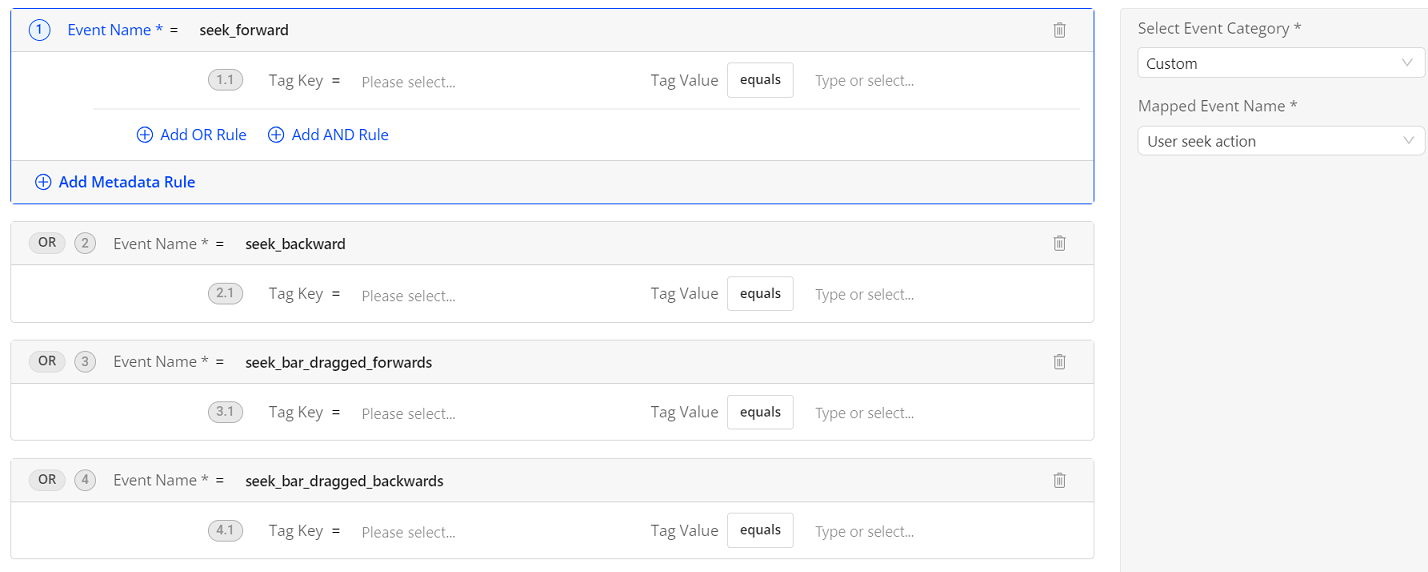
Video Seek Events: For example, to track and analyze user behaviors when seeking videos, map the custom events seek_forward, seek_backward, seek_bar_dragged_forwards, and seek_bar_dragged_backwards to an event User seek action.
|
|||
|
App Login Events: For example, to track the user login behavior and analyze the login success rate, map the event button_click with the tag key button_click_element_text and the tag value Log in to an event Login Button Click.
|
|||

Video Events
With these Video and DPI SDK versions, Conviva automatically sends video events to the DPI SDK:
| Platform | Min App SDK | Min Video SDK |
|---|---|---|
| Android | 0.5.2 | 4.0.30 |
| iOS | 0.2.10 | 4.0.31 |
| JS SDK | 0.3.17 | 4.5.13 |
| C SDK | 2.184.0.1 | No |
| Roku | 0.2.3 | No |
| Rust | 1.0.4 | No |
| React Native | 0.2.0 | No |
| Flutter | 0.3.9 | No |
Conviva video events (conviva_video_events) are also available using abbreviations as tag keys.
|
For This Element or Activity |
Use this DPI Event Type |
Tag Keys |
Tag Value |
Platform |
Example Metrics |
|---|---|---|---|---|---|
|
Video events |
conviva_video_events |
an: asset name. avgbr: average bitrate in kbps. br: bitrate in kbps. cen: custom event name. ced: custom event data. cl: content length in seconds. clid: client ID assigned by Conviva to the physical device. err: error message. ft: isFatal, a boolean value indicating whether the error is fatal. fw: framework name in which the media player runs. fwv: framework version. iid: instance ID. When several players run on the same device, each player should have a unique instance ID. lv: isLive, a boolean value indicating whether the content currently playing is Live. mn: module name mv: module version name: device name newsc: new state change oldsc: old state change pn: player name sid: session id identifying the current session, unique on this client. sst: session start time as UNIX epoch time in milliseconds. st: session time from the session start in milliseconds. |
c3.sdk.init for Video SDK init c3.video.attempt for attempt event c3.video.end for session end event c3.video.play for play event c3.video.pause for pause event c3.video.error for error event (c3.isFatal as true/false) c3.video.buffering for buffering start event c3.video.bitrate_switch for bitrate switch event c3.video.set_content_info for metadata change c3.sdk.custom_event, c3.video.custom_event for custom event c3.ad.ad_break_start for ad start c3.ad.ad_break_end for ad end CWSStateChangeEvent for audio, subtitle, and closed captions change events |
JavaScript Android iOS Roku (coming soon, api required) |
Video Attempts Video Plays Video Start Failure Error Video Playback Failure Error |
Out-of-Box Metrics and Metadata
Quickly get started analyzing your user experiences with out-of-box metrics and metadata.
Metrics By Metric Category
| Category | Metrics | ||
| Audience and Engagement |
App Active Time (Interval) (Formerly Active Time) |
||
| QoE and KPI Metrics | |||
| Frustration Signals | |||
| Web User Experience | |||
| Mobile User Experience | |||
| Service Performance |
Mins with 0 Network Response Code |
Mins with 4xx Network Response Code |
|
Metadata as Dimensions
|
Category |
Metadata |
||
|---|---|---|---|
| App |
App Name Application Build Application Version Bundle Info |
Client ID Customer Account Platform Sensor Version |
|
| User | User Email | ||
|
Device |
Browser Name Browser Version Device Hardware Type Device Manufacturer Device Marketing Name Device Model |
Device Name Device Operating System Device Operating System Family Device Operating System Version Traffic Type Note: See Traffic Type for more information. |
|
| GEO & ISP |
ASN Cities Connection Countries |
DMAs ISPs States Zipcode |
|
| Page (Web) |
Edited Page Title First Launch Page Host Page Path |
Page Referrer Page Title Referrer Host |
|
| UTM Parameters (Web) | UTM Campaign | UTM Medium | |
| UTM ID | UTM Source | ||
| Screen (Mobile) |
Edited Screen Title Previous Screen Title |
Screen Title | |
| Network Request |
Network Request Endpoint Network Request Http Method Network Request Response Code |
Network Request Url Host Network Request Url Path |
|
| Events | User Event Category | User Event Name | |
| Errors | ANR Reason | Error Message | |
| Error Event | Stack Trace | ||
| Global Tags | Dimensions that are based on global tags. | ||
| Event Tags | Dimensions that are based on event tags. | ||
Note: All dimension values are now rounded to two decimal places.
Metrics by Platform|
Web (JS) Metrics |
Mobile (Android and iOS) Metrics |
|---|---|
|
--- |
|
|
--- |
|
|
--- |
|
|
--- |
|
|
--- |
|
|
--- |
|
|
--- |
|
|
--- |
|
|
--- |
|
|
--- |
|
|
--- |
|
|
--- |
|
|
--- |
|
|
--- |
|
|
--- |
|
|
--- |
|
|
--- |
|
|
--- |
|
|
--- |
|
|
--- |
|
|
--- |
|
|
--- |
|
|
--- |
|
|
--- |
|
| --- | |
|
--- |
|
| --- | |
|
--- |
|
| --- | |
|
--- |
|
| --- |
Metric Definitions By Device
Metrics: Native Applications Native applications are applications installed on mobile devices or TVs.
| Metric | Definition | Secondary Metrics | Supported Sensors |
|---|---|---|---|
| App Crashes |
Most mobile app crashes are caused by memory management issues, network connectivity problems, insufficient device storage, operating system conflicts, and mismanaged errors and exceptions. To monitor and improve app performance, the App Crashes metric tracks these application crash occurrences in native mobile applications. As a count, it shows the total number of crashes. For Android and iOS apps, Conviva DPI automatically collects conviva_application_error events triggered by crash conditions, which then populate the App Crashes metric. For more details, see App Crashes Explained. |
Sessions |
|
|
User Sessions With App Crashes |
The number of user sessions in which at least one application crash occurred during the session. |
Sessions |
|
|
Users With ANR |
This metric measures the number of users who experienced ANR within 30 seconds after the app fails to respond. |
Sessions |
|
|
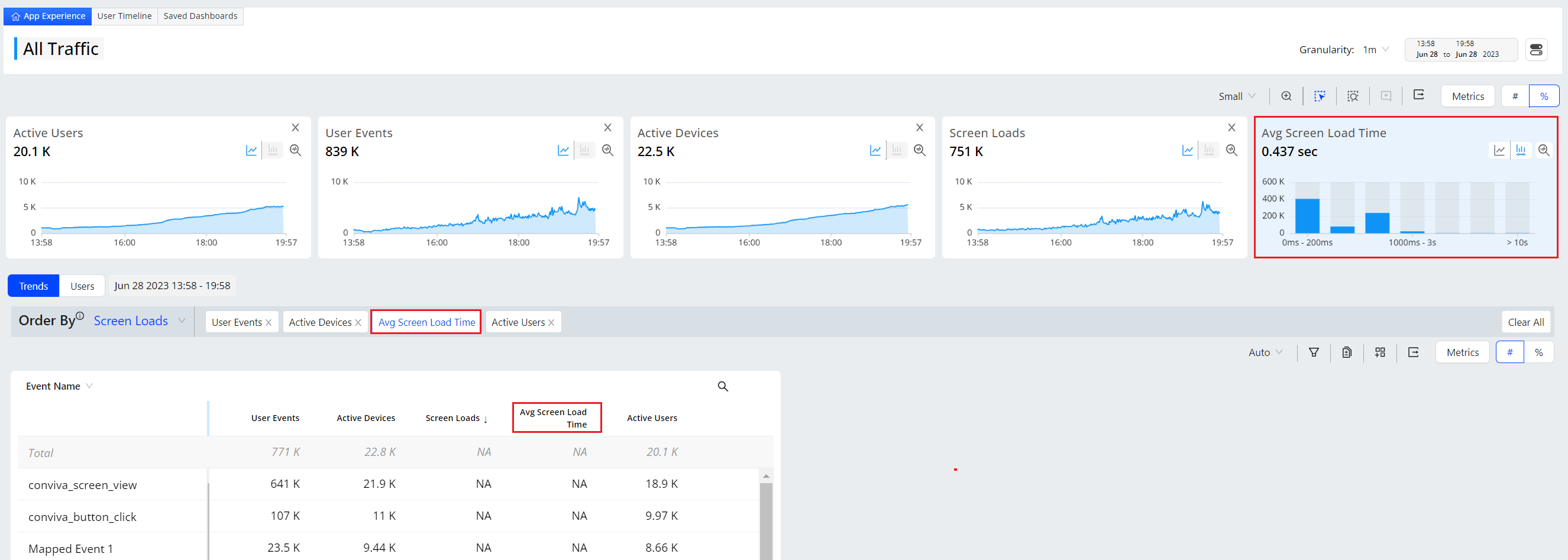
Screen Load Time |
The duration, measured in seconds, to completely load a screen in a mobile app. The metric is calculated by dividing the total time in seconds for loading screens on a mobile app, starting from the initiation of loading screens to the completion of loading in the mobile screen, by the number of loaded screens. This metric supports percentile and average queries. For more information on different percentile details, see Percentile Aggregation. Distribution: App Start Up Complete vs Screen Load Time Distribution: a distribution by preset buckets, where each bucket displays the total screen loads count in a specified range for corresponding screen load time. This distribution helps you understand screen load time and app performance, enabling you to optimize both the app and screen.
|
ScreenLoads |
|
|
Note: The screen load time metric applies only to native Android and iOS applications. Hybrid applications with React Native or Flutter frameworks do not support this metric and report the screen load time as NA. |
|||
|
The duration measured in seconds, for an app to start. The duration of app startup time is calculated by the Conviva sensor. The duration of app startup time is calculated by dividing the total launch time in seconds for an app by the number of app startups. This metric supports percentile and average queries. For more information on different percentile details, see Percentile Aggregation. Distribution: App Start Up Complete vs Mobile App Startup Time Distribution: a distribution by preset buckets, where each bucket displays the app start up complete count in a specified range for corresponding duration for an app to start. This distribution helps you to identify performance issues and optimize the performance of apps.
|
App |
|
|
|
Soft Navigation Time measures the page rendering time from the moment a page navigation is detected until the page is fully rendered and ready for user interaction. A soft navigation begins when a SPA changes views/routes without a full browser reload (for example, with React Router or Angular Router). During this time, the app may fetch data, update components, re-render the UI, and execute JavaScript.
This metric supports percentile and average queries. For more information on different percentile details, see Percentile Aggregation. |
Soft Navigations Counts |
JS |
|
|
The number of the event app launch during the specified time interval. |
N/A |
|
|
|
The total count of conviva_anr events during the specified time interval. |
N/A |
|
|
|
The number of conviva_screen_view events with screen load time greater than 0 seconds and less than or equal to 60 seconds.
|
N/A |
|
|
| The 5xx Network Request Failure to App Background metric counts the number of instances during which a 5xx network request failure is followed by an application transitioning to the background within 10 seconds. It quantifies the frequency of such events to highlight network request issues that led to apps transitioning to inactivity. |
5xx to app background Init |
|
|
|
The percentage of one-minute intervals in app sessions with a conviva_anr (Application Not Responding) event followed by an app restart in less than 30 seconds. The metric is calculated as the count of one-minute intervals in app sessions where a conviva_anr event occurred and the user restarted the app in less than 30 seconds, divided by the count of active minutes. |
Active Devices(Mobile) |
|
|
|
Note: Enabling the # mode displays the metric in number format, representing the total count of one-minute intervals in app sessions with a conviva_anr event followed by an app restart in less than 30 seconds. |
|||
|
App crashes often vary in engagement impact and urgency of app crashes. High impacted minutes indicate more critical issues. The percentage of one-minute intervals in app sessions with application crashes followed by an app restart in less than 30 seconds. The metric is calculated as the count of one-minute intervals in app sessions with an application crash and the user restarted the app in less than 30 seconds, divided by the count of active minutes. For more details, see .App Crashes Explained. |
Active Devices(Mobile) |
|
|
|
Note:
Enabling the # mode displays the metric in number format, representing the total count of one-minute intervals in app sessions with application crashes followed by an app restart in less than 30 seconds. |
|||
|
The percentage of sessions that become inactive within 30 seconds after the app fails to respond. This metric measures the count with which users end their sessions immediately after the app fails to respond, reflecting the impact on user experience. |
ANR -> Exit Init |
|
|
|
Note: Enabling the # mode displays the metric in numeric format. This indicates the total number of users who exit the session after the app fails to respond within 30 seconds. |
|||
| This metric measures the number of sessions that contain User Sessions With ANR - defined as the percentage of sessions that become inactive within 30 seconds after the app fails to respond. |
ANR -> Exit Init |
|
|
| This metric measures the number of users who experienced ANR within 30 seconds after the app fails to respond. |
ANR -> Exit Init |
|
|
|
The Click → Error metric captures the number and percentage of user interactions that are directly followed by a web error or mobile crash.
Click -> Error supports xPath dimension, which helps identify unique elements (works best with js-1.4.19). |
N/A |
|
|
|
This metric measures the number of user sessions with Click To Web Error / Mobile Crash - defined as the number and percentage of user interactions that are directly followed by a web error or mobile crash. |
N/A |
|
|
|
This metric measures the number of users who experienced a web error or mobile crash after a click. |
N/A |
|
|
|
To identify and respond to critical crashes that drive users to abandon the app, this metric flags how often app crashes and the related memory management, network connectivity, mismanaged errors/exceptions, and other issues led to users leaving the app. This metric shows the percentage of sessions that become inactive within 30 seconds after an app crash. For more details, see App Crashes Explained. |
Crash -> Exit Init |
|
|
|
Note: Enabling the # mode displays the metric in numeric format. This indicates the total number of users who exit the session after the app crashes and fails to respond within 30 seconds of the crash. |
|||
|
The percentage of the conviva_anr (Application Not Responding) event followed by an app restart in less than 30 seconds. The metric is calculated as the number of conviva_anr (Application Not Responding) events where the user restarted the app in less than 30 seconds, divided by ANR to App Startup Init. |
ANR -> Startup Init |
|
|
|
Note: Enabling the # mode displays the metric in number format, representing the total count of ANR events followed by an app restart in less than 30 seconds. |
|||
|
In addition to app crashes that lead to app exits, it's important to also gauge when there is lower app crash engagement impact and crash tolerance. High restart rates suggest users remain engaged despite crashes, indicating lower-level severity issues. This metric shows the percentage of app crashes followed by an app restart in less than 30 seconds. The metric is calculated as the number of app crashes where the user restarted the app in less than 30 seconds, divided by number of Crash to App Startup Init events. For more details, see .App Crashes Explained. |
Crash -> Startup Init |
|
|
|
Note: Enabling the # mode displays the metric in number format, representing the total count of app crashes followed by an app restart in less than 30 seconds. |
|||
|
This metric measures the frequency of users engaging in rapid, repetitive clicks on the same UI element, typically indicating a high level of user frustration. This metric tracks instances in which users clicked three or more times on the same clickable UI element within a two-second time window without any meaningful interaction or response. |
None |
|
|
|
Note: Rage Click supports xPath dimension, which helps identify unique elements (works best with js-1.4.19). |
|||
|
This metric measures the frequency or the number of instances when the same page URL in a web app is visited three or more times within 15 seconds, highlighting navigation instability or friction within the page navigation of the user journey. Frequent page looping might be a strong signal of:
For more information on frustration signals, see Frustration signals. |
None |
JS |
|
|
This metric measures the number of sessions that contain Rage Clicks—defined as instances in which users perform three or more clicks on the same clickable UI element within a two-second time window without any meaningful interaction or response. |
None |
|
|
|
This metric measures the number of users who performed three or more clicks on the same clickable UI element within a two-second time window without any meaningful interaction or response. |
None |
|
|
|
Excessive App Restarts measures the frequency or the number of occurrences when an application launches two or more times within a non-overlapping 60-second tumbling window. The application may restart due to the app not responding, app instability, crashes, or forced closures by the user, indicating the app session instability that forces (or chooses) users to relaunch the app multiple times in quick succession. This metric is calculated by counting the number of 60-second intervals during which at least two application restarts occurred. |
None |
|
|
Metrics: Web Applications| Metric | Definition | Secondary Metrics | Supported Sensors |
|---|---|---|---|
|
The proportion of sessions with application errors in a web application. This calculation divides the number of sessions containing web application errors by the total web app session count. |
App Sessions |
|
|
|
Note: Enabling the # mode displays the metric in number format, representing the total count of unique occurrences of the application_error event within a web page during the specified time interval. |
|||
|
The duration measured in minutes, that users spend on each web page. The metric is calculated by dividing the total duration of time users spend on each web page by the number of pages.
Distribution: Page Load Complete Count vs Minutes Per Page Distribution: a distribution by preset buckets, where each bucket displays the total page load complete count in a specified range for corresponding minutes per page. This distribution helps you understand audience engagement with web pages and optimize them accordingly. This metric supports percentile and average queries. For more information on different percentile details, see Percentile Aggregation. |
Page Load Count |
JS |
|
|
The count of hot app launches during the selected interval. Hot app launches occur when an app is brought to the foreground on an application without the need to reload the entire app, as the app was already loaded. |
N/A |
JS |
|
|
The number of document loading activities that occurred during the selected interval. |
N/A |
JS |
|
|
The total number of times a webpage fully loads and becomes ready for use during the specified time interval. |
N/A |
JS |
|
|
The duration, in seconds, for a web application to completely load and parse the basic framework of an HTML document. This metric is calculated by dividing the total duration, in seconds, for a web application to fully load and parse the basic framework of an HTML document by the number of document loading activities. Distribution: Page Load Count vs Page Load Time Distribution: a distribution by preset buckets, where each bucket displays the total document load count in a specified range of corresponding document load time. This distribution helps you understand the load performance of web applications, enabling performance optimizations.
This metric supports percentile and average queries. For more information on different percentile details, see Percentile Aggregation. |
Page Loads |
JS |
|
|
The duration in seconds, for a web application to resolve a domain name to the corresponding IP address. This metric is calculated by dividing the total duration, in seconds, that a web application takes to resolve a domain name to its corresponding IP address by the number of DNS lookup attempts made. Distribution: DNS Lookup Count vs DNS Lookup Time Distribution: a distribution by preset buckets, where each bucket displays the total DNS lookup count in a specified range for corresponding DNS lookup time. This distribution helps you understand DNS lookup performance, enabling you to optimize the web application. This metric supports percentile and average queries. For more information on different percentile details, see Percentile Aggregation. |
Page Loads |
JS |
|
|
The duration in seconds, that the application takes to fetch HTML documents, excluding scripts and stylesheets. The metric is calculated by dividing the total duration, in seconds, that a web application takes to fetch an HTML document by the number of document responses. Distribution: Document Response Count vs Document Response Time Distribution: a distribution by preset buckets, where each bucket displays the total document response count in a specified range for corresponding document response time. This distribution helps you understand document response performance, enabling you to optimize the web application. This metric supports percentile and average queries. For more information on different percentile details, see Percentile Aggregation. |
Page Loads |
JS |
|
|
The duration in seconds, for the largest content element within the viewport of a webpage to become visible to the user. The metric is calculated by dividing the total duration, in seconds, from the time loading begins to the time the largest element within the viewport becomes visible to users, by the number of loading activities. Distribution: Largest Contentful Paint Count vs Largest Contentful Paint Time Distribution: a distribution by preset buckets, where each bucket displays the total largest contentful paint count in a specified range for corresponding largest contentful paint time. This distribution helps you understand loading time for largest contentful paint time and web performance, enabling you to optimize the web application.
This metric supports percentile and average queries. For more information on different percentile details, see Percentile Aggregation. |
Page Views |
JS |
|
|
Note: The calculation of this metric depends on proper implementation of the trackPageView() API. This API should be called during any navigation events in the app. . |
|||
|
The proportion of exits that occur before the full page is drawn on the screen. This calculation divides the number of exits that occur before the full page is drawn on the screen by the sum of the exits count and the count of complete loadings. |
N/A |
JS |
|
|
Note: Enabling the # mode displays the metric in number format, representing the number of exits that occur before the full page is drawn on the screen during the selected interval. |
|||
Metrics: Web and Native ApplicationsIf you integrate both your web and native applications with the Conviva sensor, these metrics are calculated using data from both types of apps.
| Metric | Definition | Secondary Metrics | Supported Sensors |
|---|---|---|---|
|
The total number of devices that generated at least one event during the specified time interval. |
N/A |
|
|
|
The total number of unique devices with at least one flow that completes or abandons within the user-selected time window. |
N/A |
|
|
|
Note: This metric is used in the Flow Preset dashboard. |
|||
|
The total number of unique users who generated at least one event during the specified time interval. |
N/A |
|
|
|
Note: When exporting Active Users data, each row lists the unique user ID within that time interval, while the total count reflects the number of unique user IDs within the entire query time range. In cases with repeat users, the sum of unique users within the intervals will be larger than the total unique user IDs. |
|||
|
The total number of unique users with at least one flow that completes or abandons within the user-selected time window. |
N/A |
|
|
|
Note: This metric is used in the Flow Preset dashboard. |
|||
|
The total number of the network_request event during the specified time interval. |
N/A |
|
|
|
The percentage of sessions that did not include the video attempt event in an app. The metric is calculated as the count of sessions without the video attempt event in an app, divided by the count of ended sessions in the app. If the Ended Session Count metric is zero, the App Video Bounce Rate metric is set to 100% by default. |
Ended |
|
|
|
Note: Need to install the Video SDK to use the metric. |
|||
|
(Formerly known as Sessions) |
The total count of sessions that occurred during the specified time interval. |
N/A |
|
|
Note: This metrics will be deprecated soon. |
|||
|
The duration measured in seconds, for web servers to handle network requests, including the time taken to receive, process, and respond. This metric is calculated by dividing the total duration of the entire process for web servers to handle network requests by the total number of the network_request event.
Distribution: Total Request Count vs Network Request Duration Distribution: a distribution by preset buckets, where each bucket displays the total request count in a specified range for the corresponding network request duration. This distribution helps you to identify performance issues and optimize the performance of web applications. |
Network |
|
|
|
Note: Network request is a type of web request that allows web pages to update content dynamically without requiring a full page refresh. |
|||
|
App Sessions (Ended) (Formerly known as Ended Session Count) |
The total number of sessions that ended during the specified time interval. |
N/A |
|
|
Note: This metric will be deprecated soon. |
|||
|
The duration, measured in seconds, within a session before the first video attempt. This metric is calculated by dividing the total interval time from the “session start” event to the first video attempt event as a type of conviva_video_events by the number of sessions during which the viewer clicked play or the video auto-played generating a video attempt event.
Distribution: First Attempt Count vs Time To First Attempt Distribution: a distribution by preset buckets, where each bucket displays the count of first attempt in a specified range for corresponding duration within a session before the first video attempt. This distribution helps you understand user engagement with videos in your app and optimize their accessibility and visibility. This metric supports percentile and average queries. For more information on different percentile details, see Percentile Aggregation. |
App |
|
|
|
Note: Need to install the Video SDK to use the metric. |
|||
|
The count of mapped events, including both Conviva mapped events and custom mapped events. |
N/A |
|
|
|
Note: A list of mapped events can be viewed in Actviation tabs for Semantic Mapper and Management. |
|||
|
The total session lifetime active user time, in hours, of the sessions that ended during the current interval, not including the timeout window. To measure user active time and sessions, Conviva defines a user session as:
Note: The timeout window is excluded from active time. For more details, see User Sessions Explained. |
N/A |
|
|
|
The total active user session time, in hours, during the current interval, not including the timeout window. To measure user active time and sessions, Conviva defines a user session as active as long as any event is received before the 5-minute timeout window. Note: The timeout window is excluded from active time. For more details, see User Sessions Explained. |
N/A |
|
|
|
The number of user sessions that ended during the current interval. To measure user active time and sessions, Conviva defines a user session as ending when no events, including any network requests, page pings, and heartbeats, are received within the 5-minute timeout window. Note: The timeout window is excluded from active time. For more details, see User Sessions Explained. |
N/A |
|
|
|
The number of user sessions that were active during the current interval, not including the timeout window. To measure user active time and sessions, Conviva defines a user session as continuing as long as any event is received before the 5-minute timeout window. Note: The timeout window is excluded from active time. For more details, see User Sessions Explained. |
N/A |
|
|
|
The total events per app active time (interval). The metric is calculated by dividing the total number of events by the total amount of active time (interval) actively engaged in a native application or a web application. |
N/A |
|
|
|
Note: This metric was renamed from Total Events per User Active Hour. |
|||
|
The total time user spends in app within a single session. |
N/A |
|
|
|
Note: This metric will be deprecated soon. |
|||
|
The percentage of one-minute intervals in app sessions with network request failures with a response code of 0 (response code = 0). The metric is calculated as the count of one-minute intervals in app sessions with network request failures with a response code of 0, divided by the count of active minutes. |
Minutes of Active Time |
|
|
|
Note: Enabling the # mode displays the metric in number format, representing the total count of one-minute intervals in app sessions with network request failures with a response code of 0. In this metric, Mins indicates the one-minute intervals during which at least one metric impact occurred. |
|||
|
The percentage of one-minute intervals in app sessions with network request failures with a response code between 400 and 499 (response code = 4xx). The metric is calculated as the count of one-minute intervals in app sessions with network request failures with a response code between 400 and 499, divided by the count of active minutes. |
Minutes of Active Time |
|
|
|
Note: Enabling the # mode displays the metric in number format, representing the total count of one-minute intervals in app sessions with network request failures with a response code between 400 and 499. In this metric, Mins indicates the one-minute intervals during which at least one metric impact occurred. |
|||
|
The percentage of one-minute intervals in app sessions with network request failures with a response code between 500 and 599 (response code = 5xx). The metric is calculated as the count of one-minute intervals in app sessions with network request failures with a response code between 500 and 599, divided by the count of active minutes. |
Minutes of Active Time |
|
|
|
Note: Enabling the # mode displays the metric in number format, representing the total count of one-minute intervals in app sessions with network request failures with a response code between 500 and 599. In this metric, Mins indicates the one-minute intervals during which at least one metric impact occurred. |
|||
|
The percentage of one-minute intervals in app sessions with at least one successful network_request event which has a response time longer than 2 seconds. A high value indicates repeated slow network performance within the app. The metric is calculated as the count of one-minute intervals in app sessions during which at least one successful network_request event has a response time longer than 2 seconds, divided by the count of active minutes. |
Active Devices |
|
|
|
Note: Enabling the # mode displays the metric in number format, representing the total count of one-minute intervals in app sessions with at least one successful network_request event which has a response time longer than 2 seconds. In this metric, Mins indicates the one-minute intervals during which at least one metric impact occurred. |
|||
|
The proportion of total count of failed network requests. This calculation divides the total count of failed network requests by the number of network requests. Note: Enabling the # mode displays the metric in number format, representing the total number of failed network requests during the specified time interval. DPI considers a network request as failed when the response code meets any of the conditions (OR conditions):
Note: Customer defined response codes are user-configurable and do not affect the default interpretation of 2xx (Successful responses) or 3xx (Redirection messages) unless explicitly defined.
Note: If DPI sensor cannot collect a network request response code, DPI considers the network request as null and counts it towards the total number of successful network requests. |
Active Device |
|
|
Metrics: QoE and KPI Metrics | Metric | Definition | Secondary Metrics | Supported Sensors |
|---|---|---|---|
|
The percentage of non-impacted minutes. A minute is considered as non-impacted minute when the minute meets all of the conditions:
The percentage metric is calculated by dividing the number of non-impacted minutes by the number of active minutes. |
Active Devices |
|
|
|
The percentage of impacted minutes. A minute is considered impacted if the minute meets either of the conditions:
|
Active Devices |
|
|
|
Note: Enabling the # mode displays the metric in number format, representing the total number of impacted minutes. |
|||
|
The percentage of one-minute intervals in app sessions during which the conviva_anr (Application Not Responding) event occurred. The metric is calculated as the count of one-minute intervals in app sessions with the conviva_anr (Application Not Responding) event, divided by the count of active minutes. |
Active Devices |
Android |
|
|
Note: Enabling the # mode displays the metric in number format, representing the total number of one-minute intervals in app sessions with the conviva_anr (Application Not Responding) event. In this metric, Mins indicates the one-minute intervals during which at least one metric impact occurred. |
|||
|
The percentage of one-minute intervals with bad events. The metric is calculated as the count of one-minute intervals with bad events, divided by the count of active minutes. |
Active Devices |
|
|
|
Note: Enabling the # mode displays the metric in number format, representing the total number of one-minute intervals with application crashes. In this metric, Mins indicates the one-minute intervals during which at least one metric impact occurred. |
|||
|
Assess crash severity by measuring how much active time is affected. With this metric, high percentages indicate widespread impact. This metric shows the number and percentage of one-minute intervals with application crashes. The metric is calculated as the number of one-minute intervals with application crashes, divided by the number of active minutes. For more details, see .App Crashes Explained. |
Active Devices |
|
|
|
Note: Enabling the # mode displays the metric in number format, representing the total number of one-minute intervals with application crashes. In this metric, Mins indicates the one-minute intervals during which at least one metric impact occurred. |
|||
|
The percentage of one-minute intervals with app startup duration over the threshold. The metric is calculated as the number of one-minute intervals with app startup duration over the threshold, divided by the number of active minutes. |
Active Devices |
|
|
|
Note: Enabling the # mode displays the metric in number format, representing the total number of one-minute intervals with app startup duration over the threshold. In this metric, Mins indicates the one-minute intervals during which at least one metric impact occurred. |
|||
|
The percentage of one-minute intervals with page load duration over the threshold. The metric is calculated as the number of one-minute intervals with page load duration over the threshold, divided by the number of active minutes. |
Active Devices |
Android |
|
|
Note: Enabling the # mode displays the metric in number format, representing the total number of one-minute intervals with page load duration over the threshold. |
|||
|
The percentage of one-minute intervals with screen load duration over the threshold. The metric is calculated as the number of one-minute intervals with screen load duration over the threshold, divided by the number of active minutes. |
Active Devices |
|
|
|
Note: Enabling the # mode displays the metric in number format, representing the total number of one-minute intervals with screen load duration over the threshold. In this metric, Mins indicates the one-minute intervals during which at least one metric impact occurred. |
|||
Metrics: Event Metrics (Beta)| Metric | Definition | Secondary Metrics | Supported Sensors |
|---|---|---|---|
|
Event Count |
The number of specific event(s) within the selected time interval. |
None |
|
|
Users with Event |
The number of unique users who experienced the event(s) within the selected time interval. |
None |
|
|
Session with Event |
The number of sessions that experienced the event(s) within the selected time interval. |
None |
|
Metrics: Flow Metrics | Metric | Definition |
|---|---|
|
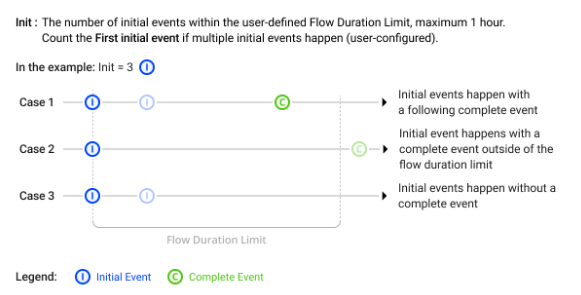
Flow Name Init (Use the first initial event)
|
The number of initial events within the user-defined Flow Duration Limit, maximum 1 hour. Count the First initial event if multiple initial events happen (user configured). |
|
Flow Name Init (Use the last initial event)
|
The number of initial events within the user-defined Flow Duration Limit, maximum 1 hour. Count the Last initial event if multiple initial events happen (user configured). |
|
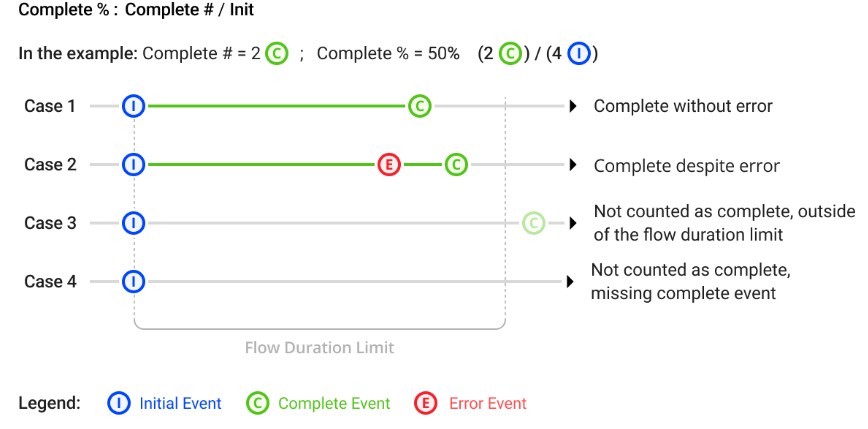
Flow Name Complete # %
|
Complete #: The number of initial events followed by a complete event within the user-defined Flow Duration Limit , maximum 1 hour. Complete %: Complete # / Init |
|
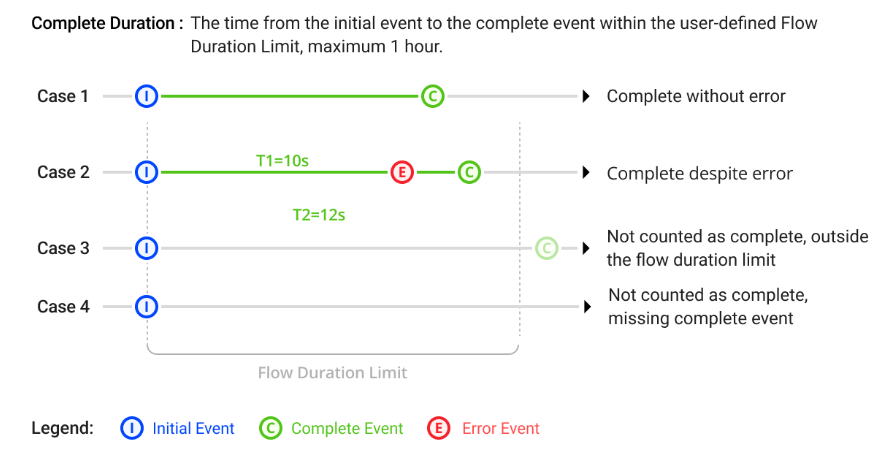
Flow Name Complete Duration
|
The time from the initial event to the complete event within the user-defined Flow Duration limit, maximum 1 hour. |
|
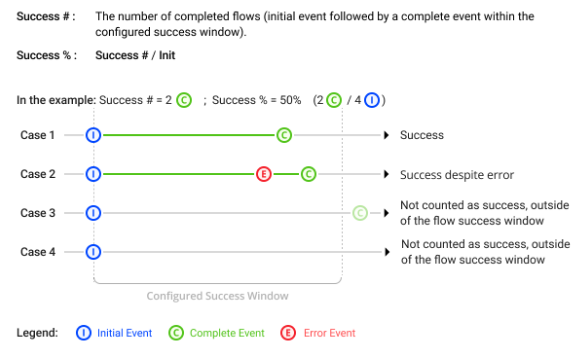
Flow Name Success # %
|
Success #: The number of completed flows (initial event followed by a complete event within the configured success window). Success %: Success # / Init |
|
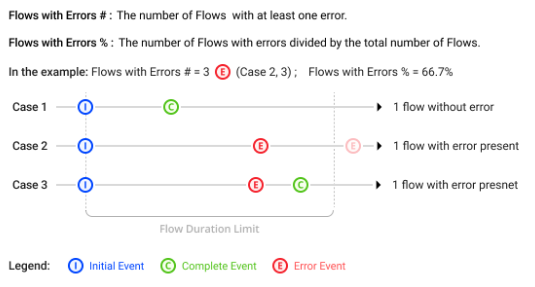
Flow Name Flows with Errors # %
|
Flows with Errors #:The number of Flows with at least one error. Flows with Errors %: The number of Flows with errors divided by the total number of Flows. |
|
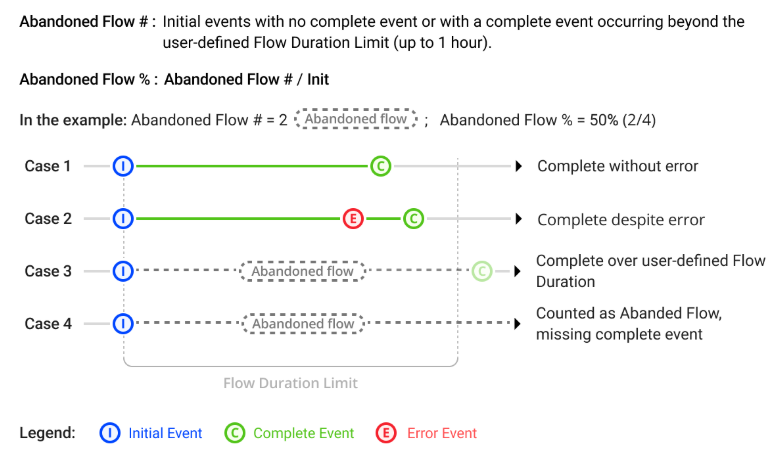
Flow Name Abandoned Flows # %
|
Abandoned Flows #: Initial events with no complete event or with a complete event occurring beyond the user-defined Flow Duration Limit (up to 1 hour). Abandoned Flows %: Abandoned Flow # / Init |
|
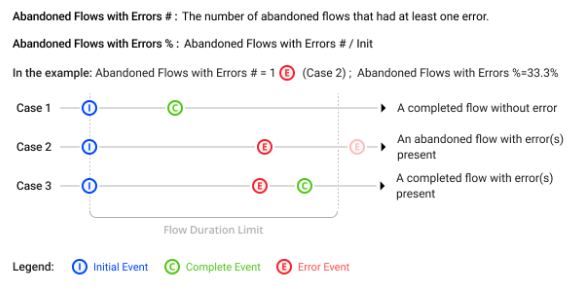
Flow Name Abandoned Flows with Errors # %
|
Abandoned Flows with Errors #:The number of abandoned flows that had at least one error. Abandoned Flows with Errors %: Abandoned Flows with Errors # / Init |
|
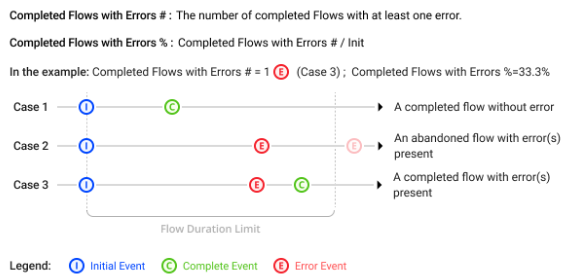
Flow Name Completed Flows with Errors # %
|
Completed Flows with Errors #: The number of completed Flows with at least one error. Completed Flows with Errors %: Completed Flows with Errors # / Init |
|
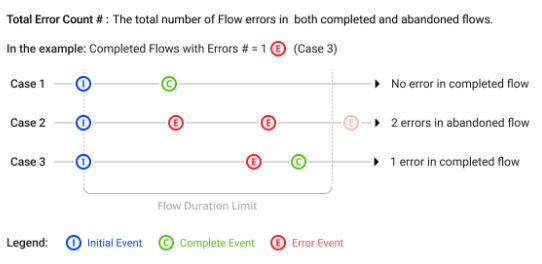
Flow Name Total Error Count
|
The total number of Flow errors in both completed and abandoned flows. |
|
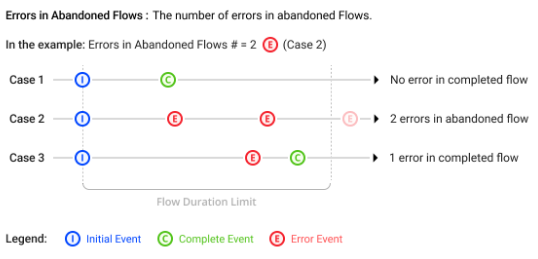
Flow Name Errors in Abandoned Flows
|
The number of errors in abandoned Flows. |
|
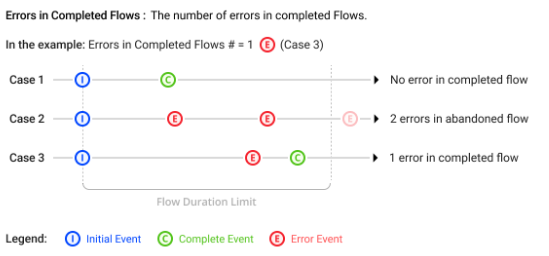
Flow Name Errors in Completed Flows
|
The number of errors in completed Flows. |
|
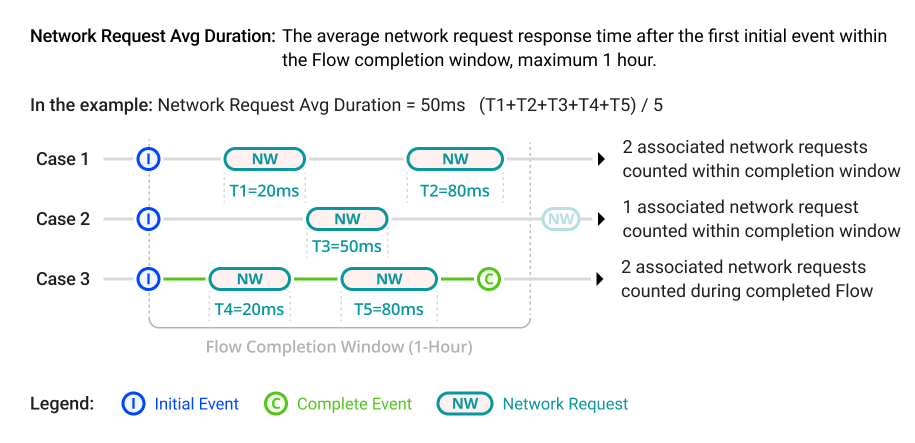
Flow Name Network Request Avg Duration
|
The average network request response time after the first initial event within the Flow completion window, maximum 1 hour. |
|
Flow Name Network Request Failure # %
|
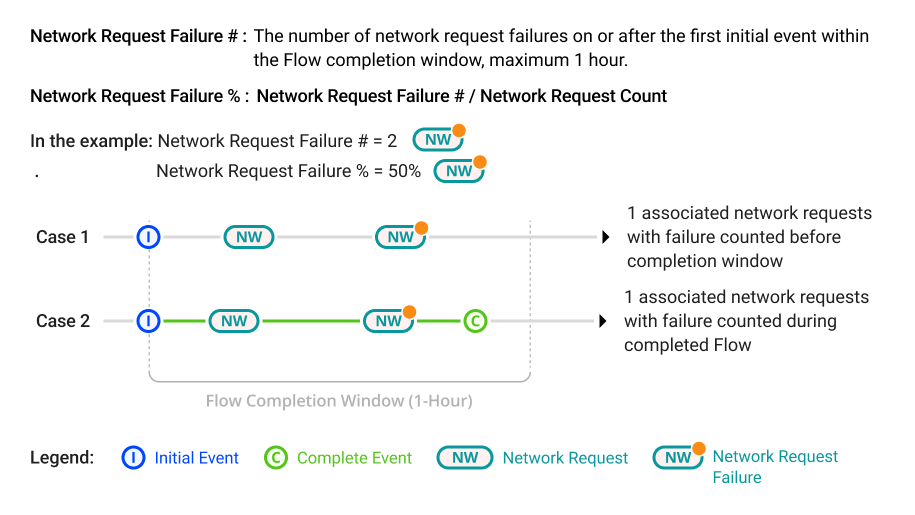
Network Request Failure #: The number of network request failures on or after the first initial event within the Flow completion window, maximum 1 hour. Network Request Failure %: Network Request Failure # / Network Request Count |
|
Flow Name Network Request Count
|
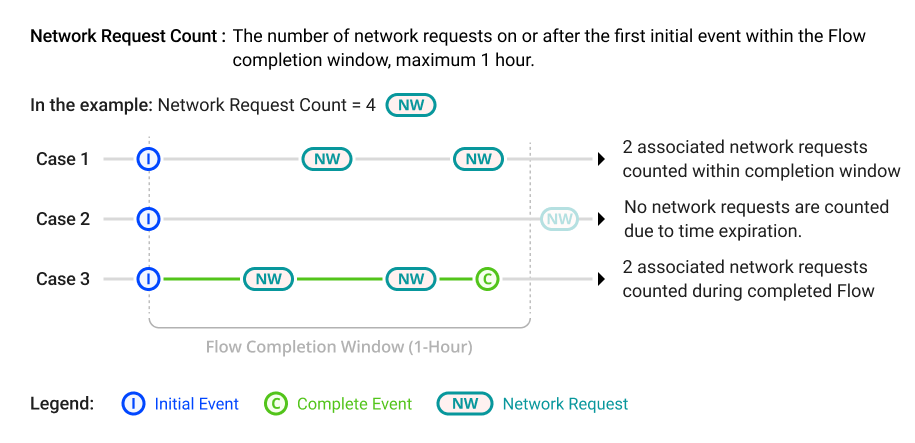
The number of network requests on or after the first initial event within the Flow completion window, maximum 1 hour. |

 Metrics: Custom Metrics
 Custom metrics are associated with specified initial/follow-up events to analyze data for complex user actions and app performance scenarios, such as analyzing the amount of time spent between viewer login and the start of video playtime, and the success rate of cart uploads to completed purchase.
DPI enables different types of individual metrics. Start mapping from a Conviva predefined event, a custom event, or a combination of both as mapping rules to comprehensively track the desired user behavior.
For how to create custom metrics, see Custom Metrics.