Monitor Out-of-Box Metrics
Use the easily accessible, out-of-box metrics and metadata to analyze metrics in Trends time series widgets and drill-downs in dimension tables.
DPI Metrics and Metadata
DPI metrics display in metric widget time series and dimension tables.
-
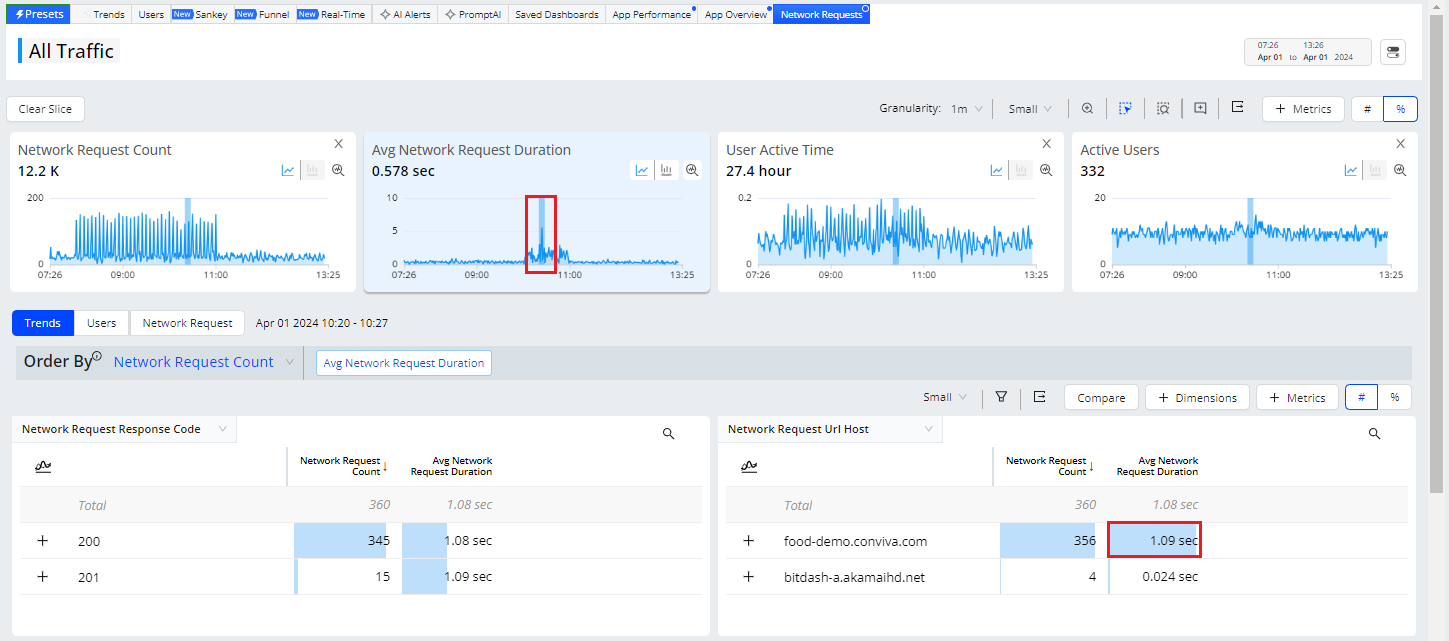
Slice anomalies and spikes (for example, high points in network request duration)
-
Drill-down in dimension tables for quick root cause analysis (for example, by URL hosts)
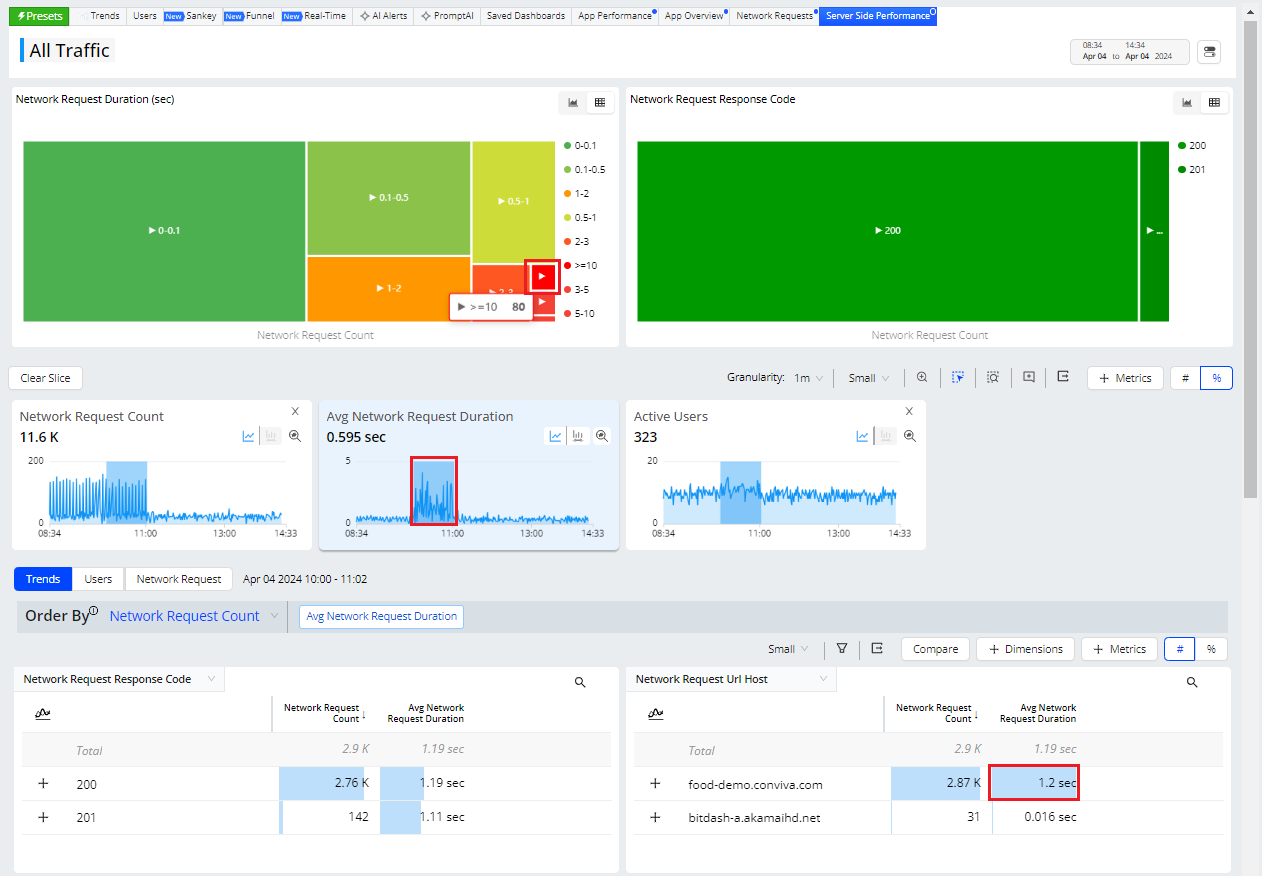
In addition to analyzing metric performance in metric time series widgets, click Presets and select a desired preset option to quickly get started with commonly used metrics and metadata use cases.
This examples shows the Preset for quick network request analysis.
Preset: Network Request Example
Preset: Server-Side Performance Example
Out-of-Box DPI Metrics
For a complete list of DPI metric definitions and support, see DPI Metrics.
| Category | Metrics | ||
| Audience and Engagement |
App Active Time (Formerly Active Time) |
||
| QoE and KPI Metrics |
Mins with High App Startup Time |
||
| Web User Experience | Avg DNS Lookup Time | ||
| Mobile User Experience | |||
| Service Performance |
Mins with 0 Network Response Code |
||
Out-of-Box DPI Metadata
|
Category |
Metadata |
||
|---|---|---|---|
| App |
App Name Application Build Application Version |
Bundle Info Platform Sensor Version |
|
|
Device |
Browser Name Browser Version Device Hardware Type Device Manufacturer Device Marketing Name |
Device Model Device Name Device Operating System Device Operating System Family Device Operating System Version |
|
| GEO & ISP |
Cities Connection Countries |
ISPs States Zipcode |
|
| Page (Web) |
Edited Page Title First Launch Page Host Page Path Page Query |
Page Referrer Page Title Page Url Referrer Host |
|
| Screen (Mobile) |
Edited Screen Title Previous Screen Title |
Screen Title | |
| Network Request |
Network Request Endpoint Network Request Http Method Network Request Response Code |
Network Request Url Host Network Request Url Path |
|
| Events | Event Category | Event Name | |
| Errors | ANR Reason | Error Message | Stack Trace |
| Global Tags | Dimensions that are based on global tags. | ||
| Event Tags | Dimensions that are based on event tags. | ||
Out-of-Box Events
Check the auto-ingested events and minimum player versions for details about auto-collected event support.
 Out-of-Box Events
DPI provides a robust set of metrics to enable application performance monitoring and user behavior analysis across your web and native applications. Metric values appear as time series and distributions in metric widgets, and alongside dimensional values in the dimension drill-down tables.
| OOB Events | Android | iOS | JavaScript (WEB) |
React Native on Android and iOS |
c-SDK | Rust | Roku | Flutter on Anroid | Flutter on iOS | Flutter on WEB (JS) |
|---|---|---|---|---|---|---|---|---|---|---|
| periodic_heartbeat | Auto-collected | Auto-collected | NA | Auto-collected | Auto-collected | Auto-collected | Auto-collected | Auto-collected | Auto-collected | NA |
| page_ping | NA | NA | Auto-collected | NA | NA | NA | NA | NA | NA | Auto-collected |
| network_request | Auto-collected | Auto-collected | Auto-collected | Auto-collected | API Config | API Config | API Config | Auto-collected only for HTTP, Dio, Chopper, and Retrofit clients | Auto-collected | Auto-collected only for HTTP, Dio, Chopper, and Retrofit clients |
| screen_view | Auto-collected | Auto-collected | NA | Auto-collected | API Config | API Config | API Config | API Config | API Config | NA |
| page_view | NA | NA | API Config | NA | NA | NA | NA | NA | NA | API Config |
| application_error | Auto-collected | Auto-collected | Auto-collected | Auto-collected | API Config | API Config | API Config |
Auto-collected; only Java and Kotlin errors |
Auto-collected | Auto-collected |
| button_click | Auto-collected | Auto-collected | Auto-collected | Auto-collected | NA | API Config | API Config | API Config | API Config | API Config |
| Any clickable UI items (including button and link) | NA | Auto-collected from Conviva Sensor ver1.1.2 onwards | NA | NA | NA | NA | NA | NA | API Config | NA |
| application_background | Auto-collected | Auto-collected | Auto-collected | Auto-collected | Not Implemented | API Config | NA | Auto-collected | Auto-collected | Auto-collected |
| application_foreground | Auto-collected | Auto-collected | Auto-collected | Auto-collected | Not Implemented | API Config | NA | Auto-collected | Auto-collected | Auto-collected |
| app_install | Auto-collected | Auto-collected | NA | Auto-collected | Not Implemented | API Config | Not Implemented | Auto-collected | Auto-collected | NA |
| deep_link_received | Auto-collected | NA | NA | NA | Not Implemented | API Config | Not Implemented | Auto-collected | API Config | NA |
| anr_start | Auto-collected | NA | NA | NA | API Config | API Config | Not Implemented | Auto-collected | NA | NA |
| anr_end | Auto-collected | NA | NA | NA | Not Implemented | Not Implemented | Not Implemented | Deprecated | NA | NA |
| conviva_fragment_view | Auto-collected | NA | NA | NA | NA | NA | NA | Auto-collected | NA | NA |
| conviva_compose_view | Auto-collected | NA | NA | NA | NA | NA | NA | Auto-collected | NA | NA |
| first_app_launch | NA | NA | Auto-collected | NA | API Config | API Config | Not Implemented | NA | NA | Auto-collected |
| page_loaded | NA | NA | Auto-collected | NA | NA | NA | NA | NA | NA | Auto-collected |
| soft_navigation | NA | NA | Auto-collected | NA | NA | NA | NA | NA | NA | NA |
| conviva_revenue_event | API Config | API Config | API Config | NA | NA | NA | NA | NA | NA | NA |
| conviva_webvitals_lcp | NA | NA | Auto-collected | NA | NA | NA | NA | NA | NA | Auto-collected |
| conviva_webvitals_inp | NA | NA | Auto-collected | NA | NA | NA | NA | NA | NA | NA |
| conviva_webvitals_cls | NA | NA | Auto-collected | NA | NA | NA | NA | NA | NA | NA |
| conviva_webvitals_fcp | NA | NA | Auto-collected | NA | NA | NA | NA | NA | NA | NA |
| conviva_webvitals_ttfb | NA | NA | Auto-collected | NA | NA | NA | NA | NA | NA | NA |
| conviva_form_start | NA | NA | Auto-collected | NA | NA | NA | NA | NA | NA | NA |
| conviva_form_submit_attempt | NA | NA | Auto-collected | NA | NA | NA | NA | NA | NA | NA |
| conviva_form_validation_error | NA | NA | Auto-collected (only for Native invalid event, HTML5 constraint validation) |
NA | NA | NA | NA | NA | NA | NA |
| conviva_form_field_blur | NA | NA | Auto-collected | NA | NA | NA | NA | NA | NA | NA |
| conviva_scroll_milestone | NA | NA | Auto-collected | NA | NA | NA | NA | NA | NA | NA |
| conviva_scroll_reset | NA | NA | Auto-collected | NA | NA | NA | NA | NA | NA | NA |
Agentic Events
Conviva JavaScript (WEB) Sensor supports the collection of agentic events:
-
Server-sent events
-
WebSocket message stream
-
Event source message stream
Predefined Mapping Event
DPI offers a comprehensive set of predefined mapped events that enable you to create custom metrics and perform application performance monitoring and user behavior analysis on the Trends dashboard.
In the Scope column:
-
Trends and Activation: The events can be used on the Trends dashboard and all pages in Activation.
-
Activation: The events can be used on all pages within Activation.
-
Metric Builder: The events can be used on the Metric Builder page of Activation.
|
Predefined Mapped Event |
Raw Event Name |
Mapping Rules |
Scope |
|---|---|---|---|
| conviva_screen_view | conviva_screen_view | Mapped directly | Trends and Activation |
| conviva_page_view | conviva_page_view | Mapped directly | Trends and Activation |
| conviva_application_error | conviva_application_error | Mapped directly | Trends and Activation |
| conviva_network_request | conviva_network_request | Mapped directly | Trends and Activation |
| conviva_window_loaded | conviva_window_loaded | Mapped directly | Trends and Activation |
| conviva_app_backgrnd_before_page_view | conviva_app_backgrnd_before_page_view | Mapped directly | Trends and Activation |
| conviva_application_foreground | conviva_application_foreground | Mapped directly | Trends and Activation |
| conviva_application_background | conviva_application_background | Mapped directly | Trends and Activation |
| conviva_application_startup | conviva_screen_view | event_name = 'conviva_screen_view' and os_type in ('android') AND unstruct_event_com_snowplowanalytics_mobile_screen_view_1_0_0.previous_name = 'Unknown' OR event_name = 'conviva_screen_view' and os_type in ('ios', 'tvos') AND unstruct_event_com_snowplowanalytics_mobile_screen_view_1_0_0.previous_id is null | Activation |
| - | conviva_session_start | find event that triggerd a new session based on the session definition, and duplicate this event as the session start event | Metric Builder |
| - | conviva_session_end | find the session end time based on the session definition, and create a dummy event on this time point | Metric Builder |
| conviva_video_play | conviva_video_events | event_name = 'conviva_video_events' AND unstruct_event_com_conviva_conviva_video_events.name = c3.video.play | Activation |
| conviva_video_attempt | conviva_video_events | event_name = 'conviva_video_events' AND unstruct_event_com_conviva_conviva_video_events.name = c3.video.attempt | Activation |
| conviva_ad_break_start | conviva_video_events | event_name = 'conviva_video_events' AND unstruct_event_com_conviva_conviva_video_events.name = c3.ad.ad_break_start | Activation |
| conviva_ad_break_end | conviva_video_events | event_name = 'conviva_video_events' AND unstruct_event_com_conviva_conviva_video_events.name = c3.ad.ad_break_end | Activation |
| conviva_video_sdk_init | conviva_video_events | event_name = 'conviva_video_events' AND unstruct_event_com_conviva_conviva_video_events.name = c3.sdk.init | Activation |
| conviva_video_set_content_info | conviva_video_events | event_name = 'conviva_video_events' AND unstruct_event_com_conviva_conviva_video_events.name = c3.video.set_content_info | Activation |
| conviva_video_bitrate_switch | conviva_video_events | event_name = 'conviva_video_events' AND unstruct_event_com_conviva_conviva_video_events.name = c3.video.bitrate_switch | Activation |
| conviva_video_buffering | conviva_video_events | event_name = 'conviva_video_events' AND unstruct_event_com_conviva_conviva_video_events.name = c3.video.buffering | Activation |
| conviva_video_pause | conviva_video_events | event_name = 'conviva_video_events' AND unstruct_event_com_conviva_conviva_video_events.name = c3.video.pause | Activation |
| conviva_video_end | conviva_video_events | event_name = 'conviva_video_events' AND unstruct_event_com_conviva_conviva_video_events.name = c3.video.end | Activation |
| conviva_sdk_custom_event | conviva_video_events | event_name = 'conviva_video_events' AND unstruct_event_com_conviva_conviva_video_events.name = c3.sdk.custom_event | Activation |
| conviva_video_custom_event | conviva_video_events | event_name = 'conviva_video_events' AND unstruct_event_com_conviva_conviva_video_events.name = c3.video.custom_event | Activation |
| conviva_defined_error | conviva_application_error and conviva_network_request | event_name = 'conviva_network_request' AND responseStatusCode in range 500-510 OR event_name = 'conviva_application_error' AND platform = 'mob' | Metric Builder |
| app crash | conviva_application_error | event_name = 'conviva_application_error' AND platform = 'mob' | Trends and Activation |
| 5XX server error | conviva_network_request | event_name = 'conviva_network_request' AND responseStatusCode in range 500-510 | Trends and Activation |
| conviva_<element>_click | conviva_<element>_click |
Mapped directly. Note: <element> can be any UI element (such as button, link, radio_button, checkbox, and div). |
Trends and Activation |
For more details about Conviva DPI, see
VSI Metrics and Metadata
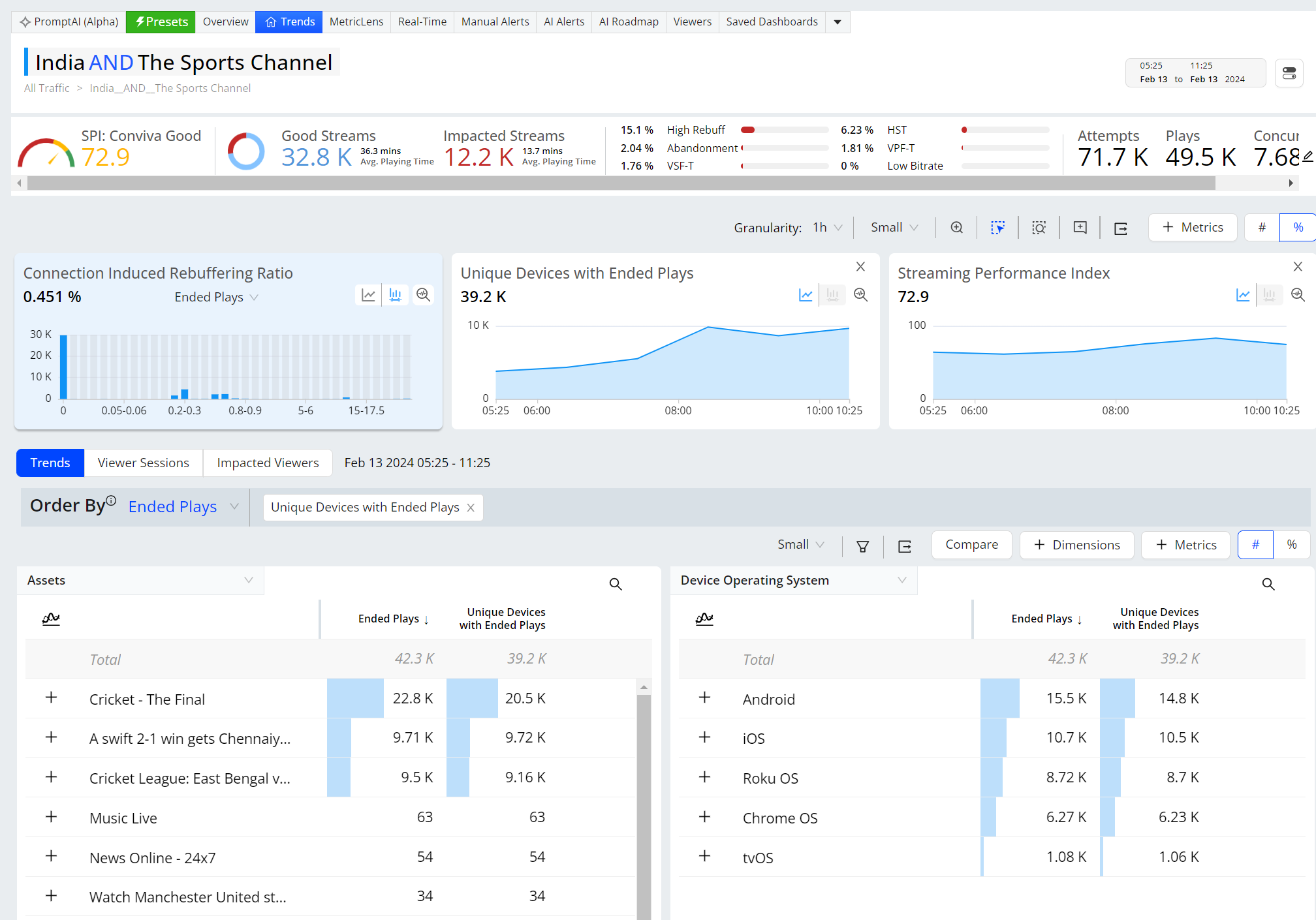
ConvivaVSI provides a robust set of video metrics enabled through the Conviva SDK and player libraries and displays out-of-box metric values in the UI as metric widget time series, metric distributions, dimensional tables for drill-down analysis, and other insightful displays.
Metrics appear in metric widgets and dimension tables in Trends, Overview, and many other dashboards. In addition to the standard metrics and data, you can get started with Conviva SPI measurements in the Overview dashboard.
Trends CIRR Example
For a complete list of VSI metrics detailed definitions, see the Metric Dictionary.
Out-of-Box Video Metrics and Metadata
| Audience and Engagement |
Average % Complete Concurrent Plays Ended Plays |
Minutes Ended Play Playing Time (Ended) Playing Time (Interval) |
Minutes Unique Device Plays Unique Devices with Ended Plays Unique Devices with Attempts |
| SPI and KPI Metrics |
Abandonment High Rebuffering High Startup Time |
Low Bitrate |
Video Playback Failures Technical Video Start Failures Technical |
| Startup Experience |
Abandonment Attempts Exits Before Video Start Exit During Pre-Roll High Startup Time |
Plays Plays (% of Attempts) Starting Bitrate Video Start Failures High Startup Time |
Video Start Failures Business Video Start Failures Technical Video Startup Time |
| Playback Experience |
Avg. Average Bitrate Avg. Peak Bitrate Bitrate Switches Average Frame Rate CIR Related Exits Concurrent Plays Connection Induced Connection Induced |
Ended Plays Paused Ratio Paused Time Rebuffering Ratio |
Video Playback Failures Video Playback Failures Business Video Playback Failures Technical Video Restart Time Zero CIRR Ended Plays |
| Ad Experience |
Ad Actual Duration Ad Attempts Ad Average Bitrate Ad Ended Plays Ad Frequency/Unique Device |
Ad Impressions Ad Impressions (% of Attempts) Ad Minutes / Unique Devices Ad Playback Failures Ad Rebuffering Ratio Ad Start Failures |
Ad Startup Time Ad Unique Devices Ads Completed (% of Ad impressions) Exits Before Ad Start |
Out-of-Box Video and DPI Metadata
|
Category |
Metadata |
||
|---|---|---|---|
|
Ad |
Ad Assets Ad Creative Id Ad Id |
Ad Media File API Framework Ad Position Ad System |
Ad Technology |
| Content |
App Name App Version Assets |
CDNs Channel Content Category |
Last CDN Edge Group Last CDN Edge Server Platform Version |
|
Device |
Browser Name Browser Version Device Hardware Type Device Manufacturer |
Device Marketing Name Device ModelDevice Name Device Operating System |
Device Operating System Family Device Operating System Version Player Framework Name Player Framework Version |
| GEO | AS Numbers Cities Countries |
Continents DMAs ISPs |
States
|
For more details about Conviva VSI, see:
Next Step: Explore DPI Features, Explore Video Features