Audience Module is an optional add-on to Audience that enables you to use the advertising capabilities features, such as ad dimensions in the Segment Builder and Filter Builder, to empower your advertising activities. Also, it provides the household demographics to empower optimal audience targeting through Conviva Audience viewership data, customized through Audience filters and segments.
Advertising Capabilities
Using Audience Module enables a full set of advertising capabilities that allow you to perform advanced ad and viewership analysis, such as evaluating advertising media plans, and analyzing the impact of ad policy changes on viewership.
| **Audience Module Ad Features** | **Example Usages** |
| Ad Metrics and Ad Dashboards | To quickly determine the overall effectiveness of the delivered ad placements, use the Ad dashboard. |
| Ad Dimensions in Filters and Segments | To create more specific filters and segments to get more related data, use ad dimensions along with other dimensions. For example, filter sessions associated with specific ad behaviors and metadata. |
| Ad Metrics in Segments | To create specific segment for viewer experience analysis, use the ad metrics in the Ad Impact category. |
| Custom Ad Dimensions | To build more advanced advertising-related filters, segments, and analytics workbench analysis, use custom ad dimensions. |
For more information regarding the advertising capabilities and use cases, see Advertising Capabilities.
Ad Placment Performance and Demographics
To help track and determine the overall effectiveness of the delivered ad placements, Audience provides Ads and Ad Details dashboards with a list of ad placements (line items) delivered in the selected period along with the corresponding metadata, such as advertiser and campaign, and metrics, such as household reach, ad impressions, and average frequency. The Ads Dashboard helps you quickly determine the overall effectiveness of the delivered ad placements. The Ad Detail dashboard displays a high-level view of your ad's reach, frequency, and impression delivery across device, content, and audience demographics
In addition, the Ad Impressions metric appears in most dashboards to display the sum of ad sessions that successfully started in the selected interval to help correlate viewership and ad performance.

You can also create filters and segments based on sessions with or without ads. For more details, see Filters and Segments. For more details about advertising capabilities, see Advertising Capabilities.
Custom Ad Dimensions
With custom ad dimensions, you can build more advanced advertising-related filters, segments, and analytics workbench analysis.
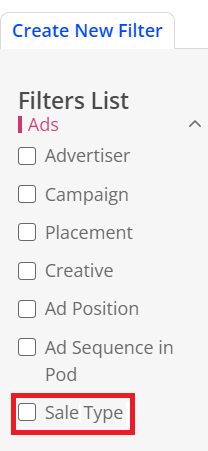
For example, you can add the Sale Type dimension to filter sessions that played either direct sold ads or programmatic ads, and analyze the performances of the ad types. For more information, see Filters and Segments.