
2026 Releases: Improved User Experience, Automatic Insights, Trends and Dashboard Enhancements
Automatic Insights
Viewer Module
No changes this release
Trends and Dashboard Enhancements
User Management
Metrics and Metadata
AI Alerts
- AI Alerts: Ad Playback Failures Added to Ads AI Alerts
- AI Alerts: KPI-based Metrics (Beta) for SPI Improvement Opportunity Metrics
- AI Alerts: Default Metrics Can Now Be Removed
- Notifications: Mute Rules — Contains Operator; Mute Rules and Global Mute Now GA
- Notifications: Mute Rules (Beta) for Condition-Based Alert Muting
- Notifications: Global Mute (Beta) for All Alert Notifications
- AI Alerts: Reinstate AI Alerts Support for Ad Metrics
Documentation
Product Naming
October 15, 2026
NewTrends: Import Layout from Another Dashboard Beta
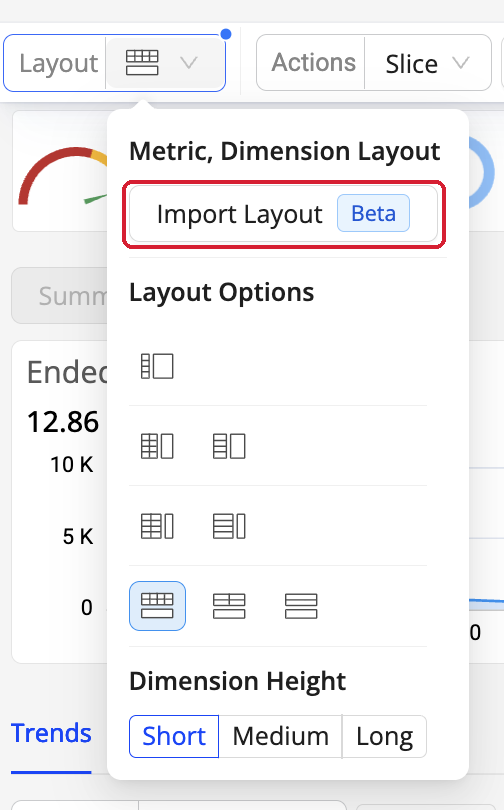
The Layout menu — Import Layout and Layout Options.
Feature Update: A new Import Layout action, under Layout > Metric, Dimension Layout, replaces the current Trends dashboard's metrics and dimensions with those of any saved dashboard or preset in one click, while keeping the current filters, date range, and comparisons unchanged. A Dashboard Applied: <name> label appears above the dashboard; remove it (×) at any time to return to the original layout. SPI settings are not overridden by the import.
Use Case: Open a shared dashboard that carries the right filters and date range but not your usual metrics, and apply your own layout in one click instead of re-selecting and re-ordering metrics and dimensions by hand.
More Details: Importing a Layout from Another Dashboard.
Notifications: Mute Rules — Contains Operator; Mute Rules and Global Mute Now GA
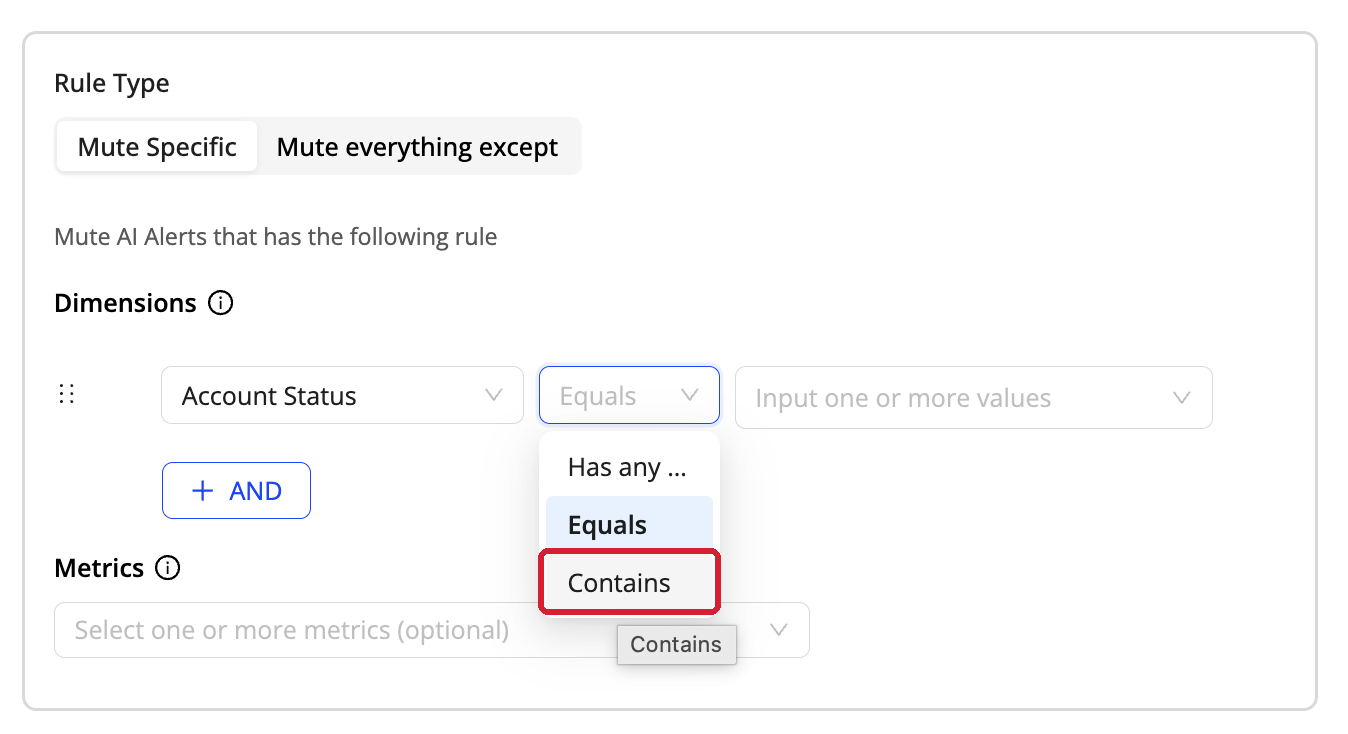
Dimension condition operators — Has any, Equals, and Contains.
Feature Update: Mute Rule dimension conditions now support a Contains operator alongside Equals and Has any, matching any dimension value that includes the entered text — for example, Asset Name Contains TRAILER instead of listing every matching asset name individually. Mute Rules (per user, in Video, Ads, and App) and Global Mute (organization-wide, set by admins) are both now generally available; the Beta tag has been removed from both.
Use Case: Mute a whole pattern of dimension values — every asset name sharing a substring, for example — with one condition instead of an Equals/Has any list that has to be maintained value by value.
More Details: Mute Rules.
September 30, 2026
NewTrends: Ended Status Dimension Beta
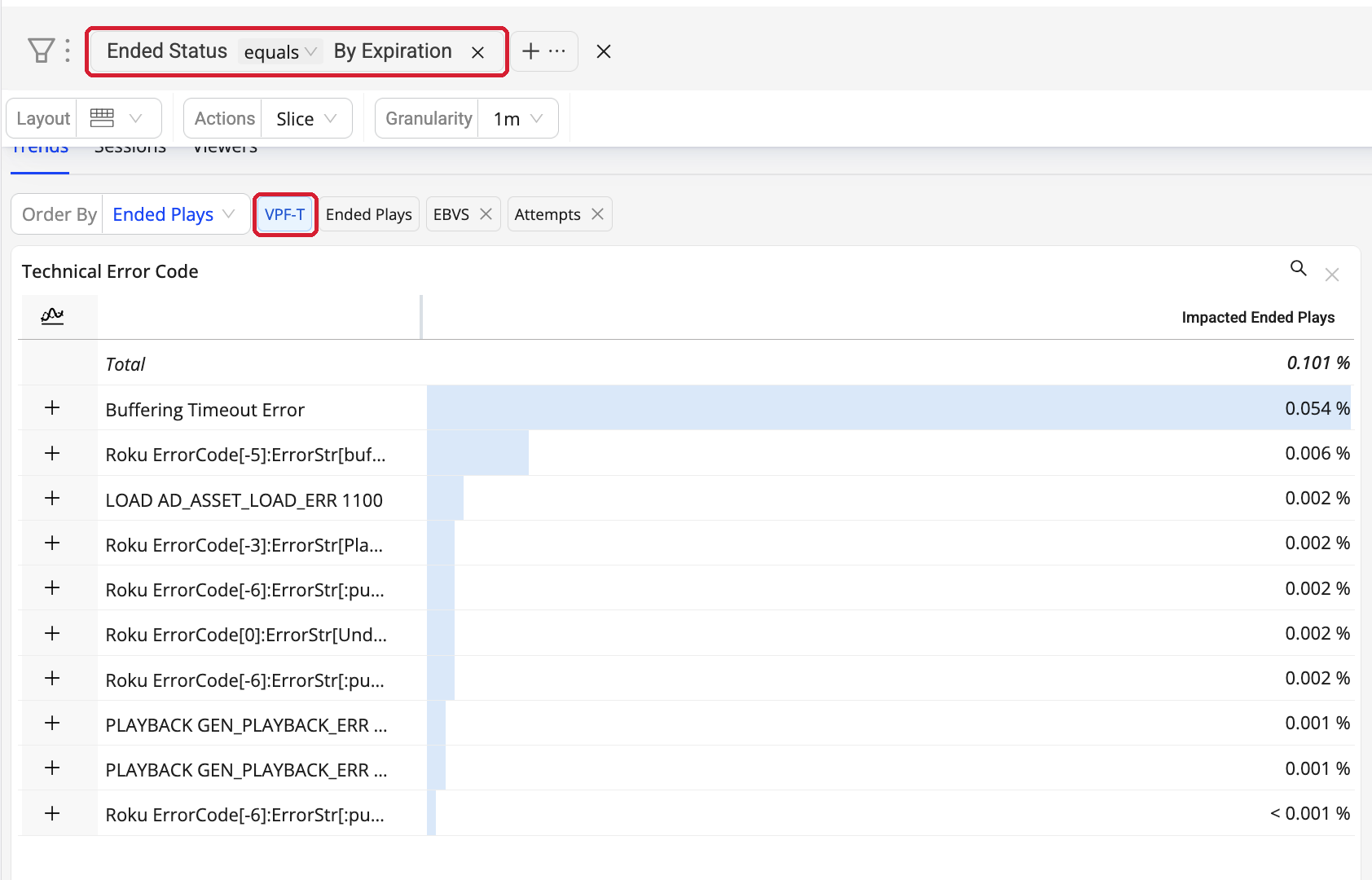
Trends > filter bar > Ended Status equals By Expiration.
Feature Update: Ended Status is now a Conviva system dimension in Trends, so you can see why a session ended. It appears in the Dimension Management page, the dimension selector popup, and the Trends dimension table, and works as a filter chip, a drill-down, or a group-by alongside other dimensions — for example, Exits Before Video Start (EBVS) by Device Type and Ended Status. Three readable values appear in tables and exports: Graceful End (the player or Conviva Sensor explicitly reported the session ended), By Expiration (no heartbeat arrived within the expiration window, so Conviva closed the session — the app was backgrounded or killed, the device slept, or the network dropped), and Not Ended (still active, or revived after a late heartbeat).
Use Case: A session the player closed and a session Conviva expired used to look identical in Trends, and expired sessions inflate EBVS and other exit-related metrics. Splitting them tells you whether rising EBVS or Video Playback Failures (VPF) is app or player instability worth fixing, or just ordinary viewer exits — without sampling individual sessions or commissioning a custom analysis.
More Details: Ended Status.
Metrics: Ending Peak Bitrate Beta
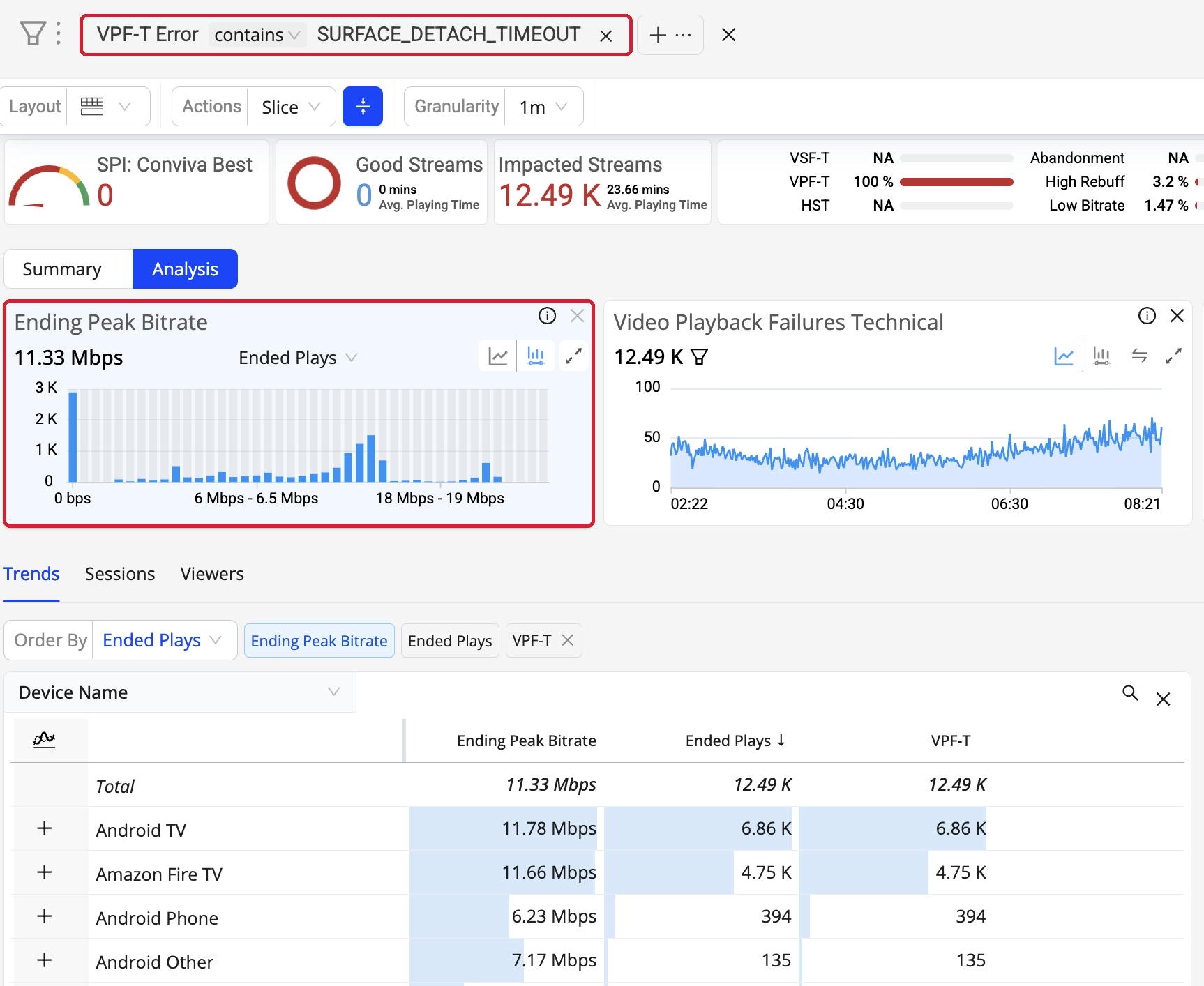
Trends > Analysis > Ending Peak Bitrate distribution, broken down by Device Name.
Feature Update: Ending Peak Bitrate is a new Ended-type metric measuring the time-weighted peak bitrate (manifest BANDWIDTH) that sessions were playing in their final one-minute interval before ending, aggregated across all Ended Plays. Buffering and paused time are excluded. It is available in Trends as a summary and time series, in Trends Live (last 15 minutes) and the Real-Time dashboard, in MetricLens, and as an Ended Plays vs Ending Peak Bitrate distribution that uses the same buckets as Avg. Peak Bitrate — slice a bucket to open the matching Viewer Sessions, or export the data. Ending Peak Bitrate is not supported in Manual Alerts or AI Alerts in this Beta.
Use Case: Avg. Peak Bitrate averages across the whole session, so a 40-minute session that ran at 26 Mbps and collapsed to 200 Kbps in its last minute before a Video Playback Failure still reports 26 Mbps. Ending Peak Bitrate shows the quality viewers actually had when they left, which points at the specific adaptive bitrate (ABR) ladder rungs, CDNs, or devices to fix.
More Details: Ending Peak Bitrate.
August 27, 2026
User Management: Viewer Access and MCP Access Permissions

Settings > User Management > Modify User > Permissions.
Feature Update: Two per-user permissions are now set from User Management. Viewer Access controls individual viewer- and user-level data — the Viewer module, viewers, sessions, timelines, and Impacted Viewers across all Video and App dashboards. MCP Access controls whether the user can reach Conviva through the Model Context Protocol (MCP) with their Conviva sign-in; access through API credentials continues to be governed by API Management. Both permissions are granted for all existing users, so nothing changes on release day, and both are cleared by default on the Invite User screen, so an admin grants them explicitly for a new user. A change takes effect the next time the user signs in, including an admin changing their own permission.
Use Case: Restrict individual viewer data to the teams that need it, and decide per user who can query Conviva from an MCP client — without creating a separate role.
More Details: Viewer Access and MCP Access.
User Management: Edit a Permission in Bulk Across Users and Accounts

Settings > User Management > Edit Permissions.
Feature Update: Every permission is now its own sortable, filterable column in the User Management grid. Filter to the users you want, select them, and click Edit Permissions to set one permission to one value across several accounts in a single action. Accounts where you cannot grant that permission are disabled, a single action is limited to 50 operations (selected users × selected accounts), and a review step returns a per-user, per-account success or failure summary.
Use Case: Roll a permission out — or take it away — for a whole team across the accounts they work in, instead of opening each user one at a time.
More Details: Edit Permissions in Bulk.
User Management: Block Invitations to Non-Federated Domains
Feature Update: On an account with this control enabled, Conviva validates the email domain of every invitation at User Management > Invite User against the account's configured SSO domain list and rejects invitations to any other domain. The approved-domain list is maintained by Conviva rather than exposed in the UI. Existing users on other domains are unaffected — only new invitations are blocked. The control is not self-serve; request it through Conviva Support.
Use Case: Keep account access inside your federated identity provider, so every new user arrives through SSO instead of a personal or third-party email address.
More Details: Block Non-Federated Domain Access.
AI Alerts: Ad Playback Failures Added to Ads AI Alerts
Feature Update: Ad Playback Failures is now a supported Ads AI Alerts metric. Ads AI Alerts previously covered the start of the ad only, so an ad that started cleanly and then broke mid-roll surfaced in next-day reporting rather than in real-time. The metric is added by default with a default sensitivity for all Ad customers, is tunable like any other ad metric under AI Alerts > Alert Config > Ad, and participates in the standard diagnostics and root-cause flow. Existing ad alert configurations are unaffected.
Use Case: Catch failures inside the ad break while the break is still running, instead of reconciling lost impressions the next day.
More Details: Ads AI Alerts.
August 20, 2026
AI Alerts: KPI-based Metrics (Beta) for SPI Improvement Opportunity Metrics Beta

Video > AI Alerts Config > KPI-based Metrics (Beta).
Feature Update: The four Streaming Performance Index (SPI) Improvement Opportunity metrics — Abandonment, High Startup Time, High Rebuffering and Low Bitrate — can now be configured as AI Alerts. Previously these metrics were only observable in the SPI workflow. Configure them in the new KPI-based Metrics (Beta) panel under Video > AI Alerts Config: select the KPI, check the Improvement Opportunity metrics to alert on, and set thresholds per severity (Info, Warning, Critical) across three conditions — Persistence exceeds, Total Impacted Devices exceeds and % Impacted Devices of Root Cause exceeds. The metrics are off by default and opt-in. One KPI's Improvement Opportunities can be added to alerting in this release, and you can switch from Conviva Good to Conviva Best after the initial enablement. Alerts fire into the existing AI Alerts workflow, use the same root-cause dimensions as the default metrics, and reach the same notification channels.
Use Case: SPI is the number you manage experience against, and the Improvement Opportunity metrics explain why it moves. Alerting on them flags a sudden deviation while sessions are still recoverable, rather than after SPI has already moved.
More Details: KPI-based Metrics (Beta).
AI Alerts: Default Metrics Can Now Be Removed
Feature Update: The default AI Alert metrics are no longer fixed. Metrics such as Video Start Time and Exits Before Video Start can be cleared from alerting when they are not the most actionable signal for your team, which makes the Improvement Opportunity metrics a replacement rather than an addition. Note that removing a metric or changing KPI/SPI settings does not auto-resolve existing alerts — any alert already active for that metric or KPI stays active.
Use Case: Enable Abandonment and, if it proves more actionable, clear the default Exits Before Video Start metric; or replace Video Start Time with High Startup Time. The result is one alert per failure mode instead of two describing the same event, which cuts triage noise.
More Details: AI Alert Sensitivity.
August 13, 2026
Notifications: Mute Rules (Beta) for Condition-Based Alert Muting
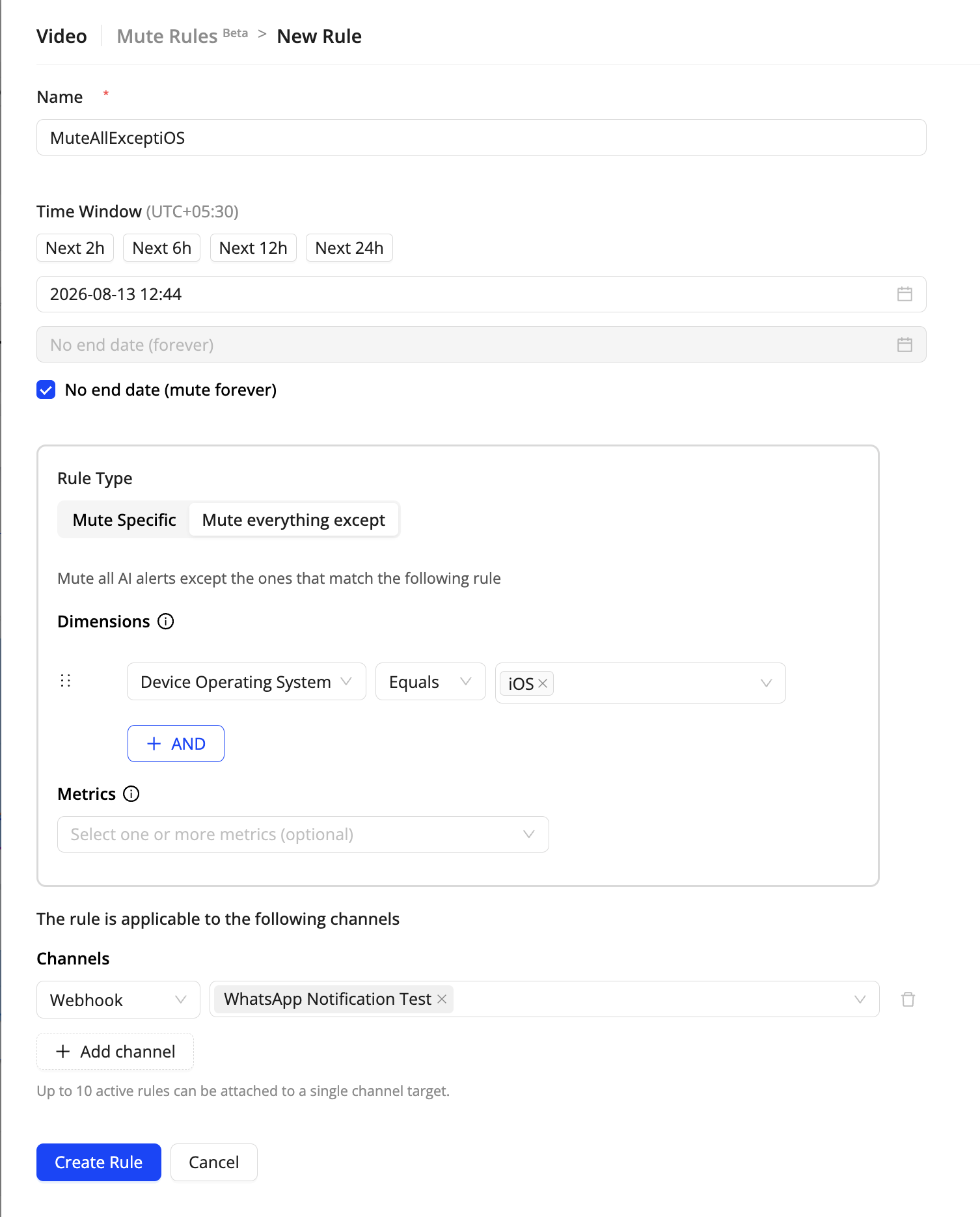
Feature Update: Mute Rules let you suppress AI Alert notifications for a defined time window based on dimension and/or metric conditions, across one or more notification channels. Choose Mute Specific to silence the alerts that match a condition, or Mute everything except to silence everything else. Rules are defined once, attached to the channels they apply to, and listed by Active, Scheduled, or Expired status. Available in Video, Ads, and App.
Use Case: During a known incident or maintenance window, mute just the noisy slice — a single device OS, a specific metric, one webhook target — so on-call teams keep seeing the alerts that matter. Alerts still appear on the Alert Listing page; only the notifications are suppressed.
More Details: Mute Rules (Beta).
August 6, 2026
Documentation: Pulse help links now open docs.conviva.ai
Feature Update: Help links inside Conviva Pulse now open documentation on docs.conviva.ai. Selecting the help control in the Pulse header takes you to the documentation for the surface you are working in.
Use Case: Get to the right reference from inside your workflow — no separate search, and always the current version of the page.
More Details: Documentation and In-App Help.
Navigation: Pulse product surfaces renamed to Video and App
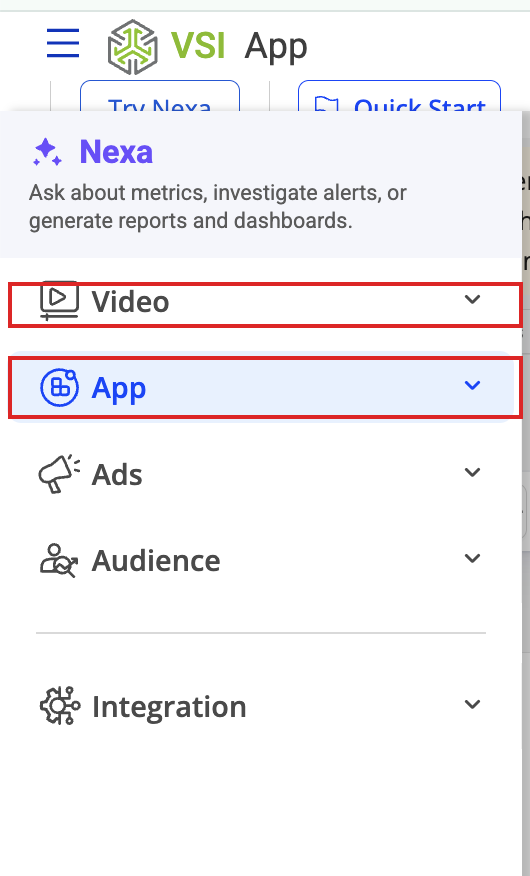
Pulse left navigation — Video and App now carry the product-surface names used across VSI.
Feature Update: The Pulse navigation labels now match the VSI product-surface model: DPI is renamed to App, and Video Streaming Insights is renamed to Video. Ads is unchanged. This is a labelling change only — no dashboards, metrics, filters, saved views, permissions, or API behavior changed, and no action is required.
Use Case: Consistent, customer-facing names across Video, App, and Ads make it clear which surface you are in and which product a given capability belongs to.
More Details: VSI Product Surfaces.
July 30, 2026
Documentation: docs.conviva.ai is now the home for all documentation
Feature Update: docs.conviva.ai is now the single home for all Pulse documentation, with a major search upgrade. It fully replaces the in-Pulse Learning Center, which will be retired soon — all the latest documentation now lives on docs.conviva.ai. Note that Pulse help links still point to the old Learning Center; they will be updated in the next release.
Notifications: Global Mute (Beta) for All Alert Notifications
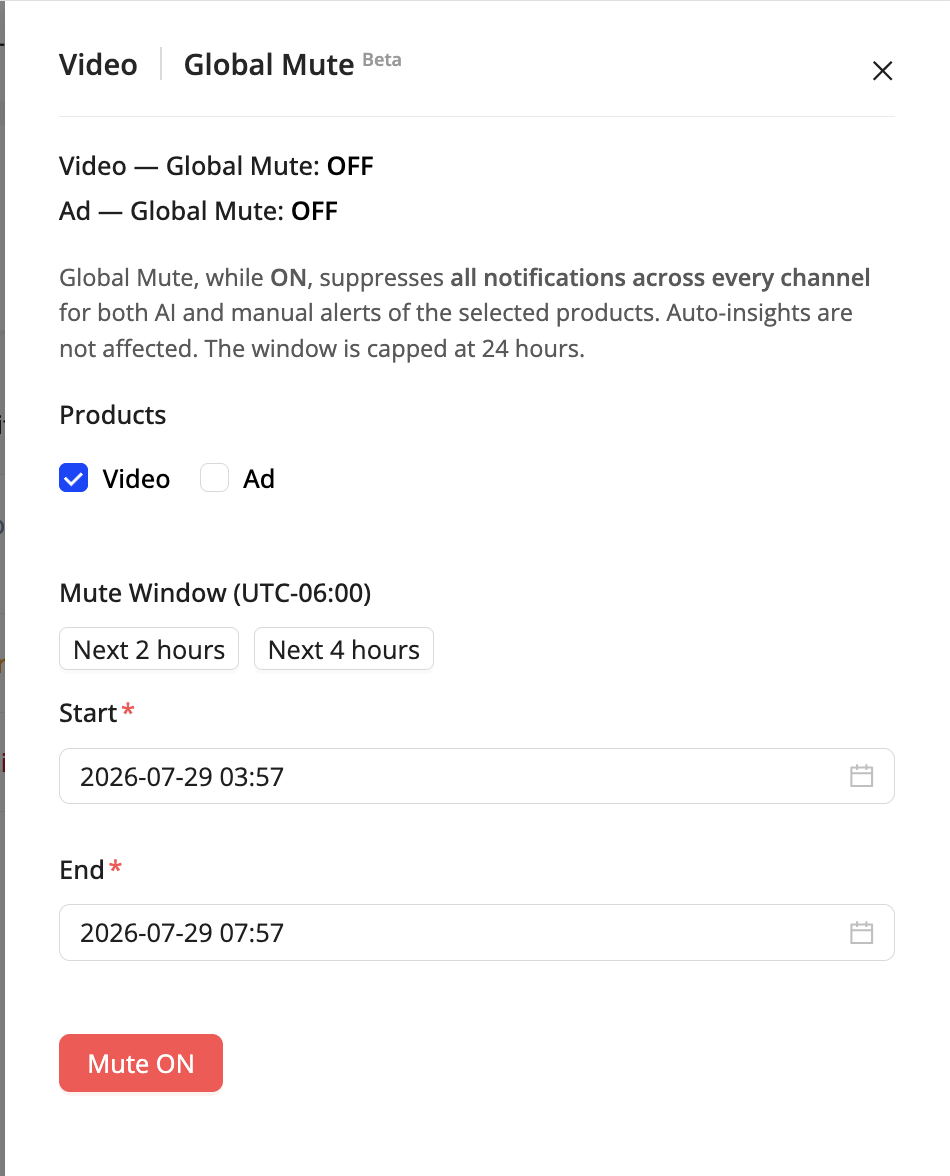
Feature Update: Mute all AI Alert and manual alert notifications across every channel for a set window (up to 24 hours) — useful for maintenance windows or known low-traffic periods.
Use Case: During a maintenance window or a known low-traffic period, mute notifications so non-actionable alerts don't reach your team, while the alerts themselves stay visible on the Alert Listing page.
More Details: Global Mute (Beta).
July 22, 2026
Unique Viewers — 3 New Metrics Beta: New Viewer ID–based metrics — Unique Viewers with Attempts, Unique Viewers with Ended Plays, and Ad Unique Viewers — count distinct viewers rather than devices, for intervals up to 24 hours within the last 30 days.
New API Management Permission at User Level: API Management is now a per-user permission (Hide, View, or Edit) set in User Management, with a separate API Admin permission that controls who can grant access to others. Learn more
Usage Dashboard — Table View Export: Export now produces a single download that combines the time-series data with a per-account table breakdown, and the export header lists all selected c3 accounts. Learn more
May 14, 2026
AI Alerts: Reinstate AI Alerts Support for Ad Metrics
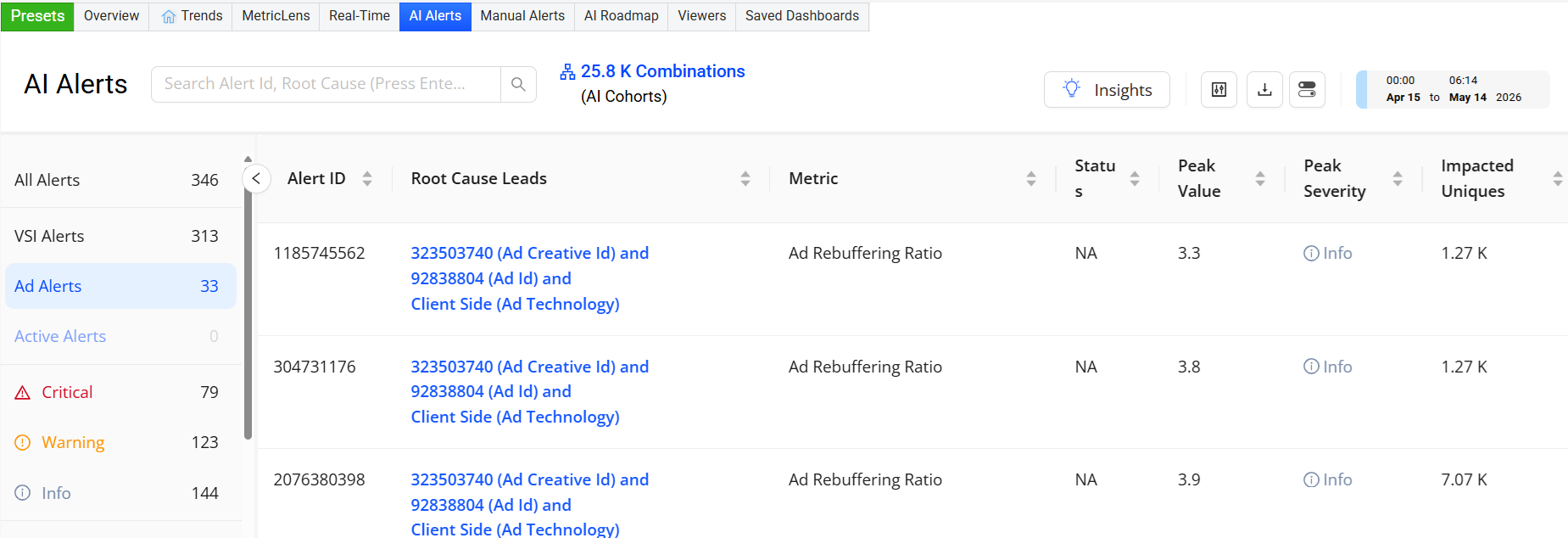
Feature Update: Resumes AI Alerts support for Ad metrics. This dashboard provides focused monitoring of video and ad-related alerts and streamlined reporting of alert data. It improves root cause visibility and enhances analysis of issue impacts. (AI Alerts for Ads will be enabled in phases starting May 14, 2026, through end of May 2026.)
Click to expand the image:
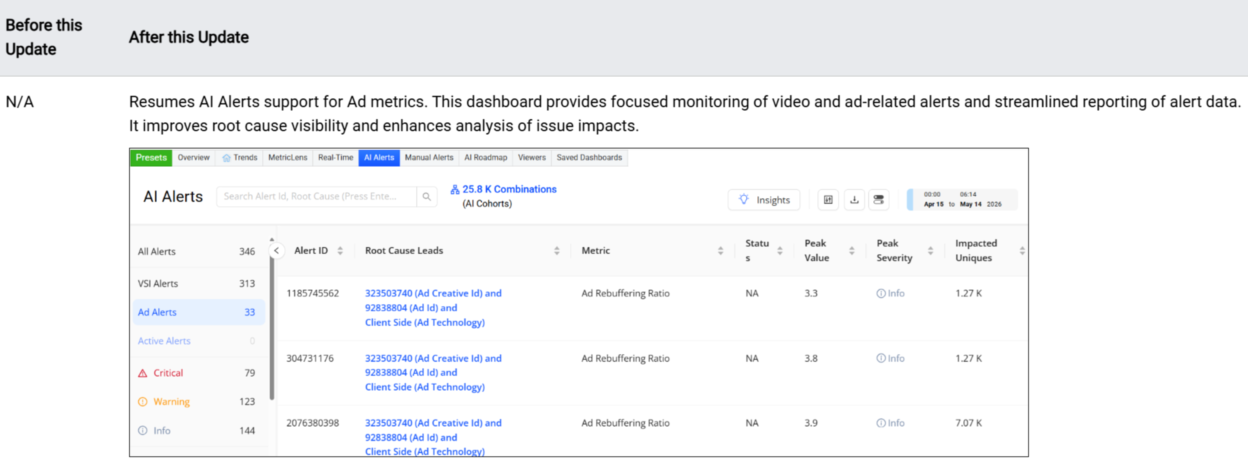
Use Case: Use the AI Alerts dashboard to identify key anomalies, then jump to detailed anomaly analysis through the Root Cause Leads link. In this example, the Root Cause Leads link for the selected alert (Ad Rebuffering Ratio) opens the AI Alert Diagnostics page for quick access to the impacted dimensions in the dimension tables. Also, see the peak value details to identify the metric's highest value, which helps analyze the issue's impacts.
More Details: AI Alerts.
ASN Dimension: Refreshes ASN Dimension Names
Feature Update: Refreshes the ASN display names for approximately 40,000 ASNs to align with the latest authoritative source data. Changes include major ownership renames and minor normalizations such as country code corrections. This update affects only the ASN dimension — the ISP dimension remains unchanged and accurate. A recurring refresh process is now in place to ensure ASN names remain up to date going forward.
May 7, 2026
Settings: New API Usage Dashboard Menu Item
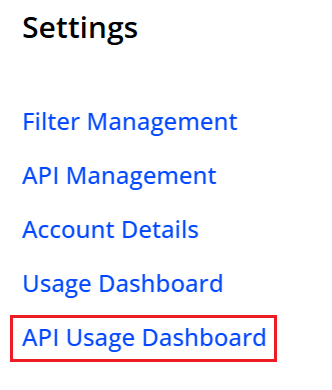
Feature Update: Simplifies API Usage Dashboard access with a direct link in the Settings menu, eliminating multi-step navigation.
Click to expand the image:
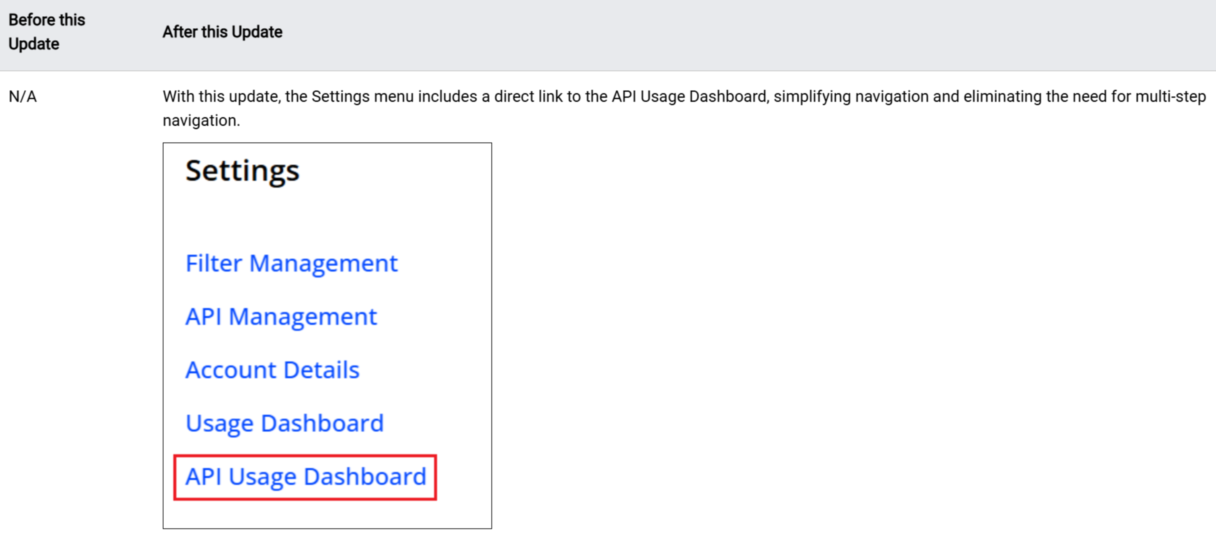
Use Case: Quickly access API usage and determine the API traffic distribution across MCP-originated and direct Pulse data calls. Monitor MCP traffic usage to build efficient agentic data models for VSI and DPI data access.
More Details: Settings and Usage Dashboard.
April 9, 2026
Usage Dashboard: Improved API Usage Visibility in the Usage Dashboard
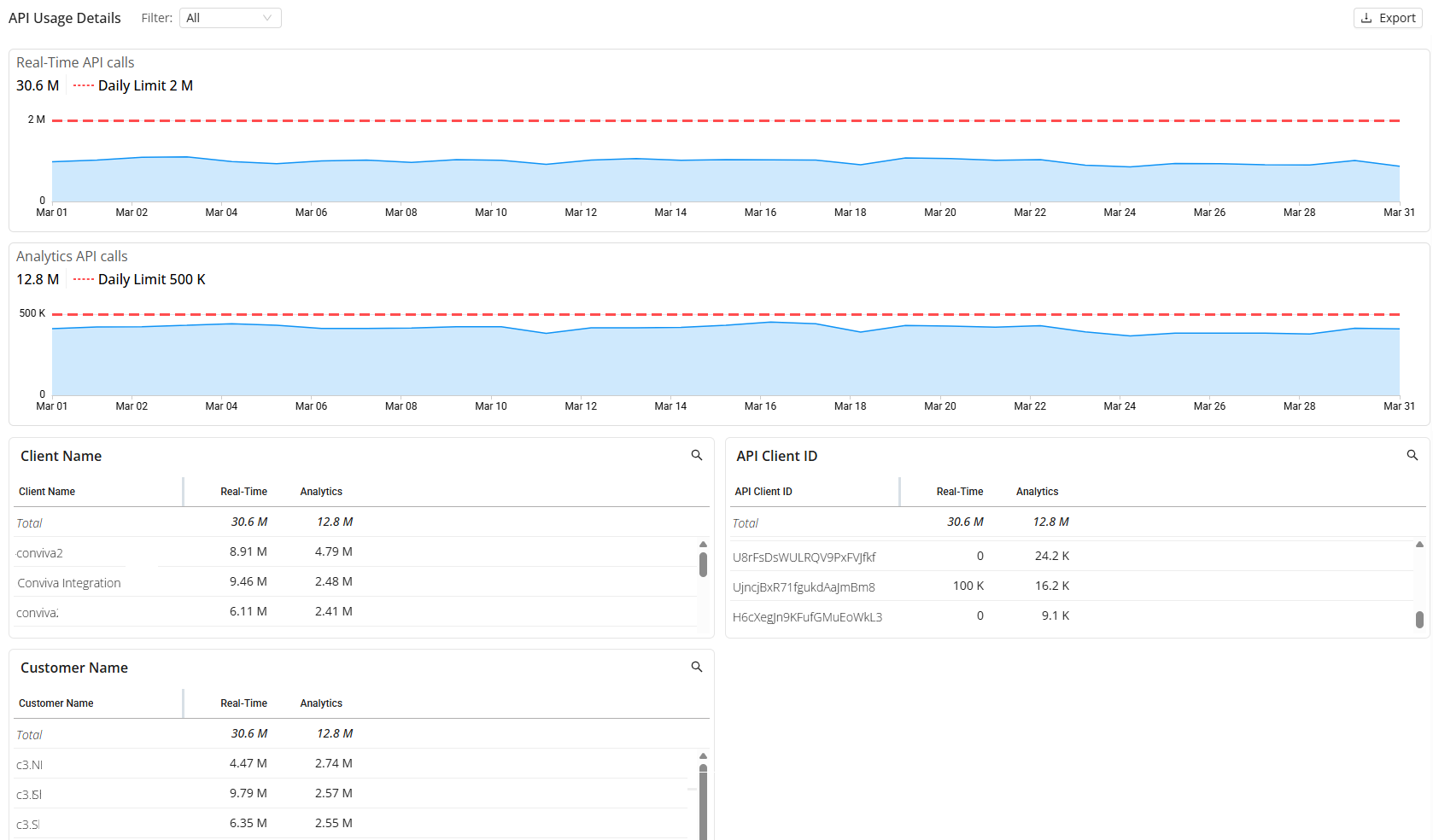
Feature Update: Introduces call origin filtering in the Usage Dashboard to distinguish between MCP-originated and Pulse API calls. This enhancement enables targeted analysis of traffic distribution, supports measurement of MCP adoption, and improves troubleshooting by isolating issues specific to each access path. The Call Origin filter provides options to view MCP-only, direct-only, or combined traffic, with dashboard metrics updating dynamically based on the selected configuration.
Click to expand the image:
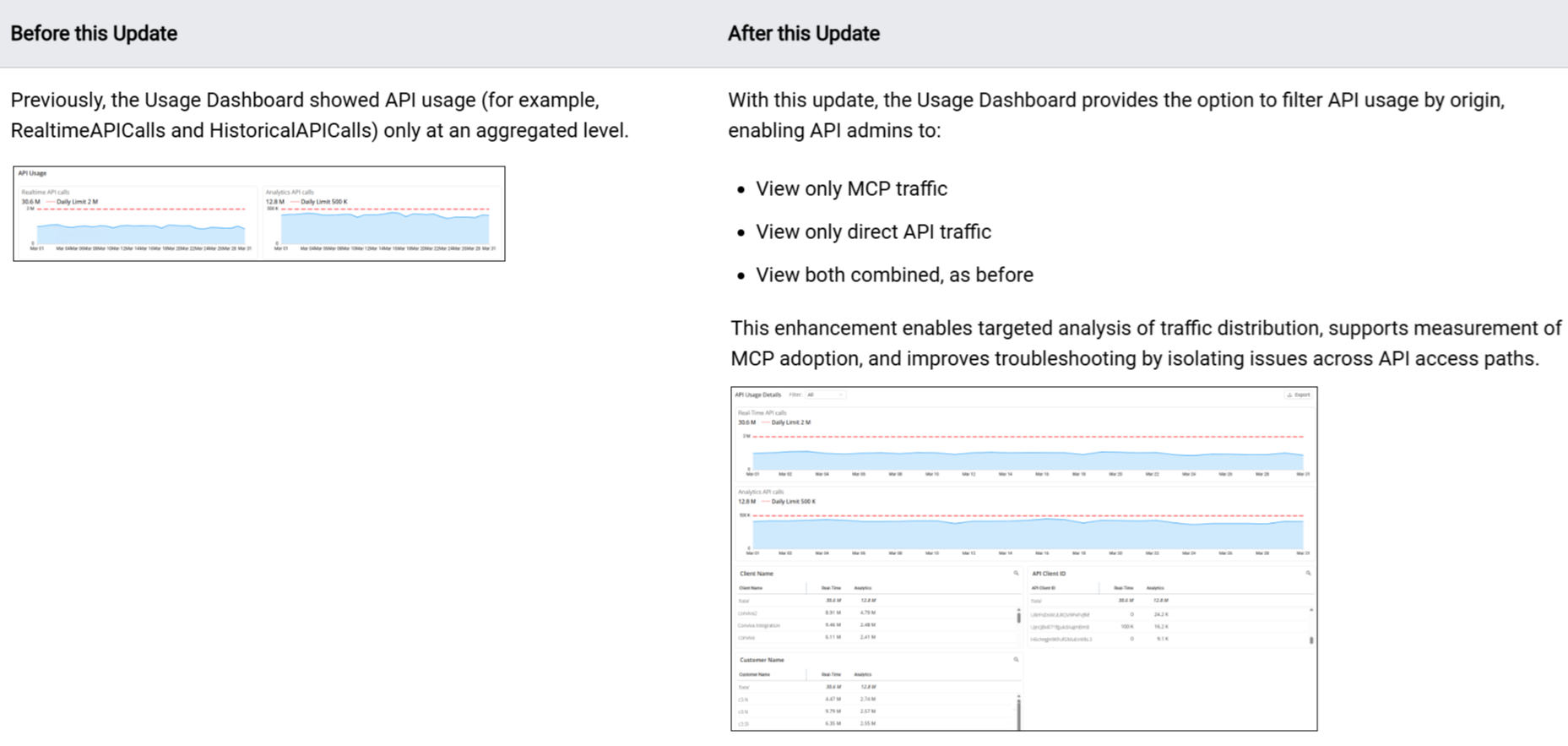
Use Case: Check your overall API usage and determine the API traffic distribution across MCP-originated and direct Pulse data calls. Monitor MCP traffic usage to build efficient agentic data models for VSI and DPI data access.
More Details: Usage Dashboard.
March 26, 2026
SPI: Updated SPI Setting Persistence for Shared and Saved Dashboards
Feature Update: Updates SPI setting persistence so shared and saved dashboards maintain the SPI settings at the time the dashboards were generated.
The behavior of the SPI on shared dashboards depends on the date the share link was generated:
- Links generated before March 26: The dashboard consistently displays the SPI based on the Overview dashboard setting, regardless of the SPI selection at the time of sharing.
- Links generated on or after March 26: The dashboard displays the specific SPI setting selected at the time of sharing.
Click to expand the image:

More Details: SPI Introduction, Overview Dashboard.
February 26, 2026
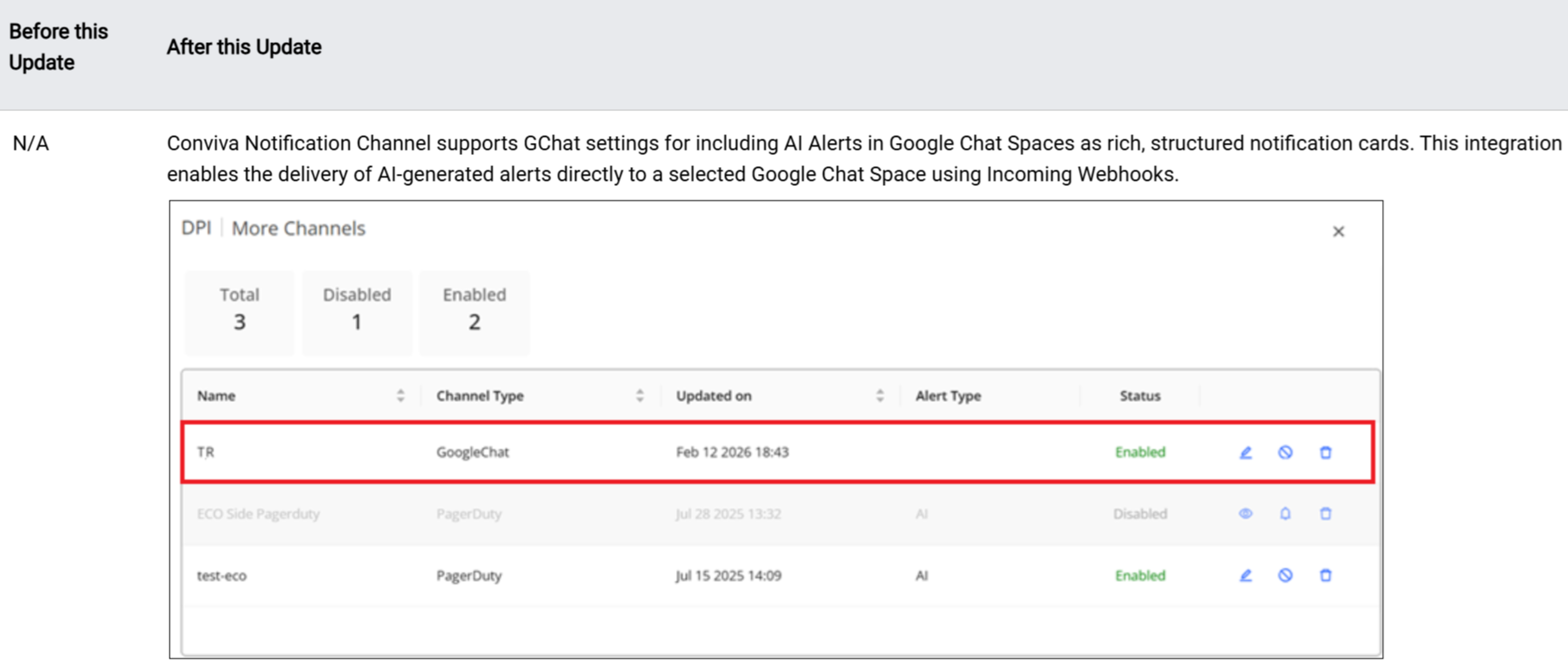
AI Alert Notification: Google Chat Notifications for AI Alerts (Beta)
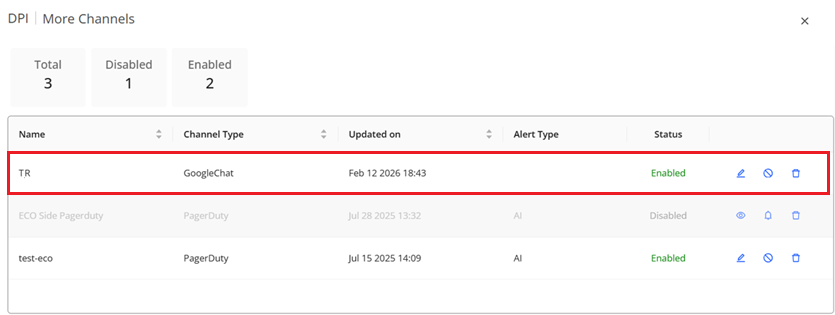
Feature Update: Enhances the Conviva Notification Channel with support for AI Alerts in Google Chat Spaces as data-rich, structured notification cards. With this release, Google Chat appears as a notification channel within Conviva's existing notification service settings. The integration enables the delivery of AI-generated alerts directly to a selected Google Chat Space using Incoming Webhooks. These notifications render as data-rich Google Chat cards, ensuring structured, readable, and actionable alert messages with links to Conviva diagnostics features.
Click to expand the image:
Use Case: Set up Conviva Google Chat settings to reduce incident response times. For example, automatically route alerts about minutes with 4xx network response codes to the web services team's Google Chat channel, enabling engineers to proactively identify and resolve client-side errors before they impact users.
More Details: Google Chat Notification.