Advertising Capabilities in Audience
Audience enables a robust set of advertising-related use cases based on session filters, viewer segmentation, demographic data and other types of reach discovery and viewer characterization.
Note: Most use cases require the Audience Module. Reach out to your Conviva representative for more information.
| Objectives | Business Goal | Features To Use |
|---|---|---|
| Advertising Media Planning | In response to an Advertiser's RFP for specific audience segments, quickly validate the viewership reach for the requested audience segment. |
|
| Proactively discover high-value, high-reach audience segments to help drive potential advertising opportunities. |
|
|
| Understand the actual household reach of ad packages targeted to specific segments. |
|
|
| Advertising Activation | Target ads more accurately to meet guaranteed audience and reach goals. Avoid over-indexing and unnecessary increases in ad load. |
|
| Advertising Measurement |
Accurately measure household reach and frequency of delivered ads to inform advertisers of the high fidelity household reach and frequency of their delivered ads. Identify ads that missed their target audience and adjust targeting to improve ad reach. Understand how well promo ads delivered against the targeted audience. |
|
| Analyze the impact of ad policy changes on viewership and ad impressions, e.g., how did increasing ad loads impact total ad impressions and viewer engagement. |
Note: To avoid confounding impacts, consider building segments for control groups, similar to A-B testing. |
|
|
Marketing Promotion Email & Social Marketing |
Discover valuable audience segments that index with high reach on your platform Target promotional campaigns to the identified segments, which can led to increases in new user acquisition and/or engagement. Target more accurately and increase efficiencies of ad inventory. |
|
|
Marketing Attribution Promotion to Subscription Conversion |
Understand promotion to content tune-in rates. Measure the effectiveness of promotional campaigns. Capture the segment of households that saw the promo ad across all owned-and-operated station properties and then watched the targeted content <x> days afterwards on another owned-and-operated station property. Improve future promotions with the understanding of which past ads converted well and which did not. Increase subscription conversion rates. |
|
| Password Sharing Analysis |
Understand the severity of password sharing on your subscription service, including the number of households that are actively leveraging shared credentials. Measure size and analyze behavior of high probability, active password sharers, for example a subscription that is being used actively (for example weekly) in multiple households. Take corrective actions to convert households leveraging shared credentials to paying customers. Increase subscription revenue. |
Use the Non-Primary Shared Subscription HHs and All Shared Subscription HHs to create segments based on the target subscriber segments. Analyze households with shared password behaviors. See Filters and Segments and Audience Segments. |
To support these use cases, Audience provides a rich set of capabilities:
-
Use session-based filters to compare viewership between video sessions with and without ads.
-
Create viewer segments to analyze ad reach across different demographic groups.
-
Display detailed ad campaign data and export a performance report of all placements to key advertisers.
Filtering Sessions Based on Ad, Audience, and Content Data
Filters provide session-based data sets, returning only data for the content sessions that match the specified session criteria. With session filters, Advertising teams can easily visualize key data points on how ads are delivered. Key ad measurement data points may include household reach, impressions, demographics, geographies, time windows, device platforms and content, all of which can be visualized and exported from most pages.
Use Filters to create session-level data sets based on matching ad and other companion criteria.
-
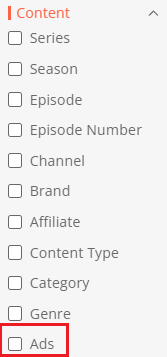
In the Content category, use the Ads filter option to select only sessions during which ads played. Performance and viewership analysis can then be performed on this subgroup of sessions, along with applying other session criteria for further analysis.
-
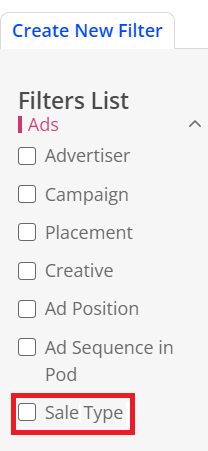
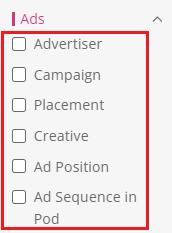
In the Ads category perform session analysis based on ad metadata, such as Advertiser, Placement, and Ad Position.
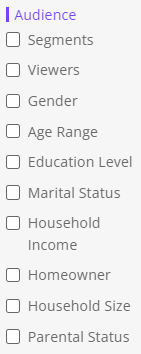
You can combine ad filter attributes with other filter attributes, such as gender, education level, and household income to create a variety of session groups for expanded session analysis of ad reach and delivery.
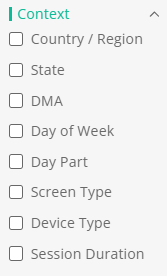
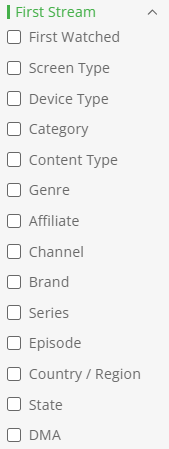
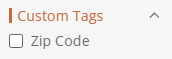
Filter Categories
|
|
|
|
|
|
For more details, see, Filters and Segments.
Segmenting Viewers Based on Ad Data and Other Viewer Behaviors
Segments provide viewer-based data sets, returning all the data related to the viewers that match the specified criteria. In the Segment Builder, use segments based on ad attributes, such as ad position, ad sequence in pod, ad impressions, and ad load, to support a wide range of ad measurement and attribution use cases .
Marketing teams can create segments of viewers that watched their promotional ads and intersect that segment with viewers who watched the promoted content, measuring attribution and conversion. Publishers can also create a segment of viewers that experienced high ad load and then compare that segment's engagement and retention across other segments.
-
In the Ads segment tab, create viewer groups based on ad position and ad sequence.
-
In the Ad Impact tab, create viewer groups based on ad load and viewed ad impressions
-
Combine ad segment attributes with other viewer and behavior attributes, such as Content, Consumption, and First Stream.


For more details, see, Filters and Segments.
Advanced Filtering and Segmentation
When applying Filter settings, you can select the Audience options for Segments to analyze the sessions from a viewer segment.
-
Analyze the sessions of viewers based on a target segment, such as Highly Engaged Viewers.
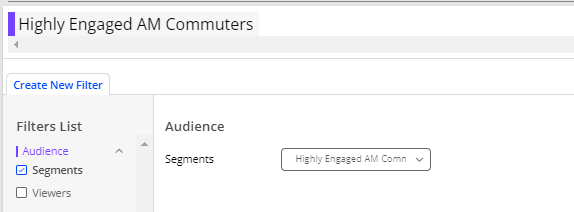
From the Segment tab, you can also join an ad-based segment with another existing segment, such as highly engaged viewers.

-
Analyze viewers with overlapping segment activities, for example joining the segment of viewers with high ad loads with the segment of lapsed viewers.
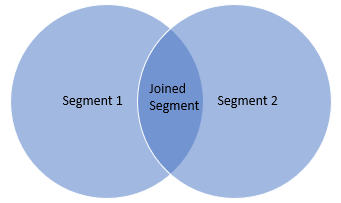
For more details, see Complex Segments.
Segment Analysis
-
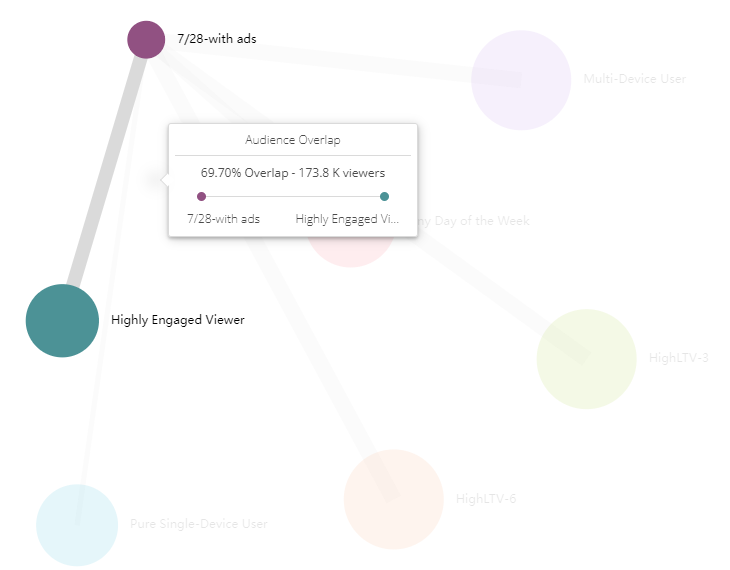
Highlight overlays between segment groups for insightful visualizations, for example viewers of sessions with ads on a specific day with highly engaged viewers. For more details, see Session Management.
Ads and Household Clustering
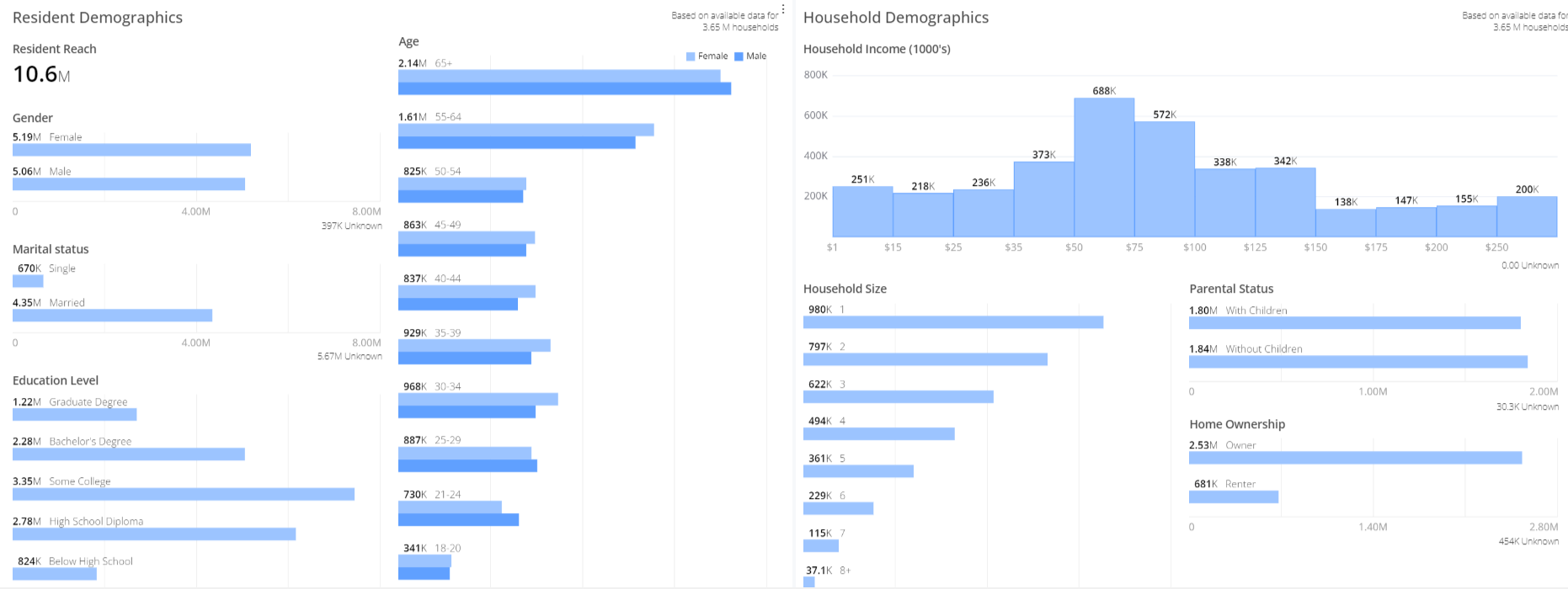
Conviva's household clustering enables pairing of ad session and viewer data with household demographics to enable displays of resident and household demographics.
Resident Demographics
The demographic data represents residents within the unique households, derived from matching Conviva StreamID household clusters with data-provider based residents per households to help you identify and understand the key resident-level demographics of the residents within the household, such as gender, age, and marital status. The total number of residents is determined by the number of residents per matched households, for example, 387k residents make up 131k households.
Household Demographics
The demographic data for household shows the data for unique households, derived from matching Conviva household clusters with data-provider based households to help you identify and understand the key characteristics of household-level demographics, such as income, the number of residents, and parental and ownership status.
Ad Analysis in Analytics Workbench
The Analytics Workbench provides a comprehensive set of fields and measurements to enable robust ad hoc analysis of ad and viewership data. For more details, see Analytics Workbench.
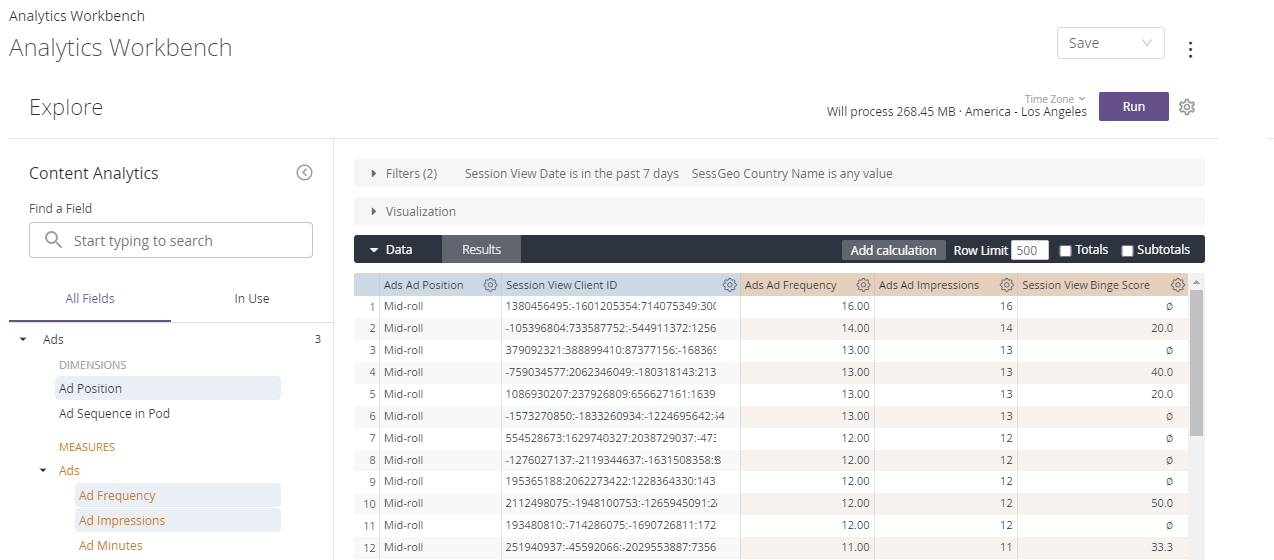
Ad Campaigns and Delivery Analysis
With the Ads dashboard you can quickly view a list of ad placements (line items) delivered in the selected period along with the corresponding metadata and metrics. The Ads Dashboard helps you quickly determine the overall effectiveness of the delivered ad placements.
-
Ad metadata: advertiser and campaign
-
Ad metrics: household reach, ad impressions, and ad frequency.
For example, filter by advertiser and select export in the kebab options to output a .csv file of the performance of all placements for a key advertiser.
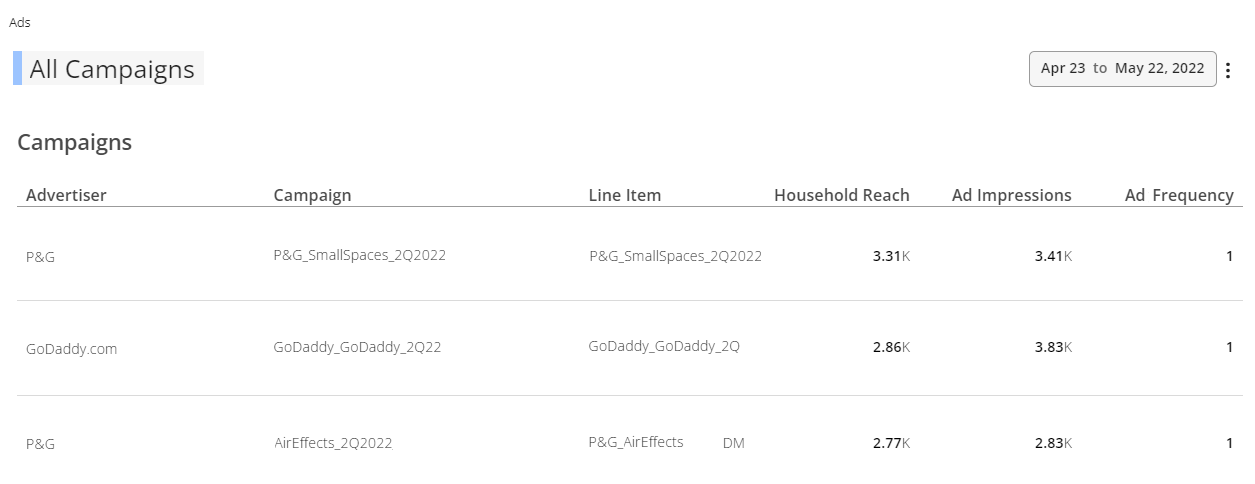
For more details, see Ads Dashboard.
The Ad Details dashboard displays a high-level view and detailed data of your ad's reach, frequency, and impression delivery across device, content, and audience demographics. This data can help you measure target audience reach by resident and household demographics, along with ad performance by ad impressions and frequency.
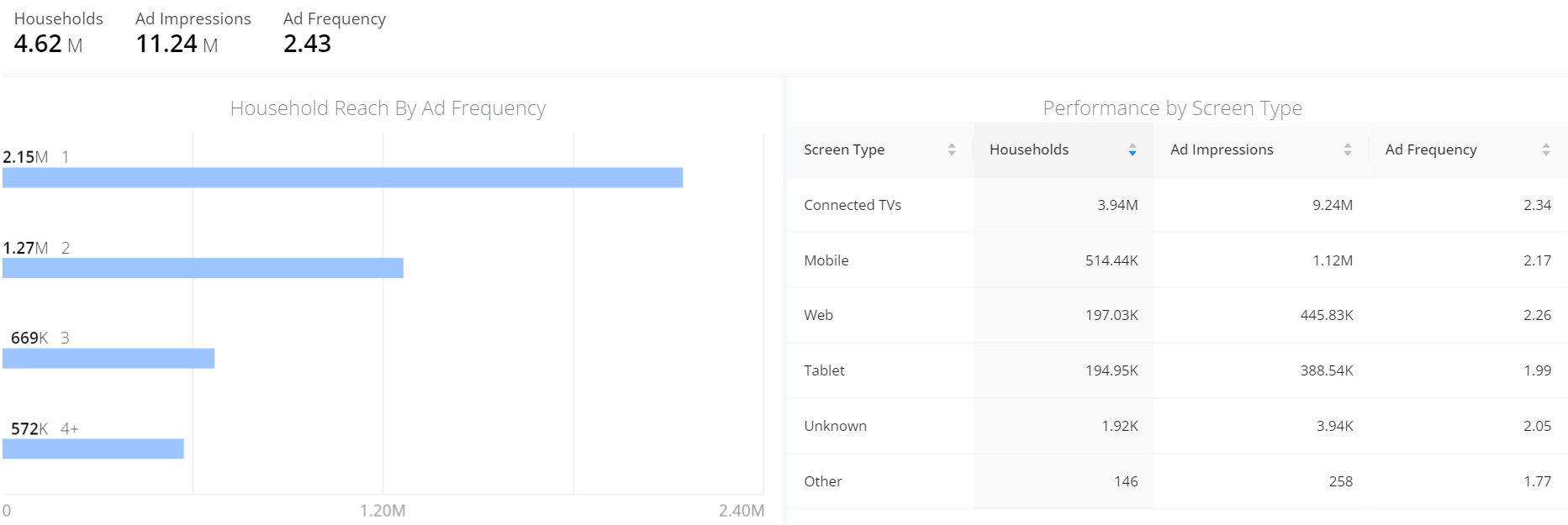
With the Ad Reach Build table, you can quickly access ad reach data and report ad reach build metrics with your advertiser clients. You can use the data to monitor the progress of ad viewing and determine whether declines in viewing indicate a trend of diminishing returns. For example, a continuous decrease in cumulative unique reach indicates a trend of diminishing returns.
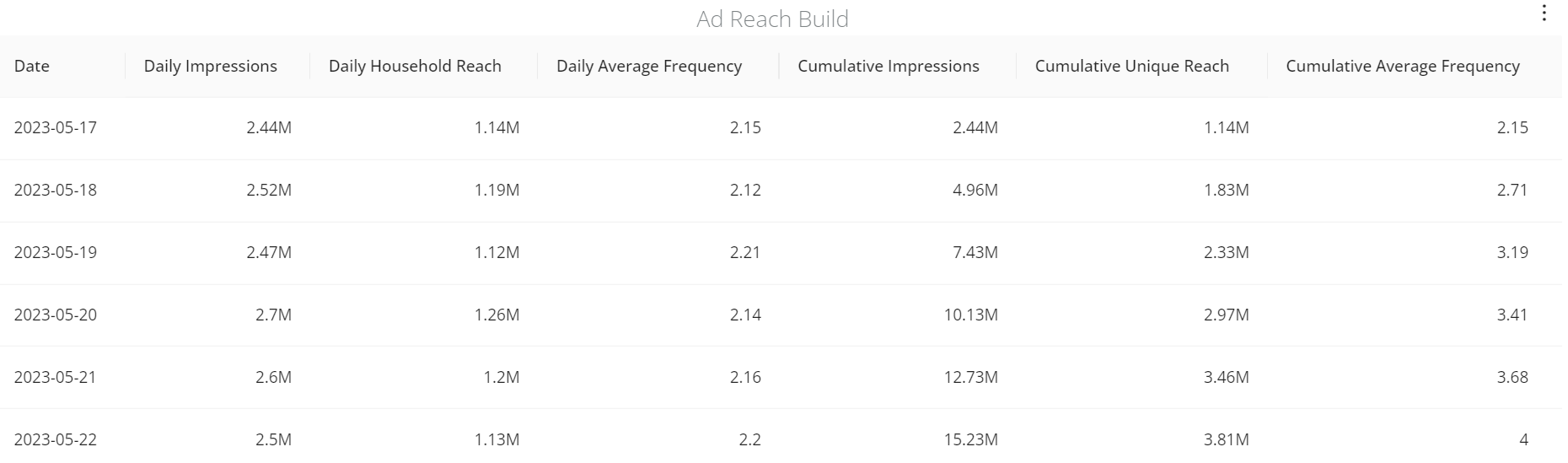
Custom Ad Dimensions
With custom ad dimensions, you can build more advanced advertising-related filters, segments, and analytics workbench analysis, for example, add the Sale Type dimension to filter sessions that played either direct sold ads or programmatic ads, and analyze the performances of the ad types. For more information, see Filters and Segments.