
Ending Peak Bitrate is the time-weighted peak bitrate that sessions were playing in their final one-minute interval before ending, aggregated across all Ended Plays. It is an Ended-type metric, derived — like Avg. Peak Bitrate — from the bandwidth field of the manifest (BANDWIDTH in HLS). Bits played during buffering and paused video are excluded.
Note: Ending Peak Bitrate is in Beta and carries a Beta label in the metric selector popup.
Avg. Peak Bitrate averages bitrate across the whole session lifetime, which hides a drop in quality right before a viewer leaves or playback fails. A 40-minute session that averaged 26 Mbps but fell to 200 Kbps in its final minute before a Video Playback Failure (VPF) still reports 26 Mbps as its Avg. Peak Bitrate. Ending Peak Bitrate reports the quality viewers actually had at the point of exit.
How It Compares to the Other Bitrate Metrics
| Metric | What it measures |
|---|---|
| Starting Bitrate | Bitrate at the join point. Currently based on Average bitrate; moving it to Peak bitrate, to align with the other Peak metrics, is on the backlog. |
| Avg. Peak Bitrate | Time-weighted peak bitrate across all intervals of the session. |
| Avg. Average Bitrate | Time-weighted average bitrate across all intervals of the session. |
| Ending Peak Bitrate | Time-weighted peak bitrate in the final interval before the session ended. |
Where It Appears
Ending Peak Bitrate is available in the following formats and dashboards:
- Ending Peak Bitrate Summary: the ending peak bitrate across all ended plays during the selected time period.
- Ending Peak Bitrate Time Series: a time series for the selected time period, where each point is the ending peak bitrate during that specific interval.
- Trends, including Trends Live for the last 15 minutes, and the Real-Time dashboard.
- MetricLens.
Distributions
- Ended Plays vs Ending Peak Bitrate Distribution: a distribution by preset buckets, where each bucket is the Ending Peak Bitrate that occurred for the respective number of ended plays. It uses the same buckets as the Avg. Peak Bitrate distribution, so the two can be read side by side. Slice a bucket to open the matching Viewer Sessions, or export the data.
Tip: Filter on a VPF error — or on Ended Status — and watch how the Ending Peak Bitrate distribution shifts. This shows which rungs of your adaptive bitrate (ABR) ladder are associated with playback failures.
Example: ending bitrate for a specific VPF-T error
- In Trends, add the filter VPF-T Error contains and the error code you are investigating — in this example,
SURFACE_DETACH_TIMEOUT. - On the Analysis tab, add Ending Peak Bitrate and switch it to the distribution view (Ended Plays) to see which bitrate buckets the failing sessions ended in.
- Break the result down by a dimension such as Device Name.
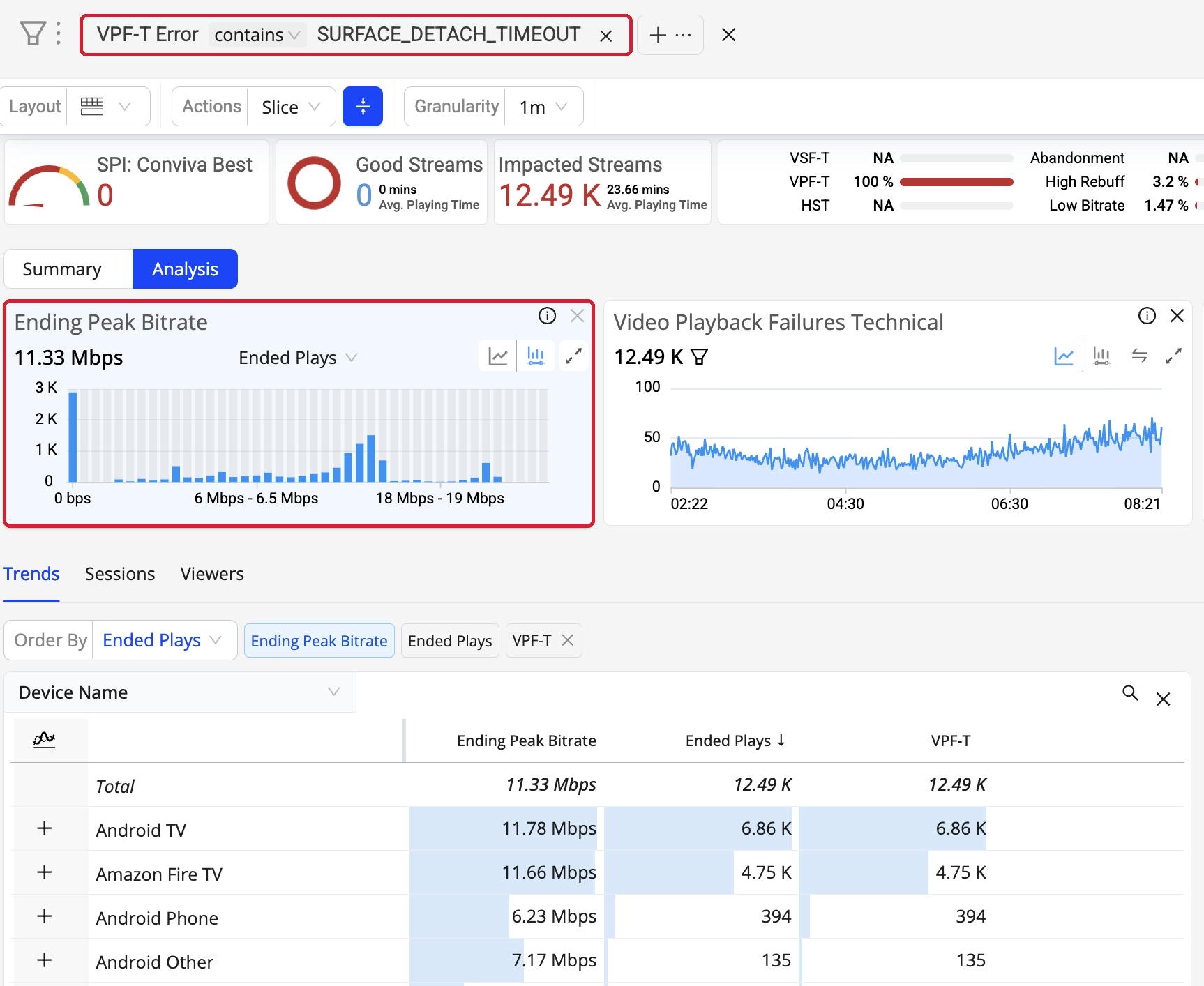
In this example, failing sessions on Android Phone ended at 6.23 Mbps, against 11.78 Mbps on Android TV and 11.66 Mbps on Amazon Fire TV — pointing at a device-specific problem rather than a delivery-wide one.
Related Support
| Metric Details | Description |
|---|---|
| Dashboards and Metric Presentation |
|
| Dimensions | Use MetricLens dimensions to filter this metric by metadata segments for enhanced root cause analysis. For example, breaking the metric down by Device Name shows whether a low ending bitrate is confined to one device family. |
| Diagnostics | The Analysis tab presents the Ended Plays vs Ending Peak Bitrate distribution. For more information, see Diagnostics and Distribution. |
| Manual Alert Support | No. Ending Peak Bitrate is not supported in Manual Alerts in this Beta. |
| AI Alert Support | No. Ending Peak Bitrate is not supported in AI Alerts in this Beta. |
| Metric Adjustment | None. |
For more metric definitions, see the Metric Dictionary.