Day Part Page
The Day Part page displays detailed data and metrics based on the selected device. You can use this data to analyze detailed user behavior with device usage.
Interval and Filter Settings
The default interval is Last 7 Days. Click the drop-down to customize the intervals for the current interval and the comparison interval. See Intervals for more details.
The filter bar shows the current filter settings and the Create Segment button.
Click the filter bar to create and modify filters.
Plays by Day Part and Day of the Week
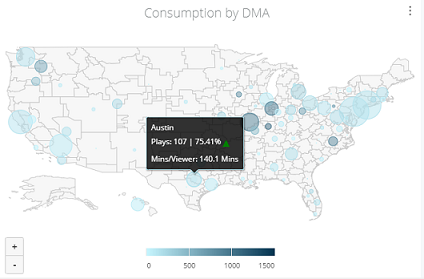
This consumption map shows the color-coded data point for the selected day part. Mouse over the data point to display the data details.
Day part includes nine divisions.
| Day Part | Time Period | Definition |
|---|---|---|
| Post Late Fringe | 1:00 AM to 2:00 AM | Early morning hours before traditional programming begins for the day, after Late Fringe. |
| Grey Zone | 2:00 AM to 6:00 AM | Transitional period between late and early day parts. During this time, programming is more flexible and diverse, catering to a specific audience with shows like infomercials, reruns, and niche content. |
| Early Morning | 6:00 AM to 10:00 AM | Very early hours of the day. This segment is characterized by programming designed for early risers and those starting their day. |
| Day Time | 10:00 AM to 4:30 PM | Midday hours. Daytime programming typically includes soap operas, talk shows, and other content suited for viewers during the day. |
| Early Fringe | 4:30 PM to 7:30 PM | Late midday hours before prime access. This segment can include local news, syndicated programming, and game shows. |
| Prime Access | 7:30 PM to 8:00 PM | Time period just before prime time. It is a period when broadcasters air local news or other programming that leads into the highly watched prime time. |
| Prime Time | 8:00 PM to 11:00 PM | Evening hours when television networks broadcast their most popular and high-rated shows. This is a key advertising slot due to its large viewership. |
| Late News |
11:00 PM to 11:30 PM | Late evening hours following prime time. This period typically includes late-night news broadcasts and provides viewers with updates on the day's events before transitioning into late-night programming. |
| Late Fringe | 11:30 PM to 1:00 AM | Time slot following late news. Late fringe programming typically includes reruns, syndicated shows, or other content targeting a specific late-night audience. |
Viewership Metrics
These viewership metrics display the metric values for the current interval. The percentage below each metric indicates the change in value from the previous interval.
- Click a metric or comparison percentage to the related data for that metric.
-
Click the Total Unique Viewers metric to jump to the Unique Viewers page for detailed viewer analysis.
Top Content By Engagement and Plays
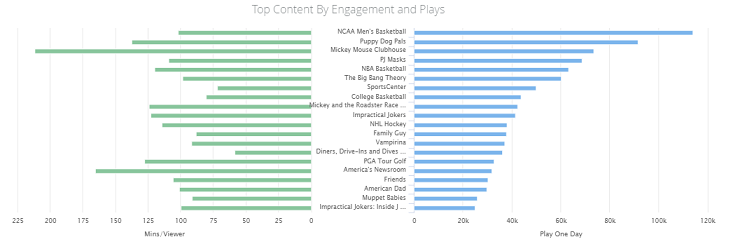
This content engagement chart displays consumption using the selected day part, so you can quickly determine series engagement and usage within that period. Engagement is measured by the daily minutes per viewer.
Mouse over any data point to display the data details and click a series value to open the Lead In/Lead On and Content page for a specific series.
Comparison with Other Time Slots
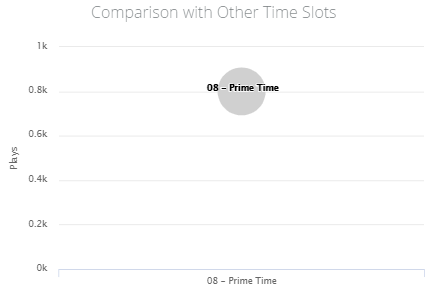
This comparison shows other day part by content views or plays to help you analyze relative day part viewership and priority.
Content Plays by Device Type
This plays chart displays consumption by device type, so you can quickly determine the proportion of usage by each device type within the selected day part.
- Mouse over any data point to display the data details.
-
Click a data area and select the option to open the device page with detailed plays data for that device.
Consumption by DMA
This consumption map shows the color-coded data DMA viewer for the selected day part with viewership (minutes/per viewer) by color and circle size. Mouse over the data point to display the data details.