
Audience Scenario—Discover Opportunities to Drive Engagement
Audience provides viewership and content data that can be used to measure long-term engagement of your viewers, analyze breakdowns of when viewer engagements peak and drop off, and optimize ad and campaign targeting based on content consumption behaviors.
Typically, this process starts with using the default behavior segments or creating your own ad hoc viewer segments for a specific content asset and target market, for example last night watchers, device type, and leadin/leadout content. Then, use the Series Overview dashboard to evaluate engagement patterns for that segment.
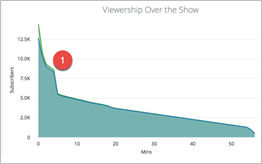
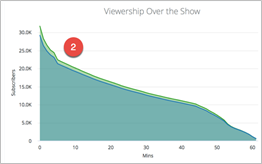
For example, this example viewership data supports adjusting engagement and media spend to favor segment 2 as that segment contains more engaged viewers.
Scenario—Creating Target Segments, and Build Analytics Workbench Visualizations
Create custom viewer segments to target a specific series and viewers, such as series name, device type, city, episodes, and time of day.
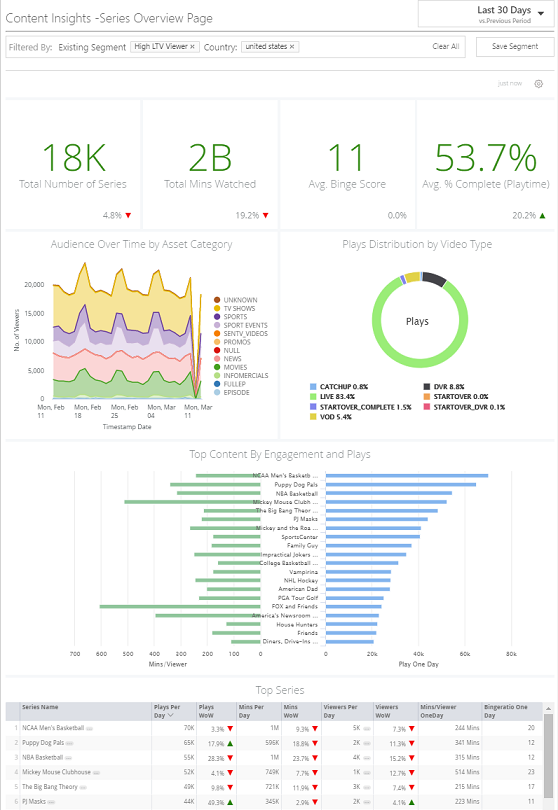
In the Series Overview dashboard, analyze the engagement patterns for target segment. This example targets high life-time value viewers in the United States.
- Drill into the Asset Category chart to verify preferences for TV shows and sports.
- Drill into the Plays Distribution to discover details about which types of live viewing this segment viewed the most.
- Analyze the top content series and viewership metrics to further understand which series these viewers preferred.
Based on your series analysis, use the Analytics Workbench to create data visualizations to display the target segment preferences and which content or delivery changes and impact segment viewership.