
Video Playback Failures Technical Rate (per 1k mins), or VPF-T /1k mins, reports technical playback failures per 1,000 minutes of Playing Time (Interval). Beta
Video Playback Failures Technical (VPF-T) as a percentage divides technical playback failures by Ended Plays. During a live event most of the audience is still watching, so very few plays have ended, and a handful of failures can appear as an alarming percentage. The same inflation can appear early in a long-form video on demand (VOD) premiere, before viewers start finishing. VPF-T Rate avoids this because Playing Time (Interval) includes sessions that are still in progress, so the rate reflects the audience watching right now rather than only the plays that have ended.
Calculation
VPF-T Rate (per 1k mins) = VPF-T ÷ Playing Time (Interval) in minutes × 1,000
For example, 20 technical playback failures over 10,000 playing minutes is a VPF-T Rate of 2.0 /1k.
Failures and playing time cover the same window and the same streams, so the value means the same thing at 1-minute or hourly granularity, and for any device, CDN, or geography breakdown.
Values display with a /1k unit. For example, 0.209 /1k is approximately one technical playback failure for every 4,800 minutes watched.
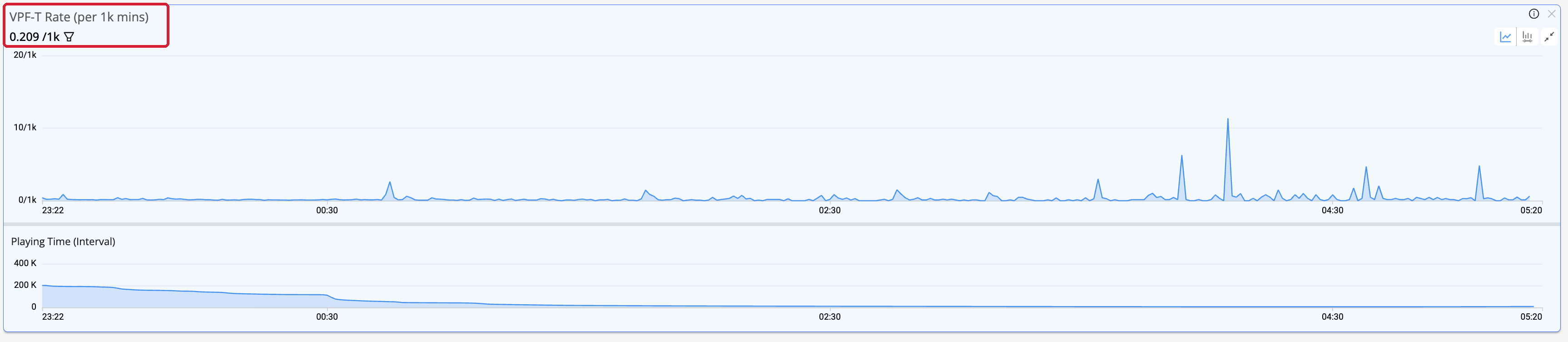
VPF-T Rate (per 1k mins) time series, plotted with Playing Time (Interval) for context.
Usage Notes
- Insufficient data. The metric shows N/A when Playing Time (Interval) is under 1,000 minutes for that interval or row, so small samples do not produce misleading rates.
- Existing VPF-T is unchanged. The VPF-T percentage metric remains available. This metric is additional, not a replacement.
- Absolute count. In dimension tables, toggle to # to show the absolute VPF-T count.
- Spikes at the end of an event. Expect the rate to spike as an event ends and the audience drops off, because the denominator shrinks. Plot the metric with Playing Time (Interval) to read these spikes correctly.
Related Support
| Metric Details | Description |
|---|---|
| Dashboards | Trends (time series and dimension tables), for real-time and historical ranges. Select it from the metrics selector like any other Video metric. |
| Dimensions | Analyze this metric by dimensions such as device, CDN, or geography to understand the impact and narrow the root cause. |
| Diagnostics | No |
| Manual Alert Support | No |
| AI Alert Support | No |
| Metric Adjustment | None |
For more metric definitions, see the Metric Dictionary.