
Introduction
The video player should send the Pragma:C-XServerSignature parameter from the streaming HTTP handler to the content delivery network (CDN), and the CDN must respond back with C-XServerSignature:cdn=<<CDN-NAME>>; groupID=<<groupID>>; server-signature=<<server signature>>; status=<<http response status code>>; url=<<Manifest/SegmentURL>>; as the response.
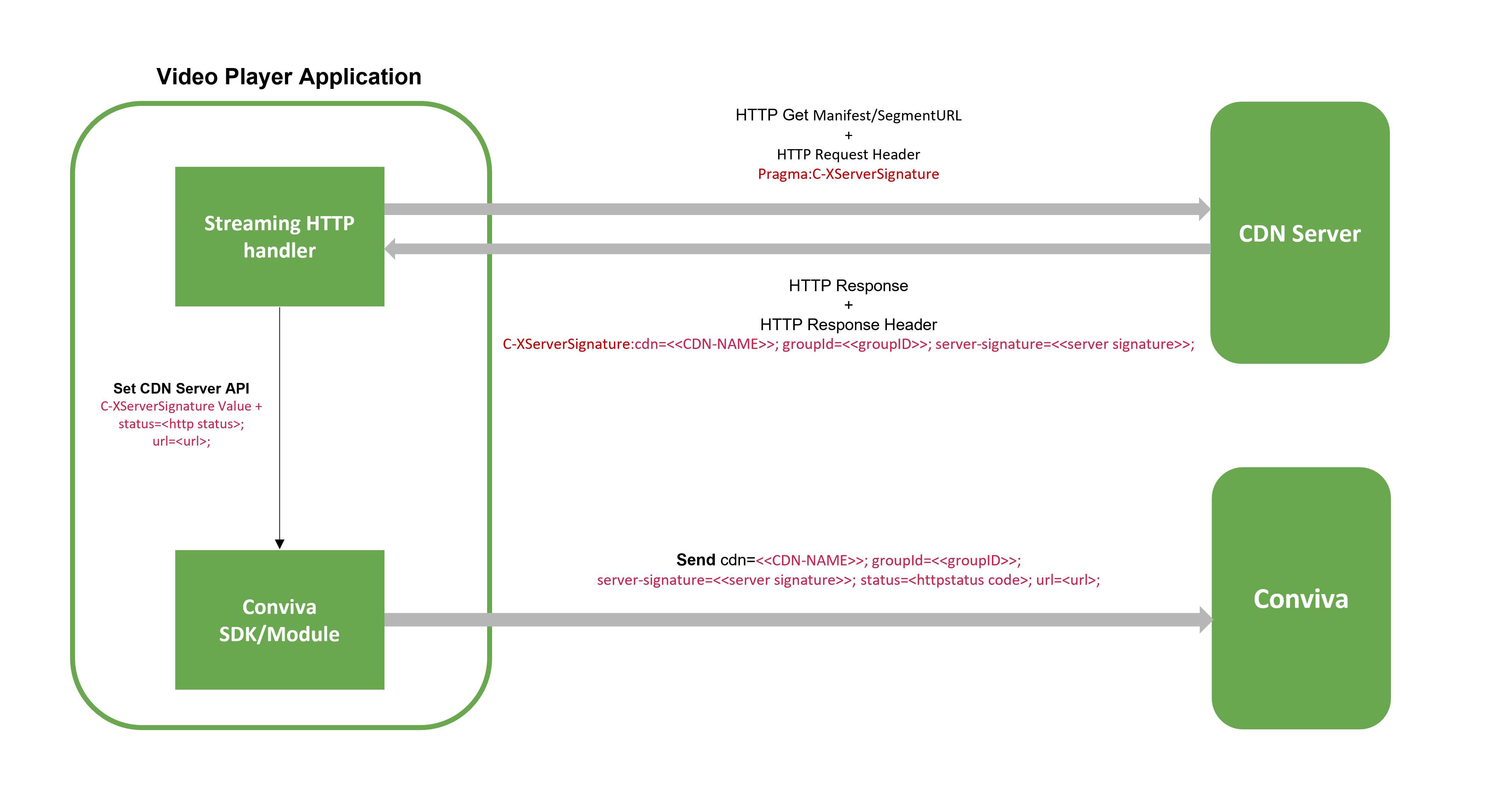
Field Definitions
| Field Name | Description |
|---|---|
<<CDN-NAME>>
|
Name of the CDN in uppercase. |
<<groupID>>
|
The region or pop identifier of the CDN Edge Server. |
<<server signature>>
|
The signature of the server that served the HTTP request. The expected value is:
The server signature is the CDNEdgeServer that will be provided by Conviva in SSD or SessionsAPI or Alerts. Video player developers need to work with their CDN partners to send the signature, collect the edge server IP value, and then call Conviva API to set the CDNEdgeServer across platforms. |
<<http response status code>>
|
The HTTP response status code sent from the video player application to the CDN Server. |
<<Manifest/SegmentURL>>
|
The Manifest or Segment URL of the content added into the request header from the video player application. |
Example Request and Response
The following is an example request sent from the video player application and the example response received from the CDN.
Request
http://abc015-de-f8-prd-xyz.cdn01.example.com/v1/frag/bmff/enc/cenc/t/BTSP13HD_HD_SU_EXAMPLE_3669_0_123456789123456789.mpd
Response
C-XServerSignature: cdn=abc; groupID=12345; server-signature=123.456.789.00; is the response header or value and 200 OK is the status code of the response.
curl -v -o /dev/null http://abc015-de-f8-prd-xyz.cdn01.example.com/v1/frag/bmff/enc/cenc/t/BTSP13HD_HD_SU_EXAMPLE_3669_0_123456789123456789.mpd
  % Total    % Received % Xferd  Average Speed   Time    Time     Time  Current
                                 Dload  Upload   Total   Spent    Left  Speed
  0     0    0     0    0     0      0      0 --:--:-- --:--:-- --:--:--     0*   Trying 123.456.789.00...
* TCP_NODELAY set
* Connected to abc015-de-f8-prd-xyz.cdn01.example.com (123.456.789.00) port 80 (#0)
> GET /v1/frag/bmff/enc/cenc/t/BTSP13HD_HD_SU_EXAMPLE_3669_0_123456789123456789.mpd HTTP/1.1
> Host: abc015-de-f8-prd-xyz.cdn01.example.com
> User-Agent: curl/7.64.1
> Accept: */*
>
< HTTP/1.1 200 OK
< Server: Apache/2.4.6 (CentOS)
< X-MoneyTrace: trace-id=b123db2a-db12-3456-78t-123456789;parent-id=-123456789987654321;span-id=-987654321123456789
< X-Powered-By: viper-mod_super8-3.24.3-1
< Access-Control-Allow-Origin: *
< Access-Control-Allow-Headers: X-MoneyTrace
< Cache-Control: max-age=1
< Last-Modified: Wed, 19 May 2021 10:11:11 GMT
< Date: Wed, 19 May 2021 10:11:12 GMT
< Content-Length: 25271
< Connection: keep-alive
< XYZ-Mon-Iucid-Del: 1116299
< Content-Type: application/dash+xml
< C-XServerSignature: cdn=XYZ; groupID=12345; server-signature=123.456.789.00
< Access-Control-Expose-Headers: Server, Range, Content-Length, Content-Range,XYZ-Mon-Iucid-Ing,XYZ-Mon-Iucid-Del,XYZ-Request-BC
< Access-Control-Allow-Credentials: false
< Access-Control-Allow-Methods: GET,POST,HEAD
< Access-Control-Max-Age: 86400
<
{ [8616 bytes data]
100 25271  100 25271    0     0   163k      0 --:--:-- --:--:-- --:--:--  165k
* Connection #0 to host abc015-de-f8-prd-xyz.cdn01.example.com left intact
Report CDN Edge Server IP
Create a string by concatenating the data available in the HTTP request and responses.
Read the response header value (
C-XServerSignature) from every stream HTTP response.Concatenate the response header value with the status code of the response and the Manifest or Segment URL that was requested for fetching the Edge Server details. The following is a sample of a CDN Edge Server IP string that must be reported to Conviva.
C-XServerSignature: cdn=XYZ; groupID=12345; server-signature=123.456.789.00; + ";status=200; url=http://abc015-de-f8-prd-xyz.cdn01.example.com/v1/frag/bmff/enc/cenc/t/BTSP13HD_HD_SU_EXAMPLE_3669_0_123456789123456789.mpd"
- Invoke the below mentioned Conviva API's to set the CDNEdgeServer across platforms.
The integration must concatenate the HTTP status, response code, and the URL with the
C-XServerSignaturevalue, and it must be sent to Conviva SDK/Library. If this pattern is not followed, then the values will not be populated.
| Platform | API | Integration Instructions |
|---|---|---|
| Android | videoAnalytics.reportPlaybackMetric(ConvivaSdkConstants.PLAYBACK.CDN_IP, cdnEdgeServerIpValue);
|
Conviva Android Sensor Integration |
| JavaScript | videoAnalytics.reportPlaybackMetric(Conviva.Constants.Playback.CDN_IP, cdnEdgeServerIpValue);
|
Conviva JavaScript Sensor Integration |
| iOS/tvOS | videoAnalytics.reportPlaybackMetric(CIS_SSDK_PLAYBACK_METRIC_CDN_IP, value: cdnEdgeServerIpValue);
|
Conviva iOS/tvOS Sensor Integration |
| C | notifier->set_CDNServerIP(ccl_notifier_context_t *notifier_context, const char *cdnEdgeServerIpValue);
|
Conviva C Sensor Integration |
| Roku | conviva.setCDNServerIp(videoNode, cdnEdgeServerIpValue);
|
Conviva Roku SceneGraph Sensor Integration |
| Xbox MediaElement/MediaPlayer | WinClient.setCDNServerIP(sessionId, cdnEdgeServerIpValue);
|
Conviva XBox One / Windows 10: MediaPlayer/MediaElement Sensor Integration |
| Xbox WinJS | ConvivaUWP.WinClient.setCDNServerIP(sessionId, cdnEdgeServerIpValue);
|
Conviva XBox One / Windows 10: XBox WinJS Sensor Integration |