
Audience Demographic Widgets
The Demographic widget empowers optimal audience targeting through Audience viewership data, customized through Audience filters and segments.
Providing separate data breakouts for residential demographics (gender, age, education level, and others) and household demographics (income, household size, parental status, and others), this widget displays demographics data to help you identify and understand the key audience characteristics of your viewership. The Conviva StreamID leverages a built-in mechanism to identify households and build the household ID using probabilistic methods to classify a set of devices into a cluster (deduplicated household) based on patterns of consumption across locations, time, IP addresses, and content signatures.
Note: The household demographics are available after installing the Conviva Audience Module add-on package. Reach out to your Conviva representative for more information about this feature and Audience Module availability.
Resident Demographics
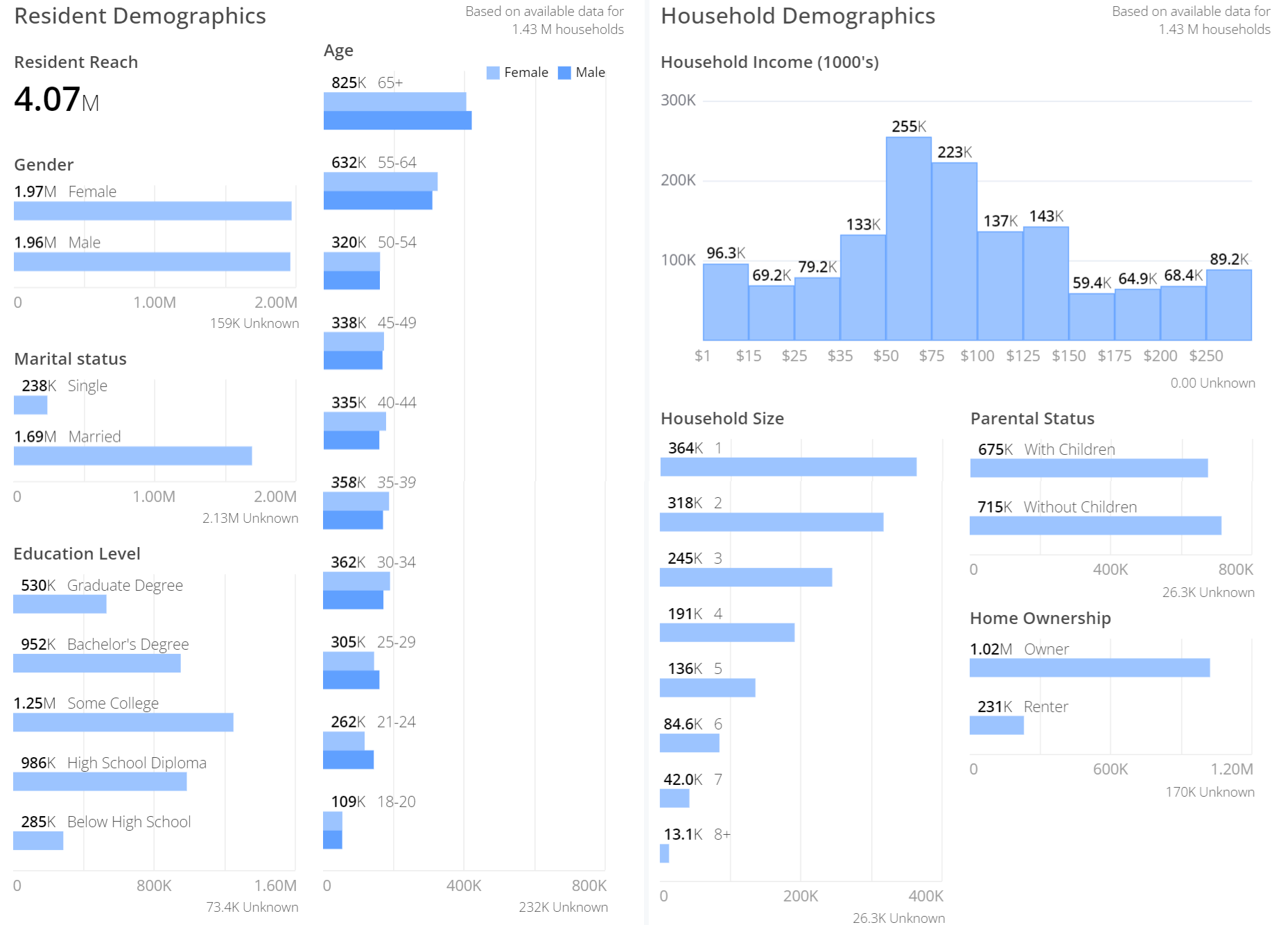
The demographic data is for residents within the unique households. The data helps you identify and understand the key resident-level demographics of the residents within the household, such as gender, age, and marital status. The total number of residents is determined by the number of residents per household, for example, 387k residents make up 131k households.
The screenshot displays a segment of residents which indicates a viewership of both genders and a majority of married viewers.
Note: The Resident Demographics metrics indicate residential composition within the households reached. As many households are composed of more than 1 resident, the total residents reached is typically higher than the households reached. Households can have multiple male and female residents, hence the reach of each gender may exceed the number of households.
Household Demographics
The demographic data for household shows the data for unique households. The data helps you identify and understand the key characteristics of household-level demographics, such as income, the number of residents, and parental and ownership status.
The screenshot displays a segment of households which indicates a viewership of both parental status and a majority of home owners.
Download Data
You can download the data set that is displayed on the widgets to perform additional analysis. Click the kebab icon on the top right of the widget, and then click Download Data.
The Download window is displayed with various customizations for you to choose from.
The default file format is TXT. You can also choose from one of the following file formats:
- Excel
- CSV
- JSON
- HTML
- Markdown