
October 29, 2026
Apply Saved Filters Directly in Nexa
Feature Update (Beta):
Use your existing Pulse saved filters in Nexa to focus an investigation without rebuilding the filter conditions in a prompt. Saved Filters is available in Beta for all customers and supports both Video/Ads and App saved filters.
Type @ in the prompt box to open the saved-filter picker. Search by filter name or ID, choose a filter, and ask your question. You can also type / and select /saved-filters from the command menu.
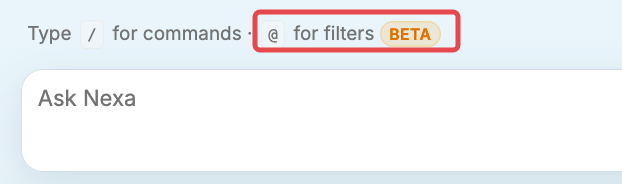
The @ shortcut opens Saved Filters from the prompt box.
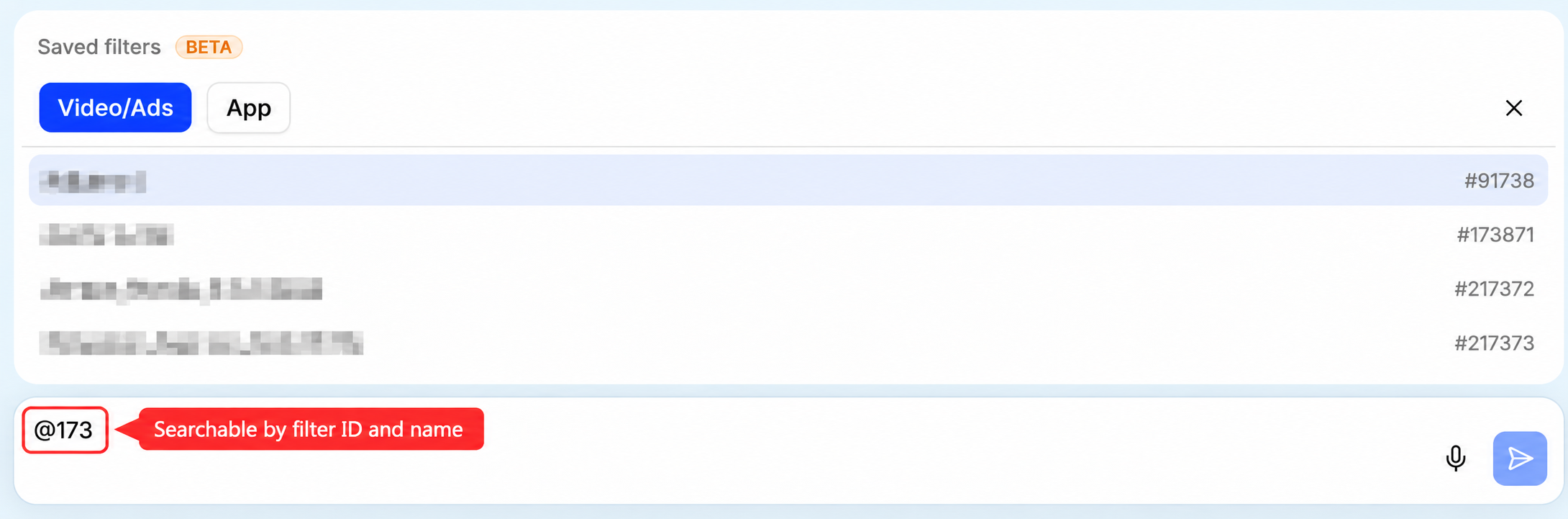
Find a saved filter by name or ID in the Video/Ads or App tab.
The selected filter stays in scope for follow-up questions and carries into generated dashboards, reports, and scheduled reports. Compact labels show the active filter. Switching or clearing the filter removes the previous filter conditions from the active scope.

Scheduled reports retain a reference to the selected saved filter.
Try It:
Start a Nexa conversation, type @, and choose a saved filter. Ask a question, then generate a dashboard or report to use the same filter scope in the output.
Beta notes: A filter may be deselected after opening a shared link, refreshing the page, or reopening a session. A saved analysis may also open without its associated filter. Reselect the filter with @ or ask Nexa to apply it by its exact name or ID; chat history alone does not reactivate it. Filters with more than 100 conditions may fail or return an error.
More Details: Saved Filters (Beta).
Video Startup Time Now Available in Viewer Columns
Feature Update:
Video Startup Time is now available as a column in the Nexa Viewer session list for eligible Video accounts. Add it to review startup times for individual sessions while investigating a viewer's experience.
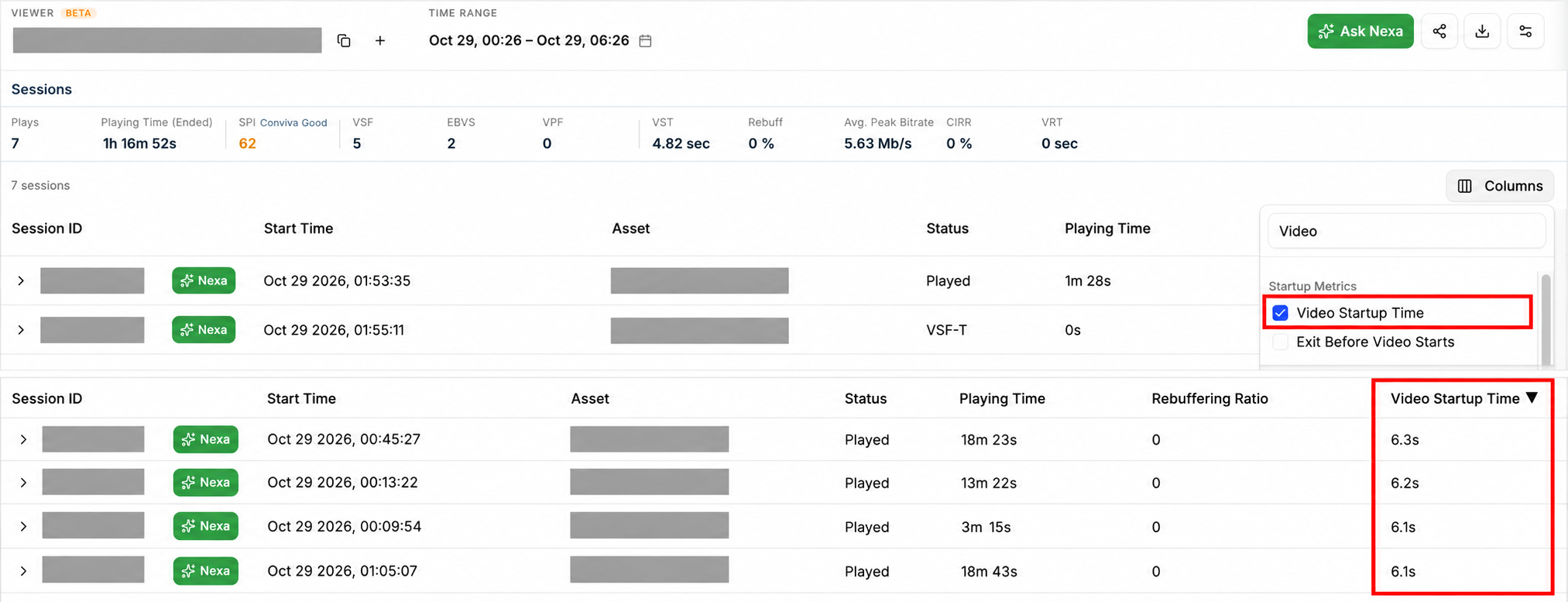
Select Video Startup Time in Columns to display the metric in the session list.
Try It:
Open a viewer in Nexa and click Columns above the session list. Search for Video, then select Video Startup Time under Startup Metrics. The session table displays the column alongside the other selected metrics.
More Details: Video Startup Time.
September 11, 2026
Ask Nexa From a Session Diagnostic
|
|
|
|
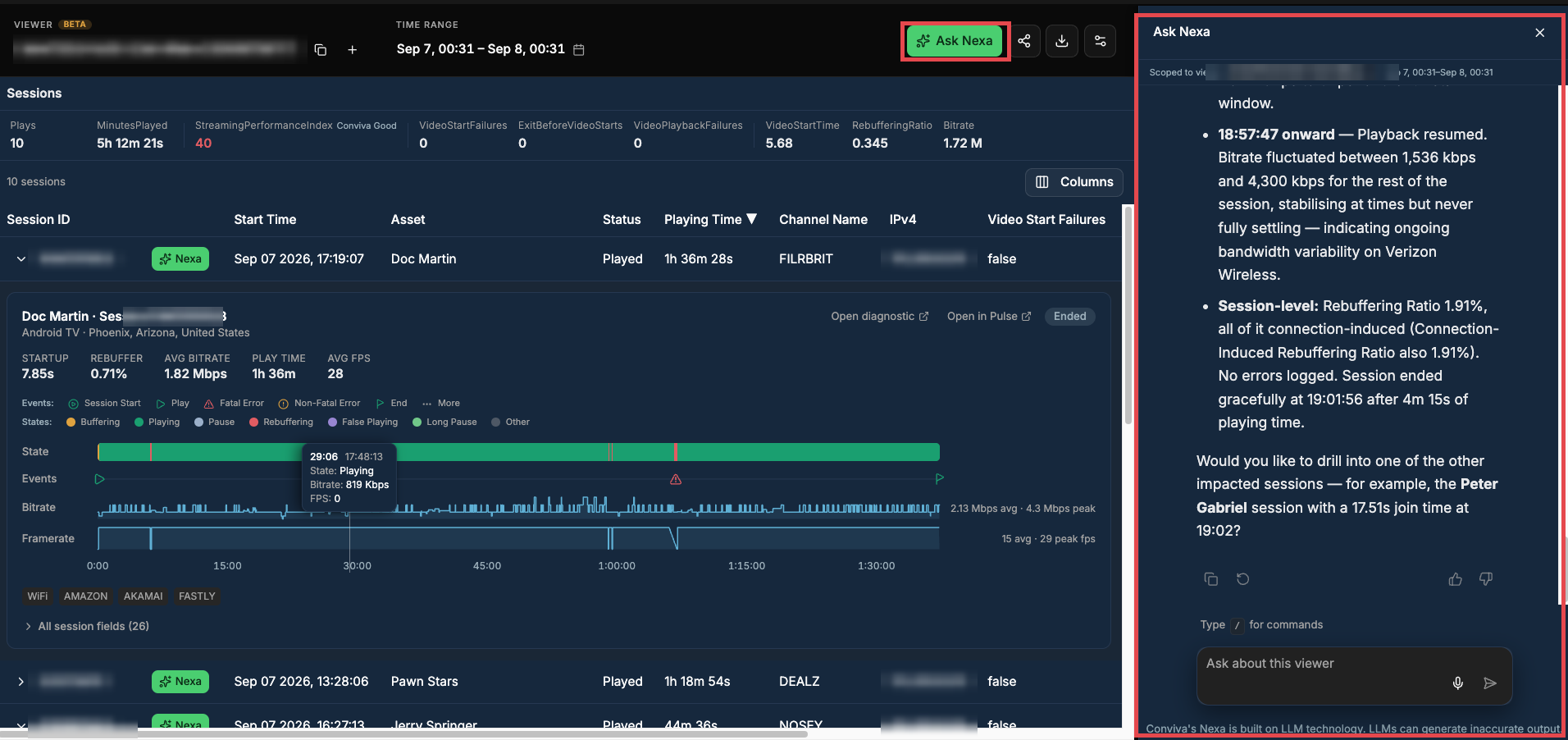
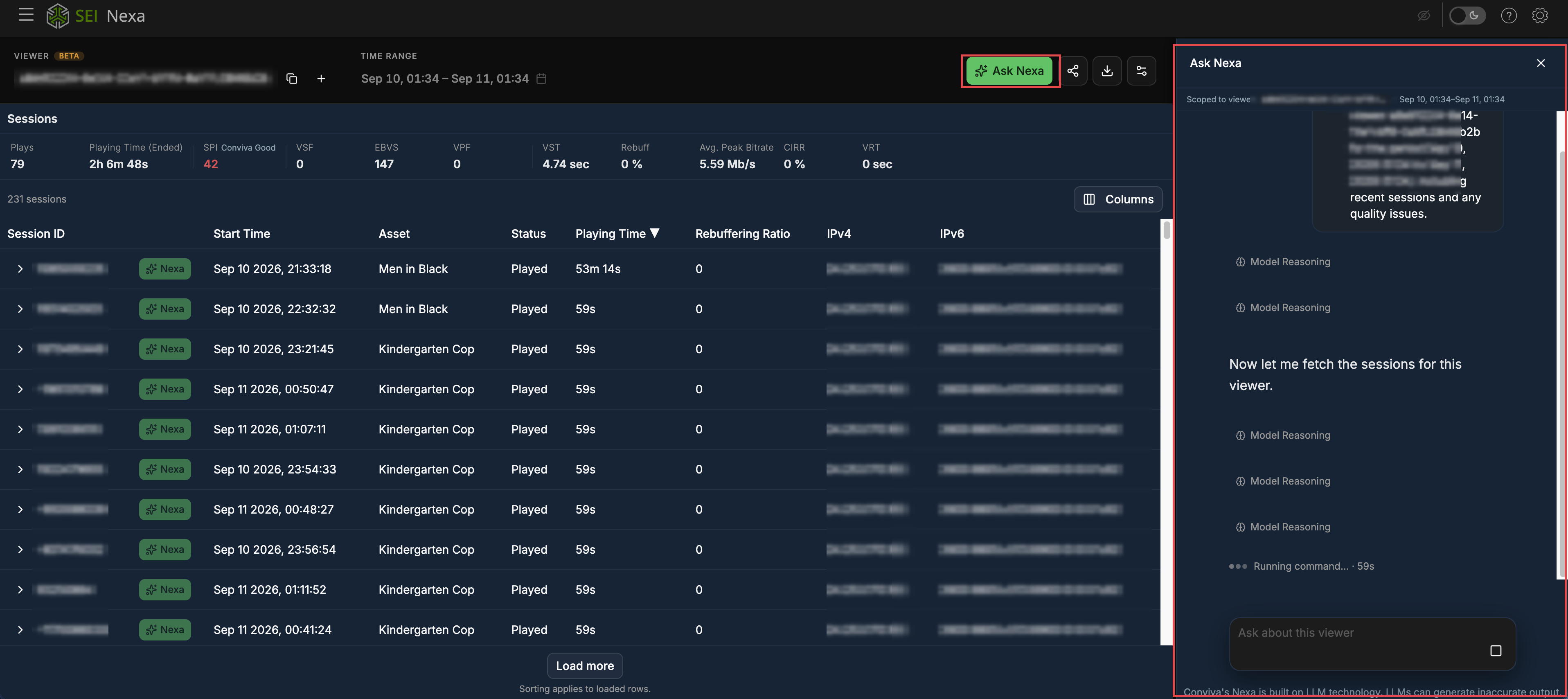
Feature Update (Beta):
Adds an Ask Nexa entry point to the session diagnostic and to every row in the Viewer Module session list. The session stays on the left and the chat panel opens on the right, so the evidence remains in view while you ask about it.
The panel opens already scoped to the viewer, the session, and the selected time range. Follow-up questions no longer require restating a viewer ID or re-entering a date range, which previously meant expanding a session panel and re-establishing context before asking anything.
Try It:
Open a session diagnostic and click Ask Nexa, or click the Nexa button on any session row in the session list. Ask a follow-up question without repeating the viewer ID or the time range.
Share a Viewer or Session Diagnostic With a Link
|
|
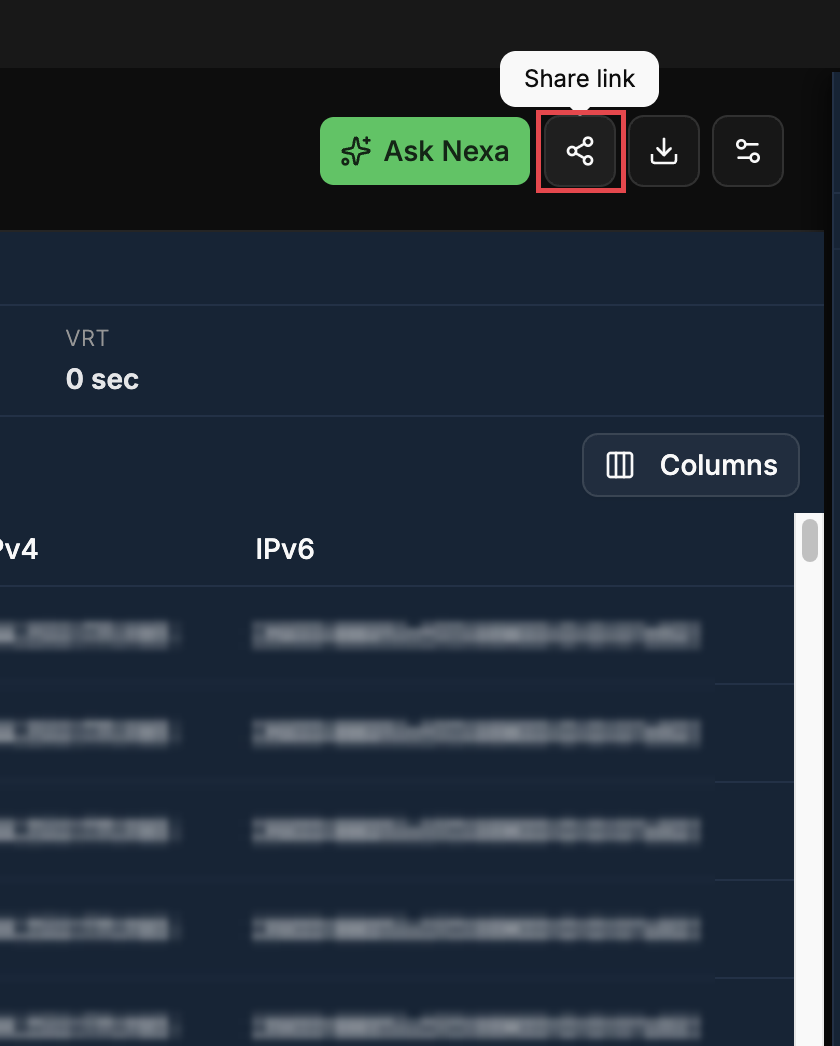
Feature Update (Beta):
Any viewer or session diagnostic can now be shared as a link. The recipient opens the same view, on the same customer account, so handing an investigation to a colleague is a paste rather than a screenshot or a set of instructions for rebuilding the view.
Try It:
Click the share icon in the viewer or diagnostic toolbar and send the generated link to a colleague.
Open Another Viewer in a New Tab
|
|

Feature Update (Beta):
A second viewer analysis can be opened in a new tab from the + button beside the viewer ID, leaving the current analysis intact. Comparing two viewers previously meant abandoning the analysis already open and rebuilding the second one in its place.
Try It:
Click + next to the viewer ID to open another viewer in a new tab. The original analysis stays open in its own tab.
CSV Export for Session Lists and Diagnostics
|
|
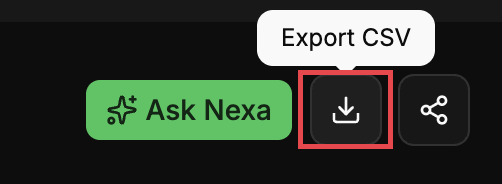
Feature Update (Beta):
The Viewer Module session list and the session diagnostic both export as CSV, so session data can be moved into a spreadsheet, a ticket, or a report without being retyped.
Try It:
Click the Export CSV icon on the session list or the diagnostic.
Ad Breaks on the Diagnostic Timeline
|
|
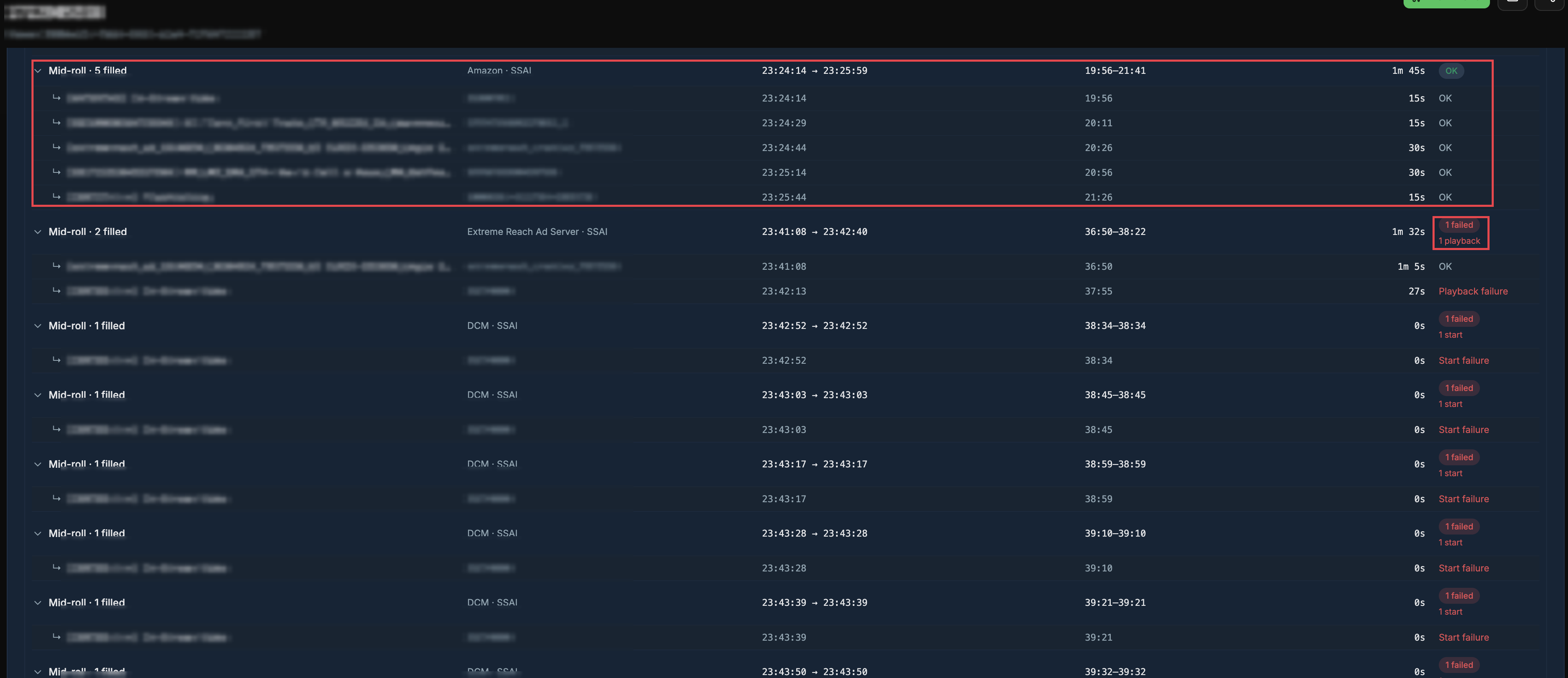
Feature Update (Beta):
Ads on the session diagnostic timeline are now grouped into breaks rather than listed as a flat set of creatives. Each break shows its position in the stream, how many ads were filled, the ad server and insertion method, the break's time range and duration, and a status — with failures called out against the break as a start failure or a playback failure.
Expanding a break lists its individual creatives with their own timings and outcomes. A failure can now be traced to the break it belongs to, where previously it identified only that a creative had broken.
Try It:
Open a session diagnostic and find the ad track on the timeline. Expand any break to see its creatives and where the failure sits.
September 2, 2026
Scheduled Run Status & Failure Reasons
|
|
|
|
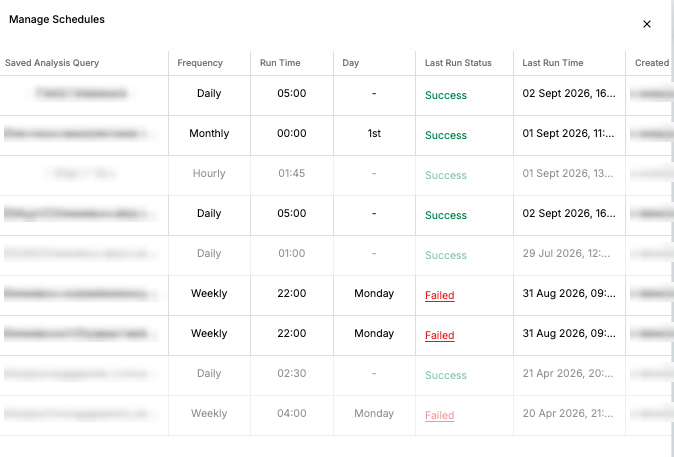
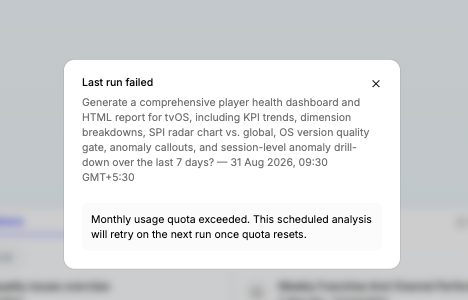
Feature Update:
Manage Schedules now shows a Last Run Status and Last Run Time against every schedule. Where a run failed, clicking the status opens the reason — the originating prompt, the run timestamp, and a plain-language explanation such as a monthly usage quota being exceeded, along with whether it will retry automatically. Diagnosing a missing report is now self-serve instead of a support thread.
Try It:
Open Manage Schedules and check the Last Run Status column. Click any Failed status to see the reason for that run.
August 20, 2026
Diagnostic Panel in Nexa Viewer Module
|
|
|
|
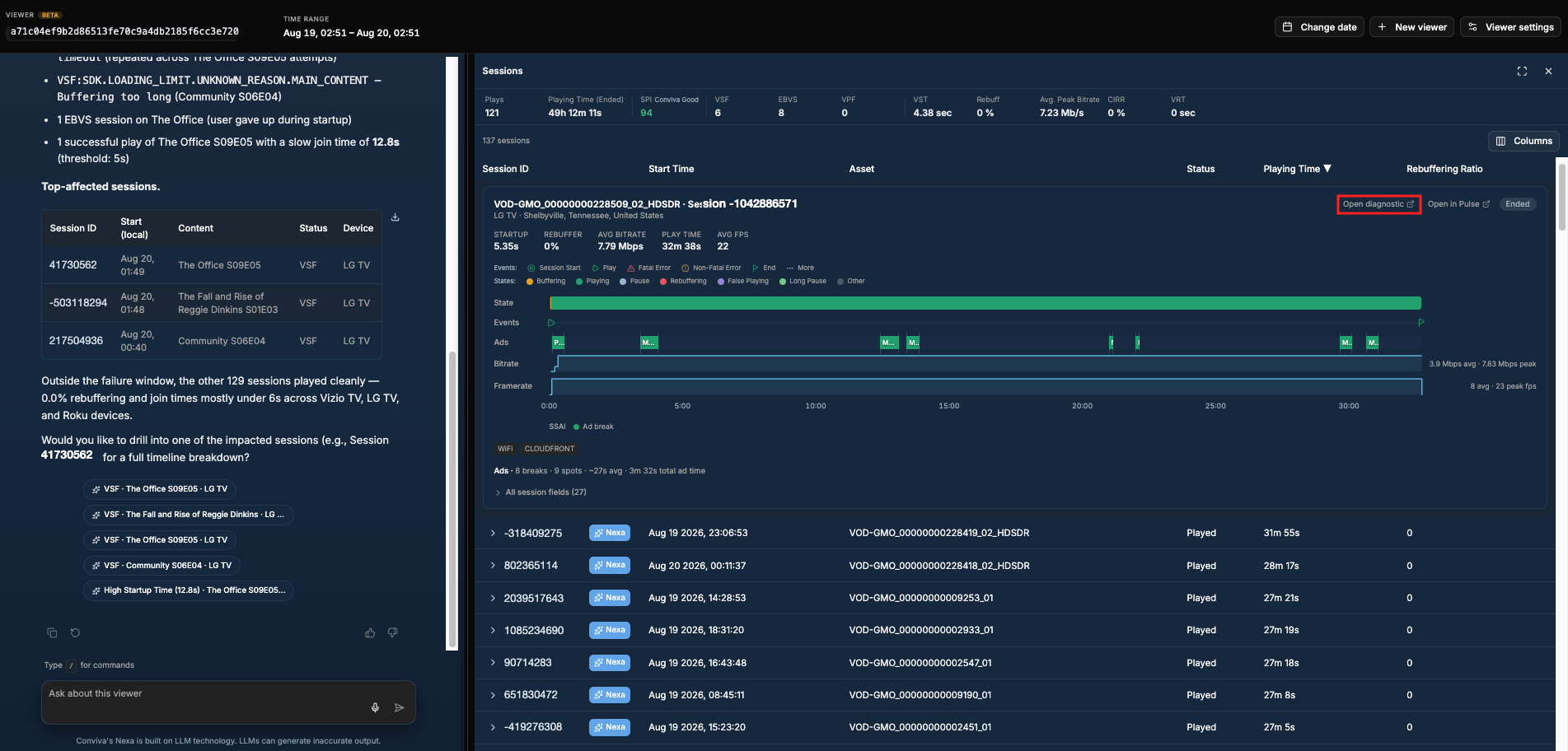
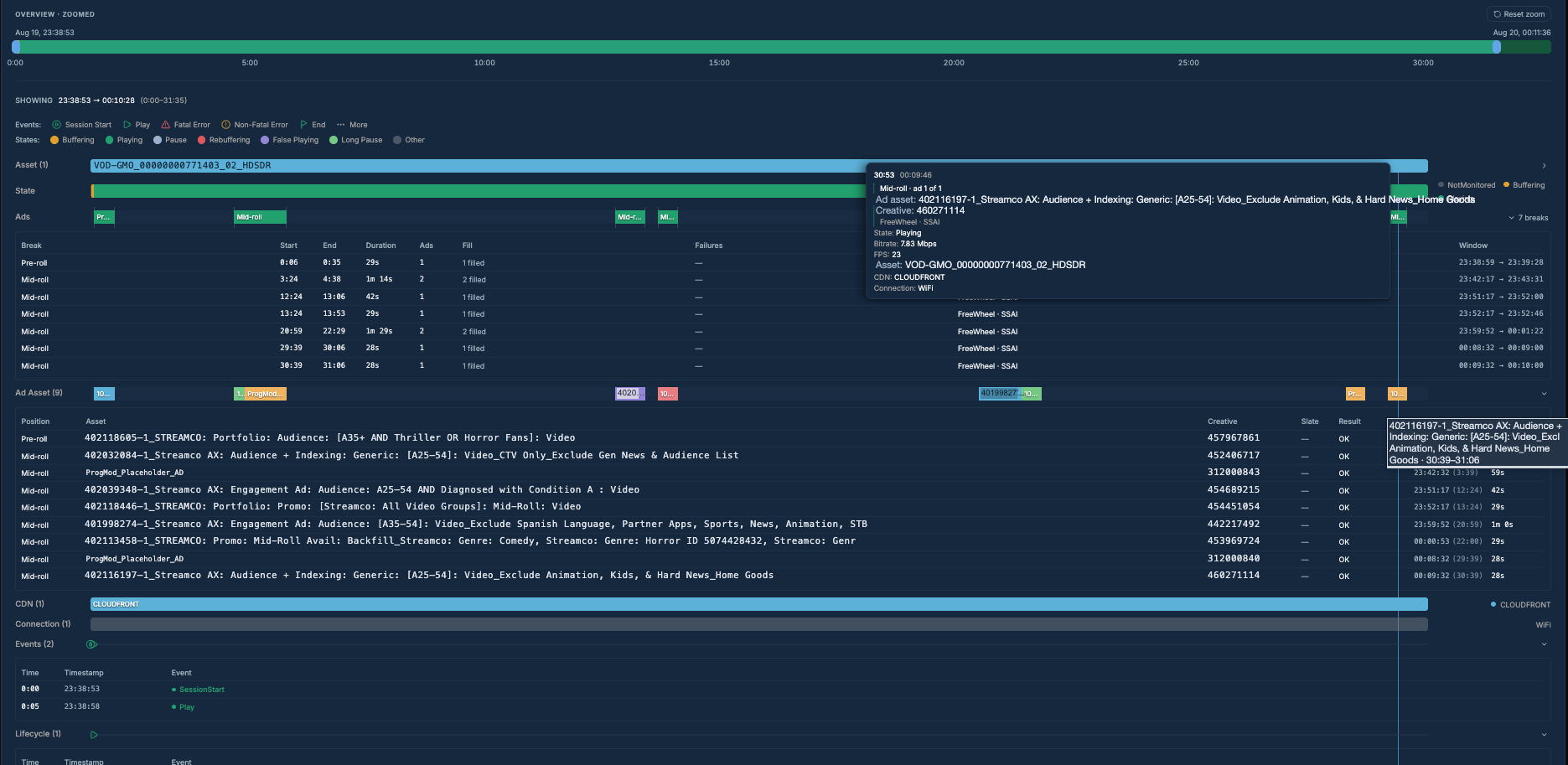
Feature Update (Beta):
Adds a diagnostic panel to the Nexa Viewer Module that displays a complete session timeline in a single view: asset changes, playback state (buffering, playing, paused), ad breaks with attribution and duration, CDN switches, connection type, and the full event log — all aligned on the same time axis. This combined Video + Ads diagnostic view is a Nexa-exclusive capability not available in Pulse, giving Ops and Support teams one place to investigate exactly what happened in a session without cross-referencing multiple dashboards.
Try It:
Expand any session in the Viewer Module and click Open diagnostic. The full session timeline opens, showing Asset, State, Ads, Ad Asset, CDN, Connection, Events, and Lifecycle tracks aligned on a single time axis. Use this to diagnose rebuffering spikes, failed ad breaks, mid-session CDN switches, and other playback events in one view.
July 30, 2026
Ask Nexa — Viewer & Trends Entry
|
|
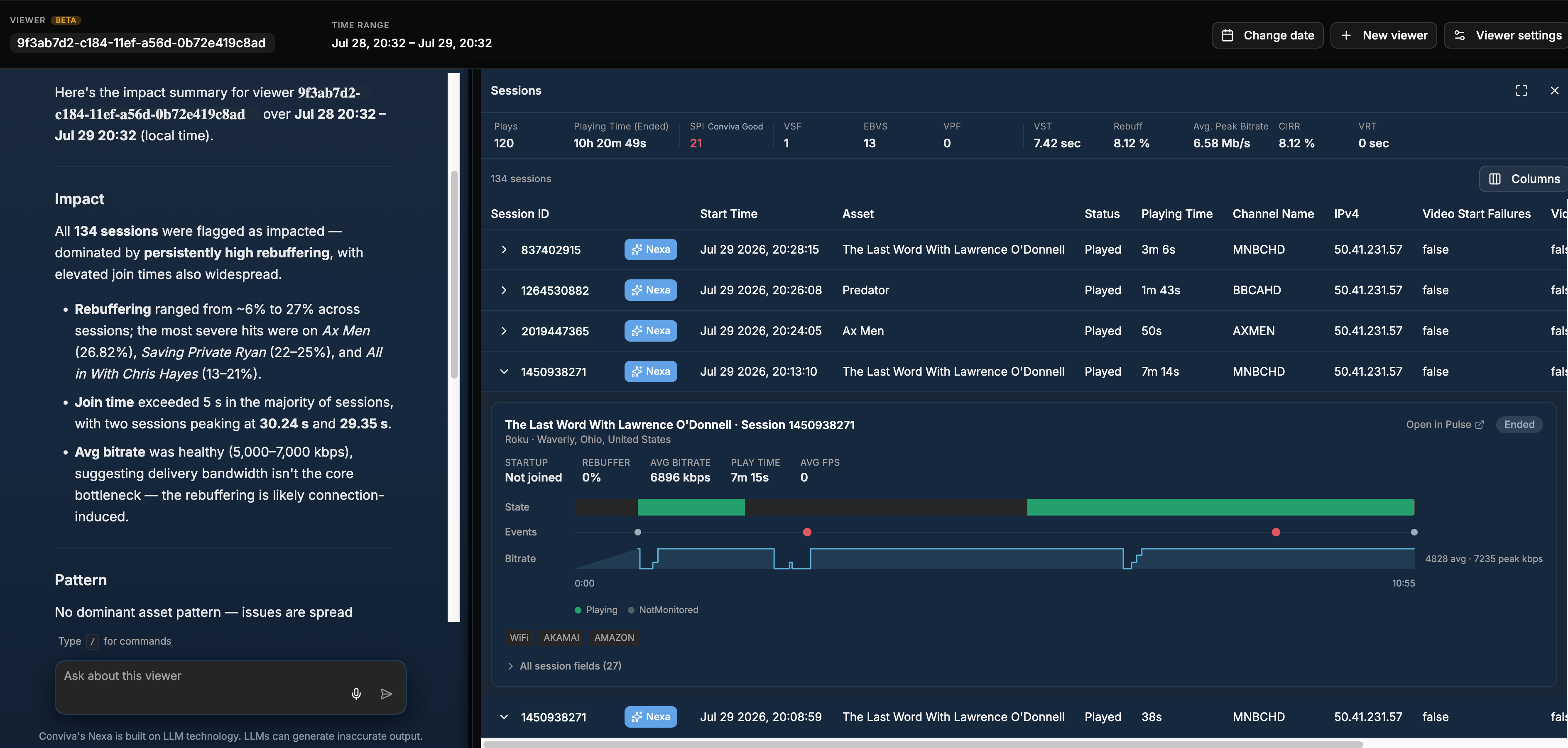
Feature Update (Beta):
Adds an Ask Nexa entry point directly in the Viewer Module and in the Viewers tab in Trends. Selecting "Ask Nexa" from a session row or a viewer row opens a dedicated Viewer canvas inside Nexa — without leaving the current workflow — showing an AI-generated impact summary, the viewer's session list, and a chat box for follow-up questions.
A Viewers module is also now embedded in Nexa's own top panel, so you can query viewer data directly from within Nexa at any time.
Try It:
When investigating a specific viewer complaint, select the viewer's row in the Viewer Module or Trends and click Ask Nexa. Nexa opens the Viewer canvas with an AI impact summary and the session list in context — no need to copy a viewer ID, switch tabs, and re-enter the query manually.
Token Usage Reporting — Account, C3 & User Level
|
|
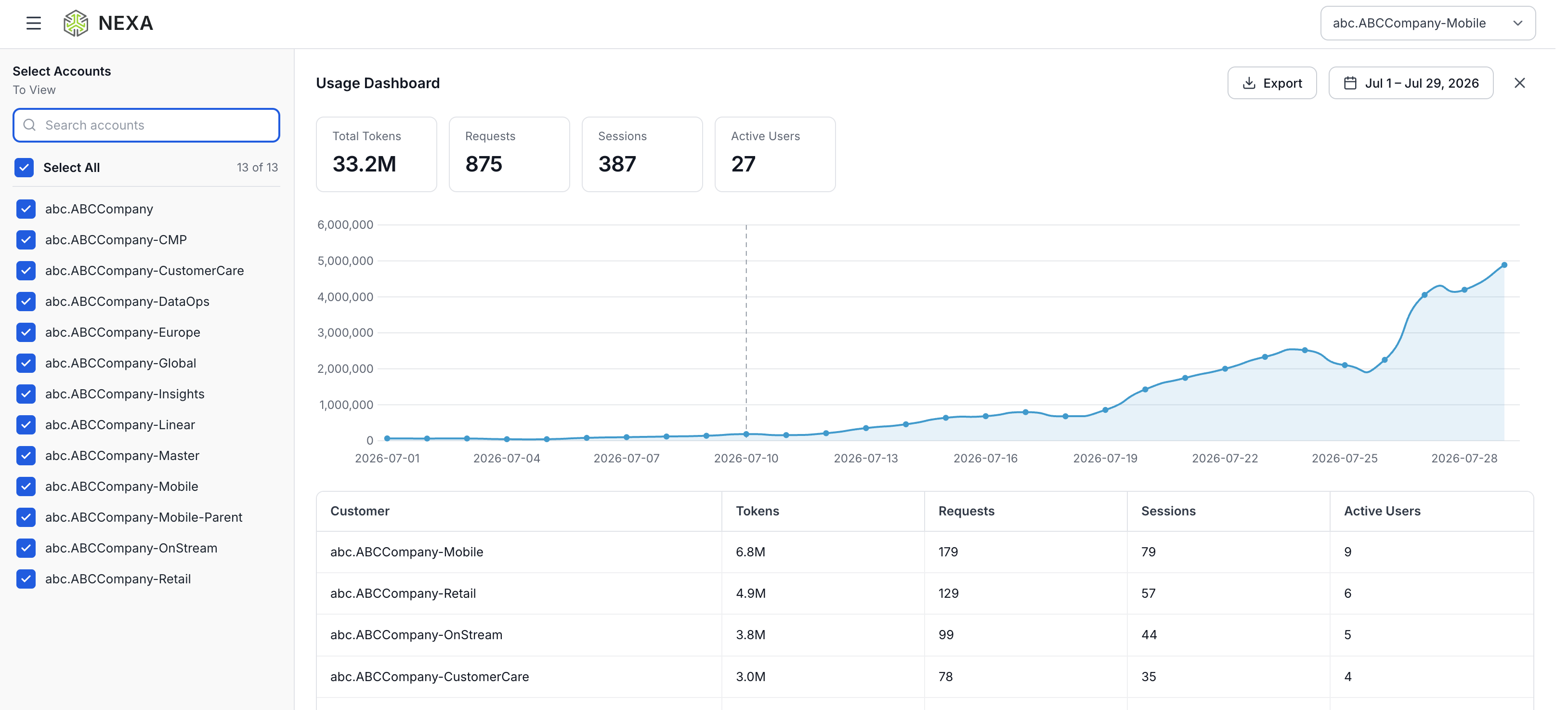
Feature Update:
Nexa now provides token usage reporting at the account, C3, and user level. Overall consumption is visible via the Usage Dashboard. Detailed Nexa token usage — broken down by C3 and individual user — is available via the Nexa Usage Dashboard under Settings.
Try It:
Navigate to Settings → Nexa Usage Dashboard to view token consumption per user and per C3. Use the top-level Usage Dashboard to review aggregate token, request, session, and active-user counts across accounts and track usage trends over time.
July 22, 2026
Industry Benchmarking for Streaming Quality
|
|
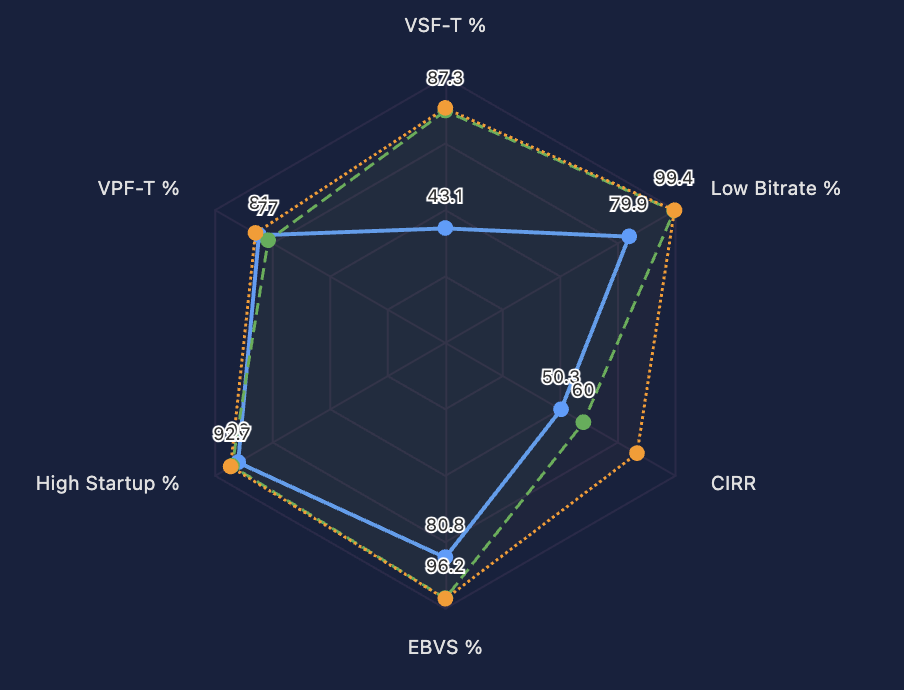
Feature Update:
Extends Nexa with industry benchmarking for streaming quality. Ask for a comparison in plain language and Nexa builds it against Conviva's cross-publisher OTT cohort — real production data from every publisher Conviva monitors — sliced by any dimension (country, device, ISP, OS, and more) and visualized in the format you need. Compare at P50, P75, P90, P95, or P99 percentiles. Benchmarking was previously available only in Pulse's fixed dashboard views; it is now available conversationally in Nexa.
Sample Prompts:
"Show our Streaming Performance Index (SPI) sub-KPIs for the US in June 2026 as a lollipop chart vs. the P95 benchmark — top 8 devices, VOD and Live shown separately."
"Build a radar chart of our SPI sub-KPIs for the US in June 2026 vs. P95 and Conviva Best — top 4 devices."
Conviva Best Quality Threshold
|
|
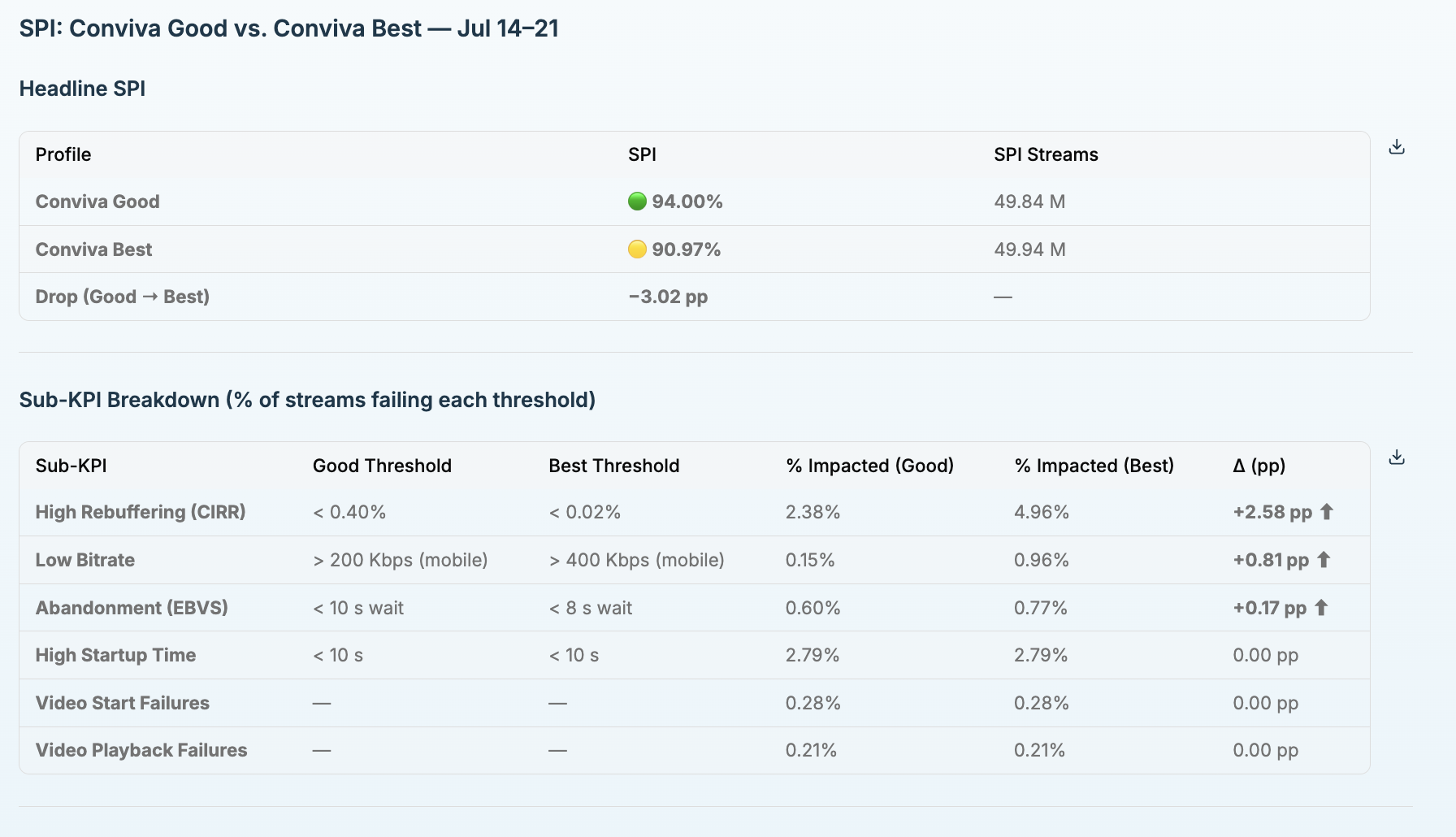
Feature Update:
Brings the Conviva Best threshold profile to Nexa. Conviva Best is the stricter, premium quality bar — previously available in Pulse but not available conversationally in Nexa. Ask for it by name and Nexa applies the stricter threshold profile to any analysis. Nexa always identifies which profile is in use, so there is no ambiguity about what a Streaming Performance Index (SPI) number means, and it defaults to the account-level KPI preference when that context is available.
Sample Prompt:
"Compare our SPI under Conviva Good vs Conviva Best thresholds for the last 7 days. Show both values side by side and tell me which sub-KPIs cause the biggest drop when switching to Best."
Pulse Drilldown Links from Conversations
|
|
Feature Update (Beta):
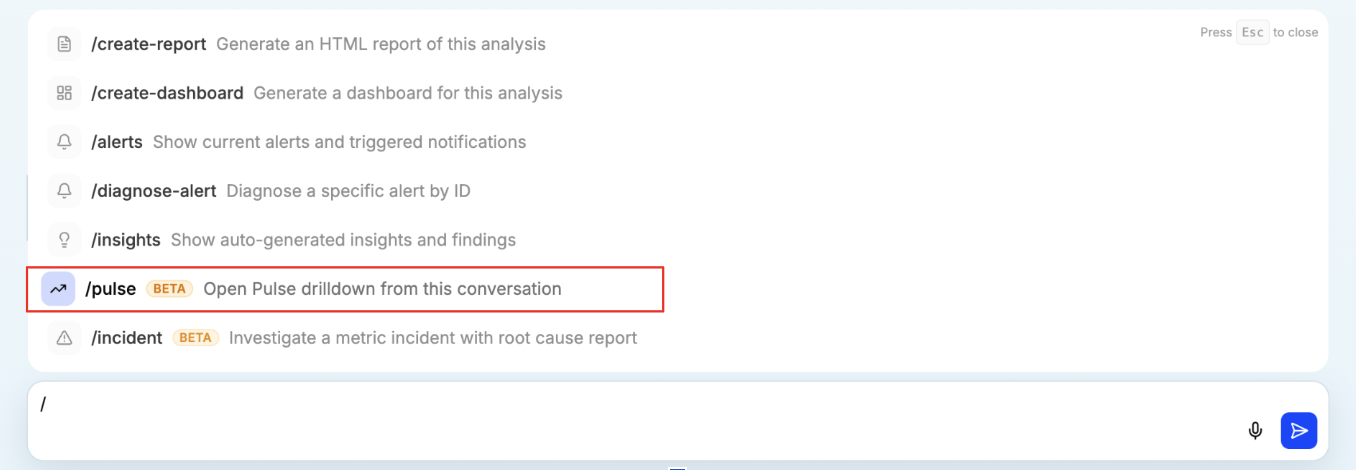
Introduces the /pulse command, which turns a Nexa conversation into a set of direct Pulse drilldown links — one for each distinct topic covered in the conversation, with any filters or thresholds already applied. Run /pulse after any Nexa conversation to jump directly into the underlying Pulse trend view for each topic without re-entering filters manually.
Use Case:
After a Nexa conversation covering video health, app health, and a specific Connection Induced Rebuffering Ratio (CIRR) spike, run /pulse. Nexa returns a ready-to-open link for each topic — for example, an iOS New York CIRR link opens directly into a Pulse trend view filtered to that device, market, and CIRR threshold.
Export Reports as PDF or HTML
|
|
Feature Update:
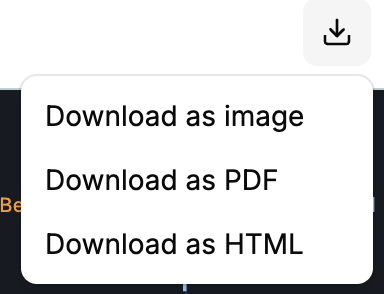
Every Nexa report and dashboard can now be exported as a PDF or HTML file, on demand or automatically on a recurring schedule. Exports are delivered as proper file attachments rather than inline images, making them suitable for saving, forwarding, and archiving.
Use Case:
On any dashboard, click the download icon and choose Download as PDF or Download as HTML. For recurring delivery, open Schedule Analysis, set Report Format to PDF or HTML, and add subscribers. Recipients receive a document attachment instead of an embedded image.
Larger Prompt Box
Feature Update:
The Nexa prompt box now accepts up to 10,000 characters. Power users running deep root-cause investigations or pasting structured prompts from other AI tools can submit complex, multi-part questions without truncation.
Reliable Long-Running Analyses
Feature Update:
Nexa now allows up to 15 minutes for complex analyses to complete. Previously, queries taking longer than five minutes appeared to fail even when Nexa was still processing, causing unnecessary resubmissions. Long-running investigations now finish properly instead of timing out.
May 15, 2026
Unified AI Analysis
|
|
Feature Update:
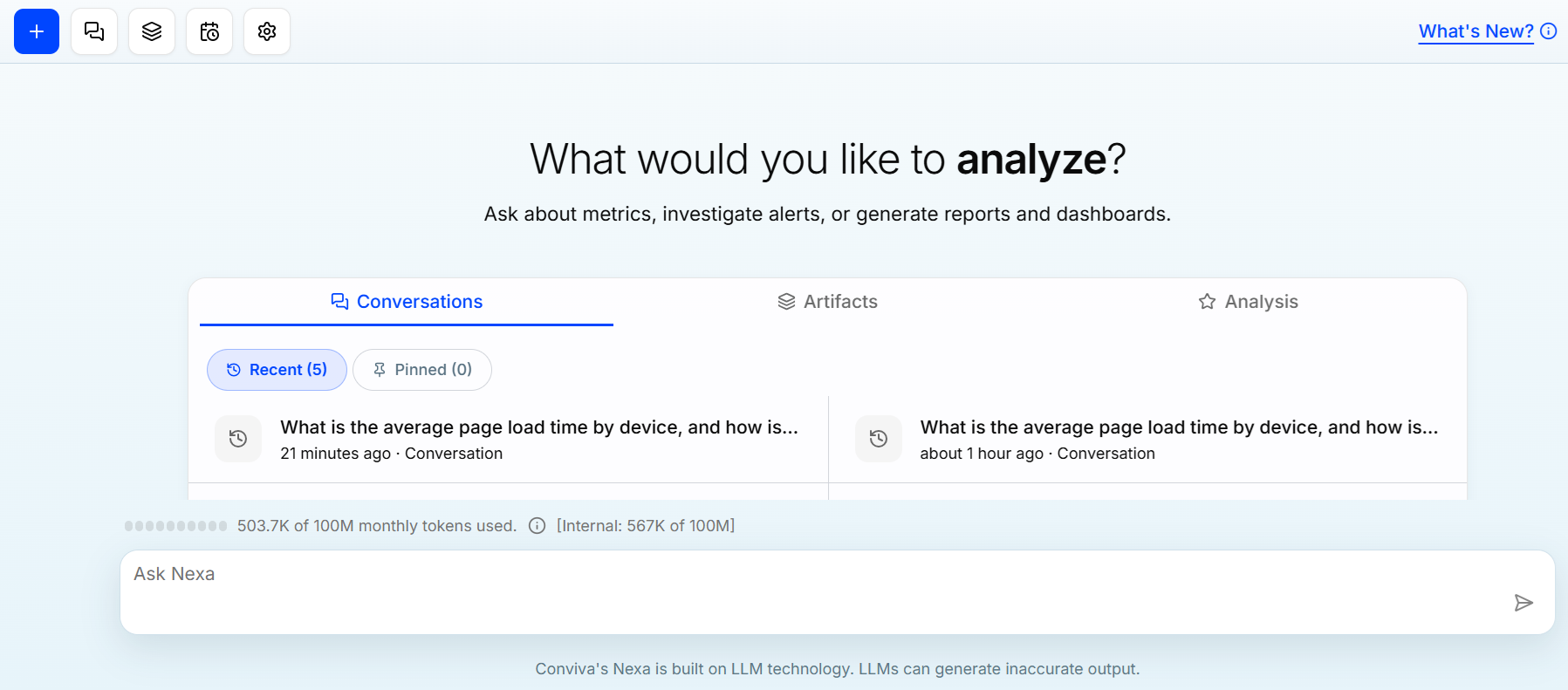
Updates Nexa as a unified AI analysis assistant within the Conviva Pulse platform, consolidating Video and App analytics into a single conversational experience.
By bringing Video and App analytics together, Nexa enables cross-domain investigation and correlation without requiring context switching between products or manual stitching of results. Key trends across quality of experience (QoE), audience, and engagement are automatically identified and surfaced, providing a comprehensive view of both video streaming and digital product performance in a single interface.
Use Case:
For the query - What is the SPI, and what is the number of active users for the last 30 days? - analysis calculates the SPI and total number of active users over the last 30 days to evaluate recent audience engagement trends. Generate the report and save the analysis for the team’s future reference. It supports ongoing monitoring of usage patterns, identification of growth or decline in user activity, and validation of the impact of recent releases or campaigns. The results enable data-driven decision-making for capacity planning, performance optimization, and continuous product evaluation.
More Details: Nexa Introduction.
January 8, 2026
Analysis Templates
|
|
Feature Update:
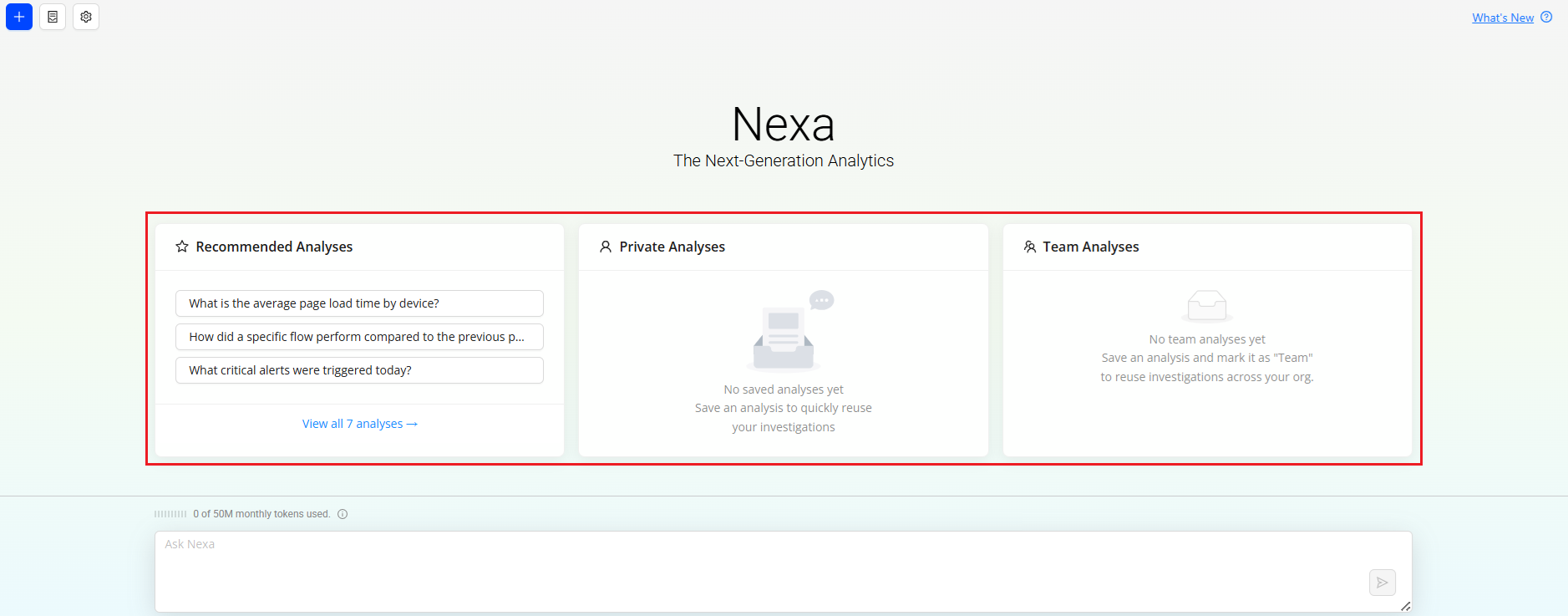
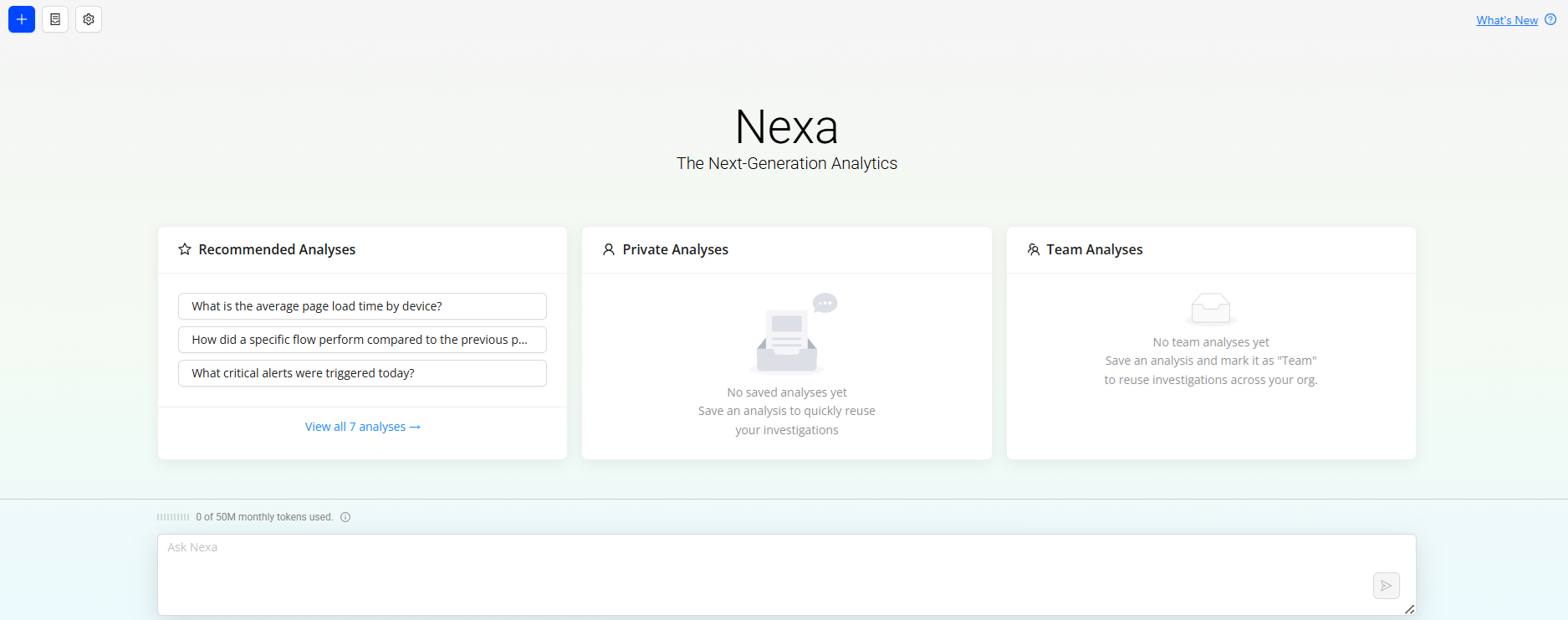
Introduces the ability to save session conversations as analysis templates for reuse. This feature enables faster access to commonly used analyses and ensures workflow consistency.
The following template types are now available:
-
Recommended Analyses: System-curated templates provided by Conviva, which are accessible only to Nexa Admins.
-
Saved Analyses: User-saved templates available for individual reference.
-
Team Analyses: User-saved templates marked as Team, making them accessible to the entire Team for shared use.
This enhancement improves efficiency, supports collaboration, and standardizes analysis practices within Nexa.
Use Case:
For the query - What is the number of active users for the last 30 days? - analysis calculates the total number of active users over the last 30 days to evaluate recent audience engagement trends. Save the analysis for the team’s future reference. It supports ongoing monitoring of usage patterns, identification of growth or decline in user activity, and validation of the impact of recent releases or campaigns. The results enable data-driven decision-making for capacity planning, performance optimization, and continuous product evaluation.
More Details: Analysis Templates.
December 17, 2025
Impacted Sessions for App
|
|
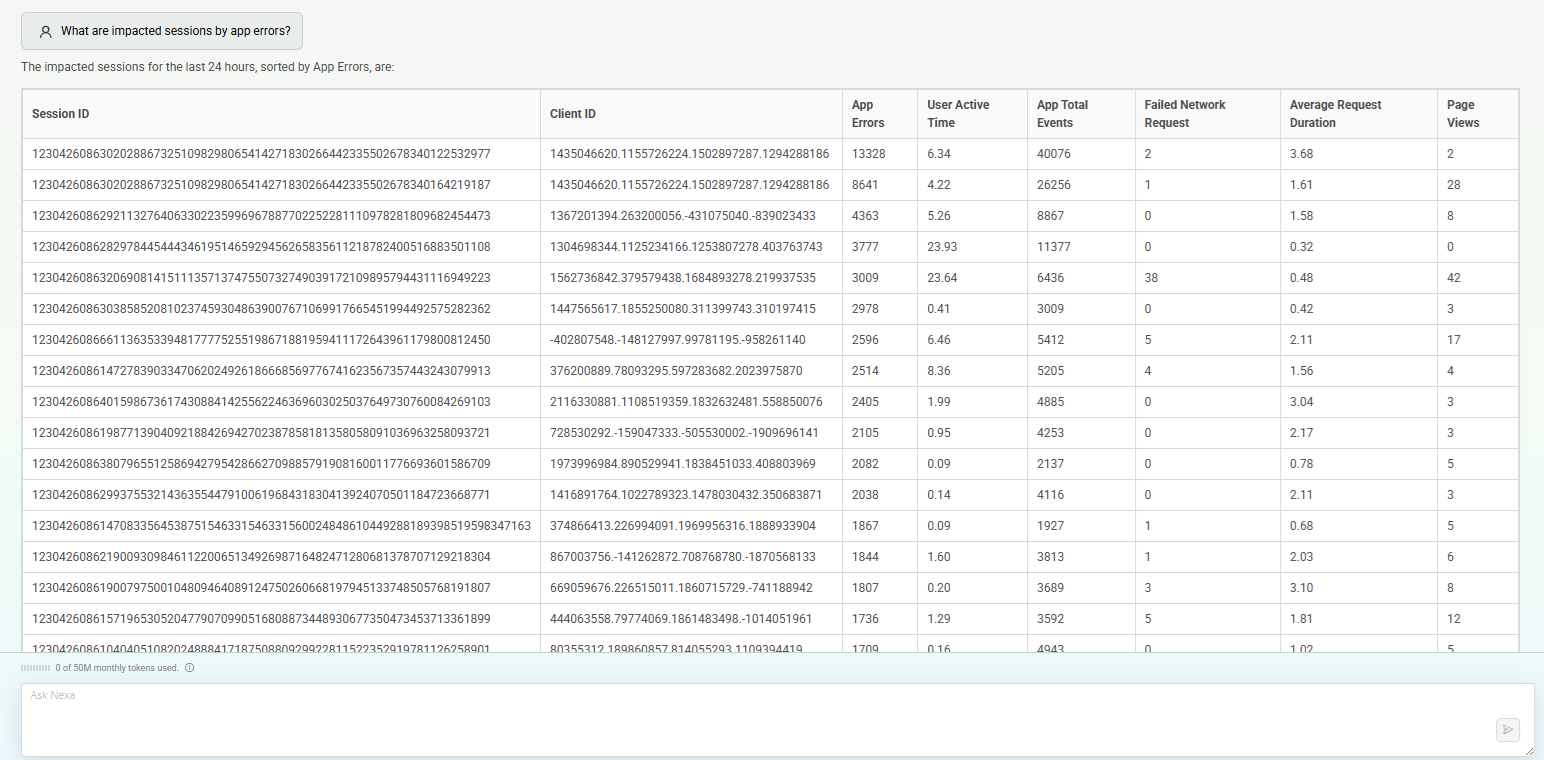
Feature Update:
Provides enhanced visibility into service impact by identifying individual sessions and end users most affected by performance issues. Teams can quickly pinpoint sessions impacted by App errors, poor QoE, anomalies, outages, or quality degradation, enabling faster, more targeted troubleshooting.
Use Case:
When a quality incident occurs—such as application startup time exceeding 3 seconds or average network request time surpassing 3 seconds—teams can instantly identify the sessions most adversely affected using Nexa’s Impacted Sessions insights. This capability enables teams to assess customer impact quickly, understand incident severity and scope, and prioritize investigations based on the most critical cases. By clearly highlighting users and sessions experiencing the app errors, failures, or degraded quality of experience (QoE), Nexa accelerates root-cause analysis, improves incident reporting accuracy, and supports timely, targeted communication with support teams for effective customer outreach.
December 4, 2025
Share Session Details
|
|
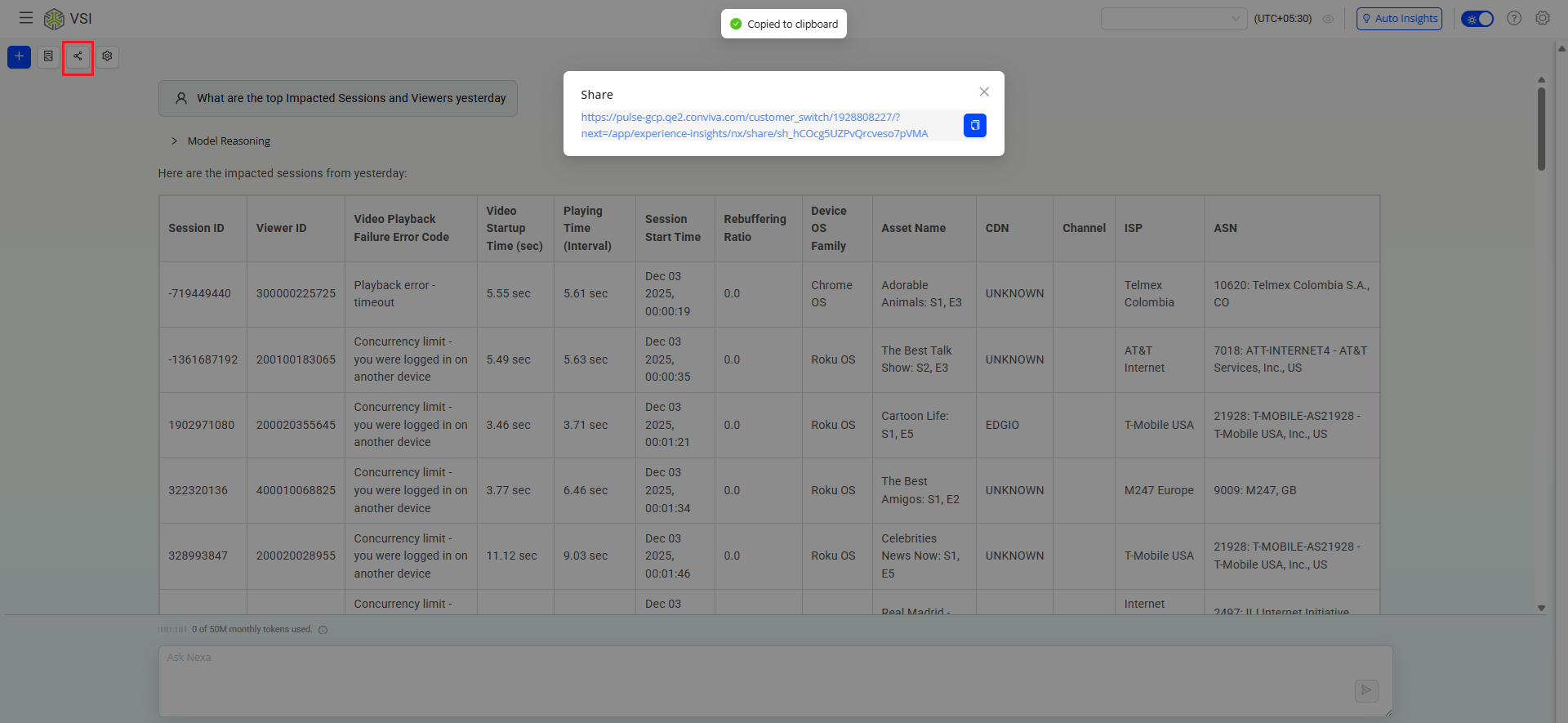
Feature Update:
Provides the option to Share the session details, allowing users (with the c3 access) to instantly view the full context—messages, insights, decisions, and outputs—without having to recreate the steps.
Use Case:
To retrieve and share insights on platform performance, the user queries, What are the top impacted sessions and viewers yesterday? This request returns a detailed view identifying the most affected sessions and viewers for the previous day, enabling timely analysis and corrective action. After reviewing the results, the user clicks the Share button, which generates a collaborative link. This link gives recipients direct access to the same insights, ensuring alignment and supporting efficient, data-driven collaboration across teams.
Top Impacted Sessions and Viewers for Video
|
|
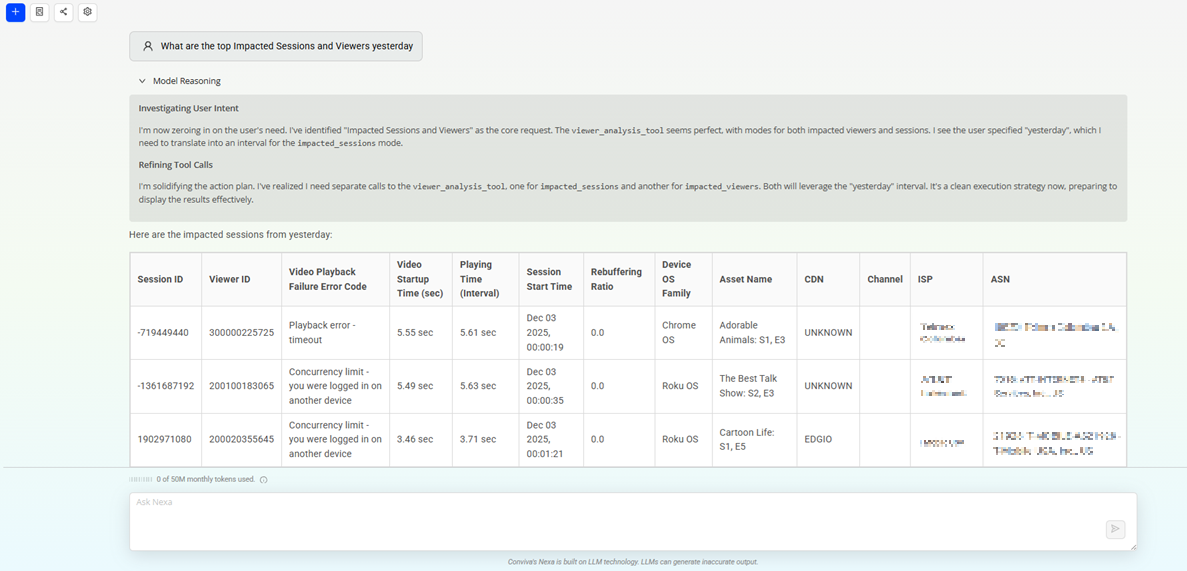
Feature Update:
Provides enhanced visibility into service impact by supporting Top Impacted Sessions and Top Impacted Viewers for Video. This update allows teams to quickly identify which sessions and end users were most affected by a performance issue, an anomaly, an outage, or a quality-degradation event.
-
Top Impacted Sessions: Provides the individual playback sessions most negatively affected based on error severity, rebuffering, video start failures, poor QoE metrics, or detected anomalies.
-
Top Impacted Viewers: Highlights the viewers experiencing the most significant impact during the event window—enabling targeted customer support, proactive outreach, and rapid root-cause identification.
Use Case:
When a quality incident occurs—such as a CDN slowdown, ISP disruption, or application performance issue—teams can instantly identify which sessions and viewers were most adversely affected using Nexa's new Top Impacted Sessions and Viewers insights. These insights allow them to assess customer impact, understand the issue severity and scope, and prioritize investigations based on the most critical cases. By highlighting the specific users and sessions that experienced the highest rebuffering, failures, or degraded QoE, Nexa enables faster root-cause analysis, more accurate incident reporting, and timely communication with support teams for targeted customer outreach.
Know Improvement Opportunities for Video
|
|
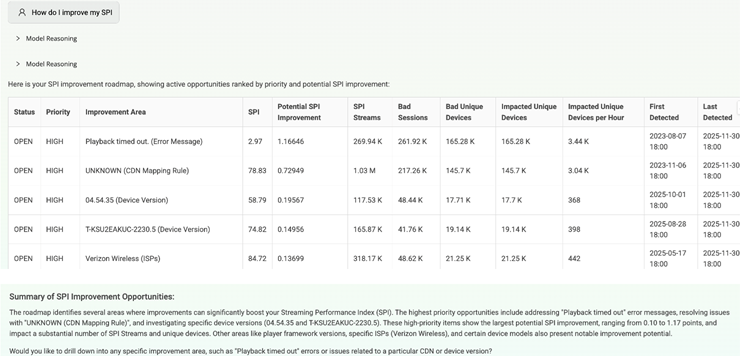
Feature Update:
Provides visibility into AI-driven Improvement Opportunities through the AI Roadmap. Users can access the AI Roadmap in Nexa to view prioritized recommendations and areas of focus to enhance performance and stability. By asking questions such as, How do I improve SPI? or Improvement opportunities for SPI, users receive targeted guidance on critical improvements. This feature helps teams identify optimization paths quickly and supports more informed, data-driven decision-making.
Use Case:
Users can understand how to enhance the Service Performance Index (SPI) for their application. The user enters the query How do I improve SPI? Nexa accesses the AI Roadmap and generates a set of prioritized SPI improvement opportunities. The system highlights key factors affecting SPI—such as latency, error rates, or buffering issues—and provides actionable recommendations tailored to the user's environment. These may include optimizing specific flows, addressing high-impact errors, improving delivery performance, or resolving recurrent issues. The user reviews these insights to determine where to focus efforts and develops a targeted plan to improve SPI metrics and overall service quality.
Support Queries for Video Alerts
|
|
Feature Update:
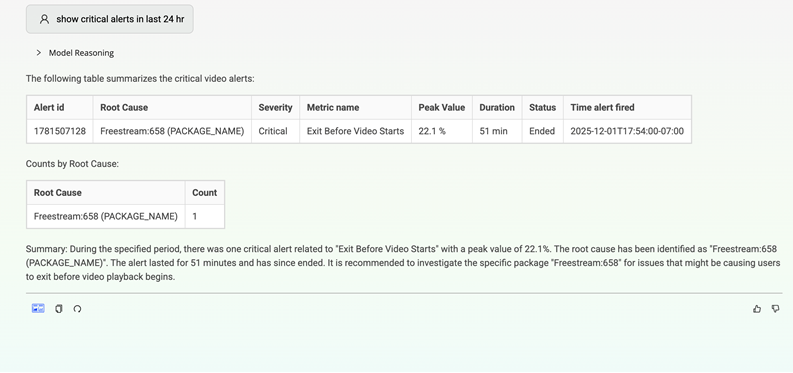
Supports Video alerts, enabling users to access viewer-specific alert information directly within Pulse. Users can retrieve alert summaries and trends by asking questions such as Critical alerts for today or Alerts for the last 7 days, providing faster visibility into viewer-level issues and helping teams identify, prioritize, and address critical problems more efficiently.
Use Case
Enter the query Show the critical alerts in the last 24 hours. Nexa retrieves all critical viewer-specific alerts generated within that period, summarizing alert types, affected sessions, and timestamps. Use this information to identify emerging issues and drill into specific alerts for root-cause analysis, enabling faster response and resolution.
Try Nexa
|
|

Feature Update:
Introduces a new Try Nexa button within Video and App — Trends Dashboard to provide users with faster, more intuitive access to Conviva Nexa. With improved discoverability and smoother transitions between monitoring and diagnostics, the update delivers a more connected and intuitive user experience.
November 13, 2025
Support for App Alerts
|
|
Feature Update:
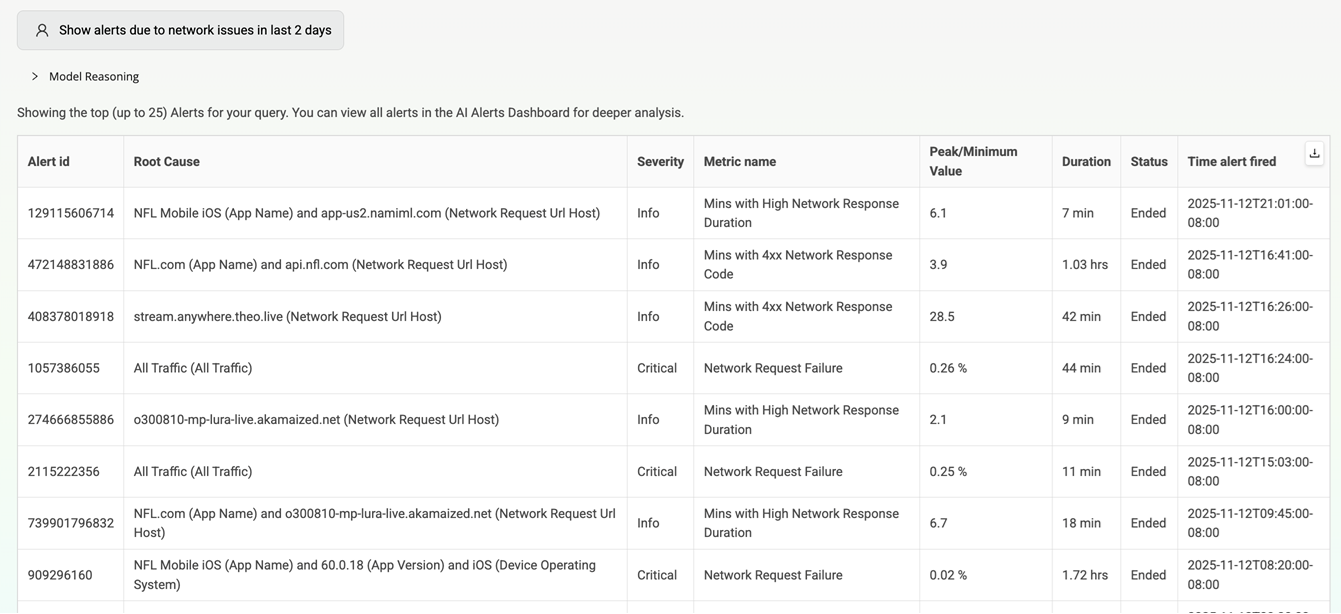
Supports App AI Alerts within Nexa, giving users immediate visibility into critical issues without leaving Pulse. This enhancement helps teams detect, investigate, and act on anomalies faster than ever. Users can request alerts using natural language—such as “Show me critical alerts for the last week” or “Show me open alerts for yesterday”—and receive results instantly. The AI Alert dashboard opens in a new browser tab to support focused analysis, and users can further examine any alert by referencing its Alert ID. This update improves the speed and clarity with which issues are identified and investigated.
Use Case
Enter the query “Show alerts due to network issues in the last 2 days.” Nexa interprets the request, applies the specified time range, and filters alerts based on network-related categories identified by App AI. The system then returns a focused list of relevant alerts, highlighting their severity, status, and associated metrics. Open an alert dashboard in a new tab for deeper investigation or select an individual Alert ID to review detailed insights and anomalies.
Support queries for Auto Insights for Broken Assets and App Versions
|
|
Feature Update:
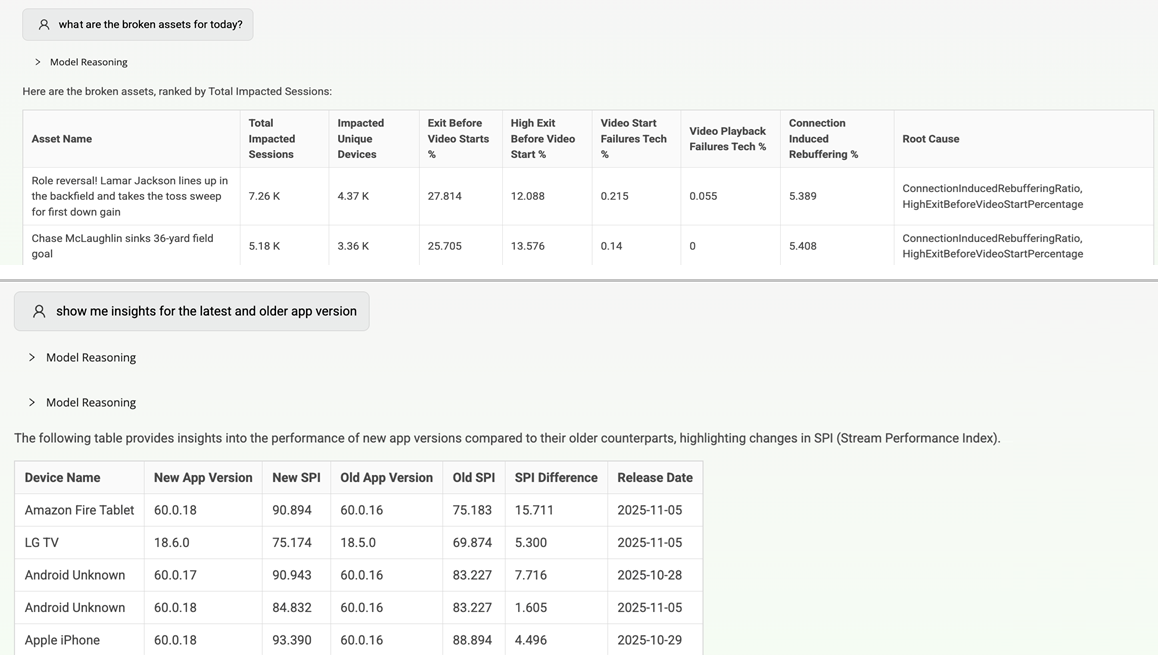
Supports queries for Auto Insights on Broken Assets and App Versions, enabling faster issue identification and analysis directly within Pulse.
Users can request insights by asking questions such as,
-
Show me broken assets for today
-
Show me broken assets due to CIRR, or
-
Compare the app versions
Nexa interprets these queries, retrieves the relevant insights, and presents a clear summary of asset health and version performance. Users can also deep dive into any specific broken asset or app version to view detailed insights and contributing factors.
Use Case
To quickly assess whether any assets are malfunctioning and potentially affecting customer experience or service performance, enter the query What are the broken assets for today? Nexa processes the request and automatically filters Auto Insights to retrieve all assets that have triggered failure conditions within the current day. Nexa returns a curated list of broken assets along with key details such as failure type, impacted regions or devices, and severity indicators. The user can then select any individual asset from the list to open a deeper view, enabling examination of root causes, historical patterns, and related performance metrics.
To assess how the latest app version performs compared to an older one, enter the query Show me the insights for the latest and old app versions. Nexa retrieves insights for both versions and presents a clear comparison of key metrics, including crashes, errors, and performance issues. The user can then drill into either version for detailed insights into impacted assets and contributing factors. These insights help determine whether the latest version shows improvements or introduces new problems.
Thinking View Enhancement
|
|
Feature Update:
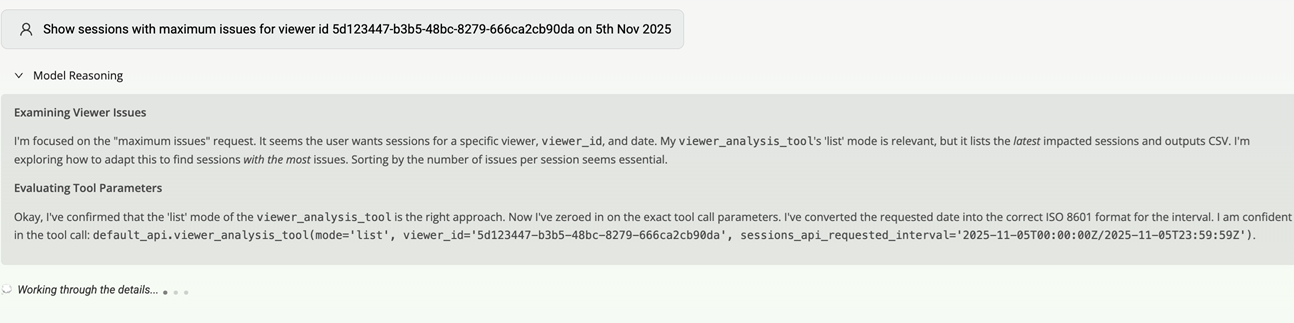
Introduces a new visible thinking state in Nexa to clearly indicate when the system is analyzing a user’s prompt. This enhancement improves interaction clarity by signaling that Nexa is actively processing the request, helping reduce perceived wait time and creating a smoother, more transparent user experience. Users can also turn off the thinking model based on their preferences, and this setting is persisted at the user level to ensure a consistent experience across sessions.
November 7, 2025
Support queries for Viewer Ids in Video.
|
|
Feature Update:
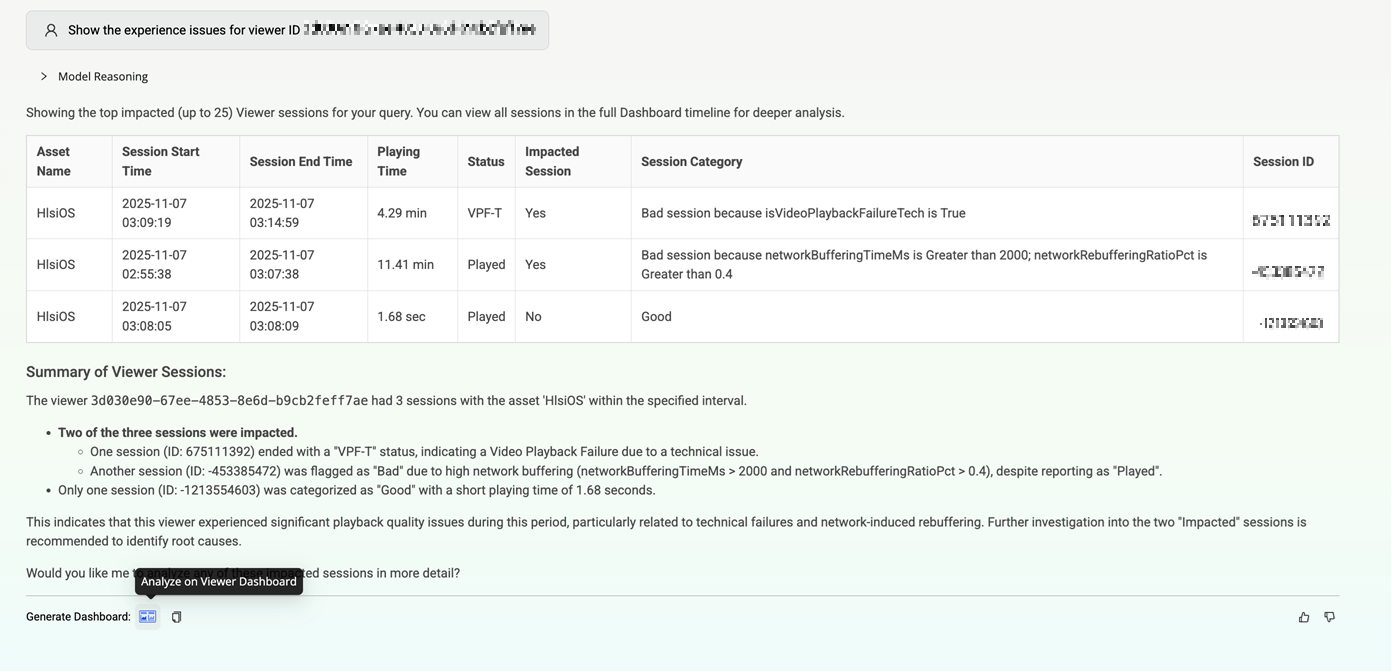
Supports Viewer ID–based analysis in Video, providing a significant AI-driven enhancement for support teams. Users can query viewer-specific insights to accelerate troubleshooting and understand individual viewing experiences with greater precision.
For example, queries such as,
-
Show the experience issues for viewer ID <Id number>
-
What were the last five sessions for viewer ID <Id number>
-
Show sessions with maximum issues on 5th Nov 2025 for viewer ID <Id number>; return targeted session and experience data.
Users can also drill down to a specific session ID to view exact timelines and pinpoint issues, such as rebuffering. This capability enables faster, more accurate support investigations and improves overall operational efficiency.
Use Case:
To investigate a viewer's complaint about poor streaming quality, enter the query: Show the experience issues for viewer ID <ID number>. Nexa performs viewer ID–based analysis in Video and returns a consolidated view of all experience issues for that viewer, such as rebuffering events, playback failures, bitrate drops, and start-up delays. The response highlights when the issues occurred, their severity, affected devices or regions, and any recurring patterns. Use this information to identify root causes—such as CDN problems, network instability, or player errors—and take targeted corrective actions, improving both the individual viewer's experience and the overall service quality.
October 30, 2025
User Timeline Integration for App.
|
|
Feature Update:
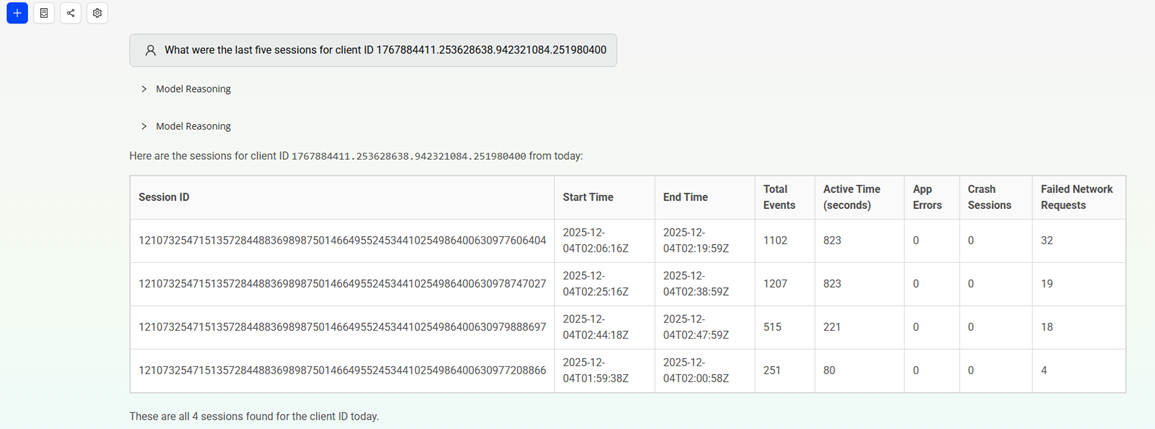
Supports user-timeline queries for App, enabling instant analysis of experience and performance at the user or client level. When a user requests timeline insights, Nexa provides a link to the user timeline dashboard, which opens in a new browser tab, ensuring a clearer, more focused view.
For example, queries such as,
-
Show the experience issues for user ID <ID number>.
-
What were the last five sessions for client ID <ID number>?
-
For the user ID <ID number> summarize issues for the last 7 days.
-
Show sessions with maximum issues on 20th October 2025 for user ID <ID number>.
This update improves diagnostic efficiency enabling the users to troubleshoot faster by viewing user-specific journeys and error summaries without switching dashboards or relying on data teams. This capability streamlines issue resolution and strengthens understanding of user impact by combining performance and experience data in a unified workflow.
Use Case:
To investigate the recent activity for a client reporting intermittent issues, enter the query What were the last five sessions for client ID <Id Number>? Nexa processes the request through App's user timeline integration and retrieves the most recent five sessions associated with that client ID. The response includes key details such as session start and end times, duration, device or platform used, and any associated experience issues. The engineer reviews this information to identify patterns—such as repeated errors, abnormal session durations, or network inconsistencies—and uses the insights to determine whether a specific problem is recurring.
Support Queries for Flow Auto Insights in Nexa
|
|
Feature Update:
Supports Flow analysis for Auto Insights, providing deeper guidance for customers with Auto Insights–enabled flows. Users can analyze any supported flow, and Nexa presents additional insights and actionable recommendations to help identify issues and optimization opportunities. This enhancement applies to customer accounts and flows where Auto Insights is enabled. Users can request information with queries such as Show details about the flow <flow name> for last week. This update improves diagnostic accuracy and supports more informed decision-making for flow performance.
Use Case:
To review the performance of a key operational flow over the past week, enter the query Show details about the flow Checkout for last week. Nexa analyzes the specified flow and returns the standard flow metrics along with newly added Auto Insights and recommendations. These insights highlight anomalies such as increased failure rates, latency spikes, or drop-off points for further investigation. The user reviews these details to identify root causes, prioritize improvements, and implement targeted fixes. This streamlined analysis helps improve flow performance and enhances the overall user experience.
What is Nexa?
|
|
Feature Update:
Nexa is Conviva’s AI-powered analytics assistant designed to help users interact with their Conviva data using natural language. Instead of navigating complex dashboards or writing queries, users can ask questions in plain English, and Nexa will interpret the request, run the appropriate Conviva API calls, and return actionable insights, summaries, or dashboards.
Nexa helps users to
-
Retrieve insights faster without complex filtering or UI navigation
-
Accelerate troubleshooting for video, app, network, or user-session issues
-
Generate dashboards on demand
-
Reduce time-to-insight for Product, Ops, Engineering, and Support teams
-
Make data analysis more accessible and intuitive for all users
Note: Conviva provides 50 million free tokens each month. The counter refreshes at the start of every month (UTC zone), and unused tokens do not carry over. Once the free tokens are utilized, contact Conviva Support for additional access.By Default, all users have use permission in Nexa.
Admins can change the permissions to,
-
No: Disables Nexa for the user in the account, including admins. No Nexa features will be accessible.
-
Use: Allows users to access and interact with Nexa features once enabled by the account admin. (Default setting)
-
Enable - (Admin-only permission): Allows the admin to activate Nexa for the entire account after accepting Conviva’s AI Acceptable Use Policy.
More Details: Nexa.