
Nexa is Conviva's unified AI analysis assistant within the Pulse platform. It consolidates Video and App analytics into a single conversational experience, eliminating the need for separate Nexa instances across sub-products.
Nexa accepts natural language prompts to perform multi-level, nested queries across video, ads, and app data. It manages multiple dimensions simultaneously, generates dashboards instantly, and delivers summaries of results alongside suggested next steps — all within one continuous analytical session.
By bringing Video and App analytics together, Nexa enables cross-domain investigation and correlation without requiring context switching between sub-products or manual stitching of results. Key trends across quality of experience (QoE), audience, and engagement are automatically identified and surfaced, providing a comprehensive view of both video streaming and digital application performance in a single interface.
|
Nexa Roles |
Use Cases |
|---|---|
|
Data Analyst Guide for Customer Experience / Product Insights |
Use as a co-pilot for natural prompt discovery of user experience impacts and evaluating areas for UI, navigation, and feature improvements.
Example: What are the active SPI improvement opportunities? |
|
Assistant for System Admin Tasks |
Gain an assistant for admin tasks to confirm user and Pulse setting, such as which notification as receiving AI alert notifications. Example: Which users are currently configured as Precision Admins? |
|
Co-pilot for Data Analysts Insights |
Empower customized, cross-feature report generations, combining time series and dimensional analysis across cross-features for targeted pattern, user experience, and service performance analysis.
Example: What content keeps users engaged? |
|
Digital Partner for fixing App and Customer Issues |
Access a digital partner for fixing App and customer issues, before users are impacted.
Example: When users report playback errors, investigate whether the issue is isolated to specific device types, correlated with a recent software release, or related to CDN performance and delivery. |
|
Assistant for Marketing Campaigns Data |
Use as a partner to improve campaign effectiveness and market data analysis.
|
|
Agent Performance Enhancer |
Discover agent performance and optimization insights
|
Nexa Getting Started
Capabilities
The following capabilities define the scope of analysis and interaction that Nexa provides within the Pulse platform.
-
Unified Cross-Sub-Product Analysis
Nexa consolidates Video and App analytics into a single conversational interface, enabling simultaneous investigations across video and application data. The platform directly correlates insights across these domains, which allows users to identify shared root causes without switching between sub-products or manually aggregating results. -
Natural Language Querying
Nexa converts plain English prompts into structured, multi-level, nested queries using a large language model (LLM). Investigations can begin at a broad business level and progressively narrow to specific dimensions, metrics, or viewer-level detail. Complex analytical requests across multiple dimensions are processed and executed within a single conversational session.
-
Automated Artifact Generation
Nexa produces structured, shareable outputs that extend beyond standard conversational responses. AI-generated reports include detailed narratives, metric values, performance deltas, top-dimension drivers, and confidence caveats. Additionally, Nexa builds interactive dashboards equipped with adjustable time pickers and data filters. The platform allows full sessions to be shared as links, and schedules recurring reports for automated email delivery at daily, weekly, or custom intervals.
-
Operationalized and Repeatable Analysis
Nexa moves analysis from one-time to repeatable. Effective prompt patterns are saved as reusable templates and can be re-run across time periods or customer contexts. Scheduled execution provides the option to automatically deliver KPI digests, alert watches, and executive readouts. Full session history is retained, allowing any prior investigation to be resumed or reused as a starting point.
-
Viewer-Level Intelligence
Nexa drills down to individual viewer sessions, surfacing session timelines, device and network conditions, and the exact failure chain across video and app products. Also, Nexa delivers structured summaries of analytical results and recommends subsequent investigative steps, supporting informed decision-making and reducing the time required to move from data to action. This capability is particularly applicable to customer support and incident review use cases.
-
Anomaly Detection and Root-Cause Analysis
Nexa continuously identifies data irregularities and surfaces key trends across quality of experience (QoE), audience, and engagement. Detected anomalies are highlighted with contextual summaries to accelerate root-cause analysis and resolution across both video and digital product data.
-
Multilingual Support
Nexa accepts prompts in any language and delivers responses in the same language, enabling consistent analytical access across globally distributed teams.
Customer data from Nexa is never used to train models.
At a high level, LLMs function as advanced autocomplete systems. They do not possess knowledge in the human sense; instead, they generate outputs by identifying and applying patterns learned during training. In Nexa, the LLM generate the insights that aligns with a given prompt, and the dashboard.
Token limits
LLMs can only handle a certain number of tokens at a time, which includes both:
-
The input you give (for example, a long question or document)
-
The output it generates (for example, the response, or the code)
-
System Prompts or contexts
Prompts
A prompt is a message you send to the AI. How you write your prompts is key to getting good results.
Context
Context refers to all domain information available to the AI, including prompts, prior responses, and existing code. The context window defines the amount of text an LLM can process simultaneously. Nexa provides a large context window; however, the AI cannot be relied upon to retain the entire conversation. Larger context windows also consume tokens more quickly, which increases cost. To preserve context while maintaining a smaller window, the AI can summarize the conversation to date and then reset the context window.
Note: If Nexa is not used for 30 days, the conversation history will be removed.
Understanding Tokens – Monthly Token Limit
Nexa employs large language model (LLM) technology to process prompts and generate sites. While knowledge of the underlying technical details is not required, it is essential to understand that LLMs operate on a token-based system. Tokens provide a standardized measure of Nexa’s processing workload. Nexa structures its free and paid plans around token usage.
Token Display in Nexa
Token usage in chat provides insight into the number of tokens consumed by prompts. Nexa displays token usage by default.
Nexa uses Token when it:
-
Reads the input
-
Think and process
-
Builds the output
Larger and more complex websites or applications require more tokens to generate.
Note: Conviva provides 50 million free tokens each month for every customer. The counter refreshes at the start of every month (UTC zone), and unused tokens do not carry over. Once the free tokens are utilized, contact Conviva Support for additional access.
Accuracy
LLMs can generate inaccurate or outdated outputs for several reasons:
-
Training set age: LLMs train on large datasets but cannot access information created after the training process concludes. When building software, developers must recognize that the LLM may not be aware of the latest versions of tools and frameworks.
-
Hallucination: LLMs operate predictively rather than deterministically. They may return different outputs for identical prompts and occasionally generate false information.
Saved conversations are retained for 30 days from the date they are saved.
Pinned conversations do not expire and cannot be deleted. Nexa allows a maximum of 10 pinned conversations at any given time.
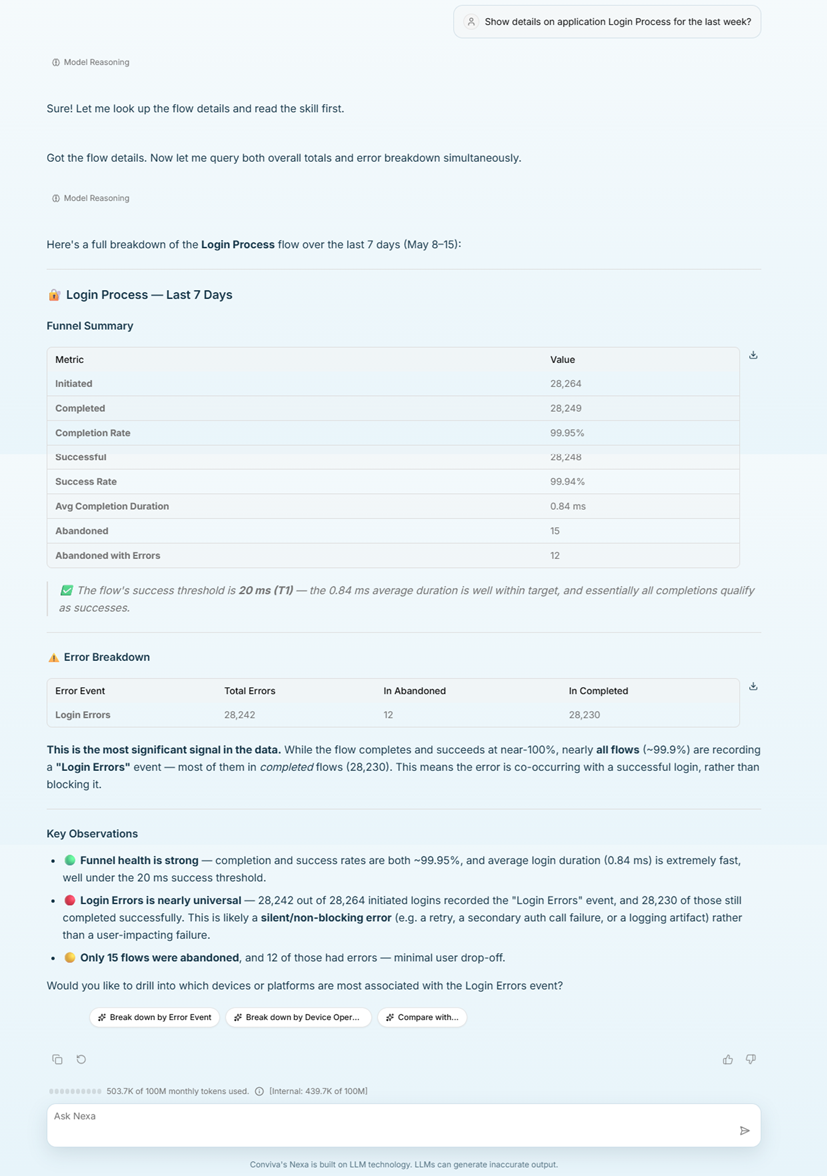
 Flow Auto insights
Analyze any flow in Nexa and Nexa shows additional insights and recommendations for the flow.
Example prompt and response:
"Show details on application login process for the last week?"
Reports
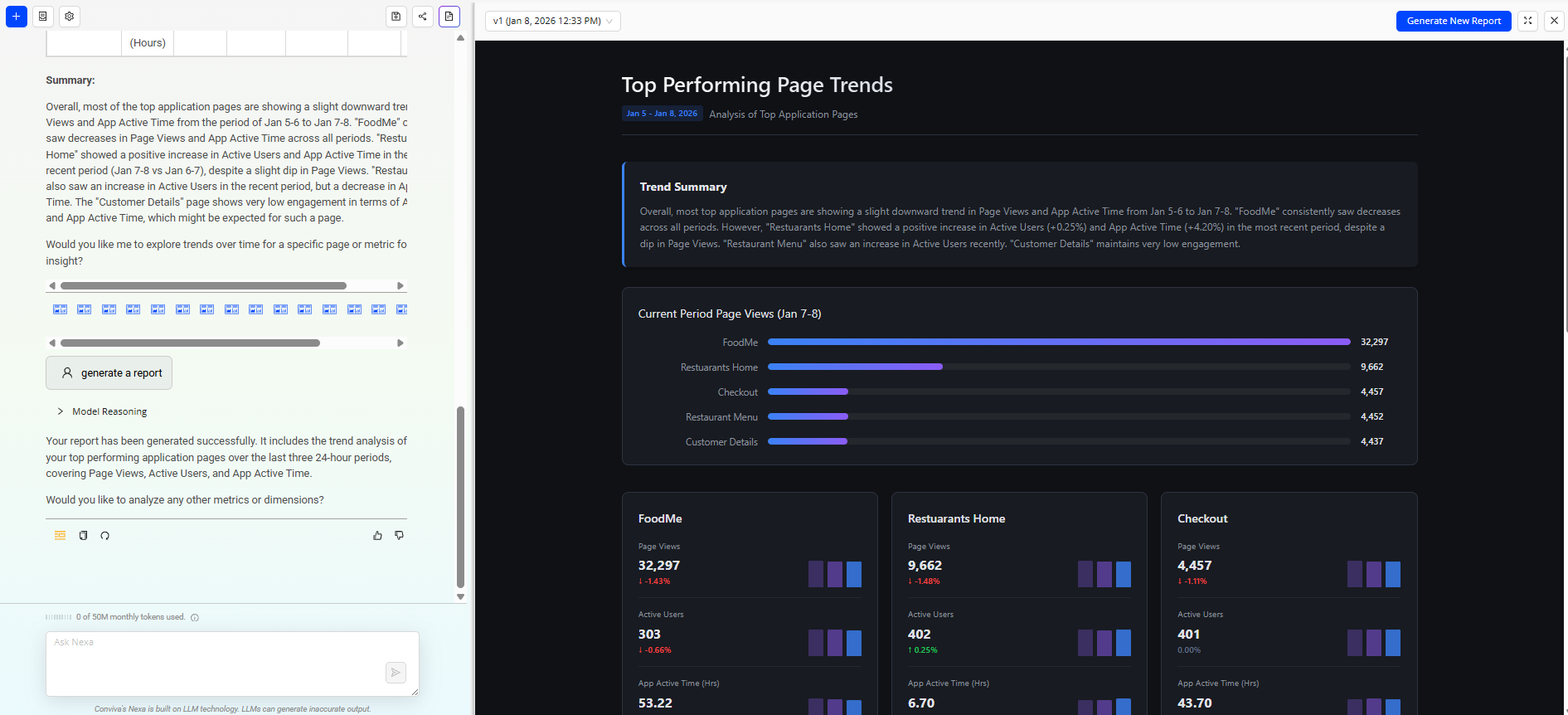
Reports provide a visual representation of the provided analysis.
-
Click the Artifacts icon to see the report page.
-
Click the Generate Report icon or type Generate Report to see the visual representation of the generated analysis.
-
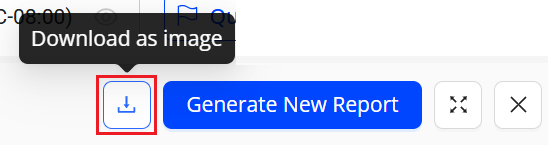
Click the Download icon to download the report as an image, a PDF, or an HTML file.
Schedules
The Manage Schedules feature automates the execution of saved analysis queries at predefined times and frequencies. It runs queries at the configured schedule and generates the corresponding reports without manual intervention.
The interface displays key schedule details, including query name, frequency, run time, weekday, creator, subscribers, and last updated information. Scheduled reports are delivered automatically to designated subscribers, ensuring consistent and timely access to analysis results.
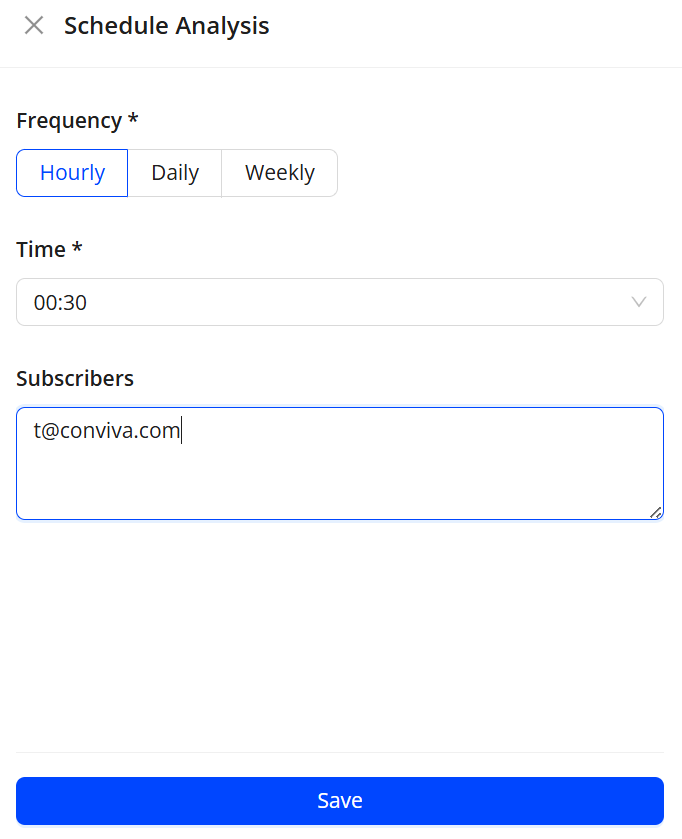
To create a schedule,
-
Click the Settings button, select Schedule Analysis from the dropdown.
-
From the list, click the kebab icon next to the saved analysis entry to see the Schedule Analysis screen.
-
On the Schedule Analysis screen, select the frequency, time and subscriber details and click Save.