Sitting
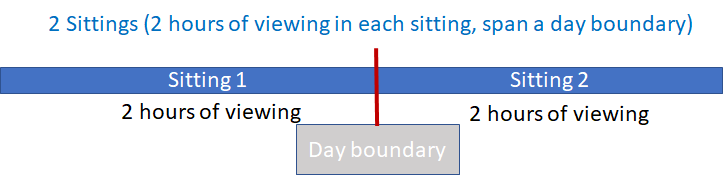
Sitting is an aggregate of all content played by a viewer in succession with no more than 60 minutes (configurable) break between each content played. Sittings are separated by daily, 24 hour boundaries; playing content continuously across a day boundary is considered as 2 sittings.
Note:
A sitting applies to an app instance on a particular device.
To configure the default break time of 60 minutes, contact a Conviva representative.
The following rules apply to Sitting:
-
Maximum Sitting Duration: 24 hours (default)
-
Maximum Allowed Break Time: 60 continuous minutes
-
Sitting End: Day Boundary
These examples show sitting timelines for different viewing scenarios and sittings:
Example 1: A single sitting (Sitting 1) with viewing content for 3 hours with a break of 15 minutes.

Example 2: Two sittings (Sitting 1 and Sitting 2) with viewing content for 2 hours each with a break of 1 hour and 15 minutes. The break in viewing is more than the maximum allowed break time of 60 minutes. Therefore, the viewing is counted as two separate sittings.

Example 3: Two sittings (Sitting 1 and Sitting 2) with viewing content for 2 hours each that spans a day boundary. For viewing that spans a day boundary, the day boundary denotes the start of a new sitting.