
Developers wishing to interface with Conviva data can easily and securely access their data for extremely rich and broad use cases using Conviva data.
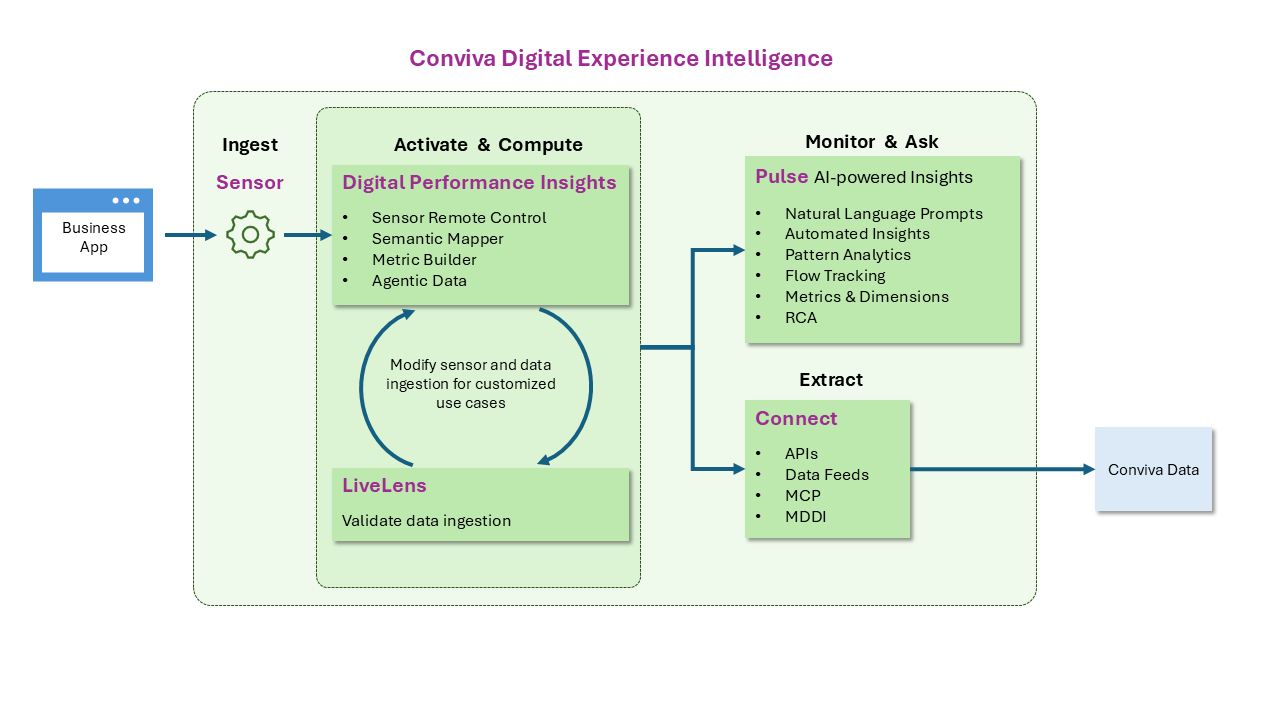
Conviva Connect data interfaces enable Conviva data access for:
-
Developers building internal dashboards
-
Data scientists deep-diving into the data
-
SREs wishing to control their Conviva account
-
AI developers wanting to connect an AI agent to their Conviva data
Data Interfaces
Conviva Connect provides a range of data interfaces to help you access your data the way you want it.
Developer Guides
Quickly learn about the latest developer updates and best practices.
Connect API Guides
SEI APIs
Metrics v3 API
Sessions v3 API
Bulk Filters API
AI Alerts API
PII Opt Out API
Precision API
Connect Data Feed Guides
Connect MCP Agentic Data Connections Guide
Conviva stores data in accordance with the Conviva data retention policy.
API data access is subject to rate limits enforced per c3 account. For the current values, see the Rate Limits section of the Metrics V3 API Guide. For full contractual limits and rate plans, see the Conviva service description.
Connect Data Feed settings configure the storage location, delivery frequency, and simple transformations of your content, ad, and identity data. Supported data storage destinations, such as databases, data lakes, and data warehouses, include Google Cloud Storage(GCS), Amazon S3 storage, and SFTP.
Please contact Conviva Support or your account representative with questions or feedback for us to improve our data services.