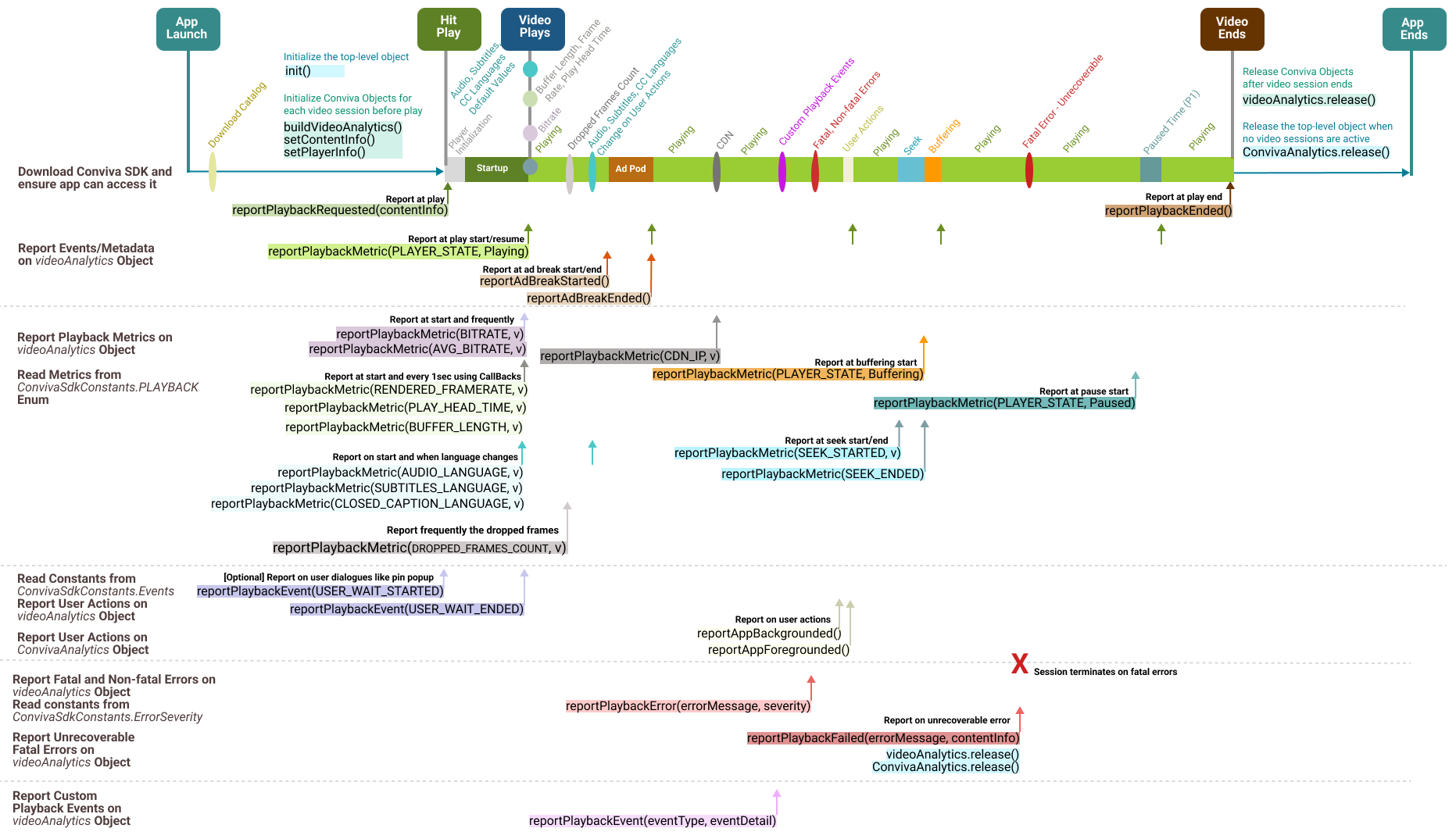
| **Initialize Objects**
|
|
ConvivaAnalytics.init(Context appContext, String customerKey, Map<String, Object> settings);
Initialize the top-level object.
|
|
ConvivaAnalytics.buildVideoAnalytics(getApplicationContext());
This object needs to be instantiated once for each video playback, and is used to report the video-related events in an application. Typically, it is instantiated after the init() call, and ideally just before the user hits play.
|
|
videoAnalytics.setPlayerInfo(Map<String, Object> playerInfo);
Call this API to set the Predefined metadata.
|
|
videoAnalytics.setContentInfo(Map<String, Object> contentInfo);
Call this API to update or amend metadata.
|
| **Reports Events and Metadata**
|
|
videoAnalytics.reportPlaybackRequested(Map<String, Object> contentInfo);
Call this API when:
User clicks the video play button
Video starts in auto-play mode
User replays video
A new video starts in play list
It's critical to make this API call correctly to monitor the video experience. For example, if the call is delayed (say, when the video starts rather than the user clicking play*), the Video Startup Time will be under-reported and the Video Start Failures will be missed.
|
|
videoAnalytics.reportAdBreakStarted(ConvivaSdkConstants.AdPlayer adPlayer, ConvivaSdkConstants.AdType adType);
Required, if your application has Ads.
Inform videoAnalytics object that an ad break has been started.
|
|
videoAnalytics.reportAdBreakEnded();
Only applicable for custom ad integration, don't call for modules. For more details, refer to the Ad session diagrams.
|
|
videoAnalytics.reportPlaybackEnded();
Call this when the video play back ends.
|
| **Report Playback Metrics**
videoAnalytics.reportPlaybackMetric(string key, Object val);
Call this API to report metric events such as a change in the player state, and buffer length.
For custom integrations, report these metric events during video playback: Player State, Play Head Time, Seek Start and End, Bitrate and Avg.Bitrate, Subtitle, Audio, and CC Languages, Frame Rate, Buffer Length, Dropped Frame Count, and CDN IP.
For modules such as Brightcove and Exoplayer, most of these metrics are automatically collected.
|
|
videoAnalytics.reportPlaybackMetric(ConvivaSdkConstants.PLAYBACK.PLAYER_STATE, "Playing");
|
|
videoAnalytics.reportPlaybackMetric(ConvivaSdkConstants.PLAYBACK.BITRATE, 3600);
At video start and frequently thereafter.
|
|
videoAnalytics.reportPlaybackMetric(ConvivaSdkConstants.PLAYBACK.AVG_BITRATE, Object val);
At video start and frequently thereafter.
|
|
videoAnalytics.reportPlaybackMetric(ConvivaSdkConstants.PLAYBACK.BUFFER_LENGTH, val);
At video start and every 1 sec thereafter using callbacks.
|
|
videoAnalytics.reportPlaybackMetric(ConvivaSdkConstants.PLAYBACK.RENDERED_FRAMERATE, val);
At video start and every 1 sec thereafter using callbacks.
|
|
videoAnalytics.reportPlaybackMetric(ConvivaSdkConstants.PLAYBACK.PLAY_HEAD_TIME, val);
At video start and every 1 sec thereafter using callbacks.
|
|
videoAnalytics.reportPlaybackMetric(ConvivaSdkConstants.PLAYBACK.AUDIO_LANGUAGE, "[en]:English");
At start and whenever audio language changes.
|
|
videoAnalytics.reportPlaybackMetric(ConvivaSdkConstants.PLAYBACK.SUBTITLES_LANGUAGE, [en]:English");
At start and whenever subtitles language changes.
|
|
videoAnalytics.reportPlaybackMetric(ConvivaSdkConstants.PLAYBACK.CLOSED_CAPTIONS_LANGUAGE, "[fr]:Fench");
At start and whenever closed captions language changes.
|
|
videoAnalytics.reportPlaybackMetric(ConvivaSdkConstants.PLAYBACK.LIVE_LATENCY, val);
Every 5 seconds while live (live content only).
|
|
videoAnalytics.reportPlaybackMetric(ConvivaSdkConstants.PLAYBACK.IS_AT_LIVE_EDGE, val);
At live session start and on every transition (live content only).
|
|
videoAnalytics.reportPlaybackMetric(ConvivaSdkConstants.PLAYBACK.CDN_IP, Object val);
|
|
videoAnalytics.reportPlaybackMetric(ConvivaSdkConstants.PLAYBACK.SEEK_STARTED, val);
when user seeks the video.
|
|
videoAnalytics.reportPlaybackMetric(ConvivaSdkConstants.PLAYBACK.SEEK_ENDED);
when seek ends.
|
|
videoAnalytics.reportPlaybackMetric(ConvivaSdkConstants.PLAYBACK.PLAYER_STATE, "Buffering");
|
|
videoAnalytics.reportPlaybackMetric(ConvivaSdkConstants.PLAYBACK.PLAYER_STATE, "Paused");
when user pauses the video
|
| **Report User Actions**
|
|
videoAnalytics.reportPlaybackEvent(ConvivaSdkConstants.Events.USER_WAIT_STARTED.toString());
Optional when the video playback request halts due to user dialogues like pin popup, accepting strong language or violence, or confirming age.
|
|
videoAnalytics.reportPlaybackEvent(ConvivaSdkConstants.Events.USER_WAIT_ENDED.toString());
Optional when the user wait time ends.
|
|
ConvivaAnalytics.reportAppBackgrounded();
Optional to handle backgrounding events such as pressing home or power off buttons, or attending a phone call.
|
|
ConvivaAnalytics.reportAppForegrounded();
Optional to handle foregrounding events.
|
| **Report Errors**
|
|
videoAnalytics.reportPlaybackFailed(errorMessage, contentInfo);
When the playback has FATAL errors from which it does not recover, invoke this method, which internally closes the video session.
|
|
videoAnalytics.reportPlaybackError(errorMessage, ConvivaSdkConstants.ErrorSeverity.FATAL);
When the playback has warnings or errors, invoke this API with appropriate severity, such as, WARNING or FATAL. When all the retries are exhausted, ensure to invoke this API with severity as FATAL, and explicitly close the video session.
|
| **Report Custom Playback Events**
|
videoAnalytics.reportPlaybackEvent(String eventType, Map<String, Object> eventDetail);
For more details about the custom playback events, reach out to your Conviva representative.
|
| **Cleanup Session**
|
|
videoAnalytics.release();
ConvivaAnalytics.release();
Call these APIs to release the object on player's sudden exit, application's graceful exit, or when the Conviva object needs to be destroyed.
|