
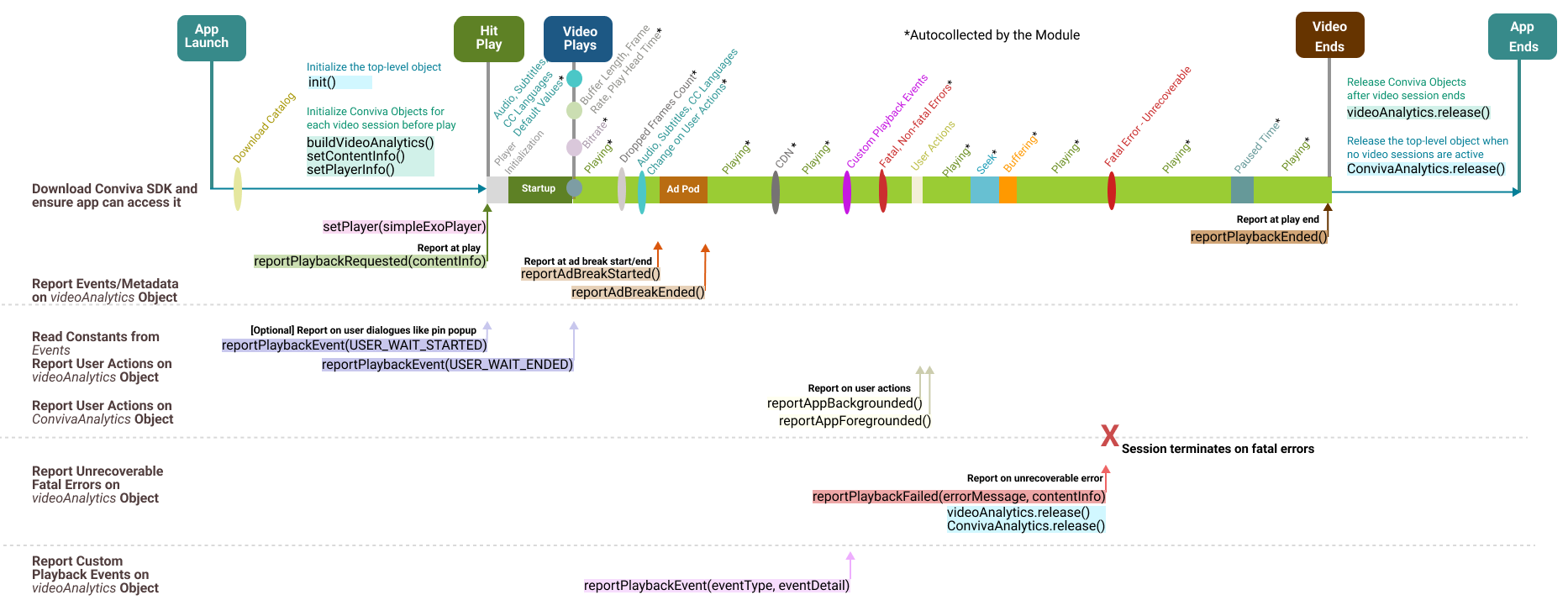
Video Session API Diagram for Android Modules

## Integration Summary * ## Integration APIs **Initialize Objects** ConvivaAnalytics.

Updated 2026-06-30 android, api, table, modules, sensor developer center, sensor integration, integration

Integration Summary

Integration API diagram

Integration APIs

**Initialize Objects**

ConvivaAnalytics.init(Context appContext, String customerKey, Map<String, Object> settings);

Initialize the top-level object.

ConvivaAnalytics.buildVideoAnalytics(getApplicationContext());

This object needs to be instantiated once for each video playback, and is used to report the video-related events in an application. Typically, it is instantiated after the init() call, and ideally just before the user hits play.

videoAnalytics.setPlayerInfo(Map<String, Object> playerInfo);

Call this API to set the Predefined metadata.

videoAnalytics.setContentInfo(Map<String, Object> contentInfo);

Call this API to update or amend metadata.

**Reports Events and Metadata**

videoAnalytics.reportPlaybackRequested(Map<String, Object> contentInfo);

Call this API when:

  • User clicks the video play button

  • Video starts in auto-play mode

  • User replays video

  • A new video starts in play list

It's critical to make this API call correctly to monitor the video experience. For example, if the call is delayed (say, when the video starts rather than the user clicking play*), the Video Startup Time will be under-reported and the Video Start Failures will be missed.

videoAnalytics.setPlayer(exoPlayer);

Set player reference, such as Exoplayer or Brightcove, to Conviva videoAnalytics object.

videoAnalytics.reportAdBreakStarted(ConvivaSdkConstants.AdPlayer adPlayer, ConvivaSdkConstants.AdType adType);

Required, if your application has Ads.

Inform videoAnalytics object that an ad break has been started.

videoAnalytics.reportAdBreakEnded();

Only applicable for custom ad integration, don't call for modules. For more details, refer to the Ad session diagrams.

videoAnalytics.reportPlaybackEnded();

Call this when the video play back ends.

**Report Playback Metrics**

videoAnalytics.reportPlaybackMetric(string key, Object val);

For modules such as Brightcove and Exoplayer, most of the metrics such as player states, seek, buffering, are automatically collected.

  • ConvivaSdkConstants.PLAYBACK.RENDERED_FRAMERATE metric is not autocollected by Exoplayer and Brightcove.

  • ConvivaSdkConstants.PLAYBACK.BUFFER_LENGTH metric is not autocollected by Brightcove.

**Report User Actions**

videoAnalytics.reportPlaybackEvent(ConvivaSdkConstants.Events.USER_WAIT_STARTED.toString()); Optional when the video playback request halts due to user dialogues like pin popup, accepting strong language or violence, or confirming age.

videoAnalytics.reportPlaybackEvent(ConvivaSdkConstants.Events.USER_WAIT_ENDED.toString()); Optional when the user wait time ends.

ConvivaAnalytics.reportAppBackgrounded(); Optional to handle backgrounding events such as pressing home or power off buttons, or attending a phone call.

ConvivaAnalytics.reportAppForegrounded(); Optional to handle foregrounding events.

**Report Errors**

Android modules auto-collect the reportPlaybackErrors

videoAnalytics.reportPlaybackFailed(errorMessage, contentInfo);

When the playback has FATAL errors from which it does not recover, invoke this method, which internally closes the video session.

**Report Custom Playback Events**
videoAnalytics.reportPlaybackEvent(String eventType, Map eventDetail);

For more details about the custom playback events, reach out to your Conviva representative.

**Cleanup Session**

videoAnalytics.release();

ConvivaAnalytics.release();

Call these APIs to release the object on player's sudden exit, application's graceful exit, or when the Conviva object needs to be destroyed.