
Integration Summary
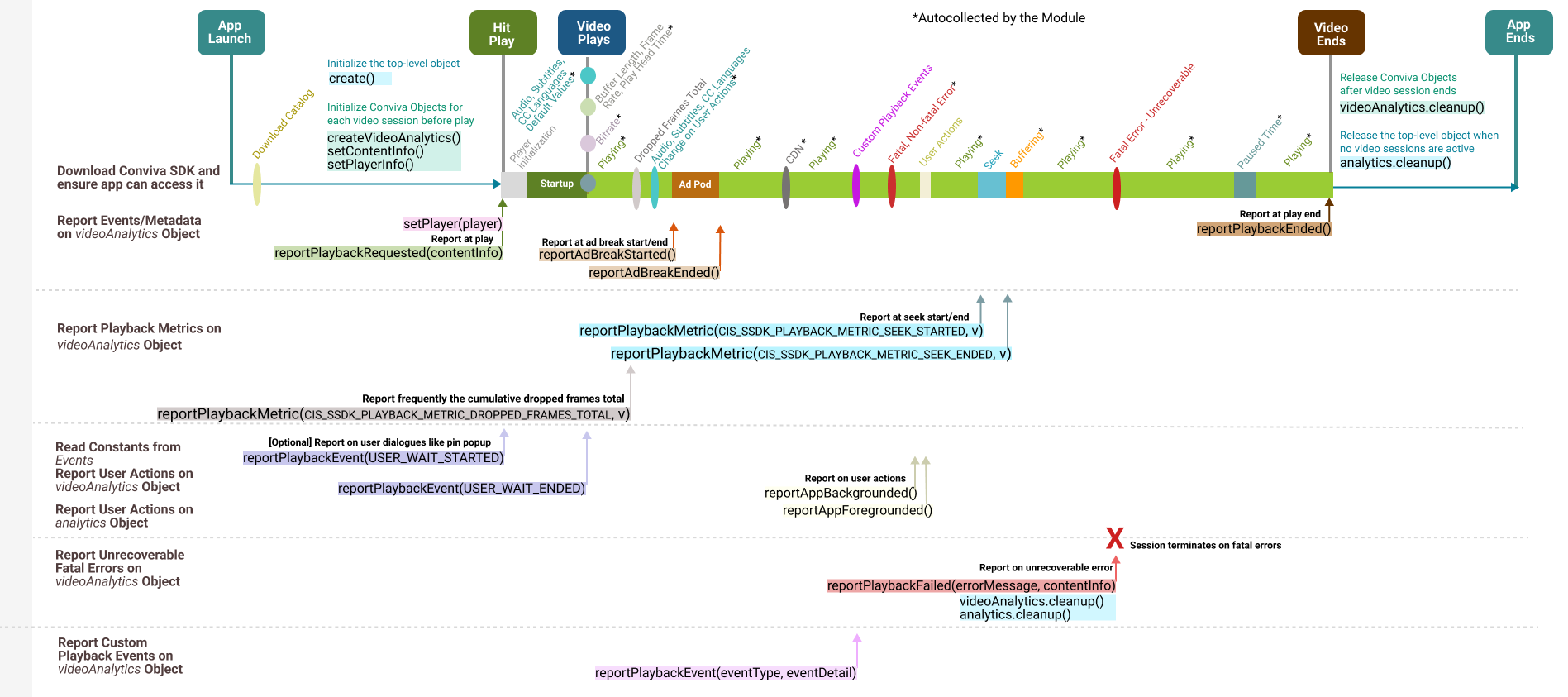
Integration APIs
| **Initialize Objects** |
|
Initialize the top-level object. |
|
This object needs to be instantiated once for each video playback, and is used to report the video-related events in an application. Typically, it is instantiated after the |
|
Call this API to set the Predefined metadata. |
|
Call this API to update or amend metadata. |
| **Reports Events and Metadata** |
|
Call this API when:
It's critical to make this API call correctly to monitor the video experience. For example, if the call is delayed (say, when the video starts rather than the user clicking play*), the Video Startup Time will be under-reported and the Video Start Failures will be missed. |
|
Set player reference, such as AVPlayer or Brightcove, to Conviva videoAnalytics object. |
|
Required, if your application has Ads. Inform videoAnalytics object that an ad break has been started. |
|
Only applicable for custom ad integration, don't call for modules. For more details on CSAI and SSAI ad sessions, see API Diagrams for Custom Ad Integration. |
|
Call this when the video play back ends. |
| **Report Playback Metrics**
For modules such as AVPlayer and Brightcove, most of the metrics such as player states, seek, buffering, are automatically collected. However, there are these metrics that you need to report for modules: |
videoAnalytics.
Report frequently the cumulative dropped frames total |
|
Report when user seeks the video |
|
Report when seek ends |
| **Report User Actions** |
|
|
|
|
|
|
|
|
| **Report Errors**
iOS modules auto-collect the reportPlaybackErrors |
|
when the playback encounters a fatal error from which it does not recover and reported only once. |
| **Report Custom Playback Events** |
videoAnalytics.reportPlaybackEvent(eventName: String, withAttributes: [AnyHashable : Any])
For more details about the custom playback events, reach out to your Conviva representative. |
| **Cleanup Session** |
|
Call these APIs to release the object on player's sudden exit, application's graceful exit, or when the Conviva object needs to be destroyed. |