
Integration Summary
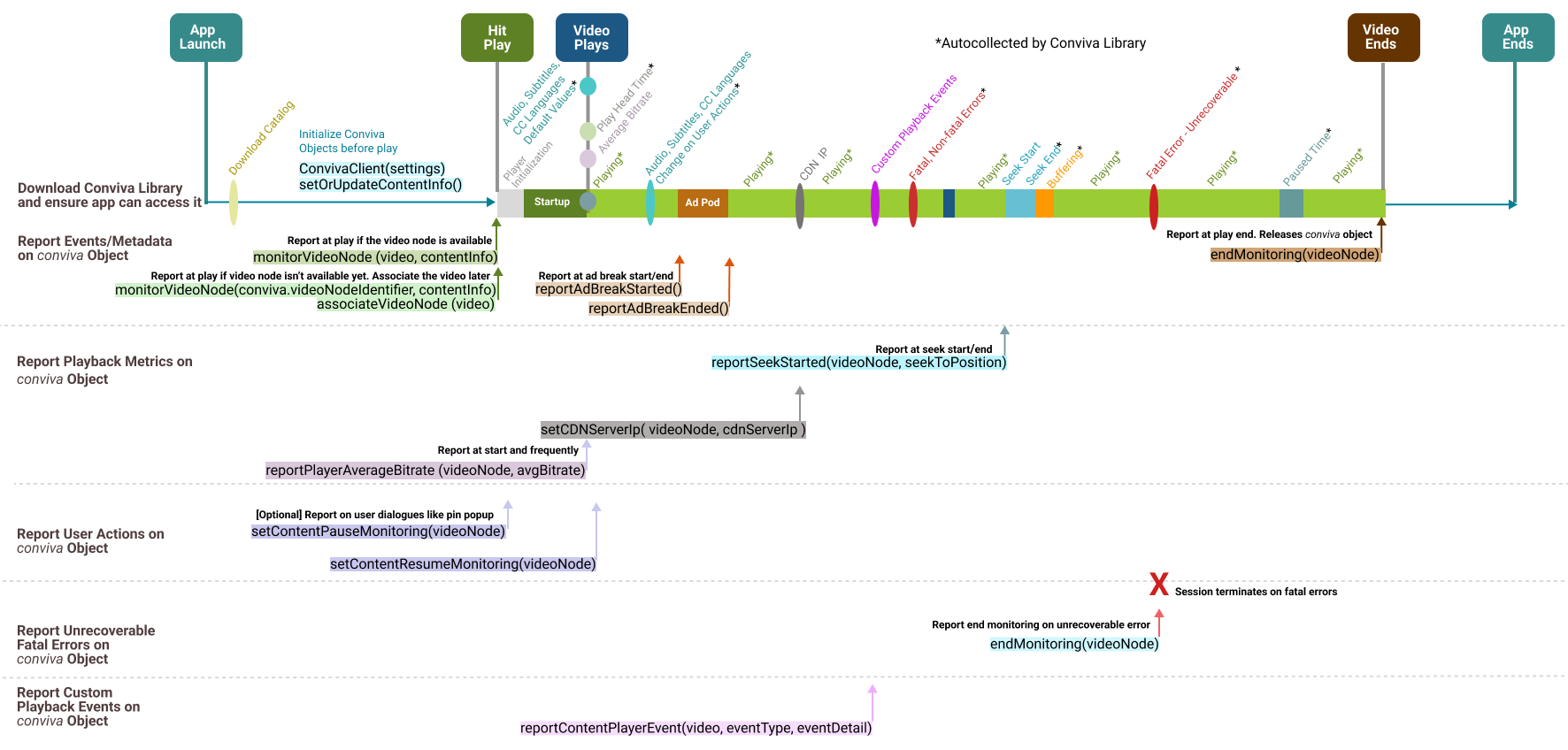
Integration APIs
| **Initialize Objects** |
|
Initialize the top-level object. |
|
Call this API to update or amend metadata. |
| **Reports Events and Metadata** |
|
Report when the video node is available. It's critical to make this API call correctly to monitor the video experience. For example, if the call is delayed (say, when the video starts rather than the user clicking play*), the Video Startup Time will be under-reported and the Video Start Failures will be missed. Call this API when:
|
|
Report when the video node is unavailable yet. Associate the video later.
|
|
Required, if your application has Ads. Inform conviva object that an ad break has been started. |
|
Report when the ad break ends. |
|
Call this when the video play back ends. It releases the Conviva objects without the need to release them explicitly. |
| **Report Playback Metrics**
Most of the metrics such as player states, app backgrounding, foregrounding, and buffering, are automatically collected. However, there are these metrics that you need to report for Roku: |
|
Report when user seeks the video. |
|
Report the CDN IP address |
|
At video start and frequently thereafter |
|
Live content only. App-computed milliseconds behind the live edge (wall clock now minus programDateTime of the fragment on screen). Positive integer. Call every 5 s while the number is valid, at the edge or in DVR. Stop by not calling. Independent of |
|
Live content only. |
| **Report User Actions** |
|
|
|
|
| **Report Errors**
Conviva library auto-collects both fatal and non-fatal playback errors. There's no need to report them. To release the conviva object on unrecoverable fatal error, invoke:
|
| **Report Custom Playback Events** |
conviva.reportContentPlayerEvent(videoNode, eventType as string, eventDetail as object)
For more details about the custom playback events, reach out to your Conviva representative. |
| **Cleanup Session** |
|
Call these APIs to release the object on player's sudden exit, application's graceful exit, or when the Conviva object needs to be destroyed. |