
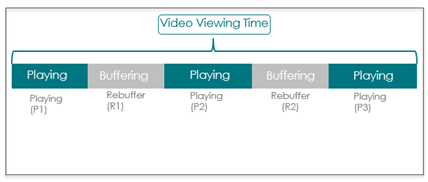
Rebuffering Ratio measures the percentage of total video viewing time (playTime + rebufferingTime) during which viewers experienced rebuffering. Play time is the total time during which the video is rendered on the screen. Both play time and rebuffering time are determined based on player-state (“playing” and “buffering”), playhead movement, and frame rate progression. Rebuffering time includes both seek and non-seek rebuffering, but does not include the buffering time before the first frame of a video is displayed or elapsed time while the video is paused.

-
rebufferingTime = R1 + R2
-
playTime = P1 + P2 + P3
For intervals, Rebuffering Ratio is aggregated across the intervals of the selected time period.

A high Rebuffering Ratio or a significant increase in this metric can be an indication of declining overall network performance and the likelihood of viewer abandonment.
Rebuffering Ratio is available in the following formats:
- Rebuffering Ratio summary: the average Rebuffering Ratio is the total time spent in rebuffering divided by the total viewing time during the selected time period.
- Rebuffering Ratio time series: a time series for the selected time period, where each point is the Rebuffering Ratio for all plays during that specific interval.
Distributions
- Ended Plays vs Rebuffering Ratio Distribution (only available in Custom dashboards): a distribution by preset buckets, where each bucket is the Rebuffering Ratio that occurred for the respective amount of Ended Plays. This distribution can help you to understand your audience tolerance for rebuffering and illustrates the actual impact of any rebuffering outliers on the average rebuffering.
- Play Duration vs Rebuffering Ratio Distribution (only available in Custom dashboards): a distribution by preset buckets, where each bucket is the Rebuffering Ratio range that occurred within the respective play durations. This distribution can help you to understand your audience tolerance for rebuffering and the actual impact of any rebuffering outliers on the average rebuffering.
You can use metric filtering to diagnose only the sessions that had high percentage of dropped frames. For more details on metric filters, see Metric filtering.
For additional analysis, Connection Induced Rebuffering Ratio measures only non-seek rebuffering. Also, Video Restart Time measures the number of seconds after user-initiated seeking until video begins playing.
Related Details
|
Metric Details |
Description |
|---|---|
| Dashboards and Metric Presentation |
|
| Dimensions | Use MetricLens dimensions to filter this metric by metadata segments for enhanced root cause analysis. For example, limiting data to specific ISP and player dimensions can narrow the root cause of higher Rebuffering Ratio to a known provider and player type. |
| Diagnostics |
The Diagnostic page presents detailed information about the Rebuffering Ratio and the specific errors in selected time ranges. You can also apply Filters to see where failures are occurring, for example by CDN/Resource and ASN, and which assets are affected most often. For more information about diagnosis with this metric, see Diagnostics. |
| Manual Alert Support |
Yes. Receive alerts when Rebuffering Ratio exceeds pre-defined threshold values based on customizable alert conditions. This event may fire multiple times per video view. For more information about setting alerts for this metric, see Alerts. |
| AI Alert Support | Yes. For more information about setting AI alert sensitivity and receiving AI alerts for this metric, see AI Alerts. |
| Metric Adjustments |
Conviva removes continuous rebuffering of more than 90 seconds (extended continuous rebuffering) from the rebuffering metrics. This accounts for scenarios a when player gets stuck reporting a rebuffering state for an extended period. Micro rebuffering, continuous rebuffering less than 200 milliseconds, is not excluded. |
For more metric definitions, see the Metric Dictionary.