
Conviva App Sensor Integration
Conviva App Sensor Installation and Integration
Conviva Web (JavaScript) Sensor SDK Integrations
Low-code integration of Conviva App Sensor enables automatic and semantic-less data collection, and tracks application specific events and state changes.
Integrate the Conviva Web (JavaScript) SDK into the Web application. Use NPM-based SDK integration for React/Angular, and Script-based SDK integration for legacy or lightweight environments.
Integration Methods
- AI-Assisted (Beta): Use a prompt to instruct AI coding assistants, such as Cursor, Claude, or GitHub Copilot to automatically integrate the SDK, without requiring human guidance beyond initial inputs.**Prompt for NPM-based Integration
Integrate Conviva JS SDK using https://github.com/Conviva/conviva-js-appanalytics
**Prompt for Script-based Integration
Integrate Conviva JS SDK using https://github.com/Conviva/conviva-js-script-appanalytics
For more details to help get started with App Sensor integration, see:
App Sensor Integration Overview
Manual: Access the respective GitHub page NPM-based or Script-based, to follow the integration intsructions and copy code snippets. Follow this method if you prefer step-by-step control over the SDK integration. For more details to help get started with App Sensor integration, see:
Migration from version 0.x.x to version 1.x.x
While migrating from Conviva Web (JavaScript) version 0.x.x to version 1.x.x, you need to replace some older code as per the following table:
| JavaScript |
Version 0.x.x Codes to be removed |
Version 1.x.x Codes to be added |
|---|---|---|
| NPM-based |
|
|
| NPM-based |
|
|
| NPM-based |
|
No need to add any codes after removing the corresponding code. |
| Script-based |
|
|
| Script-based |
|
|
| Script-based |
|
No need to add any codes after removing the corresponding code. |
Google Tag Manager (GTM) Integration with Conviva Web (JavaScript) Sensor
Integrate Google Tag Manager with Conviva Web (JavaScript) App Sensor.
| Steps |
Description |
|||||||||||||||||||||||||||||||||||||||||||||||||||||||||||||||||||||||||||||||||
|---|---|---|---|---|---|---|---|---|---|---|---|---|---|---|---|---|---|---|---|---|---|---|---|---|---|---|---|---|---|---|---|---|---|---|---|---|---|---|---|---|---|---|---|---|---|---|---|---|---|---|---|---|---|---|---|---|---|---|---|---|---|---|---|---|---|---|---|---|---|---|---|---|---|---|---|---|---|---|---|---|---|---|
| Prerequisites |
|
|||||||||||||||||||||||||||||||||||||||||||||||||||||||||||||||||||||||||||||||||
|
Add Template to GTM (Follow either Option A or Option B) |
Open GTM container and navigate to the Templates tab.
Download the template.tpl file from the GitHub repository.
|
|||||||||||||||||||||||||||||||||||||||||||||||||||||||||||||||||||||||||||||||||
| Create Variables |
Navigate to Variables -> User-Defined Variables -> New to create the following variables. Use the exact names so that tags can reference them.
Conviva -- Customer Key: Your Conviva Customer Key.
Data Layer Variables (For each variable, set the version of Data Layer Variable Version to Version 2.)
|
|||||||||||||||||||||||||||||||||||||||||||||||||||||||||||||||||||||||||||||||||
| Create Triggers |
Navigate to Triggers -> New to create following triggers.
|
|||||||||||||||||||||||||||||||||||||||||||||||||||||||||||||||||||||||||||||||||
| Create Tags |
Navigate to Tags -> New, then select the Conviva DPI JS SDK tag type for each tag below. Init Tag Ordering and Pre-Init Queue (The behavior depends on which SDK version are using.)
Use SDK v2.0.0 or above for the best experience. The pre-init queue eliminates timing issues and simplifies your GTM setup. You don't need to worry about tag firing order. |
|||||||||||||||||||||||||||||||||||||||||||||||||||||||||||||||||||||||||||||||||
| Initialize (init) |
Loads the SDK and initializes tracking. Fire once per page.
Even with SDK v2.0.0's pre-init queue, using **Initialization -- All Pages** is still recommended as a best practice to minimize queue buffering time. |
|||||||||||||||||||||||||||||||||||||||||||||||||||||||||||||||||||||||||||||||||
| Track Page View |
Sends a page-view event. Required for correct session and page metrics.
Trigger
|
|||||||||||||||||||||||||||||||||||||||||||||||||||||||||||||||||||||||||||||||||
| Track Custom Event |
Sends a named custom event with optional data.
If both the table and the variable are set, they are merged. Variable keys take priority. TriggerdataLayer Push If you push multiple conviva_customEvent events on the same page, GTM's Data Layer Variables may return merged/stale data from a previous push. See Avoiding Merged Event Data in Advanced Configuration to resolve this. Forwarding existing events to Conviva If your site already pushes events to GA4 or another analytics tool (for example, Step 1: Create a Custom JavaScript variable: Conviva -- Current Event Data This variable reads data directly from the triggering push, bypassing GTM's merged composite state: Step 2: Configure the Conviva Custom Event tag
Step 3 – Choose a trigger strategy
One trigger and one Conviva tag handle all matched event types. Why not use Data Layer Variables?
GTM merges all dataLayer.push() calls into a single composite state. A Data Layer Variable reading a key that appears in multiple pushes returns the last-written value — which may be from a different, earlier event. The {{Conviva -- Current Event Data}} Custom JS variable reads directly from the individual push object at fire time, so each firing gets only that push's own keys. |
|||||||||||||||||||||||||||||||||||||||||||||||||||||||||||||||||||||||||||||||||
| Track Revenue |
Sends a purchase/revenue event with fixed event name conviva_revenue_event. Enables revenue metrics: Total Revenue, Revenue per Visitor, Average Order Value, Average Cart Size. Required Fields
Optional Fields
Line-Item Object Keys Each item in the Purchased items array supports:
TriggerdataLayer Push |
|||||||||||||||||||||||||||||||||||||||||||||||||||||||||||||||||||||||||||||||||
| Set User ID |
Sets or updates the viewer/user ID. Fire after login or when user identity is known.
Trigger dataLayer Push |
|||||||||||||||||||||||||||||||||||||||||||||||||||||||||||||||||||||||||||||||||
| Set Custom Tags |
Sets global key/value tags applied to all subsequent events.
If both are set, they are merged. Variable keys take priority. Trigger dataLayer Push |
|||||||||||||||||||||||||||||||||||||||||||||||||||||||||||||||||||||||||||||||||
| Unset Custom Tags |
Removes previously set custom tag keys.
TriggerdataLayer Push |
|||||||||||||||||||||||||||||||||||||||||||||||||||||||||||||||||||||||||||||||||
| Track Error |
Reports an error for error-rate analysis.
TriggerdataLayer Push |
|||||||||||||||||||||||||||||||||||||||||||||||||||||||||||||||||||||||||||||||||
| dataLayer Reference |
Quick reference for all supported events. Push the
|
|||||||||||||||||||||||||||||||||||||||||||||||||||||||||||||||||||||||||||||||||
| Script Source Options |
Main SDK
SDK v2.0.1 (default) includes the built-in pre-init queue. If you select v1.5.5, see Init Tag Ordering and Pre-Init Queue for important differences. Cohort Replay SDK When Init with Cohort Replay is enabled:
Replay always loads before the main SDK. The template handles this automatically. Customer-Hosted Permissions The template only allows scripts from
Without this step, GTM blocks the script silently. |
|||||||||||||||||||||||||||||||||||||||||||||||||||||||||||||||||||||||||||||||||
| Advanced Configuration |
Consent Mode To gate tracking on user consent, assign the Init tag to a consent-based trigger instead of "Initialization -- All Pages". All other Conviva tags depend on Init, so gating Init effectively gates all tracking. For the SDK v2.0.0 and above, with the pre-init queue, tags that fire before a consent-gated Init are automatically buffered and replayed once consent is granted and Init runs. On v1.5.5, those tags would fail. Cross-Subdomain Client ID Check Enable Client ID in cookies in the Init tag to share clientId across subdomains such as, Client ID from URL or dataLayer To sync Set the Init tag's Avoiding Merged Event Data GTM merges all dataLayer.push() calls into one global state. If you push multiple custom events rapidly, variables may return stale data from a previous push. To always read the most recent push, use Custom JavaScript variables instead of Data Layer Variables for the Custom Event tag: Conviva -- Custom Event Name (from last push): Conviva -- Custom Event Data (from last push): Then in your Custom Event tag, set Event name to Forwarding Existing Events to Conviva If your site already pushes events to GA4 or another analytics tool and you want to forward them to Conviva without changing your existing dataLayer pushes, use one Conviva Custom Event tag with GTM's built-in Create a Custom JavaScript variable: Conviva -- Current Event Data This variable scans backwards through Configure the Conviva Custom Event tag:
Trigger options:
Device Metadata Expand the Device Metadata group in the Init tag to pass device information. All fields are optional.
Tag Sequencing With SDK v2.0.0 and above, tag sequencing is generally not needed -- the pre-init queue handles timing automatically. However, if you are using v1.5.5, or want explicit ordering for other reasons, use Tag Sequencing:
|
Salesforce Commerce Cloud Integration with Conviva Web (JavaScript) Sensor
Integrate Salesforce Commerce Cloud with Conviva Web (JavaScript) App Sensor.
| Steps |
Description |
|---|---|
| Prerequisites |
|
| Include Sensor |
Open the Site’s base package htmlHead.isml file (for example, app_storefront_base/cartridge/templates/default/common/htmlHead.isml) and add the following code before any other scripts: |
| Initialize Tracker |
In the Site's base package htmlHead.isml file (for example, app_storefront_base/cartridge/templates/default/common/htmlHead.isml), add the following code immediately after the tracker include script:
Code |
| Set UserID |
Set the User ID if you have any logged-in customer ID (for example, It tags all events with the Shopper’s ID. |
| Track Page View |
Track page view events after the pages get rendered completely. For Salesforce SPA (Single Page Application) or componentized pages, call the Page View on route/content changes. By default, it uses |
| Track Custom Events |
Track any custom events (for example, Add to Cart) |
Shopify Merchant Store Integration with Conviva Web (JavaScript) Sensor
Integrate Conviva Web (JavaScript) App Sensor with Shopify Merchant Store.
Prerequisites for Shopify Marchant Store Integration
CUSTOMER_KEYas provided by Conviva or your analytics admin.App Name and Version for the shop (for example, My Store Shopify/1.0.0)
Conviva Web (JavaScript) Sensor. Download the latest
convivaAppTracker.jsscript file from here.Upload the
convivaAppTracker.jsscript file to your hosted server.
Configuring Conviva Web (JavaScript) SDK in Shopify Theme
Perform the following steps in Shopify Theme to install the tracker and enable it for auto-collecting UI events.
| Steps |
Description |
|---|---|
| Add Tracker |
|
| Initialize Tracker |
Open the theme.liquid file and add the following code with:
|
| Set UserID |
Set the User ID if you have any logged-in customer ID (for example, In the theme.liquid file, add the following script before any auto-collection events: |
Install Conviva Web (JavaScript) SDK in Shopify Web Pixel
Perform the following steps in Shopify Web Pixel to install the tracker and enable it for page view and custom events tracking.
| Steps |
Description |
|---|---|
| Add Tracker |
|
| Initialize Tracker |
Initialize the tracker with the same value of appId, convivaCustomerKey, and appVersion, as specified for Shopify Theme integration. |
| Track Page View |
Track page view events after the pages get rendered completely. Subscribe to Shopify’s Pixel Event API to track page view events. For complete property list, see Shopify’s Web Pixel Event API documentation. To track the page views, subscribe to the events: Always subscribe and set it. |
| Track Custom Events |
OR
|
Conviva App Sensor Installation
To integrate the ConvivaApp Sensor, follow the README file instructions in the GitHub repository.
Conviva Video Sensor Integration
Quick Integration
Follow these instructions to complete the Conviva Video Sensor integration on JavaScript players:
Step 1: Install Conviva Library
Developer Steps
Step 2: Configure Metadata
Developers Steps
Step 3: Report Events and Metadata
Developer Steps
Step 4: Integrate Video Players
Developer Steps
Step 5: Handle User ActionsUse Conviva methods to report custom events. Use Conviva methods to control data collection and delete collected data. Developer Steps
Step 6: Clean Up Session
Developer Steps
|
Prerequisites
Obtain your account's CUSTOMER_KEYs.**Conviva provides a test account and a production account for Test and Production environments, respectively. You can find your CUSTOMER_KEY here: Pulse - Account Info. Ask your Conviva representative for assistance if you have problems accessing it.
Pass the gatewayUrl parameter to init() method of Conviva SDK. The gatewayUrl is specific for your account and shall ONLY be used for tests, never for production deployment.
Sample gatewayUrl for Testing:
https://<*customer_key*>.ts-testonly.conviva.com
IMPORTANT: If there's any doubt on how to set the gateway URL, consult your Conviva representative - this is a critical parameter. For production, Conviva library uses the automatically-assigned gatewayUrl.
Use Touchstone 2.0 in Pulse to perform self-validation and debugging of video sensor integration
For Conviva JavaScript Sensor Integration, you can use any custom gateway URL with a proxy service setup. This is applicable for JavaScript version 4.7.13 onwards.
Plan your metadata
Conviva supports Pre-defined, Device, and Custom metadata. Work with your project team to determine the need to collect any custom metadata. It's also recommended to work with your Conviva representative to create your metadata plan prior to integration.
Integration Summary
Click an image to view a summary of the API call sequence:**
|
JavaScript Custom Integration (SDK Only) 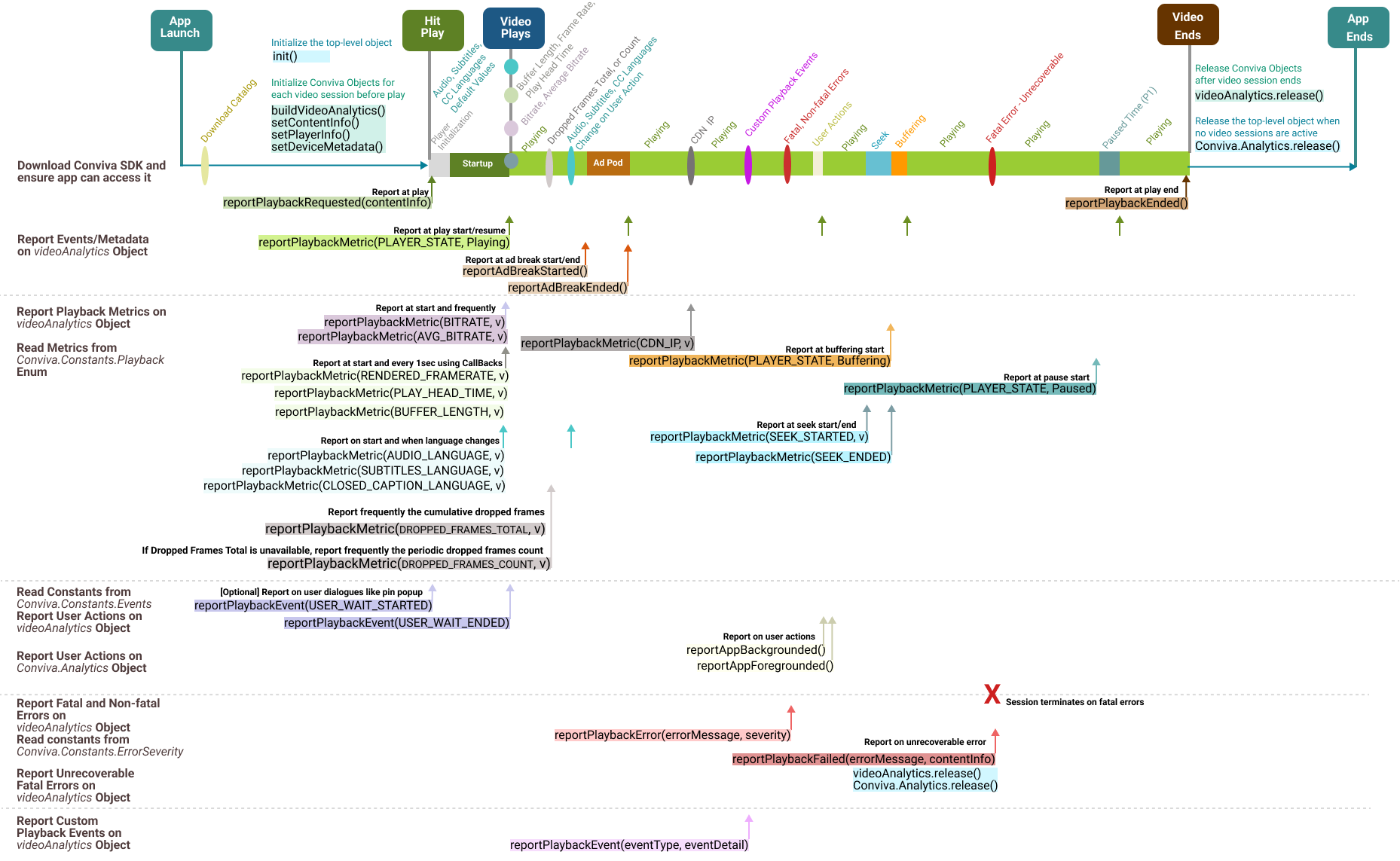
|
Conviva JavaScript VideoJS Player Module 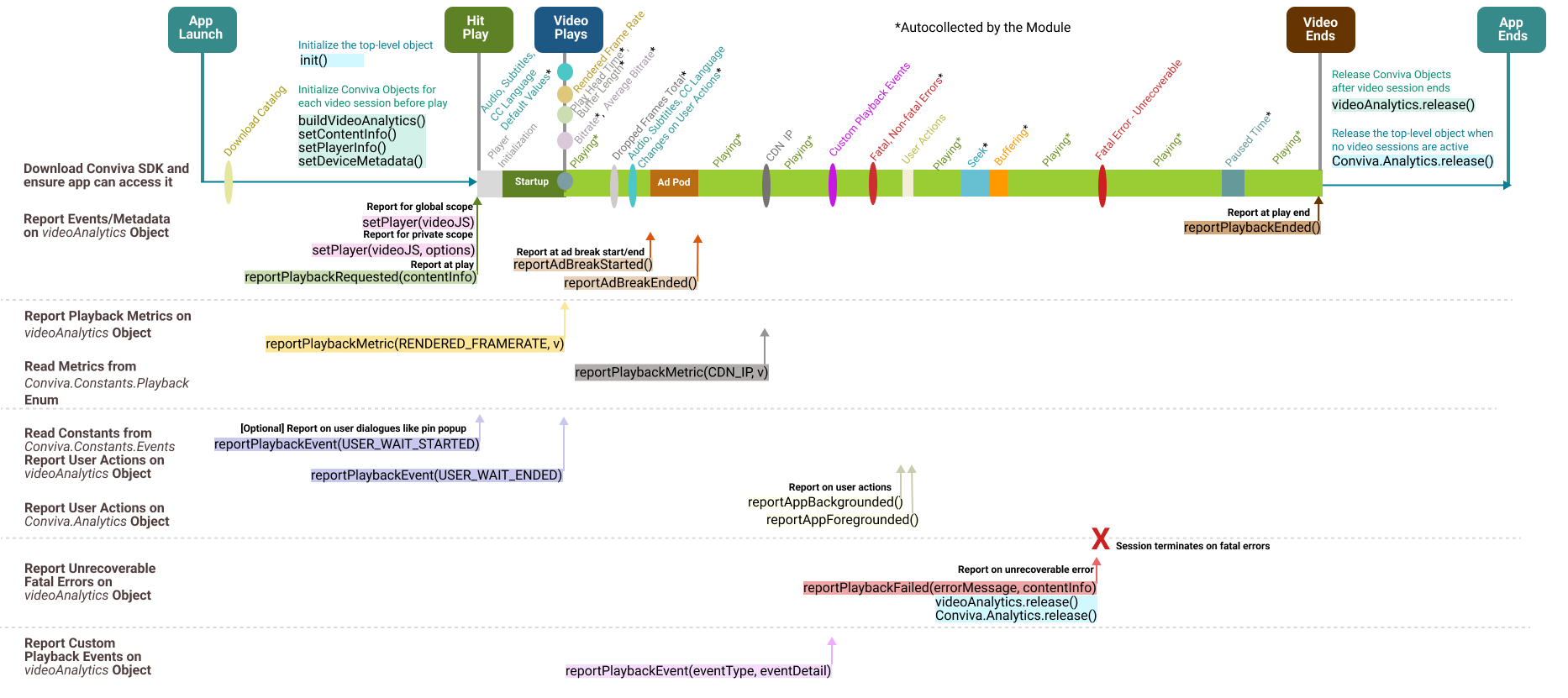
|
|
Use for video players other than VideoJS, HTML5VideoElement, **Samsung Taizen AVPlay, Chromecast CAF, Playstation Trilithium, Playstation WebMAF. Report all the playback metrics, such as bitrate, player states, seek, and buffering. For API call details, refer to JavaScript Custom Integration API List. |
Use for VideoJS video players. Autocollects most playback metrics, such as bitrate, player states, seek, and buffering. For API call details, refer to JavaScript VideoJS Module Integration API List. |
|
Conviva JavaScript Chromecast CAF Player Module 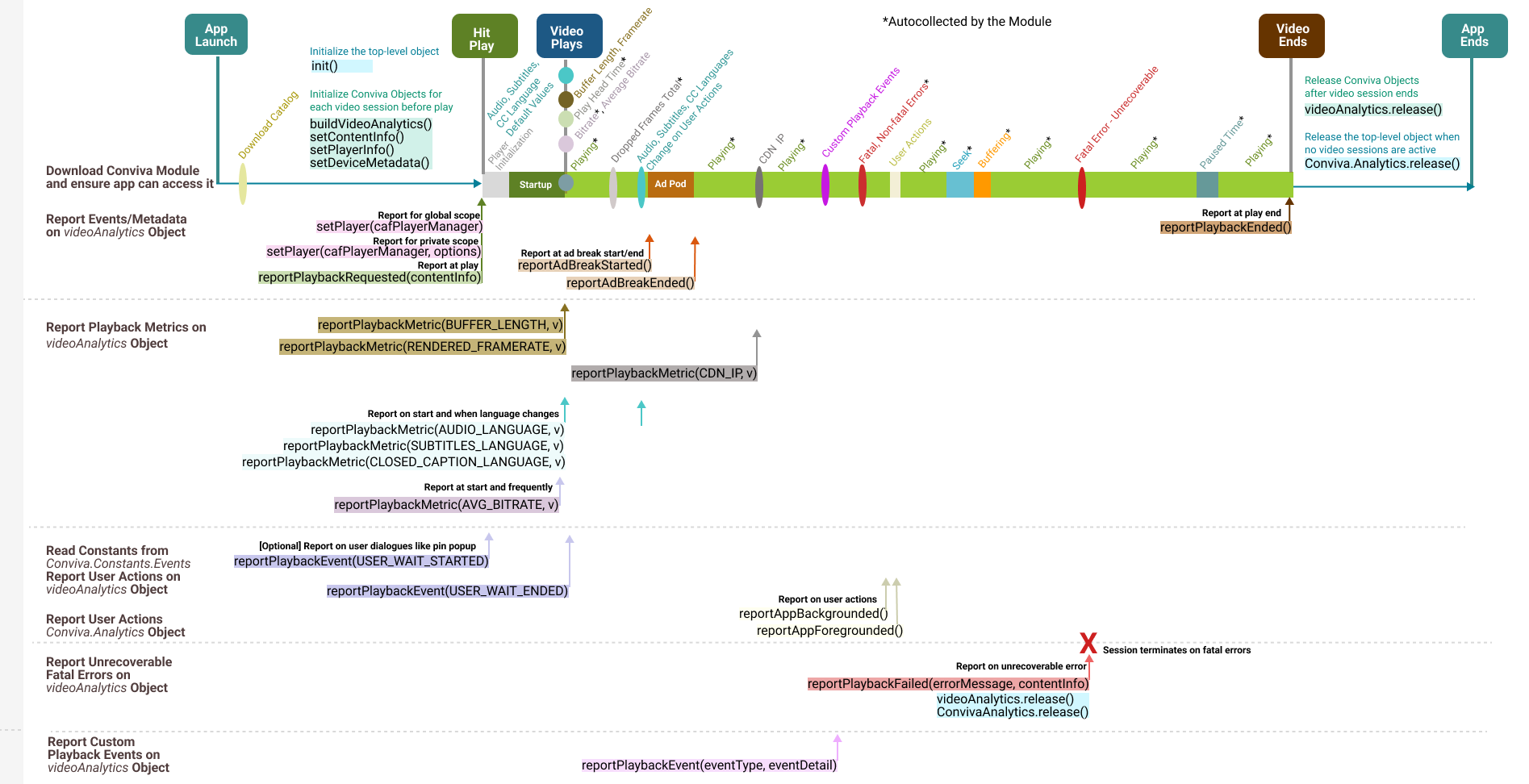
|
Conviva JavaScript Samsung Tizen AVPlay Module 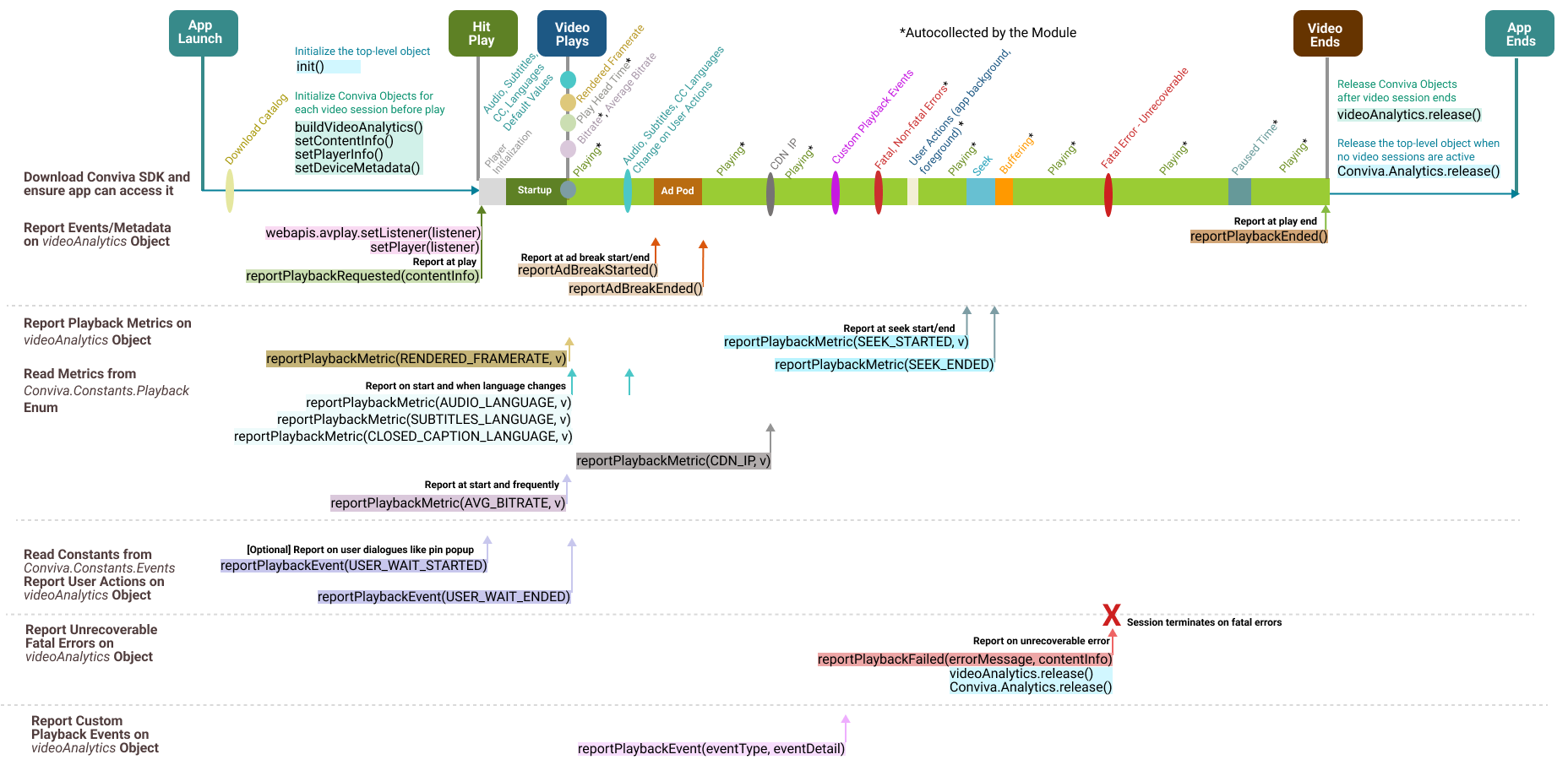
|
|
Use for Chromecast CAF video players. Autocollects most playback metrics, such as bitrate, player states, seek, and buffering. For API call details, refer to JavaScript Chromecast CAF Module Integration API List. |
Use for Samsung Tizen AVPlay video players. Autocollects most playback metrics, such as bitrate, player states, and user actions. For API call details, refer to JavaScript Samsung Tizen Module Integration API List. |
Integration Summary Steps
Integration Summary Steps
Install Conviva Library
Download the library and add dependencies.
Initialize the
Conviva.Analyticsusing your CUSTOMER_KEY.Create an instance of
videoAnalyticsobject to report video related events.If your player has ads: Create an instance of
adAnalyticsobject to report ad related events.
Configure Metadata
Implement the metadata by following the instructions to use the pre-defined keys, as well as custom metadata, if applicable.
Implement device metadata. By default, Conviva sensor modules autocollects few device metadata.
Report Events and Metadata
Implement the
videoAnalytics.reportPlaybackRequested(contentInfo)method to report playback attempt request along with metadata (content, workflow, audience, and other relevant metadata).Use the
videoAnalytics.reportPlaybackEnded()method to report the of end playback.
Integrate Video Players
Add Conviva module dependency for your video player (if available), and pass player instance to Conviva by calling
videoAnalytics.setPlayer(playerInstance). If following custom integration guidelines, implement video and metric reporting as prescribed by the corresponding specification.Add Conviva module dependency for your ad player (if available), and pass ad manager instance to Conviva by calling
adAnalytics.setAdListener(adManagerInstance, extraInfo). If following custom ad manager guidelines, implement ad metadata, events and metric reporting as prescribed by the corresponding specification.
Handle User Actions
Report Network Metrics.
Clean Up
Call 'release' methods to cleanup Conviva.Analytics, videoAnalytics, adAnalytics objects upon application exit.
Test and Validate
Test your integration using Touchstone. Follow the instructions and tutorials at Self-Validation Use Cases Videos.
Be sure to replace your TEST CUSTOMER_KEY with the PRODUCTION key to go live with your application, and generate the session traffic to the following Touchstone gateway URL:
https://.ts-testonly.conviva.com Done! Analyse your data in Pulse and improve your viewer experience - let's make video experience better!
API Reference Documentation
The JavaScript SDK API reference documentation can be found here.
1. Install Conviva Library
Add Conviva Libraries and Configure Dependencies
|
Add core SDK |
You can add the Conviva libraries by choosing one of the following options:
From Core SDK version 4.4.3 onwards Conviva supports installation through npm and yarn package managers. To install using the npm package manager, use:
To install using the yarn package manager, use:
To download and add the library explicitly from Conviva GitHub, refer: https://github.com/Conviva/conviva-js-coresdk From Core SDK version 4.1.1 onwards, Conviva shares 2 different files:
Refer to this sample code which includes the Conviva JS SDK: |
|---|---|
|
Add dependencies |
If using one of the players Conviva provides a module for, refer to Integrate Video Players for the details of player integration. |
|
Add dependencies for Ad SDKs |
If using one of the Ad SDKs Conviva provides a module for, download and add the library explicitly: https://github.com/Conviva/conviva-js-imasdk Refer to Integrate Ad Managers for the details of ad manager integration. |
|
Initialize the top level object |
Initialize the top level Conviva Analytics object:
Click the arrow to view the reference implementation
No need to set gatewayUrl and LogLevel settings for your production release explicitly. The Conviva sensor has the right default value.The allowed parameters are:
Sample code illustrating initialization with/without debug: IMPORTANT: No need to set Expected Errors Due to Dual Stack IPv4/v6 Network SupportExpected Errors Due to Dual Stack IPv4/v6 Network SupportWhen the Conviva sensor is initialized with production settings, the SDK sends a single request to the endpoints below:
Sending both requests enables correlation of IPv4 and IPv6 addresses in dual-stack networks. If only IPv4 or IPv6 addressing is used (single-stack networking), it is expected that one request will fail. All the following requests will be sent to the endpoint below which supports both IPv4 and IPv6:
|
|---|---|
Initialize the video object |
Create This object will be used throughout the entire application lifecycle to report video related events. |
Initialize the ad object |
Create This object will be used throughout the entire application lifecycle to report ad related events. This method requires |
2. Configure Metadata
Metadata enables analysis of your data using different dimensions, for example, content, audience, device, workflow, player, and operating system.
Conviva categorizes metadata tags into three buckets (Predefined, Device, Custom).
Pre-defined Video and Content Metadata
Conviva defines the constants or fixed string keys for commonly used metadata. These metadata keys provide critical information about video and ad content, versioning, workflow.
test
IMPORTANT: In case of Conviva modules used for ads or video integration, Conviva autocollects certain fields to simplify the integration. Please refer to the particular module specification for details.
The table below provides the pre-defined metadata fields.
IMPORTANT: Conviva modules for video players only capable of autocollecting few metadata (such as FRAMEWORK_NAME, FRAMEWORK_VERSION, DURATION, ASSET_NAME...) and the rest of the metadata shall be set by your application. Please refer to the particular module metadata section for details.
IMPORTANT: To assign content category labels, such as Audio, Trailer, Tile Play, or Short Video, use the c3.cm.categoryType pre-defined content metadata constant.
Constants for Pre-defined Video and Content Metadata
Constants for Pre-defined Video and Content Metadata
| Key / Constant | Type | Implementation Note |
|---|---|---|
|
Conviva.Constants.ASSET_NAME |
string | The unique name for each stream/video asset. Values
are up to your choice, but a human-readable text prefixed with the unique video
ID works best in most Conviva sensors.This provides for clarity in
reports and makes most popular content easily identifiable. Pattern: [videoID]
Video Title
The following are typical patterns for VOD (movies and episodic content)
and Live streams:
|
|
Conviva.Constants.IS_LIVE |
enum | Denotes whether the content is video on-demand or a live stream. Affects the
computation and availability of the Conviva metrics.
Acceptable values:
Conviva.Constants.StreamType.VOD
Conviva.Constants.StreamType.LIVE |
| Conviva.Constants.PLAYER_NAME | string | A string value used to distinguish video players (applications). Simple values that are unique across all of your integrated platforms work best here. If the same player used across multiple platforms, e.g., Tizen, LG TV, WEB, give separate names for each application / platofrm: e.g., "JS Tizen", "JS LGTV", "JS WEB". Do not include the build or version number in this property. The intention is to have a simple way of differentiating data from different players / platforms. |
| Conviva.Constants.VIEWER_ID | string | Required for Viewers Module. A unique identifier to distinguish individual viewers or devices through Conviva's Viewers Module. The value shall be unique abstract user's identifier. If user is anonymous, do not set any value for this tag. |
| Conviva.Constants.STREAM_URL | string |
The manifest URL of the video stream.
The Conviva backend config server attempts to map a portion of StreamURL into a CDN name. For example: In the URL The URL values reported in the streamURL are case insensitive. The streamURLs with either uppercase or all lowercase are acceptable. |
| Conviva.Constants.DEFAULT_RESOURCE | string |
This value specifies the video server or CDN name from where the streaming resource is played. Set this field when the video server resource cannot be inferred from the STREAM_URL. For example, if the streamURL is The DEFAULT_Resource value is case sensitive. If the resource name is initially reported as AKAMAI (uppercase) and subsequently modified in the app to akamai (lowercase), it is necessary to inform Conviva about the change because both need to be mapped in the Conviva backend configuration server to ensure that both point to the same CDN name (AKAMAI).
|
| Conviva.Constants.DURATION | integer | Duration of the video content, in seconds. |
| Conviva.Constants.ENCODED_FRAMERATE | integer | Encoded frame rate of the video stream in frames per second. |
| Conviva.Constants.FRAMEWORK_NAME | string | Video Player Framework Name.
NOTE: Autocollected if Conviva module used for video player integration, required for custom integration.
Otherwise, set using the API |
| Conviva.Constants.FRAMEWORK_VERSION | string | Video Player Framework Version.
NOTE: Autocollected if Conviva module used for video player integration, required for custom integration.
Otherwise, set using the API |
| "c3.app.version" | string | Application build version. Shall have the same value for both ads and video. |
| "c3.cm.contentType" | string | Advanced content delivery methods along with Live and VOD.
Acceptable values: "Live", "Live-Linear", "DVR", "Catchup", "VOD". |
| "c3.cm.channel" | string | The channel on which the content is consumed.
Example: "ABC". |
| "c3.cm.brand" | string | The name of the brand to which the content belongs.
Examples: "ABC X", "ABC Y". |
| "c3.cm.affiliate" | string | Affiliate or MVPD name for TV Everywhere authenticated services.
Examples: "Xfinity", "Comcast". |
| "c3.cm.categoryType" | string |
Content business categories of interest. Use this constant to assign content category labels, such as Audio, Trailer, Tile Play, or Short Video. Examples: "Episodic", "Movies", "News", "Sports", "Events", "Informercials", "Shorts", "Promos", "Audio", "Tile Play", "Short Videos", "Trailer". |
| "c3.cm.name" | string | Name of CMS Provider.
Examples: "CMS", "ROVI", "TMS". |
| "c3.cm.id" | string | Unique asset identifier to query CMS system to gather additional asset metadata information for a specific asset.
Example: "003b094d-fc5c-3d5a-8ed0-301bf848291e". |
| "c3.cm.seriesName" | string | The name of Series. Set the value only if the metadata cannot be gathered from CMS System. Null if not applicable.
Examples: "Friends", "Null". |
| "c3.cm.seasonNumber" | string | The Season number. Set the value only if the details cannot be inferred from Asset Provider Server. Null if not applicable.
Examples: "1", "Null". |
| "c3.cm.showTitle" | string | The name of the Episode or Show Title. Set the value only if the details cannot be inferred from Asset Provider Server. Null if not applicable.
Examples: "The One with All the Cheesecakes", "Null". |
| "c3.cm.episodeNumber" | string | The Episode number. Set the value only if the details cannot be inferred from Asset Provider Server. Null if not applicable.
Examples: "3", "Null". |
| "c3.cm.genre" | string | The Primary content genre. Set the value only if the details cannot be inferred from Asset Provider Server. Null if not applicable.
Examples: "Drama", "Null". |
| "c3.cm.genreList" | string | The list of the applicable content genre. Set the values in a comma separated list only if the details cannot be inferred from Asset Provider Server. Null if not applicable.
Examples: "Drama, Crime, Political, Violence", "Null" |
| "c3.cm.utmTrackingUrl" | string | The UTM parameters in the URL track the effectiveness of online marketing campaign across traffic sources and publishing media. Autocollected from window.location.search, if not set by the application. Conviva uses CONTAINS logic to parse the individual UTM parameters from the URL provided, so either the full URL or just the UTM parameters is acceptable.
Example values: This tag is only applicable for web and mobile devices. |
Device Metadata
Any Device metadata such as device brand, manufacturer, model, type, version, operating system
name and version, category which are common for all the concurrent playback with in one
Analytics instance can be reported using the Conviva.Analytics.setDeviceMetadata(/* object */ deviceMetadata):
deviceMetadata:objectcontaining the key - value pairs ofConviva.Constants.DeviceMetadataand
string/Conviva.Constants.DeviceType/Conviva.Constants.DeviceCategory types.
We recommend consulting to your Conviva representative in case you decide to customize your device metadata.
Device Metadata Instructions
The table below provides the list of pre-defined metadata for device metadata.
var deviceMetadata = {};
deviceMetadata[Conviva.Constants.DeviceMetadata.CATEGORY] = Conviva.Constants.DeviceCategory.WEB;
// set the rest of the required metadata fields as per the table below
Conviva.Analytics.setDeviceMetadata(deviceMetadata);
The table below provides the list of device metadata keys of Conviva.Constants.DeviceMetadata type:
| Key | Type | Description | Example Values |
|---|---|---|---|
| BRAND | string | Brand of the device | "Apple", "Samsung", "Huawei", "Google" |
| MANUFACTURER | string | Manufacturer of the device | "Samsung", "Apple", "HTC", "Sony" |
| MODEL | string |
Model of the device [Critical Key] For more details, refer to the API Reference document, and search for the key. |
"iPhone 6 Plus", "HTC One", "Roku 3" |
| TYPE | Conviva.Constants. DeviceType | Type of the device. Only allows the DeviceType values and discards any other string values | Conviva.Constants.DeviceType.
DESKTOP
Conviva.Constants.DeviceType. CONSOLE_LOG Conviva.Constants.DeviceType. MOBILE |
| OS_NAME | string | Name of the operating system used by the device, in uppercase | "WINDOWS", "LINUX", "IOS", "MAC", ANDROID", "FIREOS", "ROKU", "PLAYSTATION",
"CHROMEOS" |
| OS_VERSION | string | Version of the operating system used by the device | "10.10.1", "8.1", "T-INFOLINK2012-1012", "Fire OS 5" |
| CATEGORY | Conviva. Constants. DeviceCategory |
Device Category to which the used device belongs to. Only allows the Constants.DeviceCategory values and discards any other string values [Critical Key] For more details, refer to the API Reference document, and search for the key. |
Conviva.Constants.DeviceCategory.WEB
Conviva.Constants.DeviceCategory. ANDROID Conviva.Constants.DeviceCategory. PLAYSTATION |
| SCREEN_RESOLUTION_WIDTH | int | Width of the current display in pixels.
Autocollected using window.screen.width API for most of the web-based platforms. |
1280, 1440, 1366, 1920 |
| SCREEN_RESOLUTION_HEIGHT | int | Height of the current display in pixels.
Autocollected using window.screen.height API for most of the web-based platforms. |
720, 900, 768, 1080 |
| SCREEN_RESOLUTION_SCALE_FACTOR | float |
The ratio of the current display hardware-based pixels to the device-independent pixels. Autocollected as 1,if the value not set by application. Autocollected using window.screen.devicePixelRatio API for most of the web-based platforms. |
1.5, 2, 1 |
Custom Metadata
Refer to App Manager->Setup Metadata page for your account to find the custom tags which shall be implemented.
Set custom tags in a similar way for either video or ads, by adding the tags to the contentInfo / adInfo objects, passed into corresponding methods of videoAnalytics / adAnalytics objects.
c3.cm format, for instance, c3.cm.MyCustomTag1. Conviva reserved the c3.cm naming convention for the pre-defined or required metadata.Update/Amend Metadata
The device metadata can be immediately set when the values are available.
To update or amend pre-defined and custom tags for video, use the videoAnlaytics.setContentInfo(/object/ contentInfo):
contentInfo: object containing the key - value pairs of metadata tags for video content.
Example usage:
var contentInfo = {};
contentInfo[Conviva.Constants.ASSET_NAME] = "[channel_id] Live Channel Name";
// set the values for the other pre-defined keys as appropriate
contentInfo["c3.cm.contentType"] = "Live-Linear";
// set the values for custom tags as required per definition for your account
contentInfo["my_custom_tag_key"] = "my_custom_tag_value";

videoAnalytics.setContentInfo(contentInfo);
IMPORTANT: Please note that different Conviva products, such as Conviva Video and Conviva Audience may have different logic with respect to handling updated values. Conviva recommends to update the metadata only when it is available and do not set any default values before the metadata is available.
3. Report Events and Metadata
Report Video Play Start
For each play, report playback attempt requests |
The keys / constants and expected values of the required metadata tags are defined in the Implement Metadata section below. Refer to the below example illustrating usage of this API: IMPORTANT: It's critical to make this API call correctly to monitor video experience - monitoring session created from this moment, and key metrics are captured based on this event. For example, if this call done late (say, when video starts rather than user clicks 'play'), the Video Startup Time will be under-reported, Video Start Failures will be missed, etc. Please note that each video should be monitored separately - call this method for each new video played. IMPORTANT: If some of the content metadata tags aren't available at start, they can be set later or amended by
|
|---|
Report Ad Breaks to Video Session
IMPORTANT:The SDK autocollects the reportAdBreakStarted() / reportAdBreakEnded() events in case of the Conviva Ad Modules used.
Report Ad Break |
To handle ads, inform videoAnalytics object that ad break is startedstarted:
The ideal event for invoking this method is on main video pause, to clear stage for Ad playback. If the same video player instance used for ads as for the video, call it when application requests the ads. Refer to the below sample code for illustration of how reporting shall be done in these scenarios: Client-side AdsServer-side AdsOn ad break ended |
|---|
Report Video Play End
| For each play end, report playback ended |
|
4. Integrate Video Players
Conviva core SDK is universal and player agnostic, therefore it can be used to integrate any video player using the programming language it's written for.
For ease and speed of integration, Conviva also provides plug-in modules for the most commonly used video players.
The modules allow to autocollect events from the particular player.
If instructions for your player are not shown below, please follow the instructions for "Custom Integration", or contact your Conviva representative.
HTML5VideoElement
HTML5VideoElement
Conviva HTML5 Video Element module autocollects events emitted by HTML5 and <video> tag (HTMLVideoElement). Therefore, it's not necessary to report these events explicitly by using "reportPlaybackMetric()" API. It's still required to report application events such as bitrate, backgrounding, metadata, session close, ad-related events.
By default, the native HTML5 Video Element does not support the HLS/SS/MPD protocols. For your reference, this document showcases the inclusion of reference MSE packages of HLS/DASH/SS. You can include any MSE package for your application.
|
Add the Conviva HTML5 Video Element module dependency |
You can add the Conviva HTML5 Video Element module dependency by choosing one of the following options:
From HTML5 Video Element module version 4.0.7 onwards, Conviva supports installation through npm and yarn package managers. To install using the npm package manager, use:
To install using the yarn package manager, use:
To download and add the library explicitly from Conviva GitHub, refer: https://github.com/Conviva/conviva-js-html5 Refer to this sample code to include the Conviva library and MSE open source: Via HTML: Via import/require: Application doesn't need to implement the system utility functions of Time, Timer, HTTP, Storage Load/Save, Log as Conviva HTML5VideoElement module uses Conviva's default ones. |
||||||||||||||||||||
|---|---|---|---|---|---|---|---|---|---|---|---|---|---|---|---|---|---|---|---|---|---|
Set player reference to Conviva videoAnalytics |
If Core SDK and html5 module are loaded in private scope instead of global scope, then pass the html5 module object as the second argument in the setPlayer API. Important: The application sets the player reference immediately after the player instance is available. Starting that moment, Conviva library will listen for all relevant events automatically. Metrics monitored by Conviva HTML5 Video Element module (if applicable):
|
||||||||||||||||||||
Implement Metadata |
Metadata monitored by Conviva HTML5 Video Element module (if applicable):
Report the device metadata of CATEGORY and TYPE explicitly by the application, as Conviva can autocollect the remaining metadata from the UAS. Refer to the code sample below: To implement the rest of metadata, refer to the above sections of common pre-defined, pre-defined video, and custom metadata definitions for implementation details. |
Known HTML5 Limitations
| Metric Name | Impact | Conditions | Issue |
|---|---|---|---|
| Average Bitrate | Not reported | HTML5 Specs | Bitrate is not reported by default as per the HTML5 Spec. |
| Average % Complete | Under reported | Player state is PAUSED
Content is available in cache Toggle Play Pause within ~1sec |
Conviva reports only PAUSED state without intermediate PLAYING state.
Conviva HTML5 Module infers the PLAYING state based on the play head position poll logic, which takes ~1 sec to identify the player state. |
| Under reported | Low bandwidth
Video toggles between buffer and play |
Delay in reporting the PLAYING state and reports extra BUFFERING state.
Conviva HTML5 Module infers the PLAYING state based on the play head position poll logic, which takes ~1 sec to identify the player state. |
|
| Over reported | Seek video by dragging progress bar while the content is playing
Windows Internet Explorer / Edge |
Player remains in PLAYING state without intermediate BUFFERING state.
HTML5VideoElement does not set the player state to PAUSED in IE/Edge browsers on start of seek, unlike other browsers. Conviva recommends the application to set the player state to PAUSED in case of IE/Edge during start of seek and resume play on seek end. |
|
| Connection Induced Rebuffering Ratio (CIRR) | Over reported | HLS/MPD/SS: unreachable content during mid-stream | Player reports BUFFERING state instead of generating a fatal error. |
| Under reported | Live and VOD content
Low bandwidth |
Player reports seek events when there is low bandwidth. | |
| Under reported |
Live SSAI content Low bandwidth |
HTML5 module is receiving explicit pause state from the player while buffering. | |
| Over reported | Low bandwidth
Video toggles between buffer and play |
Delay in reporting the PLAYING state and reports extra BUFFERING state.
Conviva HTML5 Module infers the PLAYING state based on the play head position poll logic, which takes ~1 sec to identify the player state. |
|
| Over reported | Mac Device Sleep
Firefox Browser |
HTML5 Video Element does not pause the content when the device goes to sleep. (Chrome browser pauses the content when the device goes to sleep.) | |
| Exit Before Video Start (EBVS) | Over reported | HLS/MPD/SS: unreachable content during playback start | Player reports BUFFERING state instead of generating a fatal error. |
| Minutes Ended Play | Under reported | Player state is PAUSED
Content is available in cache Toggle Play Pause within ~1sec |
Conviva reports only PAUSED state without intermediate PLAYING state.
Conviva HTML5 Module infers the PLAYING state based on the play head position poll logic, which takes ~1 sec to identify the player state. |
| Under reported | Low bandwidth
Video toggles between buffer and play |
Delay in reporting the PLAYING state and reports extra BUFFERING state.
Conviva HTML5 Module infers the PLAYING state based on the play head position poll logic, which takes ~1 sec to identify the player state. |
|
| Over reported | Seek video by dragging progress bar while the content is playing
Windows Internet Explorer / Edge |
Player remains in PLAYING state without intermediate BUFFERING state.
HTML5VideoElement does not set the player state to PAUSED in IE/Edge browsers on start of seek, unlike other browsers. Conviva recommends the application to set the player state to PAUSED in case of IE/Edge during start of seek and resume play on seek end. |
|
| Minutes Unique Device | Under reported | Player state is PAUSED
Content is available in cache Toggle Play Pause within ~1sec |
Conviva reports only PAUSED state without intermediate PLAYING state.
Conviva HTML5 Module infers the PLAYING state based on the play head position poll logic, which takes ~1 sec to identify the player state. |
| Under reported | Low bandwidth
Video toggles between buffer and play |
Delay in reporting the PLAYING state and reports extra BUFFERING state.
Conviva HTML5 Module infers the PLAYING state based on the play head position poll logic, which takes ~1 sec to identify the player state. |
|
| Over reported | Seek video by dragging progress bar while the content is playing
Windows Internet Explorer / Edge |
Player remains in PLAYING state without intermediate BUFFERING state.
HTML5VideoElement does not set the player state to PAUSED in IE/Edge browsers on start of seek, unlike other browsers. Conviva recommends the application to set the player state to PAUSED in case of IE/Edge during start of seek and resume play on seek end. |
|
| Rebuffering Ratio (RR) | Over reported | HLS/MPD/SS: unreachable content during mid-stream | Player reports BUFFERING state instead of generating a fatal error. |
| Over reported | Low bandwidth
Video toggles between buffer and play |
Delay in reporting the PLAYING state and reports extra BUFFERING state.
Conviva HTML5 Module infers the PLAYING state based on the play head position poll logic, which takes ~1 sec to identify the player state. |
|
| Over reported | Mac Device Sleep
Firefox Browser |
HTML5 Video Element does not pause the content when the device goes to sleep. (Chrome browser pauses the content when the device goes to sleep.) | |
| *Total Minutes* | Under reported | Player state is PAUSED
Content is available in cache Toggle Play Pause within ~1sec |
Conviva reports only PAUSED state without intermediate PLAYING state.
Conviva HTML5 Module infers the PLAYING state based on the play head position poll logic, which takes ~1 sec to identify the player state. |
| Under reported | Low bandwidth
Video toggles between buffer and play |
Delay in reporting the PLAYING state and reports extra BUFFERING state.
Conviva HTML5 Module infers the PLAYING state based on the play head position poll logic, which takes ~1 sec to identify the player state. |
|
| Over reported | Seek video by dragging progress bar while the content is playing
Windows Internet Explorer / Edge |
Player remains in PLAYING state without intermediate BUFFERING state.
HTML5VideoElement does not set the player state to PAUSED in IE/Edge browsers on start of seek, unlike other browsers. Conviva recommends the application to set the player state to PAUSED in case of IE/Edge during start of seek and resume play on seek end. |
|
| *Video Restart Time (VRT)* | Over reported | Live, SSAI, and VOD content
Low bandwidth |
Player reports seek events when there is low bandwidth. |
| Under reported | Seek video by dragging progress bar while the content is playing
Windows Internet Explorer / Edge |
Player remains in PLAYING state without intermediate BUFFERING state.
HTML5VideoElement does not set the player state to PAUSED in IE/Edge browsers on start of seek, unlike other browsers. Conviva recommends the application to set the player state to PAUSED in case of IE/Edge during start of seek and resume play on seek end. |
|
| Video Start Failures (VSF) | Under reported | HLS/MPD/SS: unreachable content during playback start | Player reports BUFFERING state instead of generating a fatal error. |
| Video Startup Time (VST) | Over reported | Play the content | Delay in reporting the PLAYING state after the first frame is rendered.
Conviva HTML5 Module infers the PLAYING state based on the play head position poll logic, which takes ~1 sec to identify the player state. |
| Video Playback Failures (VPF) | Under reported | HLS/MPD/SS: unreachable content during playback start | Player reports BUFFERING state instead of generating a fatal error. |
| Viewer Hours | Under reported | Player state is PAUSED
Content is available in cache Toggle Play Pause within ~1sec |
Conviva reports only PAUSED state without intermediate PLAYING state.
Conviva HTML5 Module infers the PLAYING state based on the play head position poll logic, which takes ~1 sec to identify the player state. |
| Under reported | Low bandwidth
Video toggles between buffer and play |
Delay in reporting the PLAYING state and reports extra BUFFERING state.
Conviva HTML5 Module infers the PLAYING state based on the play head position poll logic, which takes ~1 sec to identify the player state. |
|
| Over reported | Seek video by dragging progress bar while the content is playing
Windows Internet Explorer / Edge |
Player remains in PLAYING state without intermediate BUFFERING state.
HTML5VideoElement does not set the player state to PAUSED in IE/Edge browsers on start of seek, unlike other browsers. Conviva recommends the application to set the player state to PAUSED in case of IE/Edge during start of seek and resume play on seek end. |
| Metadata Name | Impact | Conditions | Issue |
|---|---|---|---|
| Device Manufacturer | Not Autocollected | Desktop Browsers: - Windows 7 - Windows 10 - Linux | The Conviva library autocollects this information from the User Agent String and cannot infer this metadata for desktop browsers. |
| Device Marketing Name | Not Autocollected | Desktop Browsers: - Windows 7 - Windows 10 - Linux - Mac | The Conviva library autocollects this information from the User Agent String and cannot infer this metadata for desktop browsers. |
| Device OS Version | Not Autocollected | Desktop Browsers: - Windows 7 - Windows 10 - Linux | The Conviva library autocollects this information from the User Agent String and cannot infer this metadata for desktop browsers. |
Custom Integration
Custom Integration
Conviva sensor can be used to integrate video players using explicit metric reporting using the videoAnalytics object. The major steps required are listed below:
Report playback failures |
To report fatal playback error AND quit the session:
To report fatal playback error AND keep the session open (e.g., in case of player internal re-try or fallback logic) or triggered before session creation AND create session (e.g., in case of preload enabled or while loading metadata):
Example usage: |
||||||||||||||||||||||||||||||||||||||||||||||||||||||
|---|---|---|---|---|---|---|---|---|---|---|---|---|---|---|---|---|---|---|---|---|---|---|---|---|---|---|---|---|---|---|---|---|---|---|---|---|---|---|---|---|---|---|---|---|---|---|---|---|---|---|---|---|---|---|---|
Report playback metrics |
Example usage: The table below defines the events required to be implemented, with the corresponding parameters for each event key:
IMPORTANT: At any given time, a player can report the language of either the subtitles or the closed captions. When it reports one of them, the other language is set to off if it has already been reported. Report these languages (if they're available) on session start as well as when the user changes them on the current playback. Example: If the audio, subtitle, or closed captions language option was initially enabled but later disabled, ensure to report the most recent language option value as off. Example: Additionally, for live streams, report the following metrics:
|
||||||||||||||||||||||||||||||||||||||||||||||||||||||
|
Implement Callback function for polled metrics |
There are certain metrics which do not have events, hence SDK
provides a callback to update these values at a certain
frequency.
Once
NOTE: Since this API callback is called every 1 sec, it is recommended that no other metrics than the one specified be updated. It must not retain strong references to instances in outer scopes. |
||||||||||||||||||||||||||||||||||||||||||||||||||||||
Implement Metadata |
For Custom Integration, Conviva sensor does not capture any metadata automatically. To implement the rest of metadata, refer to the above sections of common pre-defined, pre-defined video, and custom metadata metadata definitions for implementation details. |
Known JS SDK Limitations
Please refer to the Platform specific page for limitations.
| Metadata Name | Impact | Conditions | Issue |
|---|---|---|---|
| Device Manufacturer | Not Autocollected | Desktop Browsers: - Windows 7 - Windows 10 - Linux | The Conviva library autocollects this information from the User Agent String and cannot infer this metadata for desktop browsers. |
| Device Marketing Name | Not Autocollected | Desktop Browsers: - Windows 7 - Windows 10 - Linux - Mac | The Conviva library autocollects this information from the User Agent String and cannot infer this metadata for desktop browsers. |
| Device OS Version | Not Autocollected | Desktop Browsers: - Windows 7 - Windows 10 - Linux | The Conviva library autocollects this information from the User Agent String and cannot infer this metadata for desktop browsers. |
Video.js
Video.js
Conviva Video.js module autocollects events emitted by Video.js player. Therefore, it's not necessary to report these events explicitly by using "reportPlaybackMetric()" API. It's still required to report application events such as backgrounding, metadata, session close, ad-related events.
|
Add the Conviva Video.js module dependency |
You can add the Conviva Video.js module dependency by choosing one of the following options:
From Video.js module version 4.1.10 onwards, Conviva supports installation through npm and yarn package managers. To install using the npm package manager, use:
To install using the yarn package manager, use:
To download and add the library explicitly from Conviva GitHub, refer: https://github.com/Conviva/conviva-js-videojs Refer to the following sample code to load Video.js components first followed by Conviva modules: Via HTML: Via import/require: Application doesn't need to implement the system utility functions of Time, Timer, HTTP, Storage Load/Save, Log as Conviva Video.js module uses Conviva's default ones. |
||||||||||||||||||||||||||||||
|---|---|---|---|---|---|---|---|---|---|---|---|---|---|---|---|---|---|---|---|---|---|---|---|---|---|---|---|---|---|---|---|
Set player reference to Conviva videoAnalytics |
If Core SDK and Video.js module are loaded in private scope instead of global scope, then pass the Video.js module object as the second argument in the Starting that moment, Conviva library will listen for all relevant events automatically. Metrics monitored by Conviva Video.js module (if applicable):
IMPORTANT: The Conviva VideoJS plugin auto-collects and reports the language change events in |
||||||||||||||||||||||||||||||
Implement Metadata |
Metadata monitored by Conviva Video.js module (if applicable):
Report the device metadata of CATEGORY and TYPE explicitly by the application, as Conviva can autocollect the remaining metadata from the UAS. Refer to the code sample below: To implement the rest of metadata, refer to the above sections of common pre-defined, pre-defined video, and custom metadata metadata definitions for implementation details. |
||||||||||||||||||||||||||||||
| Clean up Conviva objects |
Report end of playback when playback ends or when all the ads are completed, whichever occurs last. Conviva objects must be released when the webpage lifecycle ends. Refer to Conviva Cleanup for more details. |
Known Video.js Limitations
| Metric Name | Impact | Conditions | Issue |
|---|---|---|---|
| Audio, Subtitles, or Closed Captions Language | Incorrectly reported | For HLS in Safari | The player is not reporting the track type (subtitle or closed caption) as the same as in the HLS manifest file. |
| For DASH in Safari | When there is no label attribute in the manifest file, it reports the id attribute value. |
||
| DASH protocol for other browsers | If DASH protocol has only lang attribute mentioned in the manifest file, then both lang and label attributes report the same value.
|
||
By default, the module auto-collects the lang value as *main* if the lang and label attributes are missing in the DASH manifest file. |
|||
| Not Supported | DASH Protocol with embedded webvtt content | Only supports subtitles of type webvtt that are not embedded with video. | |
| DASH Protocol with TTML content | Doesn't support subtitles and closed captions of type TTML. | ||
| Peak Bitrate | Delay in reporting | HLS, SS and DASH | Peak Bitrate reporting is delayed when the player enters the PLAY state. Player is giving the event late. |
| Under reported | For HLS VOD in Android Chrome | Peak Bitrate information is not available. | |
| Under reported | For HLS Demux | Audio bitrate information is not available using player.tech(true).vhs or player.tech(true).hls APIs. |
|
| Under reported | HLS on Safari | Browser does not report the peak bitrate for HLS content. | |
| Under reported | MP4 Content | Bitrate information is not available. | |
| Connection Induced Rebuffering Ratio (CIRR) | Over reported | Midstream failure | When content is unreachable, the Player reports a BUFFERING state instead of generating a fatal error. |
| Under reported | Live and VOD content, Low bandwidth | Player reports seek events when there is a low bandwidth. | |
| Rebuffering Ratio (RR) | Under reported | Drag during user seek | When a user seeks by dragging, the player reports PAUSE before moving to BUFFERING. |
| Over reported | Midstream failure | When content is unreachable, the Player reports BUFFERING state instead of generating a fatal error. | |
| Video Playback Failures (VPF) | Under reported | Midstream failure | When content is unreachable, the Player reports BUFFERING state instead of generating a fatal error. |
| Video Restart Time (VRT) | Over reported | Live and VOD content, Low bandwidth | Player reports seek events when there is a low bandwidth. |
| Video Start Failures (VSF) | Under reported | DASH in MAC Safari | The player does not report an error event when content is unreachable. |
| Under reported | Video segment download failure | The player does not report an error event, when manifest is accessible, but segment files are not accessible. | |
| Over reported | For MP4 content, the first item in the playlist is unreachable | The player reports an error event twice, when content is unreachable and is the first item in the playlist. | |
| Video Startup Time (VST) | Over reported | For HLS in IE 11 Windows 7 | Player state change does not occur until playback begins. Also for HLS Live content, playhead time is not updated until the spinner is rendered on the screen. |
| All Metrics | Replay is not supported | For MP4 content in IE 11 | The reference application of Video.js does not replay the streams and Conviva could not claim support. |
| Not reported | iOS Safari Browser in iOS OS 14.4 version and IPhone 7 | Conviva reports player state as UNKNOWN after the mid-roll ad is completed, as intermittently currenttime() returns constant, even though the video playback resumes end of mid-roll content. | |
| Inaccurate | Muxed Content on Mac Safari and Mid Stream Low Bandwidth | The Video.js player intermittently reports a false PLAYING state followed by an increment of playhead position even though the playback is stalled. The Conviva Video.js plugin infers the PLAYING state based on the playhead position poll logic instead of buffering. |
| Metadata Name | Impact | Conditions | Issue |
|---|---|---|---|
| Device Manufacturer | Not Autocollected | Desktop Browsers: - Windows 7 - Windows 10 - Linux | The Conviva library autocollects this information from the User Agent String and cannot infer this metadata for desktop browsers. |
| Device Marketing Name | Not Autocollected | Desktop Browsers: - Windows 7 - Windows 10 - Linux - Mac | The Conviva library autocollects this information from the User Agent String and cannot infer this metadata for desktop browsers. |
| Device OS Version | Not Autocollected | Desktop Browsers: - Windows 7 - Windows 10 - Linux | The Conviva library autocollects this information from the User Agent String and cannot infer this metadata for desktop browsers. |
Chromecast v2 (Deprecated)
Chromecast v2 (Deprecated)
Conviva Chromecast v2 module autocollects events emitted by Player Manager. Therefore, it's not necessary to report these events explicitly by using "reportPlaybackMetric()" API. It's still required to report application events such as backgrounding, metadata, session close, ad-related events.
Add the Conviva Chromecast v2 module dependency |
You can add the Conviva Chromecast v2 module dependency by choosing one of the following options:
From Chromecast v2 module version 4.0.8 onwards, Conviva supports installation through npm and yarn package managers. To install using the npm package manager, use:
To install using the yarn package manager, use:
To download and add the library explicitly from Conviva GitHub, refer: https://github.com/Conviva/conviva-js-chromecast-v2 Refer to this sample code which includes the Chromecast v2 modules followed by Conviva modules: Application doesn't need to implement the system utility functions of Time, Timer, HTTP, Storage Load/Save, Log as Conviva Chromecast v2 module uses Conviva's default ones. Conviva suggest that you initialize Conviva on |
||||||||||||||||||||||||||||||
|---|---|---|---|---|---|---|---|---|---|---|---|---|---|---|---|---|---|---|---|---|---|---|---|---|---|---|---|---|---|---|---|
Set player reference to Conviva videoAnalytics |
Since that moment, Conviva library will listen for all relevant events automatically. Metrics monitored by Conviva Chromecast v2 module (if applicable):
|
||||||||||||||||||||||||||||||
Implement Metadata |
Metadata monitored by Conviva Chromecast v2 module (if applicable):
To implement the rest of metadata, refer to the above sections of common pre-defined, pre-defined video, and custom metadata metadata definitions for implementation details. |
||||||||||||||||||||||||||||||
|
Clean up Conviva objects |
Report end of playback where cast framework's |
Known Chromecast v2 Module Limitations
| Metric Name | Impact | Conditions | Issue |
|---|---|---|---|
| Average Bitrate | Not reported | For HLS VOD or HLS LIVE content with single bitrate option | Chromecast is not reporting cast.framework.events.EventType.BITRATE_CHANGED event during video playback.
If you have access to bitrate information, please use reportPlaybackMetric API to report it manually. |
| Connection Induced Rebuffering Ratio (CIRR) | Under reported | Low bandwidth during LIVE content | The player reports PAUSE before moving to BUFFERING during low bandwidth scenarios. |
| Under reported | Resume playback after PAUSE | When resuming content playback without any seek operation, the player triggers extra cast.framework.events.EventType.SEEKING and cast.framework.events.EventType.SEEKED events. |
|
| Rebuffering Ratio (RR) | Under reported | Low bandwidth during LIVE content | The player reports PAUSE before moving to BUFFERING during low bandwidth scenarios. |
| Under reported | Low bandwidth during Live content when resuming from Pause state | Chromecast reports extra seek start and seek end events during network rebuffering during low bandwidth and when resuming from Pause state. | |
| Video Restart Time (VRT) | Over reported | Resume playback after PAUSE | When resuming content playback without any seek operation, the player triggers extra cast.framework.events.EventType.SEEKING and cast.framework.events.EventType.SEEKED events. |
| Over reported | Low bandwidth during Live content when resuming from Pause state | Chromecast reports extra seek start and seek end events during network rebuffering during low bandwidth and when resuming from Pause state. | |
| Video Startup Time (VST) | Under reported | Delay in cast or errors prior to a successful cast | Conviva metric collection requires a successful cast to a receiver display (e.g., TV with Chromecast on HDMI port). |
| Metadata Name | Impact | Conditions | Issue |
|---|---|---|---|
| Screen Resolution | Incorrectly-Reported | 4K Display | Chromecast screen resolution API outputs 1080p resolution for all displays, including 4K display. |
Chromecast CAF
Chromecast CAF
Conviva Chromecast CAF module autocollects events emitted by Player Manager. Therefore, it's not necessary to report these events explicitly by using "reportPlaybackMetric()" API. It's still required to report application events such as backgrounding, metadata, session close, ad-related events.
|
Add the Conviva Chromecast CAF module dependency |
You can add the Conviva Chromecast CAF module dependency by choosing one of the following options:
From Chromecast CAF module version 4.0.9 onwards, Conviva supports installation through npm and yarn package managers. To install using the npm package manager, use:
To install using the yarn package manager, use:
To download and add the library explicitly from Conviva GitHub, refer: https://github.com/Conviva/conviva-js-chromecast-caf Refer to this sample code which includes the Chromecast CAF modules followed by Conviva modules. Via HTML: Application doesn't need to implement the system utility functions of Time, Timer, HTTP, Storage Load/Save, Log as Conviva Chromecast CAF module uses Conviva's default ones. Via Import/Require: Conviva suggest that you initialize Conviva on |
||||||||||||||||||||||||||||||||
|---|---|---|---|---|---|---|---|---|---|---|---|---|---|---|---|---|---|---|---|---|---|---|---|---|---|---|---|---|---|---|---|---|---|
Set player reference to Conviva videoAnalytics |
The If Core SDK and ChromecastCaf module are loaded in private scope instead of global scope, then pass the ChromcastCaf module object as the second argument in the setPlayer API. Starting that moment, Conviva library will listen for all relevant events automatically. Metrics monitored by Conviva Chromecast CAF module (if applicable):
|
||||||||||||||||||||||||||||||||
Implement Metadata |
Metadata monitored by Conviva Chromecast CAF module (if applicable):
To implement the rest of metadata, refer to the above sections of common pre-defined, pre-defined video, and custom metadata metadata definitions for implementation details. |
||||||||||||||||||||||||||||||||
|
Clean up Conviva objects |
Report end of playback where cast framework's |
Known Chromecast CAF Module Limitations
| Metric Name | Impact | Conditions | Issue |
|---|---|---|---|
| Average Bitrate | Not reported | For HLS VOD or HLS LIVE content with single bitrate option | Chromecast is not reporting cast.framework.events.EventType.BITRATE_CHANGED event during video playback.
If you have access to bitrate information, please use reportPlaybackMetric API to report it manually. |
| Average Frame Rate | Not reported | Play the content few seconds | Conviva CAF module does not auto collect the RENDERED_FRAMERATE until the CAF provides accurate values. (PlayerManager.getStats().decodedFrames API gives more than 60fps sometimes.) |
| Connection Induced Rebuffering Ratio (CIRR) | Under reported | Low bandwidth during LIVE content | The player reports PAUSE before moving to BUFFERING during low bandwidth scenarios. |
| Under reported | Resume playback after PAUSE | When resuming content playback without any seek operation, the player triggers extra cast.framework.events.EventType.SEEKING and cast.framework.events.EventType.SEEKED events. |
|
| Rebuffering Ratio (RR) | Under reported | Low bandwidth during LIVE content | The player reports PAUSE before moving to BUFFERING during low bandwidth scenarios. |
| Under reported | Low bandwidth during Live content when resuming from Pause state | Chromecast reports extra seek start and seek end events during network rebuffering during low bandwidth and when resuming from Pause state. | |
| Video Restart Time (VRT) | Over reported | Resume playback after PAUSE | When resuming content playback without any seek operation, the player triggers extra cast.framework.events.EventType.SEEKING and cast.framework.events.EventType.SEEKED events. |
| Over reported | Low bandwidth during Live content when resuming from Pause state | Chromecast reports extra seek start and seek end events during network rebuffering during low bandwidth and when resuming from Pause state. | |
| Video Startup Time (VST) | Under reported | Delay in cast or errors prior to a successful cast | Conviva metric collection requires a successful cast to a receiver display (e.g., TV with Chromecast on HDMI port). |
| Metadata Name | Impact | Conditions | Issue |
|---|---|---|---|
| Screen Resolution | Incorrectly-Reported | 4K Display | Chromecast screen resolution API outputs 1080p resolution for all displays, including 4K display. |
Samsung TV Tizen AVplay
Samsung TV Tizen AVplay
Conviva Samsung TV Tizen module autocollects events emitted by Tizen avplay. Therefore, it's not necessary to report these events explicitly by using "reportPlaybackMetric()" API. It's still required to report application events such as seek, metadata, session close, ad-related events.
Add the Conviva Samsung TV Tizen module module dependency |
You can add the Conviva Samsung TV Tizen module dependency by choosing one of the following options:
From Samsung TV Tizen module version 4.0.2 onwards, Conviva supports installation through npm and yarn package managers. To install using the npm package manager, use:
To install using the yarn package manager, use:
To download and add the library explicitly from Conviva GitHub, refer: https://github.com/Conviva/conviva-js-samsung-tizen Add the below mentioned configurations in the config.xml file in the application to provide the required privileges and the background support: Refer to the sample code which loads the Tizen components first and then the Conviva libraries: Application doesn't need to implement the system utility functions of Time, Timer, HTTP, Storage Load/Save, Log as Conviva Samsung TV Tizen module uses Conviva's default ones. Conviva suggest that you initialize Conviva on |
|||||||||||||||||||||||||||||||||||
|---|---|---|---|---|---|---|---|---|---|---|---|---|---|---|---|---|---|---|---|---|---|---|---|---|---|---|---|---|---|---|---|---|---|---|---|---|
Set player reference to Conviva videoAnalytics |
IMPORTANT: The application listener should be set prior to reporting of the setPlayer API. Starting that moment, Conviva library will listen for all relevant events automatically. Metrics monitored by Conviva Samsung TV Tizen module (if applicable):
Connection Type is autocollected by Tizen module using the
|
|||||||||||||||||||||||||||||||||||
Implement Metadata |
Metadata monitored by Conviva Samsung TV Tizen module (if applicable):
To implement the rest of metadata, refer to the above sections of common pre-defined, pre-defined video, and custom metadata metadata definitions for implementation details. |
|||||||||||||||||||||||||||||||||||
|
Handle Application Background and Foreground |
Set the background-support flag to enable in your applications config.xml file to allow Tizen Module to monitor video playback in background. The behavior of the playback and Conviva monitoring varies based on this flag as mentioned below. With background-support enabled, here is the behavior of the application and Conviva metrics measurement:
With background-support disabled, here is the behavior of the application and Conviva metrics measurement:
|
|||||||||||||||||||||||||||||||||||
|
Data Collection and User Preferences |
Conviva Tizen module is capable of collecting, however actual collection of identifiers is contingent upon the customer's legal department providing written instructions to Conviva to begin collection. At the discretion of the customer's legal department, some or all of these identifiers may be collected. Conviva provides this flexibility to allow the customer to determine the precise identifiers to be collected. Following tags are used to collect data:
Refer Data Collection and User Preferences to control data collection, opt-out and deletion of data. |
|||||||||||||||||||||||||||||||||||
|
Clean up Conviva objects |
The cleanup should be invoked where Application's |
Known Samsung TV Tizen Module Limitations
| Metric Name | Impact | Conditions | Issue |
|---|---|---|---|
| Average Bitrate | Incorrectly Reported | All Devices | The getCurrentStreamInfo API gives the bitrate prior to the actual switch to that bitrate, in some devices RESOLUTION_CHANGED is the exact event on which the bitrate switches visually. |
| Not Reported |
|
The getCurrentStreamInfo API reports 0 as the audio and video bitrate value. |
|
| Over-Reported |
|
The getCurrentStreamInfo API provides an extra audio bitrate along with video bitrate. |
|
| Initially Autocollected Value Remains Unchanged |
|
The Average Bitrate value remains constant during the course of playback, instead of being a changeable value. | |
| Under-reported |
webapis.avplay 1.0 Samsung TV 2.3 (2015) models
|
The getCurrentStreamInfo API provides only video information. |
|
| Connection Induced Rebuffering Ratio (CIRR) | Under-reported |
|
When the player is buffering, it reports the player state as Pause. |
| Under-reported |
|
Error is reported. | |
| Over-reported |
|
Error is not reported. | |
| Rebuffering Ratio (RR) | Under-reported |
|
Error is reported. |
| Over-reported |
|
Error is not reported. | |
| Under-reported |
|
When the player is buffering, it reports the player state as Pause. | |
| Video Playback Failures (VPF) | Under-reported |
|
The event reports onstreamcompleted instead of onerror. |
| Under-reported |
- webapis.avplay 4.0Samsung TV 5.5 (2020) modelsHLS Live protocol and Dropped connection
- webapis.avplay 4.1
Samsung TV 5.0 (2019) models
DASH Live and MP4 protocols
- webapis.avplay 3.0
Samsung TV 4.0 (2018) models
HLS Live
|
Errors are not reported. | |
| Over-reported |
|
Error is reported. | |
|
Under-reported |
|
Error is not reported. | |
| Over-reported |
|
Few frames are played just prior to reporting of error. | |
| Video Restart Time (VRT) | Under-reported |
User-initiated Seek |
When the player is buffering, it reports the player state as Pause. |
| Exits Before Video Start (EBVS) | Over-reported |
|
Errors are not reported. |
| Under-reported |
|
Error is reported. | |
| Video Start Failures (VSF) | Under-reported |
|
Errors are not reported. |
|
Over-reported |
|
Error is reported. | |
|
Under-reported |
|
Few frames are played just prior to reporting of Error. | |
| Peak Bitrate | Under-reported | All Devices |
Sometimes, the |
| Metadata Name | Impact | Conditions | Issues |
|---|---|---|---|
| Video Resolution | Initially Autocollected Value Remains Unchanged. |
|
Tizen does not report changes in video resolution during playback. The video width and height values autocollected initially remains constant during the course of the video playback even when there is a change in video resolution. |
Issue: Tizen does not report changes in video resolution during playback. The video width and height values auto-collected initially remains constant during the course of the video playback even when there is a change in video resolution.
PlayStation Trilithium
PlayStation Trilithium
Conviva PlayStation Trilithium module autocollects events emitted by Video player. Therefore, it's not necessary to report these events explicitly by using "reportPlaybackMetric()" API. It's still required to report application events such as seek, backgrounding, metadata, session close, ad-related events.
Add the Conviva PlayStation Trilithium module dependency |
You can add the Conviva PlayStation Trilithium module dependency by choosing one of the following options:
From PlayStation Trilithium module version 4.0.2 onwards, Conviva supports installation through npm and yarn package managers. To install using the npm package manager, use:
To install using the yarn package manager, use:
To download and add the library explicitly from Conviva GitHub, refer: https://github.com/Conviva/conviva-js-playstation-trilithium Refer to this sample code which includes the Conviva modules: Application need to explicitly implement the system utility functions of Timer, HTTP, Storage Load/Save and Log, Time can be used of Conviva's default ones. Click to view the reference implementation: |
||||||||||||||||||||||||||||||
|---|---|---|---|---|---|---|---|---|---|---|---|---|---|---|---|---|---|---|---|---|---|---|---|---|---|---|---|---|---|---|---|
Set player reference to Conviva videoAnalytics |
Starting that moment, Conviva library will listen for all relevant events automatically. Metrics monitored by Conviva PlayStation Trilithium module (if applicable):
Connection Type is autocollected by Trilithium module using the
|
||||||||||||||||||||||||||||||
Implement Metadata |
Metadata monitored by Conviva PlayStation Trilithium module (if applicable):
To implement the rest of metadata, refer to the above sections of common pre-defined, pre-defined video, and custom metadata metadata definitions for implementation details. |
Known PlayStation Trilithium Module Limitations
| Metric Name | Impact | Conditions | Issue |
|---|---|---|---|
| Average Bitrate | Under-reported | HLS Demuxed Content | Only video bitrate is reported by videoObject.currentBitrate API, instead of the combined bitrate (Audio + Video). |
| Connection Induced Rebuffering Ratio (CIRR) | Over-reported | MP4 content, content is unreachable during mid-stream. | Fatal errors are not reported by the player and player remains in BUFFERING state. |
| Rebuffering Ratio (RR) | Over-reported | MP4 content, content is unreachable during mid-stream. | Fatal errors are not reported by the player and player remains in BUFFERING state. |
| Video Playback Failures (VPF) | Under-reported | MP4 content, content is unreachable during mid-stream. | Fatal errors are not reported by the player. |
PlayStation WebMAF
PlayStation WebMAF
Conviva PlayStation WebMAF module autocollects events emitted by Video player. Therefore, it's not necessary to report these events explicitly by using "reportPlaybackMetric()" API. It's still required to report application events such as metadata, session close, ad-related events.
Add the Conviva PlayStation WebMAF module dependency |
You can add the Conviva PlayStation WebMAF module dependency by choosing one of the following options:
From PlayStation WebMAF module version 4.0.2 onwards, Conviva supports installation through npm and yarn package managers. To install using the npm package manager, use:
To install using the yarn package manager, use:
To download and add the library explicitly from Conviva GitHub, refer: https://github.com/Conviva/conviva-js-playstation-webmaf Refer to this sample code to include the Conviva modules: Application need to explicitly implement the system utility functions of Storage Load/Save and Timer, HTTP, Log, Time can be used of Conviva's default ones. Click to view the reference implementation: |
||||||||||||||||||||||||||||||||
|---|---|---|---|---|---|---|---|---|---|---|---|---|---|---|---|---|---|---|---|---|---|---|---|---|---|---|---|---|---|---|---|---|---|
Set player reference to Conviva videoAnalytics |
Starting that moment, Conviva library will listen for all relevant events automatically. Metrics monitored by Conviva PlayStation WebMAF module (if applicable):
Connection Type is autocollected by WebMAF module using the
|
||||||||||||||||||||||||||||||||
Implement Metadata |
Metadata monitored by Conviva PlayStation WebMAF module (if applicable):
To implement the rest of metadata, refer to the above sections of common pre-defined, pre-defined video, and custom metadata definitions for implementation details. |
||||||||||||||||||||||||||||||||
|
Handle Application Background and Foreground |
Conviva PlayStation WebMAF module autocollects the AppBackground and AppForeground events by monitoring Because of PlayStation WebMAF behavior, applicationStatusChange event doesn't comes when application goes to background but comes after it comes to foreground but Conviva still recommend to handle background events. |
Known PlayStation WebMAF Limitations
| Metric Name | Impact | Conditions | Issue |
|---|---|---|---|
| Average Bitrate | Incorrect | HLS Content | Change in bitrate is not reflected, so bitrate values are inconsistent. |
| Average Frame Rate | Incorrect | Always | PlayStation WebMAF API reports 24 per fps for frame rate, as hardcoded value. |
| Connection Induced Rebuffering Ratio (CIRR) | Over-reported | MP4, HLS, DASH & Smooth streaming content, content is unreachable during mid-stream. | Fatal errors are not reported by the PlayStation WebMAF Framework and player remains in BUFFERING state. |
| Rebuffering Ratio (RR) | Over-reported | MP4, HLS, DASH & Smooth streaming content, content is unreachable during mid-stream. | Fatal errors are not reported by the PlayStation WebMAF Framework and player remains in BUFFERING state. |
| Under-reported | User Seek | PLAYING state to BUFFERING state is not accurately reported, as it's only reported just prior to the resumption of playback. | |
| Under-reported | User Seek 2.7.0 Framework Version | Player goes into PAUSED state when the user starts seeking content. After the user resumes to play the content, there is a delay in setPlayTime (native command for seek in WebMAF) callback, as it is only reported prior to the resumption of playback. Overall, BUFFERING is not reported in this scenario. |
|
| Video Playback Failures (VPF) | Under-reported | MP4, HLS, DASH & Smooth streaming content, content is unreachable during mid-stream. | Fatal errors are not reported by the PlayStation WebMAF Framework and player remains in BUFFERING state. |
| Video Restart Time (VRT) | Under-reported | User Seek | PLAYING state to BUFFERING state is not accurately reported, as it's only reported just prior to the resumption of playback. |
| Under-reported | User Seek 2.7.0 Framework Version | Player goes into PAUSED state when the user starts seeking content. After the user resumes to play the content, there is a delay in setPlayTime (native command for seek in WebMAF) callback, as it is only reported prior to the resumption of playback. Overall, BUFFERING is not reported in this scenario. |
|
| Video Start Failures (VSF) | Under-reported | MP4 content, content is unreachable | Fatal errors are not reported by the player. |
| Over-reported | MP4, HLS, DASH & Smooth streaming content, low bandwidth scenarios. | Fatal errors are reported and session ends in VSF. |
| Metadata Name | Impact | Conditions | Issue |
|---|---|---|---|
| Asset Name | Incorrectly-Reported | Languages other than English | Player supports only English language characters and all special characters. |
| OS Version | Not Detected | Always | PlayStation Framework does not support an API to report Software Version, as a result Conviva Library reports OS Version as "Unknown". |
5. Integrate Ad Managers
Conviva core SDK is universal and player agnostic, therefore it can be used to integrate any Ad SDK using the programming language it's written for.
For ease and speed of integration, Conviva also provides plug-in modules for the most common Ad SDKs.
The modules allow to autocollect events from the particular player / Ad SDK.
If instructions for your Ad SDK are not shown below, please follow the instructions for "Custom Ad Manager" integration, or contact your Conviva representative.
Google IMA
Google IMA
Conviva provides the module to autocollect ad events emitted by IMA SDK. Therefore, it's not necessary to report these events explicitly by using core SDK APIs.
|
Add the Conviva IMA module dependency |
You can add the Conviva IMA module dependency by choosing one of the following options:
From Google IMA module version 4.0.3 onwards, Conviva supports installation through npm and yarn package managers. To install using the npm package manager, use:
To install using the yarn package manager, use:
To download and add the library explicitly from Conviva GitHub, refer: https://github.com/Conviva/conviva-js-imasdk Refer to this sample code which includes the Google IMA components first followed by Conviva modules. Via HTML: Via Import/Require: |
||||||||||||||||||||||||||||||||||||||||||||||
|---|---|---|---|---|---|---|---|---|---|---|---|---|---|---|---|---|---|---|---|---|---|---|---|---|---|---|---|---|---|---|---|---|---|---|---|---|---|---|---|---|---|---|---|---|---|---|---|
Set Ad Listener to AdAnalytics |
To enable Ad metric & metadata autocollection, pass the adsLoader instance of the IMA SDK along with videoPlayer instance, AD_TAG_URL and preload information to Metrics monitored by Conviva Google IMA module (if applicable):
|
||||||||||||||||||||||||||||||||||||||||||||||
Implement Ad Metadata |
Conviva defines the set of the metadata keys to be used for metadata implementation. The implementation can be extended by adding custom tags - refer to Custom Metadata section. The Conviva IMA module automatically collects the available values for some of the metadata tags from the IMA SDK. Some of the tags though still have to be explicitly implemented. Please refer to the table below for the metadata tag definitions and details of the implementation. No action required if implementation note says "Autocollected".
Pre-defined Ad Metadata:
|
Known IMA Limitations
| Metric Name | Impact | Condition | Issue |
|---|---|---|---|
| Ad Start Failures (ASF) | Under reported | Between Ad Request and Ad Start | Ad sessions are measured from when Conviva receives an Ad Start event. As a result, ASF, AST and EBAS reported between the Ad Request and Ad Start events are under-reported. |
| Ad Startup Time (AST) | Under reported | Always | Ad sessions are measured from when Conviva receives an Ad Start event. As a result, ASF, AST and EBAS reported between the Ad Request and Ad Start events are under-reported. |
| Exits Before Ad Start (EBAS) | Under reported | Between Ad Request and Ad Start | Ad sessions are measured from when Conviva receives an Ad Start event. As a result, ASF, AST and EBAS reported between the Ad Request and Ad Start events are under-reported. |
| Ad Attempts | Under reported | Microsoft Edge | Google IMA SDK does not report enough events on Microsoft Edge. As a result, the Ad Attempts metric will be significantly lower on this browser. |
| Rebuffering Ratio | Under reported | Safari browser | Google IMA SDK does not report adBuffering if buffering occurs after Playstart. As a result, the Rebuffering Ratio metrics will be under-reported. |
Google IMA DAI Module
Google IMA DAI Module
Conviva provides the module to autocollect ad events emitted by Google IMA DAI SDK. Therefore, it's not necessary to report these events explicitly by using core SDK APIs.
|
Add the Conviva IMA DAI module dependency |
You can add the Conviva IMA DAI module dependency by choosing one of the following options:
From Google IMA DAI module version 4.1.0 onwards, Conviva supports installation through npm and yarn package managers. To install using the npm package manager, use:
To install using the yarn package manager, use:
To download and add the library explicitly from Conviva GitHub, refer: https://github.com/Conviva/conviva-js-daisdk Refer to this sample code which includes the Google DAI components first followed by Conviva modules: Via HTML: Via Import/Require: |
||||||||||||||||||||||||||||||||||||||||||||||
|---|---|---|---|---|---|---|---|---|---|---|---|---|---|---|---|---|---|---|---|---|---|---|---|---|---|---|---|---|---|---|---|---|---|---|---|---|---|---|---|---|---|---|---|---|---|---|---|
Set Ad Listener to AdAnalytics |
To enable Ad metric and metadata autocollection, pass the StreamManager and HTMLVideoElement to adAnalytics: IMPORTANT: Once the StreamManager is created, follow the below instructions for every content playback as the streamManager events are de-registered internally on playback end. Metrics autocollected by Conviva Google IMA DAI module:
|
||||||||||||||||||||||||||||||||||||||||||||||
Implement Ad Metadata |
Conviva defines the set of the metadata keys to be used for metadata implementation. The implementation can be extended by adding custom tags - refer to Custom Metadata section. The Conviva IMA DAI module automatically collects the available values for some of the metadata tags from the IMA DAI SDK. Some of the tags though still have to be explicitly implemented. Please refer to the table below for the metadata tag definitions and details of the implementation. No action required if implementation note says "Autocollected".
Pre-defined Ad Metadata
|
Handling the Slate Sessions
Slate session enables you to monitor slates. It is created when an AD_PERIOD_STARTED event triggers, and is set to NOT_MONITORED state to avoid affecting metrics. This session is closed with the occurrence of the AD_PERIOD_ENDED event.
Conviva tracks the slate playback between the AD_PERIOD_STARTED and AD_PERIOD_ENDED events. The AD_PERIOD_STARTED event is triggered before the AD_BREAK_STARTED event, and the AD_PERIOD_ENDED event is triggered after the AD_BREAK_ENDED event.
Metrics are not calculated for slate session, if an AD break does not include slates. Metrics are calculated only when the slate starts playing after the ADs. Notably, there isn't a specific event for slates, apart from AD_PERIOD_STARTED and AD_PERIOD_ENDED.
For more information about the stream events see the Google DAI documentation.
Known IMA DAI Limitations
| Metric Name | Impact | Condition | Issue |
|---|---|---|---|
| AdPodIndex | Incorrectly reported | Live Content | The AdPodIndex for the Live content are reported incorrectly. The reported AdPodIndex are displayed as discrete values, not correctly sequenced. |
Custom Ad Manager
Custom Ad Manager
|
Report Ad Lifecycle Events |
In case of Custom Ad integration, Conviva does not autocollect any ad metrics or events. Implement the following ad events from your application to Conviva:
In the above methods, the parameter Implement it with respect to the requirements prescribed in the next step. |
||||||||||||||||||||||||||||||||||||||||||||||||||||||||||||||||||||||||
|---|---|---|---|---|---|---|---|---|---|---|---|---|---|---|---|---|---|---|---|---|---|---|---|---|---|---|---|---|---|---|---|---|---|---|---|---|---|---|---|---|---|---|---|---|---|---|---|---|---|---|---|---|---|---|---|---|---|---|---|---|---|---|---|---|---|---|---|---|---|---|---|---|---|
Implement Ad Metadata |
In case of Custom Ad integration, Conviva does not automatically collect ad metadata, except a few fields for common metadata pulled from the Pre-defined Common Metadata:
Autocollected as the same value from Pre-defined Ad Metadata:
|
||||||||||||||||||||||||||||||||||||||||||||||||||||||||||||||||||||||||
Report Ad Metrics |
Report Ad-video metrics to
Refer to the list of metric keys to be implememted in the table below:
|
API Diagrams for Custom Ad Integration
Click an image to view the API call sequence:
|
CSAI 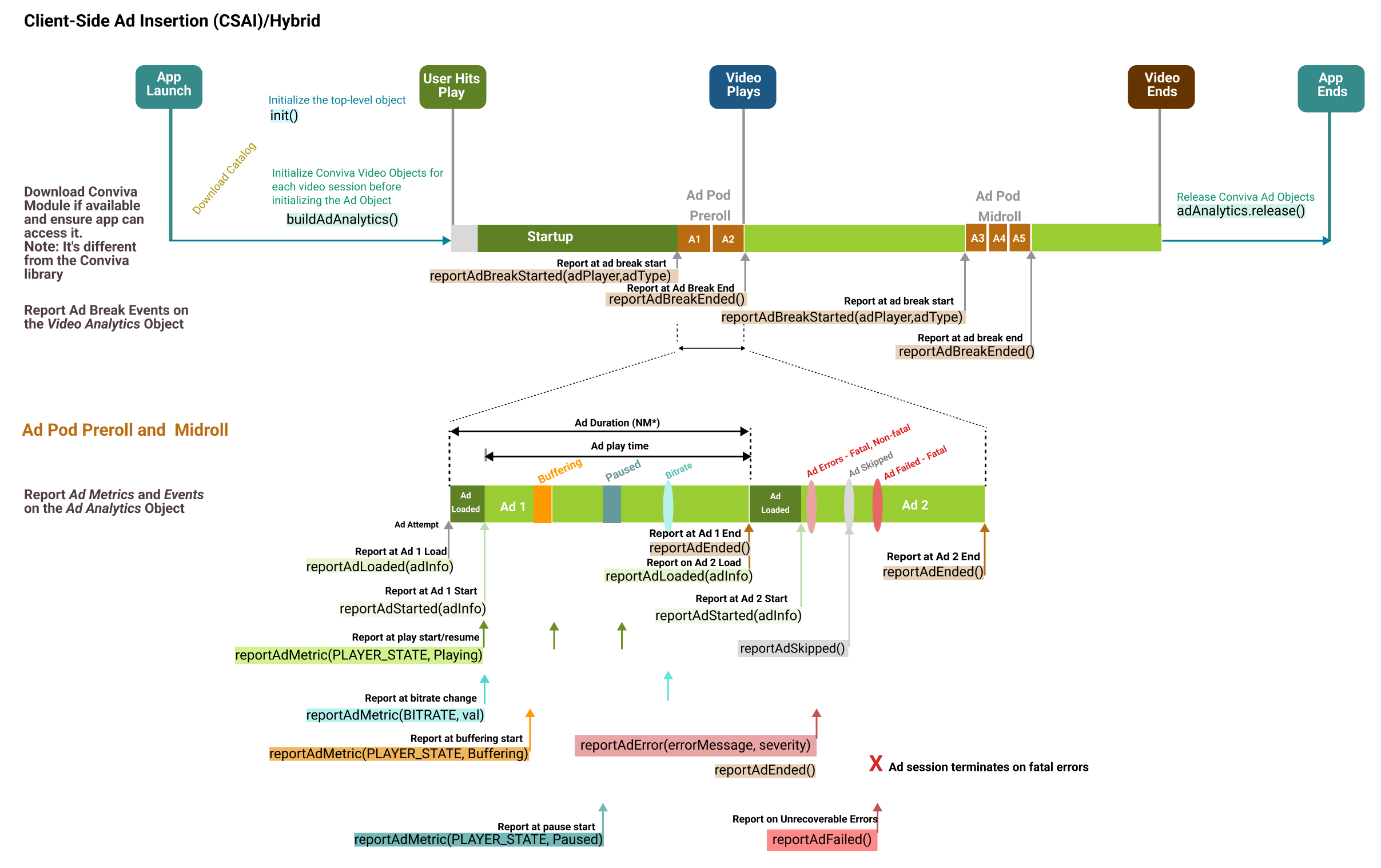
|
SSAI 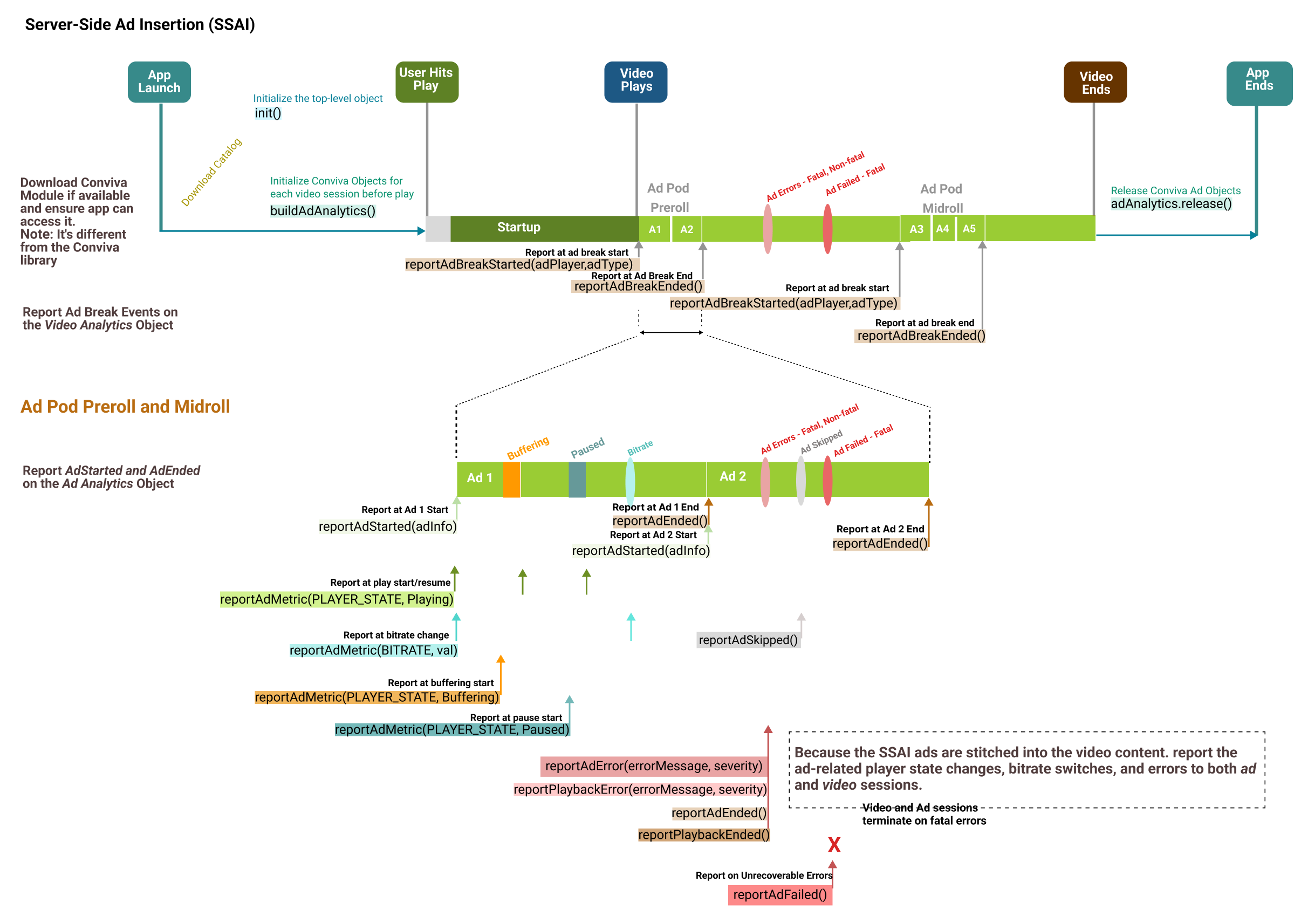
|
|
|
6. Handle User Actions
Conviva.Analytics.reportAppForegrounded();
Conviva.Analytics.reportAppForegrounded();
videoAnalytics.reportPlaybackEvent(Conviva.Constants.USER_WAIT_STARTED);
videoAnalytics.reportPlaybackEvent(Conviva.Constants.USER_WAIT_ENDED);
Data Collection and User Preferences
Data Collection and User Preferences
By default, Conviva does not collect any sets of data and relies on the customer application to pass relevant data for better user analytics. However, the appropriate legal agreement with Conviva is required in order for Conviva to begin collecting data that would be considered PII, personal information, personal data or the like under applicable data privacy laws such as the General Data Protection Regulation (GDPR) and the California Consumer Privacy Act (CCPA). Further below in this document, there is a description of the user-preference APIs that control data collection, including opt-out and deletion of data, in compliance with data privacy laws. These APIs are in addition to existing, offline processes for opt-out and data deletion requests.
Use these APIs to set the unique user identifiers, however actual collection of identifiers are contingent upon the customer's legal department providing written instructions to Conviva to begin collection. At the discretion of the customer's legal department, some or all of these identifiers may be collected. Conviva provides this flexibility to allow the customer to determine the precise identifiers to be collected.
Send unique identifier's data such as unique identifier for a device or user, for example deviceId, Mac address, advertisingIdentifier and other identifiers, use the Conviva.Analytics.setUniqueIdentifier(/* object / identifiers, / function */ callback=):
identifiers: JSON object with key value pairs of identifiers and values.callback: Optional callback function that needs to be notified if the identifiers were honored or collected by Conviva. Below mentioned are the sample result messages from Conviva: "Data collection successful" "End-user chose to opt-out of personal data collection" "End-user used privacy settings and chose to opt-out of personal data collection"
Control Data Collection and Delete Collected Data
var identifiers = {};
identifiers["androidId"] = "xyzabd123cvqn";
Conviva.Analytics.setUniqueIdentifier(identifiers, function (msg) {
console.log("Result of the setUniqueIdentifier API:" + msg);
});
Set the user preference to collect or stop collecting PII data items using Conviva.Analytics.setUserPreferenceForDataCollection(/* object / identifiers, / boolean */forAllApps):
identifiers:stringkey/value pair, where key indicates a probable data name and value is false/true. A value of false causes the SDK to stop collecting that specific data item.forAllApps:booleanvalue indicates if the preference applies to current app or all apps on the device. A value of true indicates all apps; false indicates only the current app.
|
Control the data collection |
|
|---|
Set the user preference to delete and stop collecting specific data items using Conviva.Analytics.setUserPreferenceForDataDeletion(/* object */ identifiers):
identifiers: string key/value pair, where key indicates a probable data name and value is false/true. A value of false causes the SDK to stop collecting that specific data item.
|
Delete collected data |
|
|---|
7. Report Network Metrics
Report Network Metrics
Metrics like connection type which is common for all the concurrent playback within one Analytics instance can be reported.
Conviva.Analytics.reportDeviceMetric(/* Conviva.Constants.Network / metricKey, / string */ metricValue):
metricKey: Conviva.Constants.Network type key for reporting Network Metrics.metricValue: Value of the reported network metric.
Refer to the sample code mentioned below:
Conviva.Analytics.reportDeviceMetric(Conviva.Constants.Network.CONNECTION_TYPE, "WiFi");
The table below shows the representation string values for setting connection type:
| Internet Connection Type | Representation String |
|---|---|
| Wireless | WiFi |
| Wired | Ethernet |
| Cellular 2G | 2G |
| Cellular 3G | 3G |
| Cellular 4G | 4G |
| Cellular 5G | 5G |
| Other | OTHER |
If you can fetch wireless connection sub-type, such as "802.11 a", "802.11b", "802.11n", "802.11g", then pass the sub-type instead of "WiFi". If you can measure 4G data connection sub-type like "LTE", then pass the sub-type instead of "4G".
8. Report Custom Events
Player Insight is an advanced feature which allows you to track custom events that are not related to video rendering, but rather specific to your player's functionality. These events and their attributes are then tabulated in the Player Insight dashboard at Conviva SEI (Pulse). Contact your Conviva representative to enable Player Insights in Pulse.
You may send a custom Player Insight event that can be associated with a video playback using the following method:
Report video-related events by the method videoAnalytics.reportPlaybackEvent(/* string / eventType, / object */ eventDetail=):
eventType: Mandatory argument of event type of the video player event ofstringtype.eventDetail: Optional argument of event details of the video player event ofobjecttype.
|
Report video-related events |
|
|---|
Report app-level events by the method Conviva.Analytics.reportAppEvent(/* string / eventType, / object */ eventDetail=):
eventType: Mandatory argument of event type of the app event ofstringtype.eventDetail: Optional argument of event details of the app event ofobjecttype.
|
Report app-level events |
|
|---|
Identifiers for Persistent Memory
The following value is set on the player initialization. Any time this value is cleared during application handling, such viewer logout/logins and background/foreground changes, Conviva recommends storing the value in persistent memory. If this identifier is not kept persistence, the unique devices and active devices/users values may be inflated: Conviva.sdkConfig
9. Cleanup
At video playback end, call |
|
For Ad content, call |
|
On application exit, or when the Conviva object is destroyed, release the objects |
|
10. Advanced Use Cases
You can use specific APIs in the Conviva sensor for various advanced use cases, such as:
Live or live linear streaming program changes
Video changes in the playlist
Playback does not recover from error and is reported once only
Multiple errors due to retry when playback does not recover
Playback recovers from a fatal error by switching to a different asset URL or CDN
A warning occurs when there's no impact on the playback
Handling user actions, such as user dialogues, backgrounding, and foregrounding
Auto-play disabled by browser
To learn more about these advanced use cases, see here.
11. Self Validation
Upon completion of your integration, perform self-validation to ensure metric and metadata accuracy. The self-validation guide with test cases and video tutorials is available here.
Type to search. Results appear as you type.