
Dimension Management enables the conversion of custom tags into custom dimensions for use in SEI and Ad Experience. Users can select the required tags for conversion, adhering to a tag conversion limit specified in their company's contract.
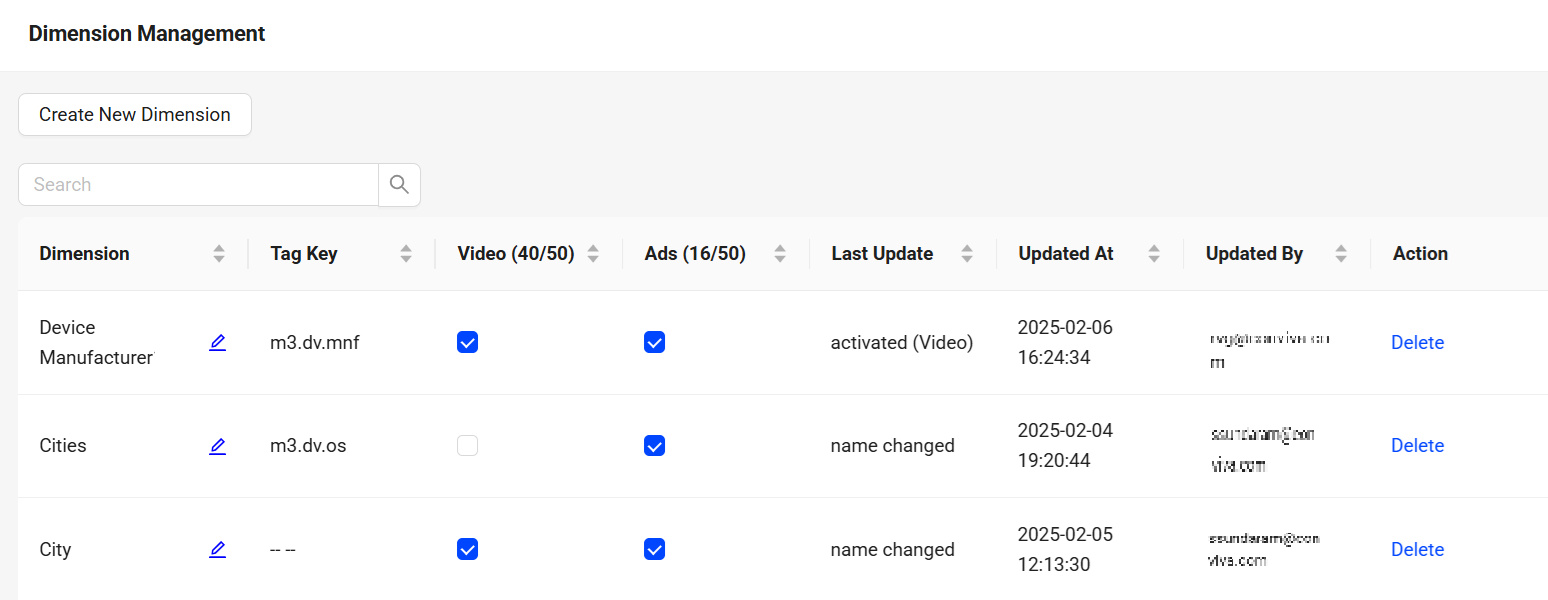
The created dimensions appears in the dimension selection list while creating the filters. This list provides the details of the last action done with date and time details. Enable a dimension for both SEI and Ads to enable it for Ads metrics. Some things to keep in mind:
- Filters cannot be created based on custom tags.
- Pulse and API return information ONLY for dimensions. Non-dimensional tags are not part of the UI and API response.
- Filtering on some Special Conviva Tags (Viewer/Client ID, VSF/VPF Error Codes, Streaming Hosts) is still supported.
Create and Delete Dimensions
-
Click on the Settings icon and select Dimension Management.
Dimension Management screen displays all the dimensions available for video and ad experience.
Only Admins can create and delete dimensions. -
Click Create New Dimension to see the options for creating new dimensions.

-
Provide the Custom Name, Tag Key, and select the product. Click Create.
The Tag Keys are the unique identifiers for every custom tag.
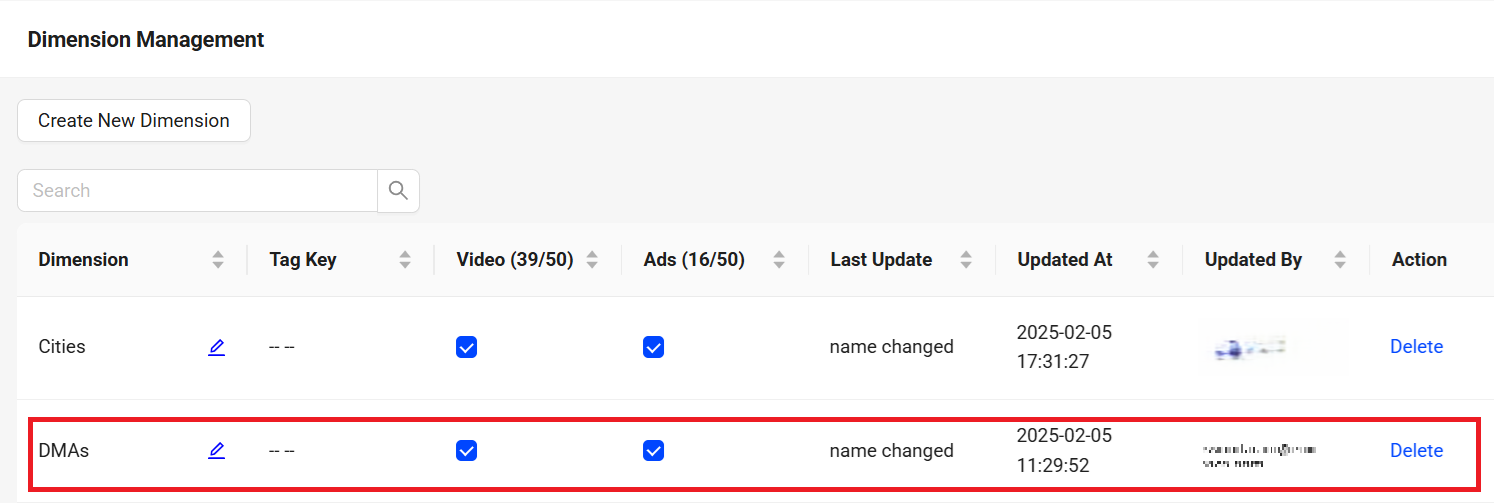
The created dimension appears in the list of dimensions.
The Counter provides the dimension count assigned to the product.In this example, the dimension DMAs is selected for both SEI and Ad Experience.
-
(If required) Clear the checkbox if the dimension is not required for the product assigned. Refresh the browser to see the updates or changes done in the dimension Management
Enable the dimension for both SEI and Ads to enable it for Ads metrics. -
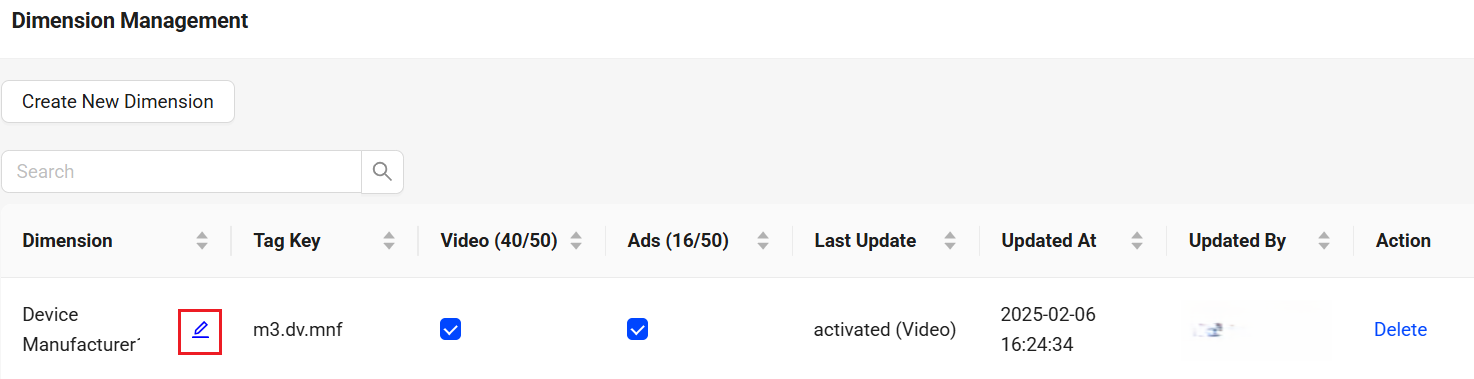
(if required) Click the Edit icon to change the dimension name.
-
Click Delete to see the Dimension confirmation screen.
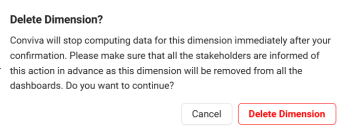 The Deleted Dimensions retain historical data and stop ingesting further data.
 -
On the dimension confirmation screen, click Delete Dimension to delete the created dimension.
Indexed Tags
The Conviva system by default collects, stores, and indexes data from the tags listed below,
| Tags | Dimension Name |
| m3.dv.mnf | Device Manufacturer |
| m3.dv.mrk | Device Marketing Name |
| m3.dv.n | Device Name |
| m3.dv.hwt | Device Hardware Type |
| m3.dv.mod | Device Model |
| m3.dv.os | Device Operating System |
| m3.dv.osv | Device Operating System Version |
| m3.dv.osf | Device Operating System Family |
| m3.dv.br | Browser Name |
| m3.dv.brv | Browser Version |
| m3.dv.fw | Player Framework Name |
| m3.dv.fwv | Player Framework Version |
|
c3.player.name |
App Name |
| c3.video.isLive | Content Category |
| c3.viewer.id | Unique Viewers |
| c3.pt.ver | Platform Version |
| c3.ad.mediaFileApiFramework | Ad MediaFileApiFramework |
| channel | Channel |
| playerVersion | App Version |
| m3.net.t | Network Type |
| m3.dv.cat | Device Category |
| c3.video.isAd | Is Ad (True /False) |
| Cities | Cities |
| States | States |
| Country | Country |
| Continent | Continent |
| ISP | ISP |
| dma | DMA |
| ASN | ASNumber |
| Asset | Assets |
| cdn | CDN |
| resource | Resource |
| errors | Errors |
| client id | Client ID |
| Precision Tags | Dimension Name |
| c3.go.algoid | Algo ID |
| c3.de.rs | Resource |
| c3.de.rsid | Resource ID |
| c3.de.cdn | CDN |
| c3.de.bitr |
Bitrate |
| Ad Related Tags | Dimension Name |
| c3.ad.id | Ad ID |
| c3.ad.position | Ad Position |
| c3.ad.system | Ad System |
| c3.ad.technology | Server Side and Client Side |
| c3.ad.adStitcher | Ad Stitcher |
| c3.ad.isSlate | Ad Type |
| c3.cp.an | Ad Assets |
| c3.ad.creativeId | Ad Creative Id |
| c3.ad.breakId | Ad Break Id |
| c3.ad.contentAssetName | Ad Content Asset Name |
| c3.cp.cdn | CDN |
| c3.cp.rs | Resource |
| c3.cp.csid | Content Session ID (in which Ad is playing) |