
The decoded frames do not include frames related to buffering or during paused video. Typically, the higher the frame rate the better the image quality and viewer experience. A session with a valid frame rate is defined as a session containing greater than 0 fps in playing state.
The totalFrames per session is the sum of the frameRate multiplied by playTime for each playTime interval in the session. Conviva collects the decoded frame rate from the player in each heart beat and then averages the frame rate for each playTime interval.
The average frame rate for the session is the totalFrames per session divided by the playTime of the session.


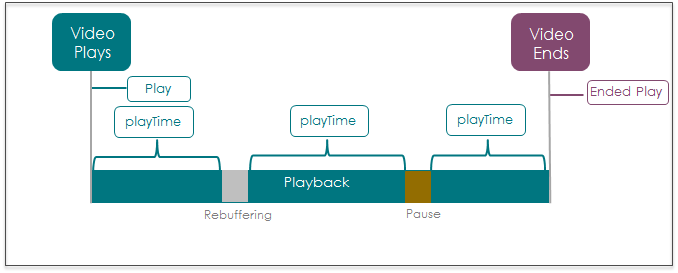
Variations in player integration and frame rate availability may impact the calculation of Average Frame Rate for a session.
For aggregation, this metric calculates the total frames played by all sessions in a time period divided by the total playTime of these sessions.

This metric can help you understand how your service is performing, i.e., how effective is your delivery infrastructure in delivering the decoded frame rate to various devices or how to detect any issues with picture quality/blurring in your service when there is a sharp drop in this metric. This metric can also help you pinpoint the right encoding parameters for a particular device (geo or ISP) or how to optimize the frame rate profile for a given manifest file depending on the device performance.
You can also use this metric to understand:
- The sweet spot of frame rate values that drives engagement.
- The capability of delivery infrastructure (device, ISP, CDN) to sustain a particular frame rate configuration for the length of a viewer’s session.
- A/B test different encoding profiles for maximizing engagement across different attributes
| Platform | Library/SDK | Minimal version for FPS support |
|---|---|---|
| iOS | iOS SDK AVPlayer | 2.116.0.3.31481 |
| iOS AVPlayer/AVQueue Player | 2.124.0.33357 | |
| Brightcove iOS | 2.119.0.32094 | |
| AppleTV | tvOS AVPlayer / AVQueue Player | 2.124.0.33385 |
| Android | Android SDK | 2.125.0.33492 |
| Nexstreaming Android (SDK- Based) | 2.122.0.32997 | |
| Adobe Primetime Android (SDK-Based) | 2.126.0.33751 |
Average Frame Rate is available in the following formats:
- Average Frame Rate summary: the average frame rate during the selected time period.
- Average Frame Rate time series: a time series for the selected time period, where each point is the average bitrate during that specific interval.
Note: When the value in this metric goes below the threshold, the value flashes red, indicating a low bitrate and a degraded viewer experience.
Distribution
Ended Plays vs Average Frame Rate Distribution (only available in Engagement and Custom dashboards): a distribution by preset buckets, where each bucket is the Average Frame Rate (fps) that occurred for the respective number of Ended Plays. This distribution can help you understand your audience tolerance for lower frame rates and illustrates the actual impact of any frame rate outliers on the number of Ended Plays.
You can use metric filtering to diagnose only the sessions that had high percentage of dropped frames. For more details on metric filters, see Metric filtering.
Related Support
|
Metric Details |
Description |
|---|---|
| Dashboards and Metric Presentation |
|
| Dimensions | Use MetricLens dimensions to filter this metric by metadata segments for enhanced root cause analysis. For example, limiting data to specific ISP and player dimensions can narrow the root cause of lower frame rates to a known provider and player type. |
| Diagnostics |
No. |
| Manual Alert Support |
No. |
| AI Alert Support | No. |
| Metric Adjustment |
None. |
For more metric definitions, see the Metric Dictionary.