
If video traffic is a result of traffic rules, Pulse applies the business logic error configuration from the account that the player directly sent the traffic to, not the account that received the traffic based on the traffic rules.
Note: Additional metrics are available to track overall video playback failures and only failures due to technical playback issues. For more details, see Video Playback Failures and Video Playback Failures Technical.
Conviva's VPF-B metric can be displayed as a sum or a percentage of the cumulative Ended Plays that terminated with a VPF-B error in the selected interval.

As a percentage, VPF-B is the sum of the Ended Plays with VPF-B divided by the sum of Ended Plays in the selected time period.

You can use the VPF-B metric to monitor the proportion of ended plays that terminate with VPF-B errors. A high VPF-B count or percentage, or a significant increase in this metric can be an early indication of declining overall player performance or the likelihood of increased fatal playback errors related to business rules that terminate the playback.
Several conditions must be met for the VPF-B calculation to count a session towards the VPF-B metric:
- A fatal error is received from the Conviva device library after playback started (after the first i-frame is rendered).
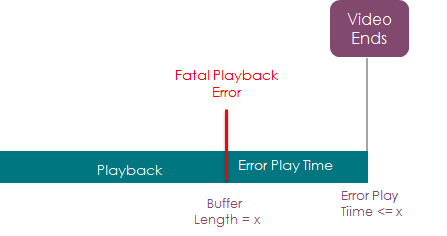
- The session ends and the total playing time from the playback error to the session end is not more than the last reported buffer length. Buffer Length is reported by device libraries. When not available, a default buffer length of 150 seconds (2.5 minutes) is used.
- The video playback failure error matches a configured business logic error. Configure business logic errors in the Settings Menu, Business Error Configuration. For more details, see Business Error Configuration.
VPF-B is available in the following formats:
- Video Playback Failures Business summary: the number of ended plays with VPF-B during the selected time period.
- Video Playback Failures Business % time series: a time series for the selected time period, where each point is the VPF-B ratio for all Ended Plays during that specific interval.
Note: Conviva lists all the VPF errors the player reports within 90 seconds of the failure in the order in which they were reported. Modifying the player error reporting and error message text can help to clarify which error caused the failure.
Distribution
- Video Playback Failures Business Distribution (only available in the Custom dashboard): each bucket shows the number of Playsthat ended with VPF-B within the defined range. This distribution can help you to understand the impact of VPF-B and illustrates the play durations when VPF-B occurred the most.
You can use metric filtering to diagnose only the sessions that had high percentage of dropped frames. For more details on metric filters, see Metric filtering.
Related Details
| Metric Details | Description |
|---|---|
| Dashboards and Metric Presentation |
|
| Dimensions | Analyze this metric by specific dimensions to understand the impact and narrow the root cause analysis. For example, filtering for specific ISP and player dimensions can narrow the root cause of the VPF to a known provider and player type. |
| Diagnostics |
View detailed information about the VPF-B in selected time ranges. You can also apply Filters to see where failures are occurring, for example by CDN/Resource and ASN, and which assets are affected most often. For more information, see Diagnostics. |
| Manual Alerts |
Receive alerts when VPF-B errors occur. For more information, see Alerts. |
| AI Alerts | No. |
| Metric Adjustments |
None. |
For more metric definitions, see the Metric Dictionary.