
You can use the VRT metric to monitor unnecessary delays in video access after user-initiated seeks. These delays often lead to session abandonment.

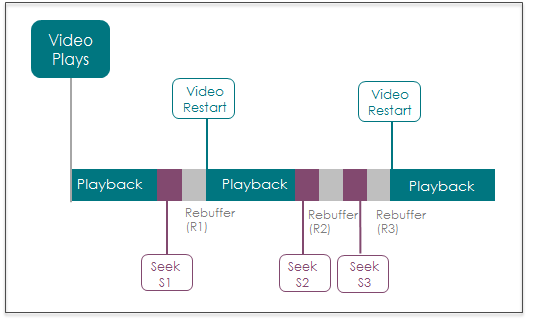
In this scenario, the Video Restart Time is ((R1 + R3) / 2). Seek S2 does not complete so the rebuffering after that seek, R2, is not included.
VRT aggregation across intervals is calculated as the average of the session VRTs throughout the interval:

This metric is an 'Interval' type metric and is presented as a summary, time series, and distribution.
- VRT summary: the average VRT of all the Plays re-starting in the selected time period.
- VRT time series: a time series for the selected time period, where each point is the average VRT for all plays re-starting in that specific internal.
Note: If you use an Audio stream or a combination of Video and Audio streams, you can also view this metric as Stream Restart Time (SRT). To switch the metric measurement between video and audio streams, contact your Conviva representation or Conviva Support.
Distribution
- VRT distribution (only available in Custom dashboards): a distribution by preset buckets, where each bucket is the number of Playswith VRT in the respective VRT range. This distribution can help you to understand the impact of VRT and illustrates the number of Playswith the most critical VRT.
Related Support
|
Metric |
Description |
|---|---|
| Dashboards and Metric Presentation |
|
| Dimensions | Use MetricLens dimensions to filter this metric by metadata segments for enhanced root cause analysis. For example, limiting data to specific ISP and player dimensions can narrow the root cause of higher Video Restart Time to a known provider and player type. |
| Diagnostics | The Diagnostic page presents detailed information about the Video Restart Time and the specific errors in selected time ranges. You can also apply Filters to see where failures are occurring, for example by CDN/Resource and ASN, and which assets are affected most often. For more information about diagnosis with this metric, see Diagnostics. |
| Manual Alert Support | Yes. Receive alerts when Video Restart Time issues occur based on customizable alert conditions. This event may fire multiple times per video view. For more information, see Alerts. |
| AI Alert Support | No. |
| Metric Adjustments |
VRT is capped at 600 seconds per viewer session. In some players, a seek event may be generated without user action, before the video has even joined. In this case, VRT is not impacted because the viewer session has not yet joined the video. For ad-supported videos, especially in the case of mid-roll ads, the user may intend to seek past the mid-roll ad position. However, business rules may require the ad to play even when the seek position is past the mid-roll. This causes the Conviva library to go into a not monitored state for the period that the ad plays after the seek event. This period of not monitored state, i.e., time spent during mid-roll playback, is removed from the VRT calculation. Also, any Unknown player states are removed from the calculated VRT. |
For more metric definitions, see the Metric Dictionary.