
If video traffic is a result of traffic rules, Pulse applies the business logic error configuration from the account that the player directly sent the traffic to, not the account that received the traffic based on the traffic rules.
Note: Additional metrics are available to track overall video start failures and only failures technical playback issues. For more details, see Video Start Failures and Video Start Failures Technical.
The error codes associated with Video Start Failures are passed by the player to Conviva to indicate either a connection failure or streaming failure. If a session had an error and subsequently received heartbeats and continued to successfully play, it does not contribute to VSF-B.

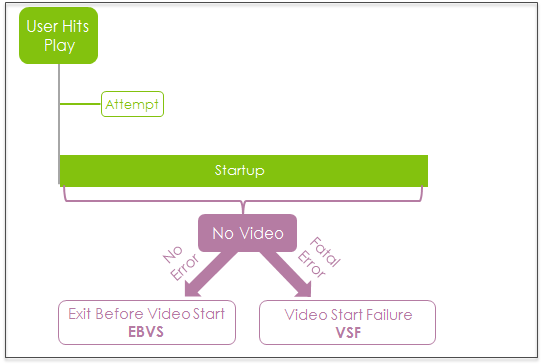
If an error is not generated when the video terminates before starting, the video termination is counted as a Exits Before Video Start (EBVS) instead of VSF.
As a percentage, the metric shows the percent of viewing Attempts that terminated with VSF-B in the selected interval.

VSF-B is an important measurement of service quality and audience engagement impacted by business errors, especially when a large percentage video starts terminate due to VSF-B. You can use the VSF-B metric to monitor the proportion of Attempts that terminate with VSF-B errors. A high VSF-B count or percentage, or a significant increase in this metric can be an indication of declining overall player performance due to business errors.
VSF-B is counted in the interval in which the failure occurs. For more information about intervals, see the Metric Dictionary.
Video Start Failures is available in the following formats:
- Video Start Failures Business: the total number of VSF during the selected time period.
- Video Start Failures Business summary: the total number of VSF during the selected time period for the top content assets.
- Video Start Failures Business time series: a time series for the selected time period, where each point is the number of VSF-B during the selected time period.
Note: Conviva lists all the VSF errors the player reports within 90 seconds of the failure in the order in which they were reported. Modifying the player error reporting and error message text can help to clarify which error caused the failure.
Related Details
|
Metric Details |
Description |
|---|---|
| Dashboards and Metric Presentation |
|
| Dimensions | Filter this metric by specific dimensions to understand the impact and narrow the root cause analysis. For example, filtering for specific ISP and player dimensions can narrow the root cause of the VSF-B to a known provider and player type. |
| Diagnostics |
The Diagnostic page presents detailed information about the VSF-B and the specific errors in selected time ranges. You can also apply Filters to see where failures are occurring, for example by CDN/Resource and ASN, and which assets are affected most often. The Diagnostics page and Custom dashboard show which errors occurred, the total number of Playsaffected by each error, and the percentage of attempts that experienced each error. Depending on the player, a single video start failure can have multiple errors associated with it. For more information, see Diagnostics. |
| Manual Alert Support |
Yes. Receive alerts when VSF-B errors occur based on customizable alert conditions. This event should fire only once per video view. For more information, see Alerts. |
| AI Alert Support | No. |
| Metric Adjustment |
None. |
Note: Revived sessions that play successfully also contribute to Attempts, Plays, and Ended Plays. Revived sessions do not contribute to VST, EBVS, and VSF. For more details about revived sessions, see Session Timeout/Expiration.
For more metric definitions, see the Metric Dictionary.