
Conviva SEI Use Cases
Conviva SEI use cases provide a hands-on way for customers to quickly implement key Conviva SEI feature scenarios.
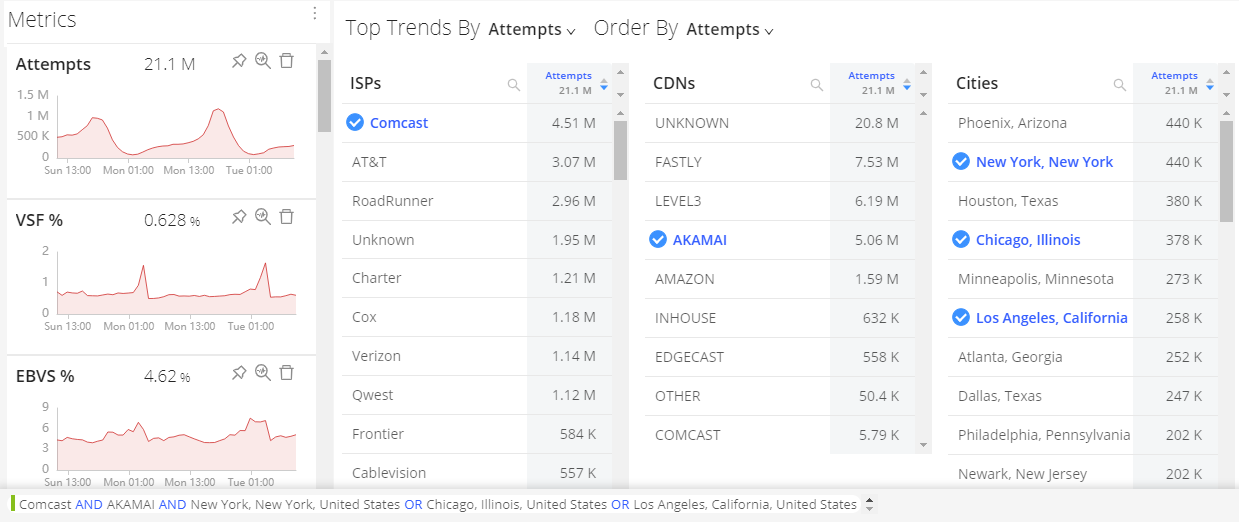
After a recent AI alert impacting several cities serviced by a specific ISP and CDN, monitor the traffic from that ISP and CDN across the impacted cities to verify the issue is not recurring.
To apply instant filtering, create a combinatorial instant filter to analyze traffic patterns within that alert group (CDN, cities, players, browser versions). This combination of known filter rules spans a variety of dimension values using both AND and OR logic, so use the combinatorial filter options to build these filtering settings.
Mouse over and click the highlighted + symbol next to the target ISP, CDN, and city dimension values. The selected combinatorial filter settings appear in the Combinatorial Filter bar, with filter rules within the same dimension, such as ISP and CDN, applied using logical OR rules, and filter values across different dimension values within the same dimension, such as cities, applied using logical AND rules.
For more details, see Trends Dashboard, AI Alerts, One-Click Filters, Combinatorial Filters, and Diagnostics and Distributions.