
This page serves as a quick reference for your integration, containing mostly code snippets that you'll need at various stages of integration. For more information or if you need any help, refer to the details on Conviva Android Sensor Integration page.
This documentation is for Android SDK 4.0.2 and above. If you are using the legacy SDK, we highly recommend you upgrade to the new SDK below. Please note that the legacy SDK is deprecated and is not supported from version 4.0.18 and above.
Integration Summary
Click an image to view the API call sequence:**
|
Android Custom Integration (SDK Only) 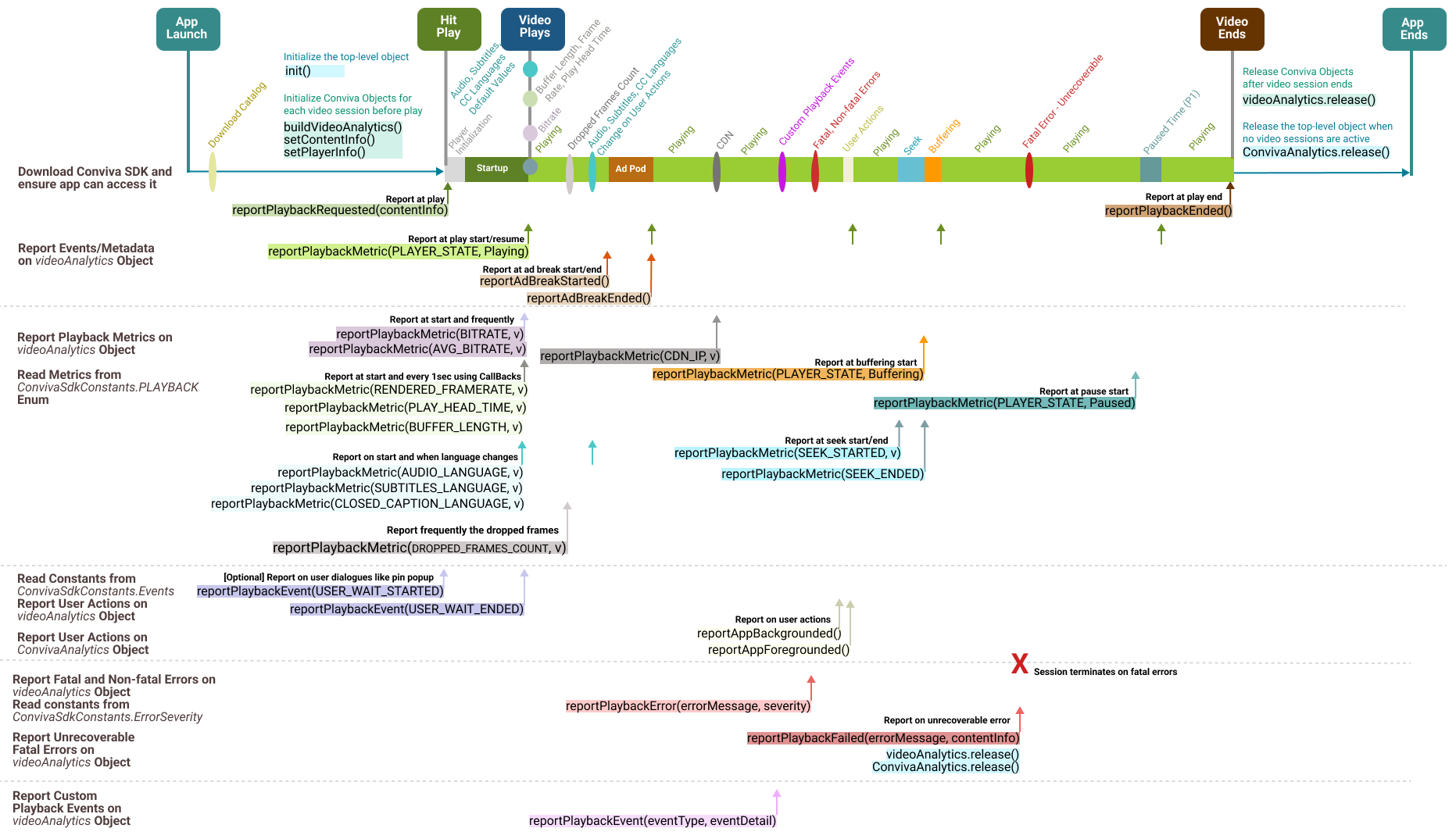
|
Conviva Android Player Modules 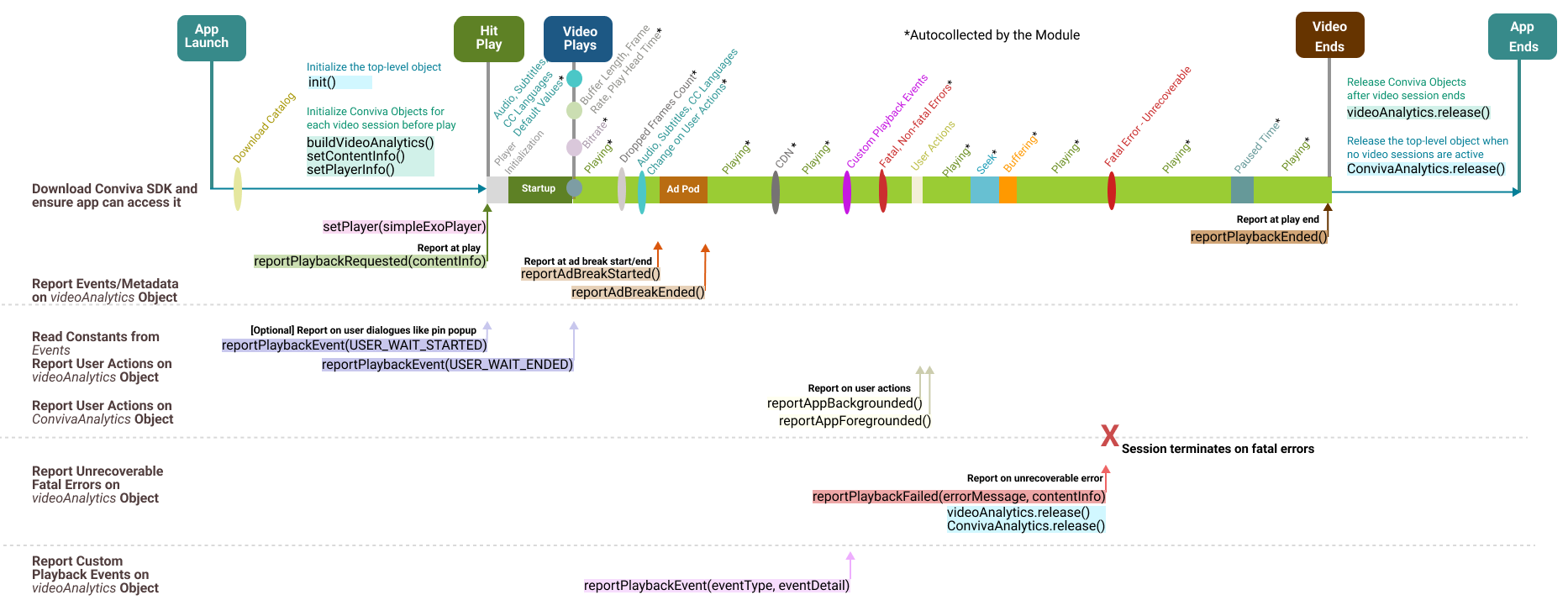
|
|
Use for video players other than Brightcove, ExoPlayer, or NexStreaming. Report all the playback metrics, such as bitrate, player states, seek, buffering, and user actions. For API call details, refer to Android Custom Integration API List. |
Use for Brightcove, ExoPlayer, and NexStreaming video players. Modules autocollect most playback metrics, such as bitrate, player states, seek, and buffering. For API call details, refer to Android Module Integration API List. |
Integration Summary Steps
Install the library and add dependencies.
Initialize the
ConvivaAnalyticsobject using your CUSTOMER_KEY.Create an instance of
ConvivaVideoAnalyticsas avideoAnalyticsobject to report video related events.- If your player has ads: Create an instance of
ConvivaAdAnalyticsas aadAnalyticsobject to report ad related events.
- If your player has ads: Create an instance of
Implement the metadata by following the instructions to use the pre-defined keys, as well as custom metadata, if applicable.
Implement device metadata (optional). By default, Conviva SDK autocollects Android device metadata.
Implement the videoAnalytics.reportPlaybackRequested(contentInfo) method to report playback attempt request along with metadata (content, workflow, audience, and other relevant metadata).
Use the videoAnalytics.reportPlaybackEnded() method to report the of end playback.
Integrate Video Players Add Conviva module dependency for your video player (if available), and pass player instance to Conviva by calling
videoAnalytics.setPlayer(playerInstance). If following custom integration guidelines, implement video events & metric reporting as prescribed by the corresponding specification. Add Conviva module dependency for your ad player (if available), and pass ad loader instance to Conviva by callingadAnalytics.setAdListener (adsLoader, settingsInfo);. If following custom integration guidelines, implement ad metadata, events & metric reporting as prescribed by the corresponding specification.
Implement the
ConvivaAnalytics.reportAppBackgrounded() / ConvivaAnalytics.reportAppForegrounded()methods to report background events.Implement
videoAnalytics.reportPlaybackEvent()method to report user events (user actions, user dialogue, etc).Set the permissions to enable the collection of Network Metrics, manage Data Collection and User Preferences.
Call 'release' methods to cleanup ConvivaAnalytics, videoAnalytics, adAnalytics objects upon application exit.
Test and Validate
After integration, perform a sanity check following the test cases in the Stream Sensor Sanity Test Plans spreadsheet. For the full validation test, use the test cases in the Stream Sensor Full Test Plans spreadsheet.
Use Touchstone in Pulse to debug your implementation if required.
Be sure to replace your TEST CUSTOMER_KEY with the PRODUCTION key and go live with your application.**Make sure the GATEWAY_URL for Touchstone is NOT used in Production!
Done! Analyse your data in Pulse and improve your viewer experience - let's make video experience better!
1. Install Conviva Library
Add Conviva Libraries and Configure Dependencies
jcenter() repository to your root file to automatically install Conviva dependencies via Gradle.|
Add core SDK |
|
|---|
|
Initialize the top level object |
|
|---|---|
Initialize the video object |
Create instance of |
Initialize the ad object |
Only if your application has ads, create |
2. Configure Metadata
Conviva categorizes metadata tags into three buckets (Predefined, Device, Custom).
Pre-defined Video and Content Metadata
The constants below are defined in the class com.conviva.sdk.ConvivaSdkConstants.
Constants for Pre-defined Video and Content Metadata
| Key | Type | Implementation Note |
|---|---|---|
| ConvivaSdkConstants.ASSET_NAME | string | Use unique name for each stream/video asset. Values are up to your choice, but a human-readable text prefixed with the unique video ID works best in most Conviva SDK's.**This provides for clarity in reports and makes most popular content easily identifiable.Pattern: [videoID] Video Title
The following are typical patterns for VOD (movies and episodic content) and Live streams:
|
| ConvivaSdkConstants.IS_LIVE | boolean | Denotes whether the content is video on-demand or a live stream. Affects the computation and availability of the Conviva metrics.
|
| ConvivaSdkConstants.PLAYER_NAME | string | A string value used to distinguish video players (applications). Simple values that are unique across all of your integrated platforms work best here. If the same player used across multiple platforms, e.g., Tizen, LG TV, WEB, give separate names for each application / platofrm: for example, "JS Tizen", "JS LGTV", "JS WEB". Do not include the build or version number in this property. The intention is to have a simple way of differentiating data from different players / platforms. |
| ConvivaSdkConstants.VIEWER_ID | string | Required for Viewers Module. A unique identifier to distinguish individual viewers or devices through Conviva's Viewers Module. The value shall be unique abstract user's identifier. If user is anonymous, do not set any value for this tag. |
| ConvivaSdkConstants.STREAM_URL | string |
The manifest URL of the video stream.
The Conviva backend config server attempts to map a portion of StreamURL into a CDN name. For example: In the URL The URL values reported in the streamURL are case insensitive. The streamURLs with either all capitals or all lower case are acceptable. |
| ConvivaSdkConstants.DEFAULT_RESOURCE | string |
This value specifies the video server or CDN name from where the streaming resource is played. Set this field when the video server resource cannot be inferred from the STREAM_URL. For example, if the streamURL is The DEFAULT_Resource value is case sensitive. If the resource name is initially reported as AKAMAI (all caps) and subsequently modified in the app to akamai (small letters), it is necessary to inform Conviva about the change because both need to be mapped in the Conviva backend configuration server to ensure that both point to the same CDN name (AKAMAI).
|
| ConvivaSdkConstants.DURATION | integer | Duration of the video content, in seconds. |
| ConvivaSdkConstants.ENCODED_FRAMERATE | integer | Encoded frame rate of the video stream in frames per second. |
| ConvivaSdkConstants.FRAMEWORK_NAME | string |
Video Player Framework Name. Autocollected if Conviva module used for video player integration, required for custom integration. videoAnalytics.setPlayerInfo(Map:
|
| ConvivaSdkConstants.FRAMEWORK_VERSION | string |
Video Player Framework Version. Autocollected if Conviva module used for video player integration, required for custom integration. videoAnalytics.setPlayerInfo(Map:
|
| "c3.app.version" | string | Application build version. Shall have the same value for both ads and video. |
| "c3.cm.contentType" | string | Advanced content delivery methods along with Live and VOD.
Acceptable values: "Live", "Live-Linear", "DVR", "Catchup", "VOD". |
| "c3.cm.channel" | string | The channel on which the content is consumed.
Example: "ABC". |
| "c3.cm.brand" | string | The name of the brand to which the content belongs.
Examples: "ABC X", "ABC Y". |
| "c3.cm.affiliate" | string | Affiliate or MVPD name for TV Everywhere authenticated services.
Examples: "Xfinity", "Comcast". |
| "c3.cm.categoryType" | string | Content business categories of interest.
Examples: "Episodic", "Movies", "News", "Sports", "Events", "Informercials", "Shorts", "Promos". |
| "c3.cm.name" | string | Name of CMS Provider.
Examples: "CMS", "ROVI", "TMS". |
| "c3.cm.id" | string | Unique asset identifier to query CMS system to gather additional asset metadata information for a specific asset.
Example: "003b094d-fc5c-3d5a-8ed0-301bf848291e". |
| "c3.cm.seriesName" | string | The name of Series. Set the value only if the metadata cannot be gathered from CMS System. Null if not applicable.
Examples: "Friends", "Null". |
| "c3.cm.seasonNumber" | string | The Season number. Set the value only if the details cannot be inferred from Asset Provider Server. Null if not applicable.
Examples: "1", "Null". |
| "c3.cm.showTitle" | string | The name of the Episode or Show Title. Set the value only if the details cannot be inferred from Asset Provider Server. Null if not applicable.
Examples: "The One with All the Cheesecakes", "Null". |
| "c3.cm.episodeNumber" | string | The Episode number. Set the value only if the details cannot be inferred from Asset Provider Server. Null if not applicable.
Examples: "3", "Null". |
| "c3.cm.genre" | string | The Primary content genre. Set the value only if the details cannot be inferred from Asset Provider Server. Null if not applicable.
Examples: "Drama", "Null". |
| "c3.cm.genreList" | string | The list of the applicable content genre. Set the values in a comma separated list only if the details cannot be inferred from Asset Provider Server. Null if not applicable.
Examples: "Drama, Crime, Political, Violence", "Null" |
| "c3.cm.utmTrackingUrl" | string | Provide the UTM parameters in the URL to track the effectiveness of the online marketing campaign across traffic sources and publishing media. Conviva uses CONTAINS logic to parse the individual UTM parameters from the URL provided, so either the full URL or just the UTM parameters is acceptable.
Example values: This tag is only applicable for web and mobile devices. |
Device Metadata
Device Metadata Instructions (Click to Expand):
Map<String, Object> deviceInfo = new HashMap<>();
deviceInfo.put(ConvivaSdkConstants.DEVICEINFO.DEVICE_BRAND, "Google");
// set the rest of the required metadata fields as per the table below
ConvivaAnalytics.setDeviceInfo(deviceInfo);
Custom Metadata
Refer to App Manager-> Metadata -> Custom Metadata page for your account to find the custom tags which shall be implemented.
Set custom tags in a similar way for either video or ads, by adding the tags to the contentInfo or adInfo objects, passed into corresponding methods of videoAnalytics / adAnalytics objects.
Update/Amend Metadata
The device metadata can be immediately set when the values are available.
Example usage:
Map<String, Object> contentInfo = new HashMap<>();
contentInfo.put(ConvivaSdkConstants.ASSET_NAME, "[channel_id] Live Channel Name");
// set the values for the other pre-defined keys as appropriate, refer to the tables below
contentInfo.put("c3.cm.contentType", "Live-Linear");
// set the values for custom tags as required per definition for your account
contentInfo.put("my_custom_tag_key", "my_custom_tag_value");

videoAnalytics.setContentInfo(contentInfo);
3. Report Events and Metadata
For each video play, report playback attempt requests |
|
|---|---|
| Report Ad Breaks to Video Session |
IMPORTANT:The SDK autodetects the reportAdBreakStarted() / reportAdBreakEnded() events in case of the Conviva Ad Modules used. To handle ads, inform videoAnalytics object that ad break is started: videoAnalytics.reportAdBreakStarted(ConvivaSdkConstants.AdPlayer adPlayer, ConvivaSdkConstants.AdType adType)Client-side AdsServer-side AdsOn ad break ended |
For each video play end, report playback ended |
|
4. Integrate Video Players
If instructions for your player are not shown below, please follow the instructions for "Custom Integration", or contact your Conviva representative.
Exoplayer
Add the Conviva ExoPlayer module dependency |
As there are backward compatibility issues with different versions of ExoPlayer, we recommend to pick the correct version of Conviva Module by referring to the release notes and the Exoplayer version that your application is using. Release Notes: https://github.com/Conviva/conviva-android-exoplayer/blob/master/CHANGELOG.md Or download and add the library explicitly from https://github.com/Conviva/conviva-android-exoplayer/releases |
||||||||
|---|---|---|---|---|---|---|---|---|---|
Set player reference to Conviva videoAnalytics |
|
||||||||
Implement Metadata |
Metadata monitored by Conviva ExoPlayer module (if applicable):
To implement the rest of metadata, refer to the above sections common pre-defined, pre-defined video, and custom metadata definitions for implementation details. |
Custom Integration
Report playback failures |
|
||||||||||||||||||||||||||||||||||||||||||
|---|---|---|---|---|---|---|---|---|---|---|---|---|---|---|---|---|---|---|---|---|---|---|---|---|---|---|---|---|---|---|---|---|---|---|---|---|---|---|---|---|---|---|---|
Report playback metrics |
Playback Metric EventsThe table below defines the events required to be implemented, with the corresponding parameters for each event key.
|
||||||||||||||||||||||||||||||||||||||||||
Implement Callback function for polled metrics |
Since this API callback is called every 1 sec, it is recommended that no other metrics than the one specified be updated. It must not retain strong references to instances in outer scopes. |
||||||||||||||||||||||||||||||||||||||||||
Implement Metadata |
For Custom Integration, Conviva SDK does not capture any metadata automatically. Refer to the above sections common pre-defined, pre-defined video, and custom metadata definitions for implementation details. |
NexStreaming
Add the Conviva NexStreaming module dependency |
|
||||
|---|---|---|---|---|---|
Set player reference to Conviva videoAnalytics |
|
Brightcove
Add the Conviva Brightcove module dependency |
|
||||
|---|---|---|---|---|---|
Set player reference to Conviva videoAnalytics using this API |
|
Integrate Ad Managers
If instructions for your Ad SDK are not shown below, please follow the instructions for "Custom Ad Manager" integration, or contact your Conviva representative.
Google IMA/DAI
Add the Conviva IMA/DAI module dependency |
Or download and add the library explicitly: |
||||||||||||||||||||||||||||||||||||||||||
|---|---|---|---|---|---|---|---|---|---|---|---|---|---|---|---|---|---|---|---|---|---|---|---|---|---|---|---|---|---|---|---|---|---|---|---|---|---|---|---|---|---|---|---|
Set Ad Listener to AdAnalytics |
To enable Ad metric & metadata auto-detection, pass the adsLoader instance of the IMA SDK to Conviva adAnalytics:
Metrics monitored by Conviva Google DAI module (if applicable):
|
||||||||||||||||||||||||||||||||||||||||||
Implement Ad Metadata |
Conviva defines the set of the metadata keys to be used for metadata implementation. The implementation can be extended by adding custom tags - refer to Custom Metadata section. The Conviva IMA/DAI module automatically collects the available values for some of the metadata tags from the IMA SDK. Pre-defined Ad Metadata:
|
adAnalytics.reportAdMetric(ConvivaSdkConstants.PLAYBACK.BITRATE, 1024);
Refer to the list of metric keys to be implemented in the table below:
| Key | Type | Implementation Note |
|---|---|---|
| ConvivaSdkConstants.PLAYBACK.PLAYER_STATE | *enum ConvivaSdkConstants.PlayerState.* | Any player state changes such as Playing, Buffering, Paused shall be reported to CONVIVA SDK. |
| ConvivaSdkConstants.PLAYBACK.BITRATE | *int (kbps)* | Report new bitrate value on change event (video + audio, or video only if audio isn't available) |
| ConvivaSdkConstants.PLAYBACK.SEEK_STARTED | *Optional: int (ms)* | Start of seeking or scrubbing by user. If seek position is known, report as the method argument. |
| ConvivaSdkConstants.PLAYBACK.SEEK_ENDED | no argument | End of seeking or scrubbing by user |
| ConvivaSdkConstants.PLAYBACK.PLAY_HEAD_TIME | *long (ms)* | Current playback position. |
| ConvivaSdkConstants.PLAYBACK.BUFFER_LENGTH | *long (ms)* | Report current Buffer length of the player. |
| ConvivaSdkConstants.PLAYBACK.RENDERED_FRAMERATE | *long (fps)* | Rendered framerate in fps. |
| ConvivaSdkConstants.PLAYBACK.CDN_IP | string (IP address) | CDN IP address in string format. |
| ConvivaSdkConstants.PLAYBACK.DROPPED_FRAMES_COUNT | int (drop frame count) | Report periodic dropped frames count for a specific time interval. |
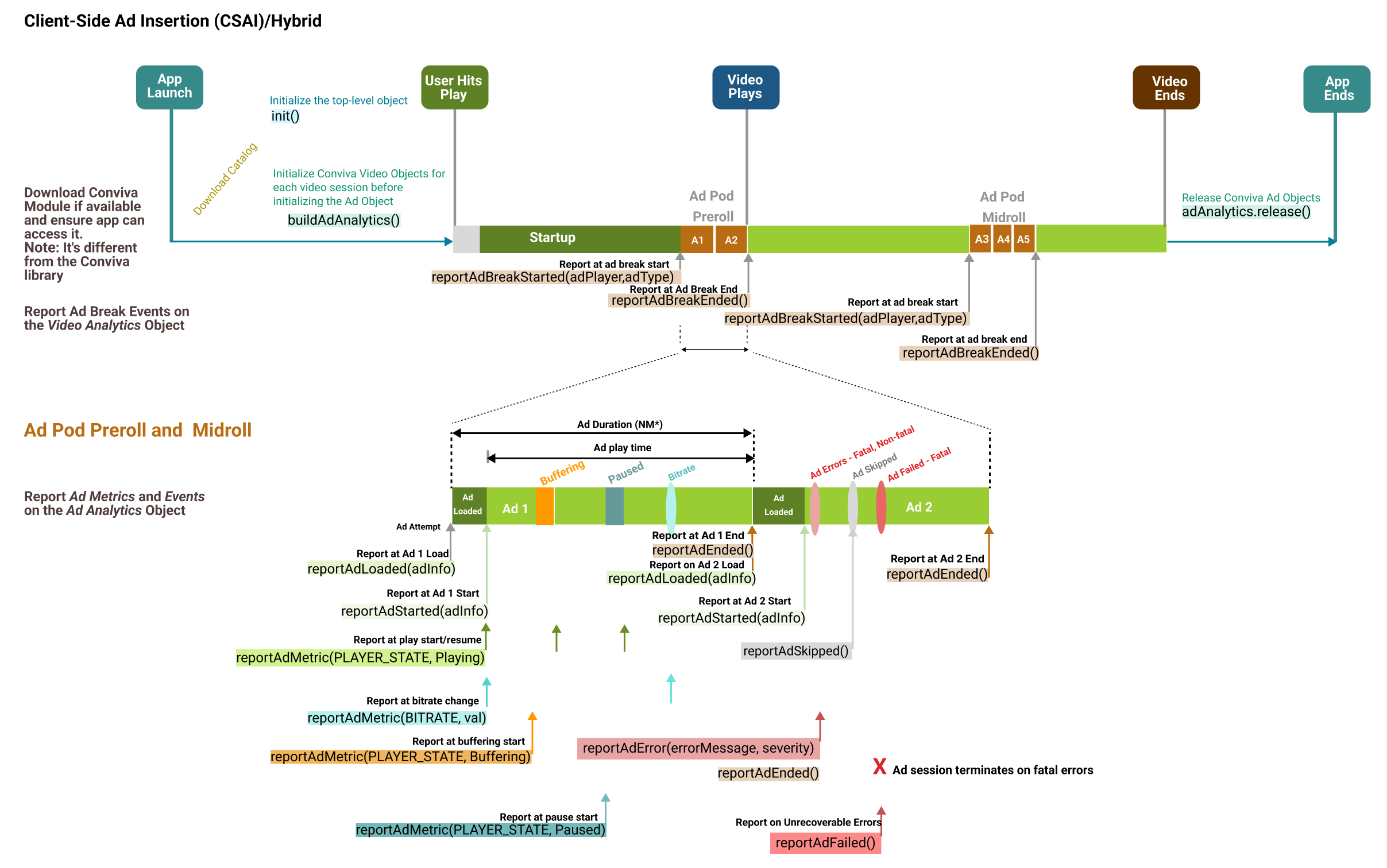
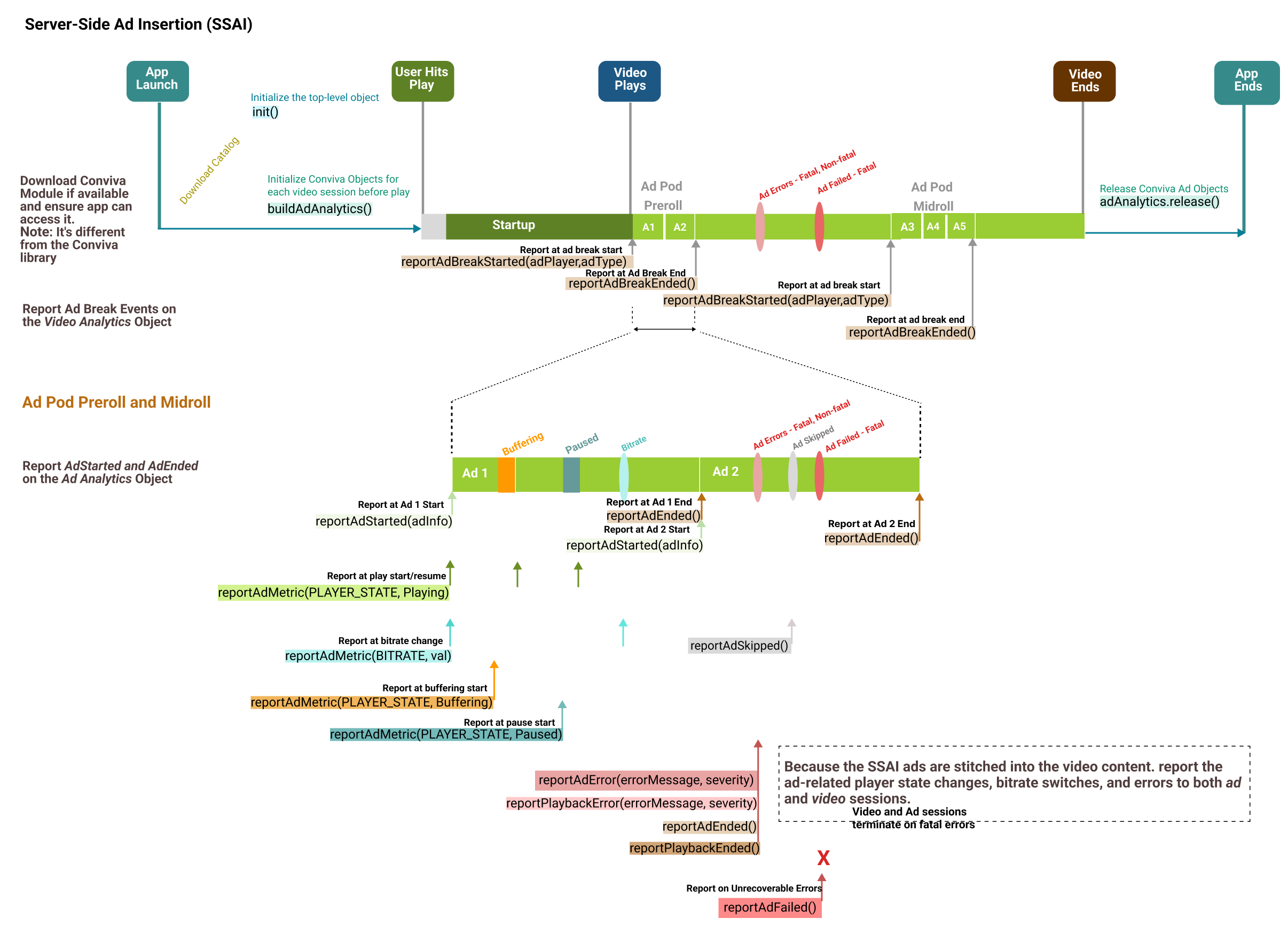
API Diagrams for Custom Ad Integration
Click an image to view the API call sequence:
**CSAI**
|
**SSAI**
|
|
|
5. Handle User Actions
Handle specific user actions such as:
app backgrounding / foregrounding
dialogues
pin popups
startover dialogues
video slates, and so on
Use the corresponding API as prescribed on the corresponding pages.
User Actions: Backgrounding
|
Handle backgrounding event (e.g., "home"/"power off" buttons) |
|
|---|---|
|
On foregrounding |
|
User Actions: User Dialogue
User Dialogues such as:
pin popup
accepting strong language / violence
confirming age
startover / resume dialogue
|
Use this API on dialogue shown |
|
|---|---|
| Use this API on dialogue dismiss |
|
Data Saver
The Conviva SDK is designed in accordance with the Data Saver capabilities of Android N. When a user enables Data Saver in Settings and the device is on a metered network, the system blocks background data usage and signals apps to use less data in the foreground wherever possible.
If Data Saver setting is enabled and the app is in the allowed list, the Conviva SDK will continue to send heartbeats as the application is allowed to use data even on metered network. But if the app is not in the allowed list or is blocked, no heartbeat will be sent in the foreground as well as the background.
Report Network Metrics
If the necessary permissions are not added in the application's manifest file, the Conviva library will report the default values, after performing the necessary security checks.
To enable the Conviva library to collect the network metrics, the application must follow the Android permission instructions provided below
<uses-permission android:name="android.permission.ACCESS_NETWORK_STATE"/>
<uses-permission android:name="android.permission.ACCESS_WIFI_STATE"/>
<uses-permission android:name="android.permission.ACCESS_COARSE_LOCATION"/>
<uses-permission android:name="android.permission.ACCESS_FINE_LOCATION"/>
<uses-permission android:name="android.permission.READ_PHONE_STATE"/>
In Android M and later versions (API 23 and above), please add a runtime permission request for
android.permission.ACCESS_COARSE_LOCATION.In Android Q and later versions (API 29 and above), please add a runtime permission request for
android.permission.ACCESS_FINE_LOCATION.
For more details, see Android permissions.
if (Build.VERSION.SDK_INT >= 23) {
   if (!(checkSelfPermission(Manifest.permission.ACCESS_COARSE_LOCATION) == PackageManager.PERMISSION_GRANTED) {
     requestPermissions(new String[]{Manifest.permission.ACCESS_COARSE_LOCATION}, 0);
     }
 }

if (Build.VERSION.SDK_INT >= 29) {
   if ( !(checkSelfPermission(Manifest.permission.ACCESS_FINE_LOCATION) == PackageManager.PERMISSION_GRANTED) {
     requestPermissions(new String[]{Manifest.permission.ACCESS_FINE_LOCATION}, 0);
     }
 }
List of metrics that require permissions and collection:
| Metric | Permission Required | Automatically Collected |
|---|---|---|
| Data Saver | android.permission.ACCESS_NETWORK_STATE
|
No |
| Connection Type | android.permission.ACCESS_NETWORK_STATE
|
Yes ** The Conviva SDK will report raw values returned by the Connection Type. Connection type can be updated after session creation, before the first video frame is rendered. |
| Link Encryption | android.permission.ACCESS_WIFI_STATE
|
Yes Link Encryption is unavailable since Android Q. |
| Wi-Fi Signal Strength | android.permission.ACCESS_WIFI_STATE
|
Yes
Android SDK reports signal strength in decibel-milliwatts (dBm). If the information is not available, the default value is 1000. |
| Cellular Signal Strength | android.permission.ACCESS_COARSE_LOCATION
|
Yes
Android SDK reports signal strength in decibel-milliwatts (dBm). If the information is not available, the default value is 1000. |
Cellular Signal Strength for WCDMA
Android SDK provides support for WCDMA signal strength from Android API 18 onwards, therefore Conviva SDK will not be able to report it below API level 18.
Android L devices: Signal strength information for cellular networks in not available in Android L devices therefore Conviva SDK will not be able to report it. This is also captured as Google Android Issue: 60430.
Android Q and above devices: With the release of Android 29, the functionality of the
getAllCellInfo()API used for fetching the cellular networks signal strength information has changed. Your applications must add a new permissionACCESS_FINE_LOCATIONfor all devices using Android Q and above.
|
Declare tools under manifest root tag |
|
|---|---|
|
Add permissions to be excluded |
|
Data Collection and User Preferences
By default, Conviva collects a set of data for better user analytics. However, the appropriate legal agreement with Conviva is required in order for Conviva to begin collecting data that would be considered PII, personal information, personal data or the like under applicable data privacy laws such as the General Data Protection Regulation (GDPR) and the California Consumer Privacy Act (CCPA). Further below in this document, there is a description of the user-preference APIs that control data collection, including opt-out and deletion of data, in compliance with data privacy laws. These APIs are in addition to existing, offline processes for opt-out and data deletion requests.
This document describes the identifiers that the libraries are capable of collecting, however actual collection of identifiers is contingent upon the customer's legal department providing written instructions to Conviva to begin collection. At the discretion of the customer's legal department, some or all of these identifiers may be collected. Conviva provides this flexibility to allow the customer to determine the precise identifiers to be collected.
Following tags are used to collect data:
- Android OS
androidId: Android ID is unique to each application on a device and valid until factory reset. -gsfId: Google Service Framework ID which is provided by Play services framework. -gaId: Google Ad identifier provided by Google Play Service framework.- Fire OS
fireAdId: Amazon Ad identifier provided by Amazon FireOS.
To retrieve the Google Service Framework ID, the following permission needs to be declared in the manifest.
<uses-permission android:name="com.google.android.providers.gsf.permission.READ_GSERVICES" />
|
Control the data collection |
|
|---|
Set user preferences to opt-out of data collection by specifying the corresponding tag to true/false. By default, Conviva assumes no restriction in collecting data.
where data is the Key/Value pair, where key indicates a probable data name and value is true/false. A value of true causes the SDK to allow collecting the data item and a value of false causes the SDK to stop collecting the data item.
Map<String, Boolean> data = new HashMap<>();
data.put("androidId", allowAndroidId); //allowAndroidId is true/false based on user preference.
data.put("gsfId", allowGsfId);         // allowGsfId is true/false based on user preference.
data.put("gaId",allowGaId);            // allowGaId is true/false based on user preference.
ConvivaAnalytics.setUserPreferenceForDataCollection(data);
|
Delete collected data |
|
|---|
Map<String, Boolean> data = new HashMap<>();
data.put("androidId", deleteAndroidId);      // deleteAndroidId is true/false based on user preference.
data.put("gsfId", deleteGsfId);              // deleteGsfId is true/false based on user preference.
data.put("gaId",deleteGaId);                 // deleteGaId is true/false based on user preference.
ConvivaAnalytics.setUserPreferenceForDataDeletion(data);
Report Custom Events
You may send a custom Player Insight event that can be associated with a video playback using the following method:
Report video-related events by the method videoAnalytics.reportPlaybackEvent(String eventType, Map
|
Report video-related events |
|
|---|
Report app-level events by the method ConvivaAnalytics.reportAppEvent(String eventType, Map:
|
Report app-level events |
|
|---|
6. Clean Up Session
After the player session ends, use report and release methods to end object reporting.
At video playback end, call |
|
For Ad content, call |
|
On application exit, or when the Conviva object is destroyed, release the objects |
|
To know about the advanced use cases and the self-validation process, refer to the Conviva Android Sensor page.