This page serves as a quick reference for your integration, containing mostly code snippets that you'll need at various stages of integration.
Updated 2026-06-30·ios, quick, integration, sensor developer center, sensor integration, getting started
This page serves as a quick reference for your integration, containing mostly code snippets that you'll need at various stages of integration. For more information or if you need any help, refer to the details on Conviva iOS/tvOS Sensor Integration page.
This documentation is for iOS SDK 4.0.0 and above. If you are using the legacy SDK, we highly recommend you upgrade to the new SDK below. To migrate from the legacy SDK to the new SDK, refer to the migration API mapping document here and a summary of the migration benefits here.
Integration Summary
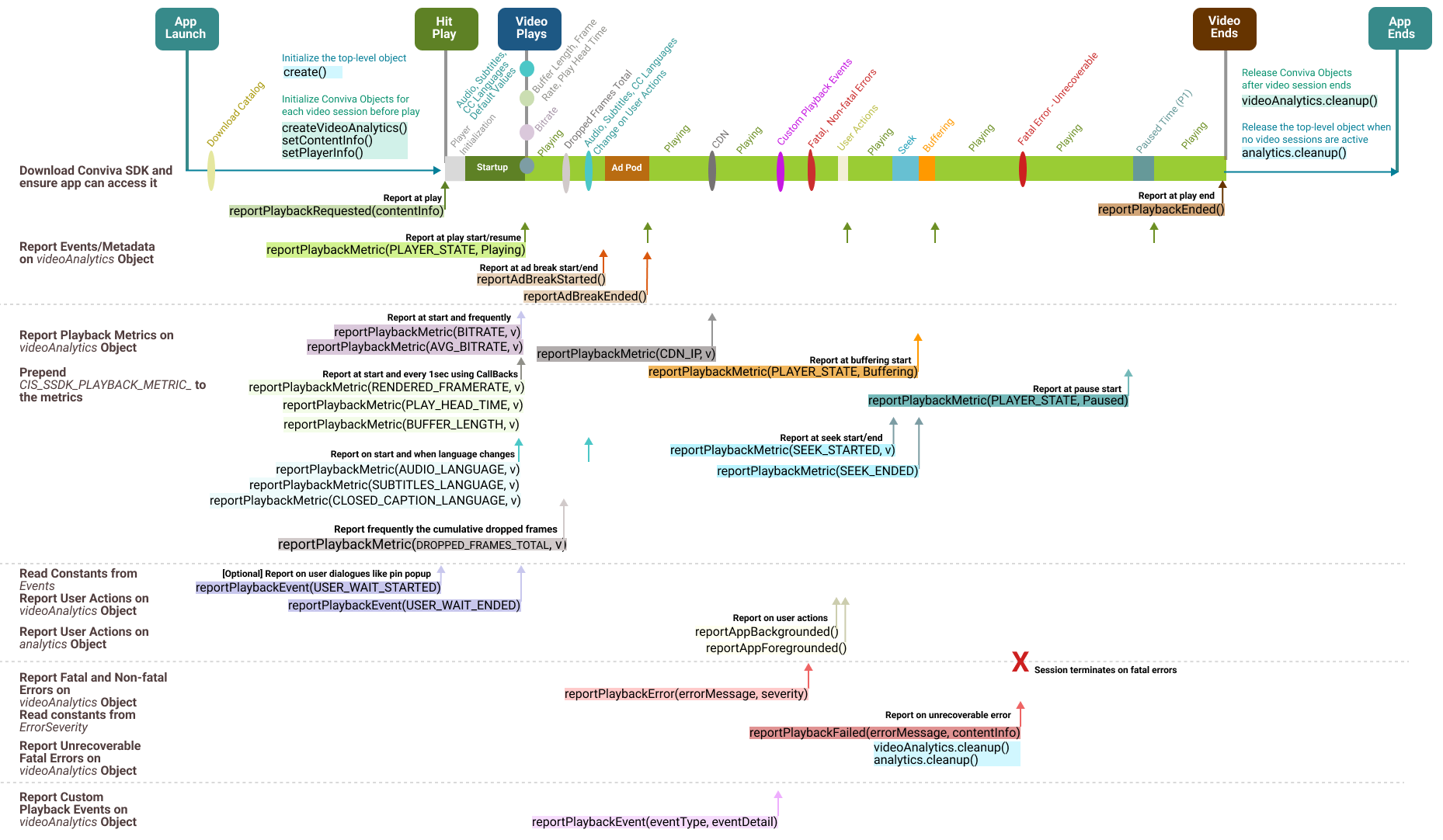
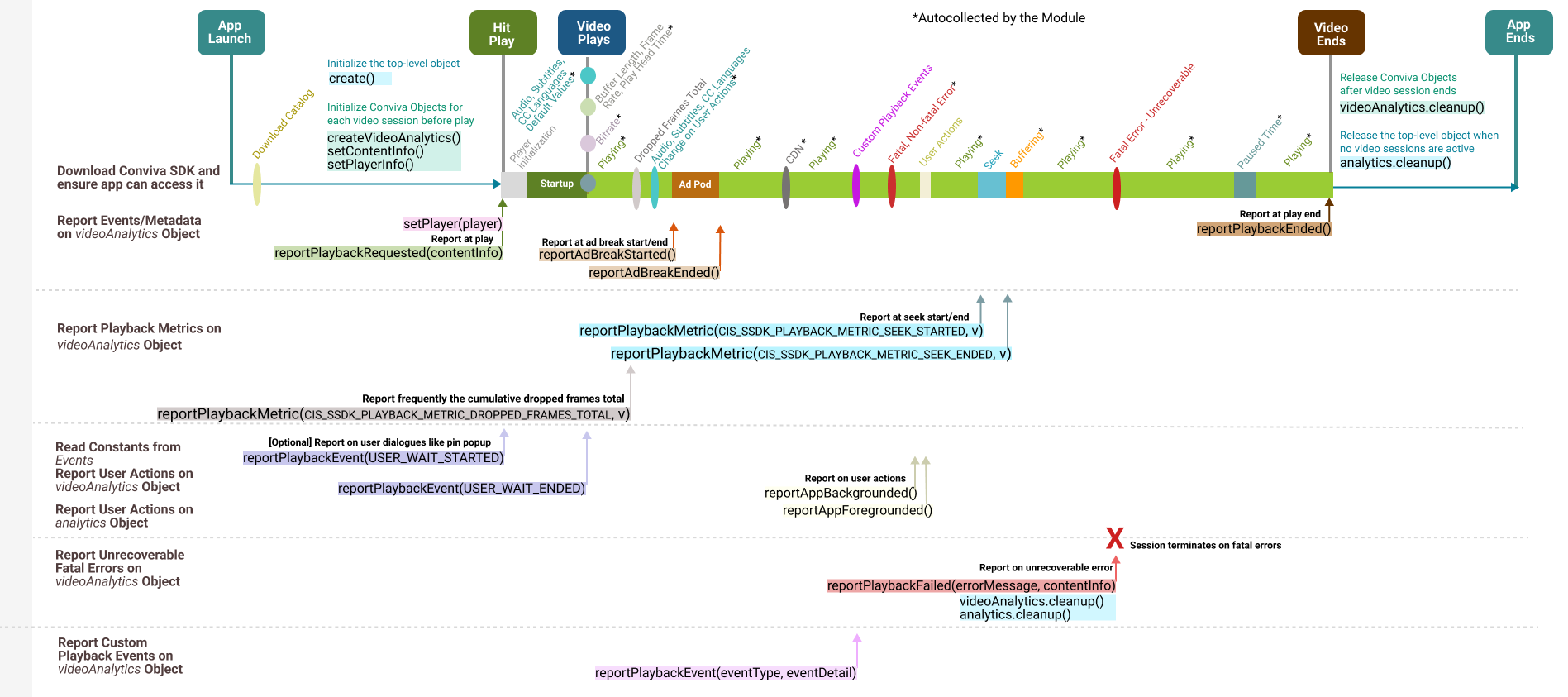
Click an image to view a summary of the API call sequence:**
iOS Custom Integration (SDK Only)
Conviva iOS Player Modules
Use for video players other than AVPlayer or Brightcove.
Report all the playback metrics, such as bitrate, player states,
seek, buffering, user actions, app backgrounding, and foregrounding.
If using one of the players Conviva provides a module for, then follow these steps.


For AVPlayer/AVQueuePlayer :


                    - Use [ConvivaAVFoundation-4.0.46](https://github.com/Conviva/ConvivaAVFoundation/releases/tag/4.0.46), if you serve advertisements in your apps.

                    - Use [ConvivaAVFoundation-4.0.47](https://github.com/Conviva/ConvivaAVFoundation/releases/tag/4.0.47), if you do not serve advertisements with your apps.


For Brightcove:


                    - Use [ConvivaBrightcove-4.0.28](https://github.com/Conviva/ConvivaBrightcove/releases/tag/4.0.28), if you serve advertisements in your apps.

                    - Use [ConvivaBrightcove-4.0.29](https://github.com/Conviva/ConvivaBrightcove/releases/tag/4.0.29), if you do not serve advertisements with your apps.


                    1. Remove <code class="text">libLivepass3AV.a</code> from "Link Binary with Libraries" of xcode.

                    1. Remove the following header files from your application:

```javascript
#import "LivePass.h"
#import "ConvivaLightSession.h"
#import "ConvivaContentInfo.h"
<div class="doc-callout doc-callout--note"><div class="doc-callout__body">If you are using an SDK that supports the Advertising Identifier, the application's plist file must have an entry for <code class="text">NSUserTrackingUsageDescription</code> key with appropriate message.</div></div>
Example usage:
<key>NSUserTrackingUsageDescription</key>
<string>App would like to access IDFA to uniquely identify the user.</string>
<div class="doc-callout doc-callout--note"><div class="doc-callout__body"><b>Application must be built with XCode 12 or above.</b></div></div>
Cocoapods Installation: Please add the following line to your pod file and run pod install:
For Upgrade with Advertising Identifier support:
pod 'ConvivaSDK','4.0.40'
For Upgrade without Advertising Identifier support:
pod 'ConvivaSDK','4.0.41'
Or download and add the library explicitly from Conviva GitHub:
Manually adding the ConvivaSDK framework to your project
        1. Unzip the package and add ConvivaSDK.xcframework to "Link Binary with Libraries" under build phase. The package contains the frameworks for both iOS and tvOS.

        1. Link the following system frameworks to "Link Binary with Libraries" section in xcode:**- SystemConfiguration
MobileCoreServices
Security
AdSupport
CoreTelephony (iOS only)
AVFoundation
Network (weak)
AppTrackingTransparency (weak) - Required only for Advertising Identifier supported library (Application must be built with XCode 12 or above).
      1. Add "-ObjC" to "Other Linker Flags" of Xcode.

      1. To refer to the Conviva classes from your source code, please add the following import statements:


  <div>


          - Swift

          - Objective C


      <div class="tab-content current" id="tab-1">
import ConvivaSDK
        </div>
        <div class="tab-content" id="tab-2">
@import ConvivaSDK;
        </div>
    </div>
If using one of the players Conviva provides a module for, add the corresponding dependency only.
- For SDK,
<li>Add the Package Dependency repository URL as <a href="https://github.com/Conviva/conviva-ios-sdk-spm">https://github.com/Conviva/conviva-ios-sdk-spm</a>
Select version as:
4.0.40 if it's with Advertising Identifier Support.
4.0.41 if it's without Advertising Identifier Support.
IMPORTANT: No need to set CIS_SSDK_SETTINGS_GATEWAY_URL and CIS_SSDK_SETTINGS_LOG_LEVEL settings for your production release. The Conviva SDK provides the default values for production.
</td>
</tr>
<tr>
<th>
Initialize the video object
                </th>
                <td>
Create instance of CISVideoAnalytics object.
This object will be used throughout the entire application lifecycle to report video related events.
<div>
- Swift
- Objective C
<div class="tab-content current" id="tab-5">
// videoAnalytics would be used throughout the integration.
let videoAnalytics = analytics.createVideoAnalytics()
</div>
<div class="tab-content" id="tab-6">
// videoAnalytics would be used throughout the integration.
CISVideoAnalytics videoAnalytics = [analytics createVideoAnalytics];
</div>
</div>
</td>
</tr>
<tr>
<th>
Initialize the ad object
</th>
<td>
This is only applicable if your application has ads.
Create CISAdAnalytics object.
This object will be used throughout the entire application lifecycle to report ad related events.
<div>
- Swift
- Objective C
<div class="tab-content current" id="tab-7">
// AdAnalytics would be used throughout the integration.
// Syntax of the API to instantiate Conviva Ad Analytics Component
func createAdAnalytics(withVideoAnalytics videoAnalytics: CISVideoAnalytics) -> CISAdAnalytics
func createAdAnalytics() -> CISAdAnalytics
// Sample code snippet to link the Video Analytics with Ad Analytics
let adAnalytics = analytics.createAdAnalytics(withVideoAnalytics: videoAnalytics)
//use videoAnalytics object from the iOS/tvOS SDK integration
</div>
<div class="tab-content" id="tab-8">
// AdAnalytics would be used throughout the integration.
-(CISAdAnalytics) createAdAnalyticsWithVideoAnalytics: (CISVideoAnalytics) videoAnalytics;
// Syntax of the API to instantiate Conviva Ad Analytics Component
- (CISAdAnalytics) createAdAnalytics;
// Sample code snippet to link the Video Analytics with Ad Analytics
CISAdAnalytics adAnalytics = [analytics createAdAnalyticsWithVideoAnalytics: videoAnalytics];
//use videoAnalytics object from the iOS/tvOS SDK integration
</div>
</div>
This method requires videoAnalytics object created at the previous step passed as a parameter.
                </td>
            </tr>
        </tbody>
    </table>
2. Configure Metadata
Pre-defined Video Metadata
Constants for Pre-defined Video and Content Metadata
<div class="doc-scroll-x">
<table cellspacing="0" cellpadding="10" class="doc-table doc-table--full">
<col />
<col />
<col />
<thead>
<tr>
<th>Key</th>
<th>Type</th>
<th>Implementation Note</th>
</tr>
</thead>
<tbody>
<tr>
<td>CIS_SSDK_METADATA_ASSET_NAME</td>
<td>string</td>
<td>For **video content **, use a unique name for each stream/video asset. Values are up to your choice, but a human-readable text prefixed with the unique video ID works best in most Conviva SDK's.** This provides for clarity in reports and makes most popular content easily identifiable.Pattern: [videoID] Video Title
The following are typical patterns for VOD (movies and episodic content) and Live streams:
Movie Pattern: [{contentId}] {Movie Title}Sample Value: [12345] The ABC MovieEpisode Pattern: [{contentId}] {Show Title} - S:{Season Number}:E{Episode Number} - {Episode Title}Sample Value: [67890] The XYZ Show - S3:E1 - The Pilot EpisodeLive Stream Pattern: [{channelNumber}] {Chanel Name}Sample Value: [10] PQRS Bay Area
CIS_SSDK_METADATA_IS_LIVE
NSNumber(Bool)
Denotes whether the content is video on-demand or a live stream. Affects the computation and availability of the Conviva metrics.
NSNumber(value: true/false)
CIS_SSDK_METADATA_PLAYER_NAME
string
A string value used to distinguish video players (applications). Simple values that are unique across all of your integrated platforms work best here. If the same player used across multiple platforms, e.g., Tizen, LG TV, WEB, give separate names for each application / platofrm: e.g., "JS Tizen", "JS LGTV", "JS WEB". Do not include the build or version number in this property. The intention is to have a simple way of differentiating data from different players / platforms.
CIS_SSDK_METADATA_VIEWER_ID
string
Required for Viewers Module. A unique identifier to distinguish individual viewers or devices through Conviva's Viewers Module.
The value shall be unique abstract user's identifier. If user is anonymous, do not set any value for this tag.
CIS_SSDK_METADATA_STREAM_URL
string
The manifest URL of the video stream.
The Conviva backend config server attempts to map a portion of StreamURL into a CDN name. For example: In the URL https://www.akamai.net/avengers.m3u8, akamai.net maps to the AKAMAI label. Conviva VSI users can then retrieve metrics based on the mapped CDN name (AKAMAI, in this case).
<div class="doc-callout doc-callout--note"><div class="doc-callout__body">The URL values reported in the streamURL are case insensitive. The streamURLs with either all capitals or all lower case are acceptable.</div></div>
</td>
</tr>
<tr>
<td>CIS_SSDK_METADATA_DEFAULT_RESOURCE</td>
<td>string</td>
<td>
This value specifies the video server or CDN name from where the streaming resource is played. Set this field when the video server resource cannot be inferred from the STREAM_URL.
For example, if the streamURL is https://cbd12348.cdn.cms.somewebsitehostname.com/abc.txt, it is not possible to infer the AKAMAI name from the streamURL, and in such a case, it is necessary to report the DEFAULT_Resource as AKAMAI.
<div class="doc-callout doc-callout--note"><div class="doc-callout__body">The DEFAULT_Resource value is case sensitive. If the resource name is initially reported as AKAMAI (all caps) and subsequently modified in the app to akamai (small letters), it is necessary to inform Conviva about the change because both need to be mapped in the Conviva backend configuration server to ensure that both point to the same CDN name (AKAMAI).
CIS_SSDK_METADATA_DURATION
integer
Duration of the video content, in seconds.
CIS_SSDK_METADATA_ENCODED_FRAMERATE
integer
Encoded frame rate of the video stream in frames per second.
CIS_SSDK_PLAYER_FRAMEWORK_NAME
string
Video Player Framework Name.
Autocollected if Conviva module used for video player integration, required for custom integration.
**Otherwise, set using the API videoAnalytics.setPlayerInfo(Map):
```javascript
// Sample code snippet
var playerInfo = [String: Any]()
// SET PLAYER NAME
// FRAMEWORK NAME CAN BE SET TO AVPLAYER OR BRIGHTCOVE OR GOOGLE IMA OR ANY OTHER
playerInfo[CIS_SSDK_PLAYER_FRAMEWORK_NAME] = "PLAYER_NAME"
videoAnalytics.setPlayerInfo(playerInfo)
```
```objectivec
// Sample code snippet
NSMutableDictionary *playerInfo = [[NSMutableDictionary alloc] init];
// SET PLAYER NAME
// FRAMEWORK NAME CAN BE SET TO AVPLAYER OR BRIGHTCOVE OR GOOGLE IMA OR ANY OTHER
[playerInfo setValue:@"PLAYER_NAME" forKey:CIS_SSDK_PLAYER_FRAMEWORK_NAME];
[videoAnalytics setPlayerInfo:playerInfo];
```
CIS_SSDK_PLAYER_FRAMEWORK_VERSION
string
Video Player Framework Version.
Set using the API videoAnalytics.setPlayerInfo(Map):
```javascript
// Sample code snippet
var playerInfo = [String: Any]()
// SET PLAYER FRAMEWORK VERSION
playerInfo[CIS_SSDK_PLAYER_FRAMEWORK_VERSION] = "1.2.3.4"
videoAnalytics.setPlayerInfo(playerInfo)
```
```objectivec
// Sample code snippet
NSMutableDictionary *playerInfo = [[NSMutableDictionary alloc] init];
// SET PLAYER FRAMEWORK VERSION
[playerInfo setValue:@"1.2.3.4" forKey:CIS_SSDK_PLAYER_FRAMEWORK_VERSION];
[videoAnalytics setPlayerInfo:playerInfo];
```
"c3.app.version"
string
Autocollected
If you want to set it manually, report application build version from the application. Shall have the same value for both ads and video.
</td>
</tr>
<tr>
<td>"c3.cm.contentType"</td>
<td>string</td>
<td>Advanced content delivery methods along with Live and VOD.
**Acceptable values: "Live", "Live-Linear", "DVR", "Catchup", "VOD".</td>
</tr>
<tr>
<td>"c3.cm.channel"</td>
<td>string</td>
<td>The channel on which the content is consumed.
Example: "ABC".
"c3.cm.brand"
string
The name of the brand to which the content belongs.
Examples: "ABC X", "ABC Y".
"c3.cm.affiliate"
string
Affiliate or MVPD name for TV Everywhere authenticated services.
Examples: "Xfinity", "Comcast".
"c3.cm.categoryType"
string
Content business categories of interest.
Examples: "Episodic", "Movies", "News", "Sports", "Events", "Informercials", "Shorts", "Promos".
"c3.cm.name"
string
Name of CMS Provider.
Examples: "CMS", "ROVI", "TMS".
"c3.cm.id"
string
Unique asset identifier to query CMS system to gather additional asset metadata information for a specific asset.
Example: "003b094d-fc5c-3d5a-8ed0-301bf848291e".
"c3.cm.seriesName"
string
The name of Series. Set the value only if the metadata cannot be gathered from CMS System. Null if not applicable.
Examples: "Friends", "Null".
"c3.cm.seasonNumber"
string
The Season number. Set the value only if the details cannot be inferred from Asset Provider Server. Null if not applicable.
Examples: "1", "Null".
"c3.cm.showTitle"
string
The name of the Episode or Show Title. Set the value only if the details cannot be inferred from Asset Provider Server. Null if not applicable.
Examples: "The One with All the Cheesecakes", "Null".
"c3.cm.episodeNumber"
string
The Episode number. Set the value only if the details cannot be inferred from Asset Provider Server. Null if not applicable.
Examples: "3", "Null".
"c3.cm.genre"
string
The Primary content genre. Set the value only if the details cannot be inferred from Asset Provider Server. Null if not applicable.
Examples: "Drama", "Null".
"c3.cm.genreList"
string
The list of the applicable content genre. Set the values in a comma separated list only if the details cannot be inferred from Asset Provider Server. Null if not applicable.
Examples: "Drama, Crime, Political, Violence", "Null"
"c3.cm.utmTrackingUrl"
string
Provide the UTM parameters in the URL to track the effectiveness of the online marketing campaign across traffic sources and publishing media. Conviva uses CONTAINS logic to parse the individual UTM parameters from the URL provided, so either the full URL or just the UTM parameters is acceptable.
This tag is only applicable for web and mobile devices.
Custom Metadata
Refer to App Manager->Setup Metadata page for your account to find the custom tags which shall be implemented.
Set custom tags in a similar way for either video or ads, by adding the tags to the contentInfo or adInfo objects, passed into corresponding methods of videoAnalytics / adAnalytics objects.
Update/Amend Metadata
To update or amend pre-defined and custom tags for video, use videoAnlaytics.setContentInfo(contentInfo: [AnyHashable : Any]):
Example usage:
<div>
- Swift
- Objective C
<div class="tab-content current" id="tab-13">
// Sample code snippet
// Dictionary for Content Metadata
var contentInfo = [String: Any]()
contentInfo[CIS_SSDK_METADATA_ASSET_NAME] = "[channel_id] Live Channel Name"
// set the values for the other pre-defined keys as appropriate
contentInfo["c3.cm.contentType"] = "Live-Linear"
// set the values for custom tags as required per definition for your account
contentInfo["my_custom_tag_key"] = "my_custom_tag_value"
videoAnalytics.setContentInfo(contentInfo)
</div>
<div class="tab-content" id="tab-14">
// Sample code snippet
// Dictionary for Content Metadata
NSMutableDictionary *contentInfo = [[NSMutableDictionary alloc] init];
[contentInfo setValue: @"[channel_id] Live Channel Name" forKey:CIS_SSDK_METADATA_ASSET_NAME];
// set the values for the other pre-defined keys as appropriate, refer to the tables below
[contentInfo setValue: @"Live-Linear" forKey:@"c3.cm.contentType"];
// set the values for custom tags as required per definition for your account
[contentInfo setValue: @"my_custom_tag_value" forKey:@"my_custom_tag_key"];
[videoAnalytics setContentInfo: contentInfo];
Refer to the below example illustrating usage of this API:
<div>
- Swift
- Objective C
<div class="tab-content current" id="tab-9">
// Syntax of the API to report the request of playback initiating the viewers experience.
func reportPlaybackRequested(contentInfo: [AnyHashable : Any)?)
// So when user clicks on play, inside the play() function of the video player.
videoAnalytics.reportPlaybackRequested(contentInfo)
// With Content Info unavailable during playback
videoAnalytics.reportPlaybackRequested(nil)
</div>
<div class="tab-content" id="tab-10">
// Syntax of the API to report the request of playback initiating the viewers experience.
-(void)reportPlaybackRequested:(nullable NSDictionary*) contentInfo
// So when user clicks on play, inside the play() function of the video player.
[videoAnalytics reportPlaybackRequested:contentInfo];
// With Content Info unavailable during playback
[videoAnalytics reportPlaybackRequested];
</div>
</div>
</td>
</tr>
<tr>
<th class="doc-table__header--no-border">Report Ad Breaks to Video Session</th>
<td>
To handle ads, inform videoAnalytics object that ad break is started: videoAnalytics.reportAdBreakStarted(adPlayer: AdPlayer, adType: AdTechnology, adBreakInfo: [AnyHashable : Any]):
- Swift
- Objective C
//Client-side Ads
// Ad Break Start for client side ad insertion with separate player instance for ads
videoAnalytics.reportAdBreakStarted(AdPlayer.ADPLAYER_SEPARATE, adType: AdTechnology.CLIENT_SIDE, adBreakInfo: adAtrributes)
// Ad Break Start for client side ad insertion with same player instance for ads
videoAnalytics.reportAdBreakStarted(AdPlayer.ADPLAYER_CONTENT, adType: AdTechnology.CLIENT_SIDE, adBreakInfo: adAtrributes)
//Server-side Ads
// Server-side ads are embedded within the main video content
// Ad Break Start for server side ad insertion
videoAnalytics.reportAdBreakStarted(AdPlayer.ADPLAYER_CONTENT, adType: AdTechnology.SERVER_SIDE, adBreakInfo: adAtrributes)
</div>
<div class="tab-content" id="tab-22">
// Sample code snippet for Ad Breaks
//Client-side Ads
// Ad Break Start for client side ad insertion with separate player instance for ads
[videoAnalytics reportAdBreakStarted: ADPLAYER_SEPARATE adType:CLIENT_SIDE adBreakInfo:adAttributes];
// Ad Break Start for client side ad insertion with same player instance for ads
[videoAnalytics reportAdBreakStarted: ADPLAYER_CONTENT adType:CLIENT_SIDE adBreakInfo:adAttributes];
//Server-side Ads
//Server-side ads are embedded within the main video content
// Ad Break Start for server side ad insertion
[videoAnalytics reportAdBreakStarted: ADPLAYER_CONTENT adType:SERVER_SIDE adBreakInfo:adAttributes];
</div>
On ad break ended
- Swift
- Objective C
<div class="tab-content current" id="tab-11">
<p>
videoAnalytics.reportAdBreakEnded()
</div>
<div class="tab-content" id="tab-12">
[videoAnalytics reportAdBreakEnded];
</div>
</div>
</td>
</tr>
<tr>
<th>
For each play end, report playback ended
</th>
<td>
- Swift
- Objective C
<div class="tab-content current" id="tab-302">
<p>
// Syntax of the API to report the end of playback.
func reportPlaybackEnded()
// So when user clicks on play, inside the play() function of the video player.
videoAnalytics.reportPlaybackEnded()
</div>
<div class="tab-content" id="tab-303">
// Syntax of the API to report the end of playback.
-(void)reportPlaybackEnded;
// So when user clicks on play, inside the play() function of the video player.
[videoAnalytics reportPlaybackEnded];
</div>
</div>
</td>
</tr>
</tbody>
</table>
4. Integrate Video Players
If instructions for your player are not shown below, please follow the instructions for "Custom Integration", or contact your Conviva representative.
AVPlayer/AVQueuePlayer
<div class="doc-callout doc-callout--note"><div class="doc-callout__body">This documentation is for iOS/tvOS SDK 4.0.0 and above. If you are using the legacy SDK, we highly recommend you upgrade to the new SDK.</div></div>
Conviva AVPlayer/AVQueuePlayer module auto-detects events emitted by AVPlayer/AVQueuePlayer.
Therefore, it's not necessary to report these events explicitly by using reportPlaybackMetric() API.
It's still required to report application events such as backgrounding, metadata, session close, ad-related events.
4.0.46 if it's with Advertising Identifier Support.
4.0.47 if it's without Advertising Identifier Support.
Or download and add the library explicitly using the links below:
<div class="doc-callout doc-callout--note"><div class="doc-callout__body">Always include the ConvivaSDK and ConvivaAVFoundation module with the same major version.</div></div>
1. **iOS**: Download the latest <a href="https://github.com/Conviva/ConvivaSDK">ConvivaSDK</a> and
<a href="https://github.com/Conviva/ConvivaAVFoundation">ConvivaAVFoundation</a>.
1. Unzip the package and add ConvivaSDK.xcframework and ConvivaAVFoundation.xcframework to "Link Binary with Libraries" under build phase. The package contains both iOS and tvOS frameworks.
1. Add the following system frameworks to "Link Binary with Libraries" section in xcode:**
CoreMedia
SystemConfiguration
MobileCoreServices
CoreTelephony (iOS only)
Security
Network (weak)
AppTrackingTransparency (weak) - Required only for Advertising Identifier supported library (Application must be built with XCode 12 or above).
1. Add "-ObjC" to "Other Linker Flags" of Xcode.
1. Add the following import statements:
Conviva SDK can be used to integrate video players using explicit metric reporting using the CISVideoAnalytics class methods.
The major steps required are listed below.
The argument errorMessage: has the same meaning as above.
The argument errorSeverity: sets the severity of the error.
Example usage:
<div>
- Swift
- Objective C
<div class="tab-content current" id="tab-107">
// report error and cleanup immediately. The contentInfo provides metadata for the failed video.
videoAnalytics.reportPlaybackFailed(errorMessage, contentInfo: contentInfo)
// report the error but keep the session open
videoAnalytics.reportPlaybackError(errorMessage, errorSeverity: .ERROR_FATAL)
</div>
<div class="tab-content" id="tab-108">
// report error and cleanup immediately. The contentInfo provides metadata for the failed video.
[videoAnalytics reportPlaybackFailed:errorMessage contentInfo: contentInfo];
// report the error but keep the session open
[videoAnalytics reportPlaybackError:errorMessage errorSeverity: ERROR_FATAL];
- <code class="text">key</code>: The keys are pre-defined in the 'CSSConstants.h' file.
- <code class="text">value</code>: It accepts multiple/zero values for the second argument.
The values of the supported "key" argument are defined as Conviva
constants (see the below table).
Example usage:
<div>
- Swift
- Objective C
<div class="tab-content current" id="tab-109">
// integer parameter in kbps for this key CIS_SSDK_PLAYBACK_METRIC_BITRATE
videoAnalytics.reportPlaybackMetric(CIS_SSDK_PLAYBACK_METRIC_BITRATE, value: NSNumber(value: 256))
</div>
<div class="tab-content" id="tab-110">
// integer parameter in kbps for this key CIS_SSDK_PLAYBACK_METRIC_BITRATE
[videoAnalytics reportPlaybackMetric:CIS_SSDK_PLAYBACK_METRIC_BITRATE value: [NSNumber numberWithInt:256]];
</div>
</div>
The table below defines the events required to be implemented, with the corresponding parameters for each event key.
<div class="doc-scroll-x">
<table class="doc-table doc-table--center" cellspacing="0" cellpadding="10">
<col />
<col />
<col />
<thead>
<tr>
<th>Key</th>
<th>Parameters/Units</th>
<th>Description</th>
</tr>
</thead>
<tbody>
<tr>
<td>CIS_SSDK_PLAYBACK_**METRIC_PLAYER_STATE</td>
<td>*PlayerState.*
</td>
<td><b>Report</b> any player state changes such as Playing, Buffering, Paused.</td>
</tr>
<tr>
<td>CIS_SSDK_PLAYBACK**METRIC_BITRATE</td>
<td>*NSNumber (kbps)*
</td>
<td>
Report new peak bitrate value on change event (video + audio, or video only if audio isn't available).
For the Average Peak Bitrate definition, refer to Average Peak Bitrate in Metric Dictionary.
Report new average bitrate value on change event (video + audio, or video only if audio isn't available).
For the Avg. Average Bitrate definition, refer to Avg. Average Bitrate in Metric Dictionary.
</td>
</tr>
<tr>
<td>CIS_SSDK_PLAYBACK_**METRIC_SEEK_STARTED</td>
<td>*Optional: NSNumber (ms)*
</td>
<td><b>Report</b> start of seeking or scrubbing by user. If seek position is known, report as the method argument.</td>
</tr>
<tr>
<td>CIS_SSDK_PLAYBACK_**METRIC_SEEK_ENDED</td>
<td>Optional: NSNumber (ms)</td>
<td><b>Report</b> end of seeking or scrubbing by user.</td>
</tr>
<tr>
<td>CIS_SSDK_PLAYBACK_**METRIC_PLAY_HEAD_TIME</td>
<td>*long (ms)*
</td>
<td><b>Report</b> current playback position.</td>
</tr>
<tr>
<td>CIS_SSDK_PLAYBACK_**METRIC_BUFFER_LENGTH</td>
<td>*NSNumber (ms)*
</td>
<td><b>Report</b> current Buffer length of the player.</td>
</tr>
<tr>
<td>CIS_SSDK_PLAYBACK_METRIC_**RENDERED_FRAMERATE</td>
<td>*NSNumber (fps)*
</td>
<td><b>Report</b> rendered framerate in fps.</td>
</tr>
<tr>
<td>CIS_SSDK_PLAYBACK_**METRIC_CDN_IP</td>
<td>string (IP address)</td>
<td><b>Report</b> CDN IP address in string format.</td>
</tr>
<tr>
<td>CIS_SSDK_PLAYBACK_METRIC**DROPPED_FRAMES_TOTAL</td>
<td>NSNumber</td>
<td><b>Report</b> cumulative dropped frames count.</td>
</tr>
<tr>
<td>CIS_SSDK_PLAYBACK_METRIC_AUDIO_LANGUAGE</td>
<td>String **</td>
<td><b>Report</b> the audio language code and name in the <code class="text">[langCode]:langName</code> format, for example, <code>[en]:English</code>. When only one of them is available, report it as such, for example, **<code>en</code>** or <code>English</code>.</td>
</tr>
<tr>
<td>CIS_SSDK_PLAYBACK_METRIC_SUBTITLES_LANGUAGE</td>
<td>String**</td>
<td><b>Report</b> the subtitles language code and name in the <code class="text">[langCode]:langName</code> format, for example, <code>[en]:English</code>. When only one of them is available, report it as such, for example, <code>en</code> or <code>English</code>.</td>
</tr>
<tr>
<td>CIS_SSDK_PLAYBACK_METRIC_CLOSED_CAPTIONS_LANGUAGE</td>
<td>String**</td>
<td><b>Report</b> the closed captions language code and name in the <code class="text">[langCode]:langName</code> format, for example, <code>[en]:English</code>. When only one of them is available, report it as such, for example, <code>en</code> or <code>English</code>.</td>
</tr>
</tbody>
</table>
IMPORTANT: At any given time, a player can report the language of either the subtitles or the closed captions. When it reports one of them, the other language is set to off if it has already been reported.**Report these languages (if they're available) on session start as well as when the user changes them on the current playback.
Example:
<div>
- Swift
- Objective C
<div class="tab-content current" id="tab-17">
// report closed_captions_language = "[en]:English" (language code and name are available)
videoAnalytics.reportPlaybackMetric(CIS_SSDK_PLAYBACK_METRIC_CLOSED_CAPTIONS_LANGUAGE, value: "[en]:English");
// report the subtitles_language = "fr" (consider only language code is available)
// reporting the subtitles will set the previously-reported closed_captions_language = "off"
videoAnalytics.reportPlaybackMetric(CIS_SSDK_PLAYBACK_METRIC_SUBTITLES_LANGUAGE, value: "fr");
</div>
<div class="tab-content" id="tab-18">
// report closed_captions_language = "[en]:English" (language code and name are available)
[videoAnalytics reportPlaybackMetric:CIS_SSDK_PLAYBACK_METRIC_CLOSED_CAPTIONS_LANGUAGE value:@"[en]:English"];
// report the subtitles_language = "fr" (consider only language code is available)
// reporting the subtitles will set the previously-reported closed_captions_language = "off"
[videoAnalytics reportPlaybackMetric:CIS_SSDK_PLAYBACK_METRIC_SUBTITLES_LANGUAGE value:@"fr"];
</div>
</div>
</div>
</td>
</tr>
<tr>
<th>
Implement Callback function for polled metrics
</th>
<td>
There are certain metrics which do not have events, hence SDK provides a callback to update these values at a certain frequency.
Once player has been initialized, implement an setUpdateHandler interface for the player so that the SDK can get continuous measures of the player such as, play head time, buffer length and rendered framerate.
<div class="doc-callout doc-callout--note"><div class="doc-callout__body">: Since this API callback is called every 1 sec, it is recommended that no other metrics than the one specified be updated.</div></div>
<div>
- Swift
- Objective C
<div class="tab-content current" id="tab-111">
// Syntax of the API to register the setUpdateHandler interface used to invoke for every 1 sec by Conviva
func setUpdateHandler(updateHandler :UpdateHandler);
// Sample code snippet
videoAnalytics.setUpdateHandler {
videoAnalytics.reportPlaybackMetric(CIS_SSDK_PLAYBACK_METRIC_BUFFER_LENGTH, value: NSNumber(value: 30000))
videoAnalytics.reportPlaybackMetric(CIS_SSDK_PLAYBACK_METRIC_PLAY_HEAD_TIME, value: NSNumber(value: 10000))
videoAnalytics.reportPlaybackMetric(CIS_SSDK_PLAYBACK_METRIC_RENDERED_FRAMERATE, value: NSNumber(value: 20))
}
</div>
<div class="tab-content" id="tab-112">
// Syntax of the API to register the setUpdateHandler interface used to invoke for every 1 sec by Conviva
- (void) setUpdateHandler:(UpdateHandler)updateHandler;
// Sample code snippet
__weak CISVideoAnalytics weakvideoAnalytics = videoAnalytics;
[videoAnalytics setUpdateHandler:^{
[weakvideoAnalytics reportPlaybackMetric:CIS_SSDK_PLAYBACK_METRIC_BUFFER_LENGTH value: [NSNumber numberWithLong : 30000]];
[weakvideoAnalytics reportPlaybackMetric:CIS_SSDK_PLAYBACK_METRIC_PLAY_HEAD_TIME value: [NSNumber numberWithLong: 10000]];
[weakvideoAnalytics reportPlaybackMetric:CIS_SSDK_PLAYBACK_METRIC_RENDERED_FRAMERATE value:[ NSNumber numberWithLong: 20]];
}];
</div>
</div>
</td>
</tr>
<tr>
<th>
Implement Metadata
</th>
<td>
For Custom Integration, Conviva SDK does not capture any metadata automatically.
<div class="doc-callout doc-callout--note"><div class="doc-callout__body">This documentation is for iOS/tvOS SDK 4.0.0 and above. If you are using the legacy SDK, we highly recommend you upgrade to the new SDK.</div></div>
Conviva Brightcove module auto-detects events emitted by Brightcove player.
Therefore, it's not necessary to report these events explicitly by using reportPlaybackMetric() API.
It's still required to report application events such as backgrounding, metadata, session close, ad-related events.
4.0.28 if it's with Advertising Identifier Support.
4.0.29 if it's without Advertising Identifier Support.
Or download and add the library explicitly using the links below:
<div class="doc-callout doc-callout--note"><div class="doc-callout__body">Always include the ConvivaSDK and Conviva Brightcove module with the same major version.</div></div>
1. **iOS**: Download the latest <a href="https://github.com/Conviva/ConvivaSDK">ConvivaSDK</a> and
<a href="https://github.com/Conviva/ConvivaBrightcove">ConvivaBrightcove</a>.
1. Unzip the package and add ConvivaSDK.xcframework and ConvivaBrightcove.xcframework to "Link Binary with Libraries" under build phase. The package contains both iOS and tvOS frameworks.
1. Add the following system frameworks to "Link Binary with Libraries" section in xcode:**
CoreMedia
SystemConfiguration
MobileCoreServices
CoreTelephony (iOS only)
Security
Network (weak)
AppTrackingTransparency (weak) - Required only for Advertising supported library (Application must be built with XCode 12 or above).
1. Add "-ObjC" to "Other Linker Flags" of Xcode.
1. Add the following import statements:
<div>
- Swift
- Objective C
<div class="tab-content current" id="tab-17">
import ConvivaSDK
import ConvivaBrightcove
</div>
<div class="tab-content" id="tab-18">
@import ConvivaSDK;
@import ConvivaBrightcove;
</div>
</div>
</td>
</tr>
<tr>
<th>
Set player reference to Conviva videoAnalytics
</th>
<td>
- Swift
- Objective C
<div class="tab-content current" id="tab-113">
<p>
//Set BCOVPlaybackController instance on Proxy and attach with video analytics object
let streamer = CISBCoveProxy.createBCoveProxy(bCovePlaybackController)
videoAnalytics.setPlayer(streamer)
</div>
<div class="tab-content" id="tab-114">
//Set BCOVPlaybackController instance on Proxy and attach with video analytics object
id streamer = [CISBCoveProxy createBCoveProxy: bCovePlaybackController];
[videoAnalytics setPlayer: streamer];
</div>
</div>
Starting that moment, Conviva library will listen for all relevant events automatically.
If your application is using BCOVPlaybackController, then please note that the built-in seek bar in BCOVPlaybackController, which handles the video seek, does not send seek-start and seek-end events to your application. We recommend you use a custom seek bar in order to have full control over seek events. You could use an AVPlayer instance to achieve this. Your application can implement the following BCOVPlaybackController delegate methods to retrieve the AVPlayer instance (having a BCOVPlaybackSession).
<div>
- Swift
- Objective C
<div class="tab-content current" id="tab-300">
</td>
</tr>
</tbody>
</table>
<div class="doc-callout doc-callout--note"><div class="doc-callout__body">After integrating the video player, review <a href="/sensor/ios/old-ios/#UseCases">advanced use cases</a> such as live program and playlist changes, fatal errors, and foreground and background actions that can be applicable for specific goals.</div></div>
Integrate Ad Managers
Conviva core SDK is universal and player agnostic, therefore it can be used to integrate any Ad SDK using the programming language it's written for.
Google IMA
Conviva provides the module to auto-detect ad events emitted by the Google IMA SDK. Therefore, it is not necessary to report these events explicitly by using core SDK APIs. It is still required to report application events such as backgrounding.
<div class="doc-callout doc-callout--note"><div class="doc-callout__body">The iOS IMA module supports only Client Side ad technologies at this moment.</div></div>
    <table  class="doc-table doc-table--full" cellspacing="9">
        <col />
        <col />
        <tbody>
            <tr>
                <th>
To enable Ad metric & metadata auto-detection, pass the adsLoader instance of the IMA SDK to Conviva adAnalytics:
- Swift
- Objective C
var info = [String: Any]()
//if adTagurl is known prior
info[CIS_SSDK_METADATA_AD_TAG_URL] = "adTagUrl";
//Below code is applicable only if you are using client side ads.
//The second argument can be AdPlayer.ADPLAYER_CONTENT or AdPlayer.ADPLAYER_SEPARATE
// Pass "ADPLAYER_CONTENT" if ads and main video use the same player, and "ADPLAYER_SEPARATE" otherwise.
info[CIS_SSDK_AD_BREAK_AD_PLAYER] = AdPlayer.ADPLAYER_SEPARATE;
// This API is used to initialise the IMA module and registers listeners for ad playback
let proxy = CISIMAProxy.createIMAProxy(adsLoader);
adAnalytics.setAdListener(proxy, andInfo:info); //info is optional here.
</div>
<div class="tab-content" id="tab-56">
NSMutableDictionary *info = [[NSMutableDictionary alloc] init];
//if adTagurl is known prior
[info setValue:@"adTagUrl" forKey:CIS_SSDK_METADATA_AD_TAG_URL];
//Below code is applicable only if you are using client side ads.
//The second argument can be ADPLAYER_CONTENT or ADPLAYER_SEPARATE
// Pass "ADPLAYER_CONTENT" if ads and main video use the same player, and "ADPLAYER_SEPARATE" otherwise.
[info setValue:@(ADPLAYER_SEPARATE) forKey:CIS_SSDK_AD_BREAK_AD_PLAYER];
// This API is used to initialise the IMA module and registers listeners for ad playback
CISIMAProxy *proxy = [CISIMAProxy createIMAProxy:adsLoader];
[adAnalytics setAdListener:proxy andInfo:info]; //info is optional here.
</div>
Starting that moment, Conviva IMA module will listen for all relevant events automatically.
The constants below are defined in the class CSSConstants.h.
Metrics monitored by Conviva Google IMA module (if applicable):
Key
Implementation Note
adAnalytics.reportAdError()
(ASF/APF)
The module listens for the ad errors fired by the player.
To report application level errors impacting user experience, call adAnalytics.reportAdError(/* string */ message) explicitly.
CIS_SSDK_PLAYBACK_METRIC_PLAYER_STATE
**Autocollected**
CIS_SSDK_PLAYBACK_METRIC_BITRATE
**Autocollected**
CIS_SSDK_PLAYBACK_METRIC_SEEK_STARTED
**Report** if the application implementation supports detecting start of seeking or scrubbing by user, as Google IMA doesn't support seek during ads by default. If seek position is known, report as the method argument.
Click to view the reference implementation
<div>
- Swift
- Objective C
<div class="tab-content current" id="tab-506">
Report if the application implementation supports detecting end of seeking or scrubbing by user, as Google IMA doesn't support seek during ads by default.
Click to view the reference implementation
<div>
- Swift
- Objective C
<div class="tab-content current" id="tab-508">
Report if the application implementation supports collecting rendered framerate, as Google IMA doesn't support API for fetching rendered framerate by default.
Click to view the reference implementation
<div>
- Swift
- Objective C
<div class="tab-content current" id="tab-514">
</div>
</div>
</td>
</tr>
<tr>
<td>CIS_SSDK_PLAYBACK_METRIC_CDN_IP</td>
<td>**Report** CDN IP address in string format.</td>
</tr>
<tr>
<td>CIS_SSDK_PLAYBACK_METRIC_DROPPED_FRAMES_TOTAL</td>
<td>**Report** periodic dropped frames count for a specific time interval.</td>
</tr>
</tbody>
</table>
</div>
</td>
</tr>
<tr>
<th>
Implement Ad Metadata
                </th>
                <td>
Conviva defines the set of the metadata keys to be used for metadata implementation.
The implementation can be extended by adding custom tags - refer to Custom Metadata section.
The Conviva IMA module automatically collects the available values for some of the metadata tags from the IMA SDK.
Some of the tags though still have to be explicitly implemented.
Please refer to the table below for the metadata tag definitions and details of the implementation.
No action required if implementation note says "Autocollected".
<div class="doc-scroll-x">
<table class="doc-table" cellspacing="0">
<col />
<col />
<col />
<thead>
<tr>
<th>Key</th>
<th>Type</th>
<th>Implementation note</th>
</tr>
</thead>
<tbody>
<tr>
<td>CIS_SSDK_METADATA_STREAM_URL**</td>
<td>string</td>
<td><b>Report</b> the value using CIS_SSDK_METADATA_AD_TAG_URL of <code class="text">adAnalytics.setAdListener()</code>. If not specified, **autocollected** as the same value from <code class="text">videoAnalytics</code>.
CIS_SSDK_METADATA_ASSET_NAME
string
**Autocollected** using ad.adTitle.
CIS_SSDK_METADATA_IS_LIVE
NSNumber(Bool)
**Autocollected** as the same value from videoAnalytics.
CIS_SSDK_METADATA_PLAYER_NAME
string
**Autocollected** as the same value from videoAnalytics.
CIS_SSDK_METADATA_VIEWER_ID
string
**Autocollected** as the same value from videoAnalytics.
CIS_SSDK_METADATA_DURATION
integer
**Autocollected** using ad.duration.
CIS_SSDK_METADATA_ENCODED_FRAMERATE
integer
**Report** if the application implementation supports collecting encoded framerate, as Google IMA doesn't support reporting of the rendered framerate by default.
CIS_SSDK_PLAYER_FRAMEWORK_NAME
string
**Autocollected** as "Google IMA SDK".
CIS_SSDK_PLAYER_FRAMEWORK_VERSION
string
**Autocollected** using IMAAdsLoader.sdkVersion().
"c3.app.version"
string
**Autocollected** as the same value from videoAnalytics - no need to set explicitly for adAnalytics.
Pre-defined Ad Metadata:
<div class="doc-scroll-x">
<table class="doc-table" cellspacing="0">
<col />
<col />
<thead>
<tr>
<th>Key</th>
<th>Implementation note</th>
</tr>
</thead>
<tbody>
<tr>
<td>"c3.ad.technology"</td>
<td>**Autocollected** as "Client Side".</td>
</tr>
<tr>
<td>"c3.ad.id"</td>
<td>**Autocollected** using ad.adId.
</td>
</tr>
<tr>
<td>"c3.ad.system"</td>
<td>**Autocollected** using ad.adSystem.
</td>
</tr>
<tr>
<td>"c3.ad.position"</td>
<td>**Autocollected** using <code class="text">ad.adPodInfo.podIndex</code>.
Set to "Pre-roll" for preroll ads, "Mid-roll" for midroll and "Post-roll" for postroll ads. </td>
</tr>
<tr>
<td>"c3.ad.isSlate"</td>
<td>Not applicable for CSAI. </td>
</tr>
<tr>
<td>"c3.ad.mediaFileApiFramework"</td>
<td>Not applicable.</td>
</tr>
<tr>
<td>"c3.ad.adStitcher"</td>
<td>Not applicable for CSAI.</td>
</tr>
<tr>
<td>"c3.ad.firstAdSystem"</td>
<td>**Autocollected** using <code class="text">ad.wrapperSystems[len-1]</code> when there is wrapper response, else from <code class="text">ad.adSystem</code>.
</td>
</tr>
<tr>
<td>"c3.ad.firstAdId"</td>
<td>**Autocollected** using <code class="text">ad.wrapperAdIds[len-1]</code> when there is wrapper response, else from <code class="text">ad.adId</code>.
</td>
</tr>
<tr>
<td>"c3.ad.firstCreativeId"</td>
<td>**Autocollected** using <code class="text">ad.wrapperCreativeIds[len-1]</code> when there is wrapper response, else from <code class="text">ad.creativeID</code>.
</td>
</tr>
<tr>
<td>"c3.ad.creativeId"</td>
<td>**Autocollected** using <code class="text">ad.creativeID</code>.
</td>
</tr>
</tbody>
</table>
</div>
</td>
</tr>
</tbody>
</table>
<div class="doc-callout doc-callout--note"><div class="doc-callout__body">During application backgrounding while an ad is playing, we recommend pausing the ad until the application is moved to the foreground.</div></div>
In case of Custom Ad integration, Conviva does not detect any ad metrics or events.
Implement the following ad events from your application to Conviva:
- <code class="text">adAnalytics.reportAdLoaded(adInfo)</code> // invoke on ad load complete
- <code class="text">adAnalytics.reportAdStarted(adInfo)</code> // invoke on ad playback start
- <code class="text">adAnalytics.reportAdFailed(errorMessage, adInfo:adInfo)</code> // invoke when ad fails to load/play
- <code class="text">adAnalytics.reportAdSkipped()</code> // user skipped the ad
- <code class="text">adAnalytics.reportAdEnded()</code> // ad playback completed
In the above methods, the parameter adInfo is a dictionary containing the key - value pairs of metadata tags for ad content.
Implement it with respect to the requirements prescribed in the next step.
</td>
</tr>
<tr>
<th>
Implement Ad Metadata
</th>
<td>
In case of Custom Ad integration, Conviva does not automatically collect ad metadata, except a few fields for common metadata pulled from the videoAnalytics object automatically.
Implement the pre-defined common and ad metadata specified in the table below.
The constants below are defined in the class CSSConstants.h.
Pre-defined Common Metadata
<div class="doc-scroll-x">
<table cellspacing="0" cellpadding="10" class="doc-table doc-table--full">
<col />
<col />
<col />
<thead>
<tr>
<th>Key</th>
<th>Type</th>
<th>Implementation note</th>
</tr>
</thead>
<tbody>
<tr>
<td>CIS_SSDK_METADATA_STREAM_URL**</td>
<td>string</td>
<td><b>Report</b> the manifest URL of the ad stream. </td>
</tr>
<tr>
<td>CIS_SSDK_METADATA_ASSET_NAME</td>
<td>string</td>
<td>**Report** "ad title" or "[ad_id] ad_title".</td>
</tr>
<tr>
<td>CIS_SSDK_METADATA_IS_LIVE</td>
<td>NSNumber(Bool)</td>
<td>**Report** the same value as for <code class="text">videoAnalytics</code>.
</td>
</tr>
<tr>
<td>CIS_SSDK_METADATA_PLAYER_NAME</td>
<td>string</td>
<td>**Autocollected** from <code class="text">videoAnalytics </code>object - no need to pass for <code class="text">adAnalytics</code>.</td>
</tr>
<tr>
<td>CIS_SSDK_METADATA_VIEWER_ID</td>
<td>string</td>
<td>**Autocollected** from <code class="text">videoAnalytics </code>object - no need to pass for <code class="text">adAnalytics</code>.</td>
</tr>
<tr>
<td>CIS_SSDK_METADATA_DEFAULT_RESOURCE</td>
<td>string</td>
<td>**Report Ad** server resource the stream is played from. Set this field when the video server resource cannot be inferred from the STREAM_URL.</td>
</tr>
<tr>
<td>CIS_SSDK_METADATA_DURATION</td>
<td>integer</td>
<td>**Report** the duration of the single ad clip, in seconds. For example, in a block of 3 ads each 30 seconds long, report 30 sec for each corresponding ad.</td>
</tr>
<tr>
<td>CIS_SSDK_METADATA_ENCODED_FRAMERATE</td>
<td>integer</td>
<td>**Report** encoded frame rate of the ad stream in frames per second. </td>
</tr>
<tr>
<td>CIS_SSDK_PLAYER_FRAMEWORK_NAME</td>
<td>string</td>
<td>Ad Player Framework Name.
**<b>Report</b> using <code class="text">videoAnalytics.setPlayerInfo(Map<String, Object>)</code>:
Swift
Objective C
```javascript
// Syntax of the API to set the Player Metadata
func setAdPlayerInfo(_ adPlayerInfo: [AnyHashable : Any])
// sample Code snippet
var adPlayerInfo = [String: String]()
// FRAMEWORK NAME CAN BE SET TO EXOPLAYER OR GOOGLE IMA OR ANY OTHER
adPlayerInfo[CIS_SSDK_PLAYER_FRAMEWORK_NAME] = "Google IMA SDK"
adAnalytics.setAdPlayerInfo(adPlayerInfo)
```
```objectivec
// Syntax of the API to set the Player Metadata
- (void) setAdPlayerInfo:(NSDictionary*)adPlayerInfo;
// sample Code snippet
NSMutableDictionary *adPlayerInfo = [[NSMutableDictionary alloc] init];
// FRAMEWORK NAME CAN BE SET TO EXOPLAYER OR GOOGLE IMA OR ANY OTHER
[adPlayerInfo setValue: @"Google IMA SDK" forKey: CIS_SSDK_PLAYER_FRAMEWORK_NAME];
[adAnalytics setAdPlayerInfo: adPlayerInfo];
```
CIS_SSDK_PLAYER_FRAMEWORK_VERSION
string
Ad Player Framework Version.
Report using videoAnalytics.setPlayerInfo(Map):
**
Swift
Objective C
```javascript
// Syntax of the API to set the Player Metadata
func setAdPlayerInfo(_ adPlayerInfo: [AnyHashable : Any])
// sample Code snippet
var adPlayerInfo = [String: String]()
adPlayerInfo[CIS_SSDK_PLAYER_FRAMEWORK_VERSION] = "3.11.2"
adAnalytics.setAdPlayerInfo(adPlayerInfo)
```
```objectivec
// Syntax of the API to set the Player Metadata
- (void) setAdPlayerInfo:(NSDictionary*)adPlayerInfo;
// sample Code snippet
NSMutableDictionary *adPlayerInfo = [[NSMutableDictionary alloc] init];
[adPlayerInfo setValue: @"3.11.2" forKey: CIS_SSDK_PLAYER_FRAMEWORK_VERSION];
[adAnalytics setAdPlayerInfo: adPlayerInfo];
```
"c3.app.version"
string
Report the application build version. Shall have the same value as for the videoAnalytics.
Pre-defined Ad Metadata
<div class="doc-scroll-x">
<table cellspacing="0" cellpadding="10" class="doc-table doc-table--full">
<col />
<col />
<col />
<thead>
<tr>
<th>Key</th>
<th>Type</th>
<th>Description</th>
</tr>
</thead>
<tbody>
<tr>
<td>"c3.ad.technology"</td>
<td>string</td>
<td>Set the value to indicate if this is a server-side ad or a client-side ad: "Server Side" or "Client Side.</td>
</tr>
<tr>
<td>"c3.ad.id"</td>
<td>string</td>
<td>The Ad ID extracted from the Ad Server that actually has the ad creative.
For wrapper ads, this is the last Ad ID at the end of the wrapper chain.
Example: "411687224".
"c3.ad.system"
string
The name of the Ad System (i.e. the Ad Server).
This Ad System represents the Ad Server that actually has the ad creative.
For wrapper ads, this is the last Ad System at the end of the wrapper chain.
Set to "NA" if not available.
Examples: "Freewheel", "Innovid", "Extreme IO", "NA".
"c3.ad.position"
string
The position of the ad. Only allows Constants.AdPosition.PREROLL/MIDROLL/POSTROLL values which are string constants of "Pre-roll", "Mid-roll" and "Post-roll" respectively.
"c3.ad.isSlate"
string
A Boolean value that indicates whether this ad is a Slate or not. Set to "true" for Slate and "false" for a regular ad. By default, set to "false".
"c3.ad.mediaFileApiFramework"
string
The name of the creative media framework. Generally used for VPAID ads.
Set to "NA" for non-VPAID ads.
Examples: "VPAID", "NA".
"c3.ad.adStitcher"
string
The name of the Ad Stitcher. If not using an Ad Stitcher, set to "NA".
Examples: "Uplynk", "Google DAI", "Google Anvato", "YoSpace", "NA".
"c3.ad.firstAdSystem"
string
Only valid for wrapper VAST responses. This tag must capture the "first" Ad System in the wrapper chain when a Linear creative is available or there is an error at the end of the wrapper chain.
Set to "NA" if not available.
If there is no wrapper VAST response then the Ad System and First Ad System should be the same.
Examples: "GDFP", "NA".
"c3.ad.firstAdId"
string
Only valid for wrapper VAST responses. This tag must capture the "first" Ad Id in the wrapper chain when a Linear creative is available or there is an error at the end of the wrapper chain.
Set to "NA" if not available.
If there is no wrapper VAST response then the Ad Id and First Ad Id should be the same.
Examples: "709684096", "NA".
"c3.ad.firstCreativeId"
string
Only valid for wrapper VAST responses. This tag must capture the "first" Creative Id in the wrapper chain when a Linear creative is available or there is an error at the end of the wrapper chain.
Set to "NA" if not available.
If there is no wrapper VAST response then the Ad Creative Id and First Ad Creative Id should be the same.
Examples: "57861167296", "NA".
"c3.ad.creativeId"
string
The creative id of the ad. This creative id is from the Ad Server that actually has the ad creative. For wrapper ads, this is the last creative id at the end of the wrapper chain.
Set to "NA" if not available.
Examples: "57861167296", "NA".
Report Ad Metrics
</th>
<td>
Report Ad-video metrics to adAnalytics by using:
adAnalytics.reportAdMetric(String, value: Any?) // report metric as per the below specs.
Example code illustrating how to set the metric:
<div>
- Swift
- Objective C
<div class="tab-content current" id="tab-27">
Refer to the list of metric keys to be implememted in the table below:
<div class="doc-scroll-x">
<table class="doc-table" cellspacing="0" cellpadding="10">
<col />
<col />
<col />
<thead>
<tr>
<th>Key</th>
<th>Parameters/Units</th>
<th>Description</th>
</tr>
</thead>
<tbody>
<tr>
<td>CIS_SSDK_PLAYBACK_METRIC_PLAYER_STATE</td>
<td>*PlayerState.*
</td>
<td>**Report** any player state changes such as Playing, Buffering, Paused.</td>
</tr>
<tr>
<td>CIS_SSDK_PLAYBACK_METRIC_BITRATE</td>
<td>*NSNumber (kbps)*
</td>
<td>**Report** new bitrate value on change event (video + audio, or video only if audio isn't available)</td>
</tr>
<tr>
<td>CIS_SSDK_PLAYBACK_METRIC_SEEK_STARTED</td>
<td>*Optional: NSNumber (ms)*
</td>
<td>**Report** start of seeking or scrubbing by user. If seek position is known, report as the method argument.</td>
</tr>
<tr>
<td>CIS_SSDK_PLAYBACK_METRIC_SEEK_ENDED</td>
<td>Optional: NSNumber (ms)</td>
<td>**Report** end of seeking or scrubbing by user.</td>
</tr>
<tr>
<td>CIS_SSDK_PLAYBACK_METRIC_PLAY_HEAD_TIME</td>
<td>*long (ms)*
</td>
<td>**Report** current playback position.</td>
</tr>
<tr>
<td>CIS_SSDK_PLAYBACK_METRIC_BUFFER_LENGTH</td>
<td>*NSNumber (ms)*
</td>
<td>**Report** current Buffer length of the player.</td>
</tr>
<tr>
<td>CIS_SSDK_PLAYBACK_METRIC_RENDERED_FRAMERATE</td>
<td>*NSNumber (fps)*
</td>
<td>**Report** rendered framerate in fps.</td>
</tr>
<tr>
<td>CIS_SSDK_PLAYBACK_METRIC_CDN_IP</td>
<td>string (IP address)</td>
<td>**Report** CDN IP address in string format.</td>
</tr>
<tr>
<td>CIS_SSDK_PLAYBACK_METRIC_DROPPED_FRAMES_TOTAL</td>
<td>NSNumber</td>
<td>**Report** cumulative dropped frames count.</td>
</tr>
</tbody>
</table>
</div>
</td>
</tr>
</tbody>
</table>
API Diagrams for Custom Ad Integration
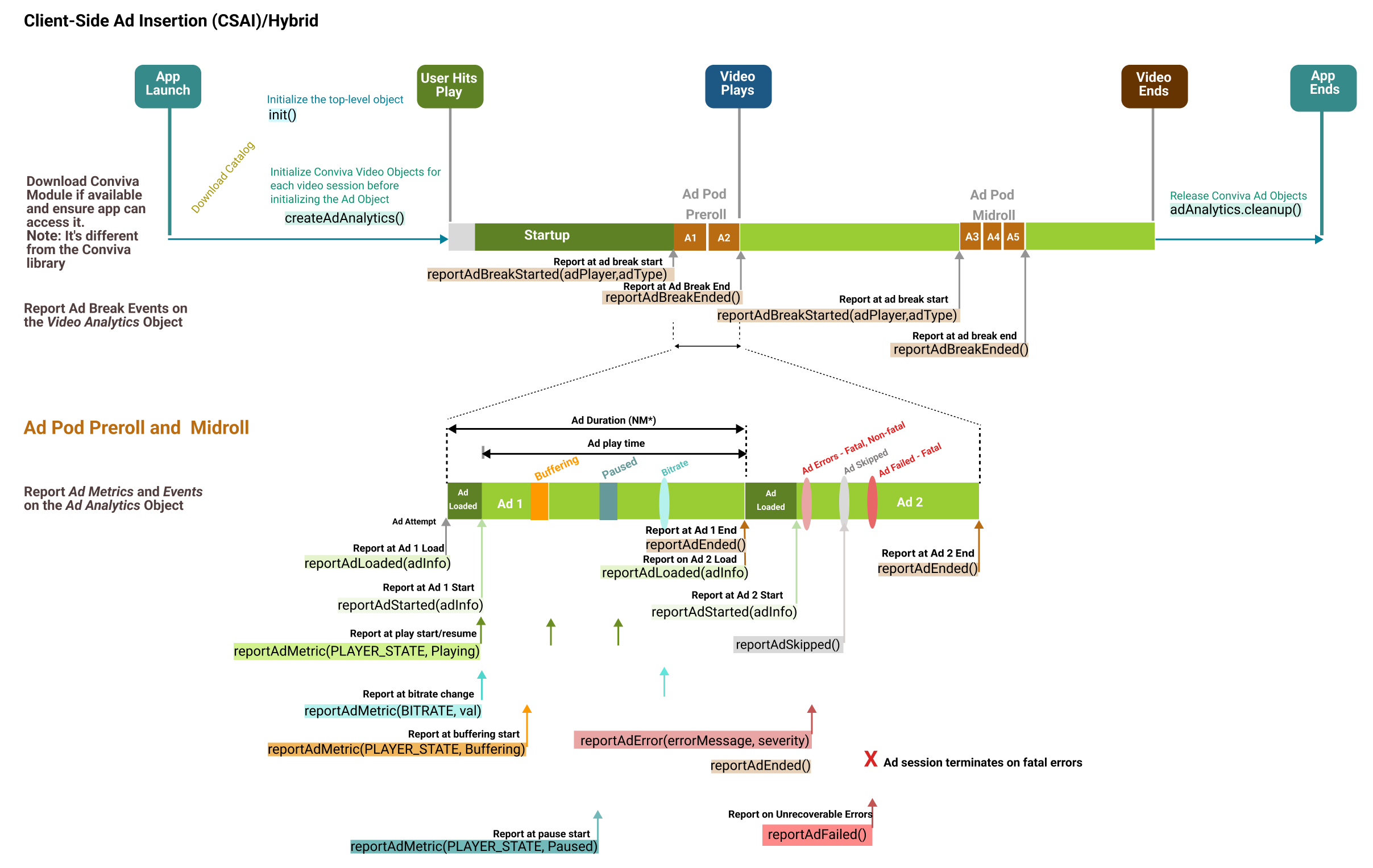
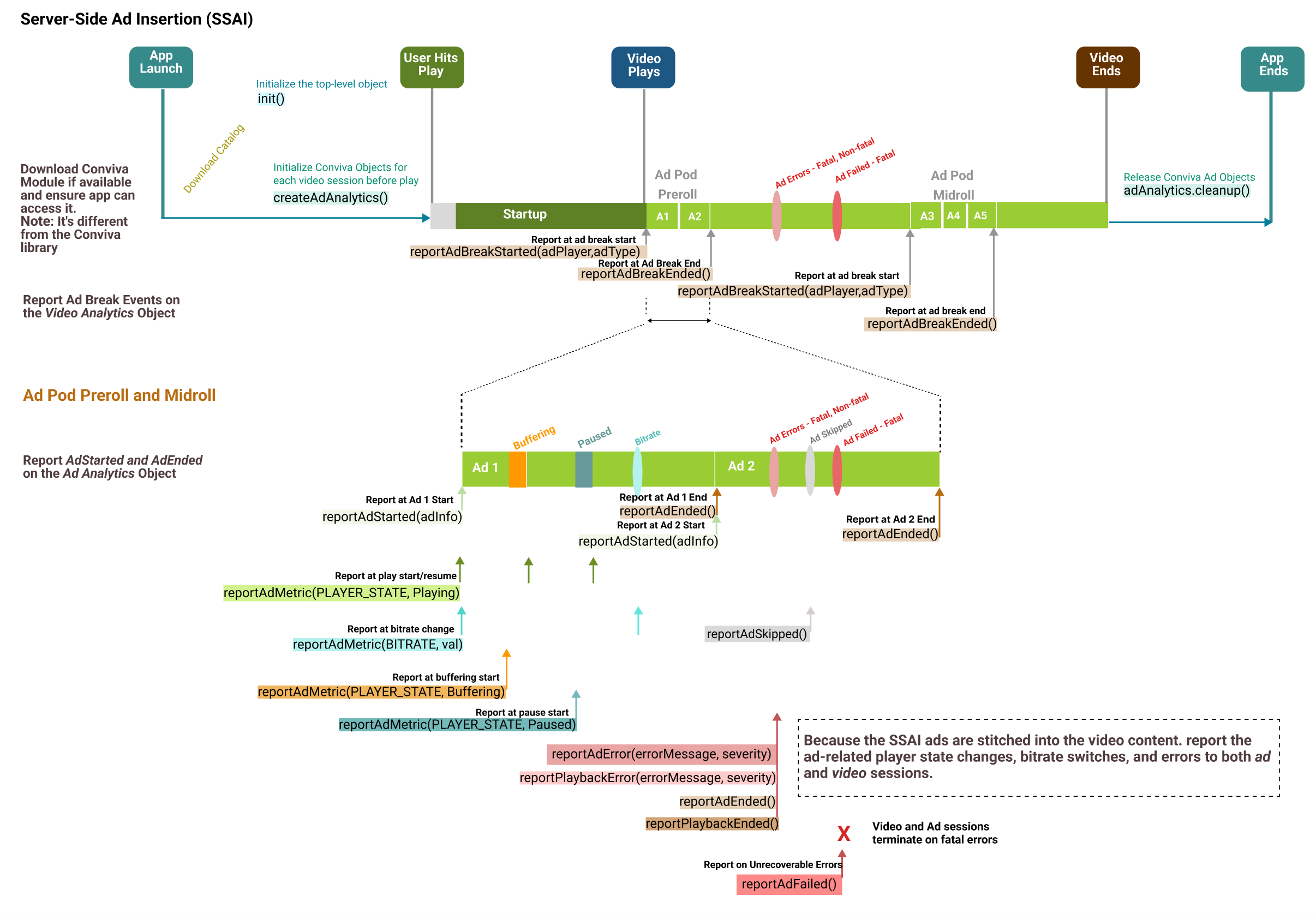
Click an image to view the API call sequence:
**CSAI**
**SSAI**
NM* - During the Non-monitoring state, while the ad plays, the main video is not tracked. However, the ad metrics are tracked in Ad Experience and reported in Pulse Ad Metrics.
Ad Session is Ad Attempt to Ad End. Ad Actual Play Time is Ad Play to Ad End. Total Ad Duration is Ad Start to Ad End.
Reporting Ad Pod/Break Start and Ad Pod/Break End can provide additional insights about ad pods in the Conviva VSI Overview dashboard Improvement Opportunities data.
Stitched ad events are included in the video stream tracking.
Ad session is from Ad Start to Ad End.
Ad Actual Play Time is from Ad Play to Ad End.
For SSAI because AST is short, Ad Duration typically equals Ad Actual Play Time.
Ad errors are reported in both video sessions and Ad sessions.
Reporting Ad Pod/Break Start and Ad Pod/Break End can provide additional insights in the Conviva VSI Overview dashboard Improvement Opportunities data.
Ad metrics are also tracked in Ad Experience and reported in Pulse ad metrics.
<div class="doc-callout doc-callout--note"><div class="doc-callout__body">Conviva Ad modules autocollect most of the metrics and metadata. For more details, contact your Conviva representative.</div></div>
5. Handle User Actions
Report Network Metrics
- The **iOS** Conviva library automatically detects the following network connection types: WiFi, 2G, 3G, 4G, OTHER. The iOS library does not support wired (Ethernet) network connection.
- The **tvOS** Conviva library automatically detects only wireless (WiFi) connection type.
- From **tvOS** 12 onwards, the tvOS Conviva library automatically detects wired (Ethernet) connection type.
The Conviva library supports the core telephony framework and fetches the raw values returned by the framework. You can reference these raw values based on the following Conviva mapping:
If you can fetch wireless connection sub-type, such as "802.11 a", "802.11b", "802.11n", "802.11g", then pass the sub-type instead of "WiFi".
<div class="doc-callout doc-callout--note"><div class="doc-callout__body">The Network Connection Type can be updated after session creation, but only before the first video frame is rendered.</div></div>
Report Signal Strength
The library cannot automatically detect signal strength of a cellular network or Wifi. However, the video application developer can report signal strength as shown in the following example:
<div>
- Swift
- Objective C
<div class="tab-content current" id="tab-39">
The application developer can make use of Apple's Network Extension Frameworks NEHotspotHelper class to fetch the WiFi signal strength. The application developer needs HotspotHelper entitlements from Apple to use NEHotspotHelper. For further details, refer to NEHotspotHelper and NEHotspotNetwork Apple documentation.
Data Collection and User Preferences
By default, Conviva collects a set of data for better user analytics. However, the appropriate legal agreement with Conviva is required in order for Conviva to begin collecting data that would be considered PII, personal information, personal data or the like under applicable data privacy laws such as the General Data Protection Regulation (GDPR) and the California Consumer Privacy Act (CCPA). Further below in this document, there is a description of the user-preference APIs that control data collection, including opt-out and deletion of data, in compliance with data privacy laws. These APIs are in addition to existing, offline processes for opt-out and data deletion requests.
This document describes the identifiers that the libraries are capable of collecting, however actual collection of identifiers is contingent upon the customer's legal department providing written instructions to Conviva to begin collection. At the discretion of the customer's legal department, some or all of these identifiers may be collected. Conviva provides this flexibility to allow the customer to determine the precise identifiers to be collected.
Following tags are used to collect data:
- <code class="text">idfa</code>: Advertising Identifier (Apple provided). This is available only on Advertising Identifier supported library. The value changes only when the user resets the Advertising Identifier, or enables and subsequently disables the Limit Ad Tracking option in the device's privacy setting.
- <code class="text">idfv</code>: Vendor Identifier (Apple provided). The value in this property remains the same when the app (or another app from the same vendor) is installed on the iOS device. The value changes only when the user deletes all the apps (from the same vendor) from the device and subsequently reinstall one or more of them.
The API shown below is used to control the data collection. Use it to set user preferences to opt-out of data collection by specifying the corresponding tag to true/false. By default, Conviva assumes no restriction in collecting data.
Control Data Collection and Delete Collected Data
The API shown below is used to control the data collection. Use it to set user preferences to opt-out of data collection by specifying the corresponding tag to true/false. By default, Conviva assumes no restriction in collecting data.
- Swift
- Objective C
<div class="tab-content current" id="tab-41">
<p>
// Set true to collect data for associated tag.
// Set false to stop collecting data for associated tag.
analytics.setUserPreferenceForDataCollection(["idfa": NSNumber(value: true), "idfv": NSNumber(value: true)])
</div>
<div class="tab-content" id="tab-42">
// Set Yes to collect data for associated tag.
// Set No to stop collecting data for associated tag.
[analytics setUserPreferenceForDataCollection: [NSDictionary dictionaryWithObjectsAndKeys: @YES, @"idfa", @YES, @"idfv", nil]];
                        </div>
                    </div>
</td>
</tr>
</tbody>
</table>
The API shown below is used to delete the collected data. Use it to delete previously collected data and opt-out of data collection by specifying the corresponding tag. By default, Conviva assumes no deletion of data.
- Swift
- Objective C
<div class="tab-content current" id="tab-43">
<p>
// Set Yes to opt out of data collection and delete previously collected data for associated tag.
// Set No won't delete any data.
analytics.setUserPreferenceForDataDeletion(["idfa": NSNumber(value: false), "idfv": NSNumber(value: false)])
</div>
<div class="tab-content" id="tab-44">
// Set Yes to opt out of data collection and delete previously collected data for associated tag.
// Set No won't delete any data.
[analytics setUserPreferenceForDataDeletion: [NSDictionary dictionaryWithObjectsAndKeys: @NO, @"idfa", @NO, @"idfv", nil]];
                        </div>
                    </div>
                </td>
            </tr>
        </tbody>
    </table>
Report Custom Events
Player Insight is an advanced feature which allows you to track custom events that are not related to video rendering, but rather specific to your player's functionality.
These events and their attributes are then tabulated in the Player Insight dashboard at Conviva Video (Pulse). Contact your Conviva representative to enable Player Insights in Pulse.
You may send a custom Player Insight event that can be associated with a video playback using the following method:
Player Insight is an advanced feature which allows you to track custom events that are not related to video rendering, but rather specific to your player's functionality.
These events and their attributes are then tabulated in the Player Insight dashboard at Conviva Video (Pulse). Contact your Conviva representative to enable Player Insights in Pulse.
- <code class="text">eventName</code>: Mandatory argument of event name of the video player event of <code class="text">string</code> type.
- <code class="text">withAttributes</code>: Argument of event attributes of the video player event of <code class="text">[AnyHashable : Any]</code> type.**<div><ul class="tabs"><li class="tab-link current" data-tab="tab-45">Swift
Objective C
```javascript
// Syntax of the API to report the player insight event
func reportPlaybackEvent(eventName: String, withAttributes: [AnyHashable : Any])
// Sample code snippet of event TestEvent with two attributes
var attr = String: Any
attr["attr1"] = "sample value"
videoAnalytics.reportPlaybackEvent("eventType", withAttributes: attr)
</div><div class="tab-content" id="tab-46">
```objectivec
// Syntax of the API to report the player insight event
- (void) reportPlaybackEvent:(NSString*)eventName withAttributes:(nullable NSDictionary*)attributes;
// Sample code snippet of event TestEvent with two attributes
NSDictionary *attr = [[NSDictionary alloc] initWithObjectsAndKeys: @"sample value", @"attr1", nil];
[videoAnalytics reportPlaybackEvent: @"eventType" withAttributes: attr];
- <code class="text">eventType</code>: Mandatory argument of event type of the app event of <code class="text">string</code> type.
- <code class="text">details</code>: Argument of event details of the app event of <code class="text">[AnyHashable : Any]</code> type.